
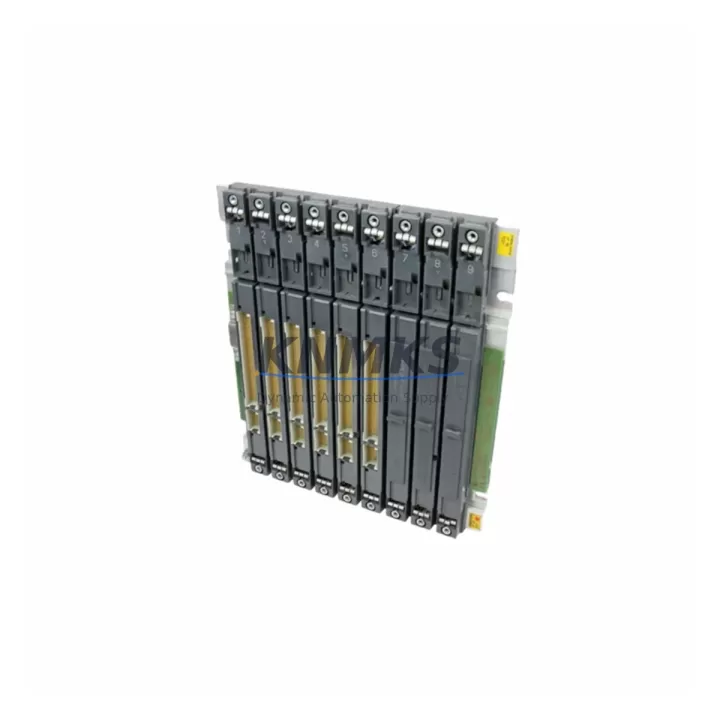
Overview
Siemens 6ES7400-1JA11-0AA0 Maintenance-Proven Spare Part for Factory Uptime
The Siemens 6ES7400-1JA11-0AA0 is the CPU 412-1 central processing unit for the SIMATIC S7-400 programmable logic controller platform — one of the most widely deployed high-availability automation systems in process industries, power generation, automotive manufacturing, and chemical plants worldwide. As a maintenance-proven spare part, this CPU module is sourced as an original Siemens component, pre-shipment tested under load, and dispatched with a support terms confirmed by quotation to support emergency replacement, planned annual overhaul, and long-term spare parts inventory programs.
Maintenance engineers managing legacy S7-400 racks understand the operational risk of an unplanned CPU failure. The 6ES7400-1JA11-0AA0 supports up to 48 KB of work memory, interfaces with the S7-400 backplane via the standard MPI/DP communication bus, and is compatible with the full range of S7-400 power supply modules, I/O racks, and expansion units. Its role as the central coordinator of the control cabinet makes it a critical single point of failure — and a mandatory line item in any serious spare parts strategy for facilities running SIMATIC S7-400 infrastructure.
Whether you are responding to an unplanned shutdown, preparing for a scheduled turnaround, or building a multi-site spare parts buffer, this unit ships tested, documented, and ready for immediate rack installation. Global dispatch is available with lead times confirmed at order placement.
Spare Maintenance Table
| Part Number | 6ES7400-1JA11-0AA0 |
| Description | CPU 412-1, Central Processing Unit for SIMATIC S7-400 |
| Brand | Siemens |
| Series | SIMATIC S7-400 |
| Work Memory | 48 KB (expandable via memory card) |
| Communication Interface | MPI (187.5 kbps – 12 Mbps); integrated DP interface |
| Backplane Compatibility | S7-400 UR1, UR2, UR2-H, CR2, CR3 racks |
| Power Supply Compatibility | PS 405 / PS 407 series (6ES7405-x / 6ES7407-x) |
| Operating Voltage | DC 5 V via backplane bus |
| Operating Temperature | 0 °C to +60 °C |
| Protection Class | IP20 |
| Mounting | Slot 2 or 3 in S7-400 rack |
| Origin | Germany |
| Condition | Original spare, pre-shipment tested |
| Support terms | 12 Months |
| Dispatch | Global, lead time confirmed at order |
Maintenance Planning for Continuous Operation
When replacing the 6ES7400-1JA11-0AA0 CPU 412-1 in a live S7-400 control cabinet, a disciplined maintenance engineer does not stop at the CPU slot. The surrounding components in the same rack and electrical circuit must be inspected and — where service life is uncertain — replaced or tested concurrently to prevent a secondary failure from immediately compromising the restored system.
Begin with the S7-400 power supply module (PS 405 or PS 407 series, e.g., 6ES7405-0DA02-0AA0 or 6ES7407-0DA02-0AA0). A degraded power supply delivering marginal 5 V DC to the backplane bus is a common root cause of intermittent CPU faults and should be load-tested before the replacement CPU is commissioned. Next, inspect the S7-400 backplane rack (UR1 or UR2) for bus connector corrosion, mechanical damage to the slot guides, and any signs of thermal stress — a damaged backplane will cause the new CPU to fault immediately on power-up.
Review all digital and analog I/O modules installed in the same rack (SM 421, SM 422, SM 431, SM 432 series). A shorted output channel or a failed input module can generate bus errors that are misdiagnosed as CPU failures. Inspect communication modules such as the CP 443-1 Ethernet module or CP 443-5 PROFIBUS module if the S7-400 system participates in a plant-wide DCS or SCADA network — a faulty CP module can prevent the replacement CPU from establishing network communication after restart.
For cabinets with signal isolation requirements, verify the condition of any installed signal isolators or barriers between field instruments and the I/O modules. Check fuse protection on the 24 V DC field supply circuits — blown fuses on field power rails are frequently overlooked during CPU replacement and will cause input modules to report all channels as zero after restart. If the system includes an IM 460 / IM 461 interface module pair for multi-rack expansion, inspect the expansion cable and both interface modules for continuity and firmware compatibility with the replacement CPU version.
Finally, if the facility operates an OP 17 or TP 270 HMI panel connected via MPI to the S7-400, verify that the HMI communication parameters (MPI address, baud rate) are correctly configured for the replacement CPU before returning the system to automatic mode. Maintaining a documented spare parts list that includes the CPU, power supply, at least one I/O module of each installed type, and the relevant communication modules is the minimum standard for a resilient S7-400 maintenance program.
Site Replacement Workflow
Step 1 — Preparation: Confirm the exact firmware version of the installed 6ES7400-1JA11-0AA0 using STEP 7 or TIA Portal hardware configuration. Verify that the replacement unit’s firmware is compatible or can be updated on-site. Download and archive the current CPU program and hardware configuration to a programming device before any physical work begins.
Step 2 — Safe Isolation: Place the S7-400 system in STOP mode via the mode selector switch. Notify the process control room and obtain a permit-to-work if required by site safety procedures. De-energize the rack via the power supply module switch — do not rely solely on the CPU STOP state.
Step 3 — Physical Replacement: Remove the failed CPU module from its rack slot. Note the slot position (typically slot 2 or 3). Insert the replacement 6ES7400-1JA11-0AA0 into the same slot. Ensure the module is fully seated and the front connector is secured. If a memory card (MC) was installed in the original CPU, transfer it to the replacement unit — the MC contains the user program and retentive data.
Step 4 — Commissioning: Re-energize the rack and observe the CPU diagnostic LEDs (SF, BF, DC5V, FRCE, RUN, STOP). A clean startup sequence should show RUN LED active with no SF or BF faults. Use STEP 7 online diagnostics to confirm all I/O modules are recognized and no bus errors are present. Restore MPI/PROFIBUS communication to connected HMI and CP modules.
Step 5 — Verification: Perform a functional test of all critical I/O channels before returning the system to automatic control. Document the replacement in the site maintenance log, including the serial number of the removed and installed units, the date, and the technician’s name. Update the spare parts inventory record to trigger a replenishment order for the next replacement unit.
Spare Parts Support FAQ
Q1: Is the 6ES7400-1JA11-0AA0 still available as a new original spare, or only as a refurbished unit?
This unit is supplied as an original Siemens spare part. Each unit undergoes pre-shipment functional testing to verify CPU operation, memory integrity, and communication interface performance before dispatch. Availability is confirmed at order placement, and global stock is maintained to support both emergency and planned procurement cycles.
Q2: How do I verify compatibility between this CPU and my existing S7-400 rack and I/O configuration?
The 6ES7400-1JA11-0AA0 CPU 412-1 is compatible with all standard S7-400 racks (UR1, UR2, UR2-H, CR2, CR3) and the full range of S7-400 I/O, communication, and interface modules. Compatibility with your specific hardware configuration should be verified against your STEP 7 hardware configuration file (HW Config). If you require pre-purchase compatibility confirmation, provide your rack configuration and we will advise before shipment.
Q3: What does the support terms confirmed by quotation cover, and what is the process for a support terms claim?
The support terms confirmed by quotation cover manufacturing defects and functional failures under normal operating conditions as defined in the Siemens S7-400 system manual. It does not cover damage caused by incorrect installation, overvoltage, or environmental conditions outside the specified operating range. To initiate a support terms claim, contact our technical support team with the unit serial number, fault description, and site installation details. Replacement or repair is coordinated with minimal lead time to reduce site downtime.
Q4: Can you support long-term supply agreements for facilities with multiple S7-400 systems?
Yes. For facilities operating multiple S7-400 racks or managing a multi-site spare parts program, we support blanket purchase orders, reserved stock agreements, and scheduled delivery programs. Long-term supply planning for legacy Siemens S7-400 components — including CPU modules, power supplies, I/O modules, and communication cards — is a core service. Contact our procurement team to discuss volume requirements and lead time commitments.
© 2026 KNMKS. All rights reserved.
Original Source: https://knmks.com
Contact: admin@knmks.com | +86 18359268345
Product Identification
- Brand / Ecosystem
-
Siemens
Siemens - Model / Series
-
6ES7400-1JA11-0AA0
SIMATIC Series - Product Family
- PLCs & Controllers
- Availability Status
- Available on request after model and quantity confirmation
- Inquiry Type
- B2B RFQ, replacement inquiry and project spare-part request
- Pre-Quote Check
- Exact SKU, brand, series, quantity, nameplate photos and destination country are checked before quotation
System Path
Where this product fits in the KNMKS automation structure.
Specification & Inquiry Focus
- Control platform
- PLC, PAC and modular controllers
- Common needs
- CPU, rack, power and I/O expansion
- Project support
- Replacement, cabinet build and maintenance
Buyer Confirmation
Information KNMKS checks before replying.
- Exact model
- 6ES7400-1JA11-0AA0
- Brand / ecosystem
- Siemens
- Product family
- PLCs & Controllers
- Application note
- Replacement, maintenance, project build or spare-part list
- Useful photos
- Nameplate, installed unit, cabinet layout or connector side
- Delivery details
- Quantity, destination country and target schedule
Document Support
Files and notes can be confirmed during quotation.
- Product photos or nameplate confirmation when available
- Packing and delivery notes before quotation confirmation
- Support scope and delivery terms confirmed per inquiry
- Export document coordination for qualified B2B requests
Inquiry Support
- Model cross-checking before quotation
- CPU, power, rack and expansion module matching
- Support for replacement and project inquiry
What to Send Us
- Brand and exact model number: Siemens 6ES7400-1JA11-0AA0
- Quantity and required delivery time
- Application, replacement requirement or nameplate photo
- Destination country and shipping preference
RFQ Preparation
This is a product inquiry page built for RFQ communication.
Fast Model Check
Send this model to KNMKS for confirmation.
Include quantity, destination country and photos if this is a maintenance replacement. The inquiry will be saved with a reference number after submission.
Brand & Compatibility Note
KNMKS displays automation product information for well-known industrial brand ecosystems and compatible replacement references. Brand names are used for product identification and compatibility reference only; final availability and commercial terms are confirmed per quotation.
 Manufacturing
 Machine Tools
 Packaging
 Energy & Power



 HMI & Displays
 Servo Systems
 Variable Frequency Drives
 Sensors