
Overview
Siemens 6ES7400-1JA01-0AA0 Maintenance-Proven Spare Part for Factory Uptime
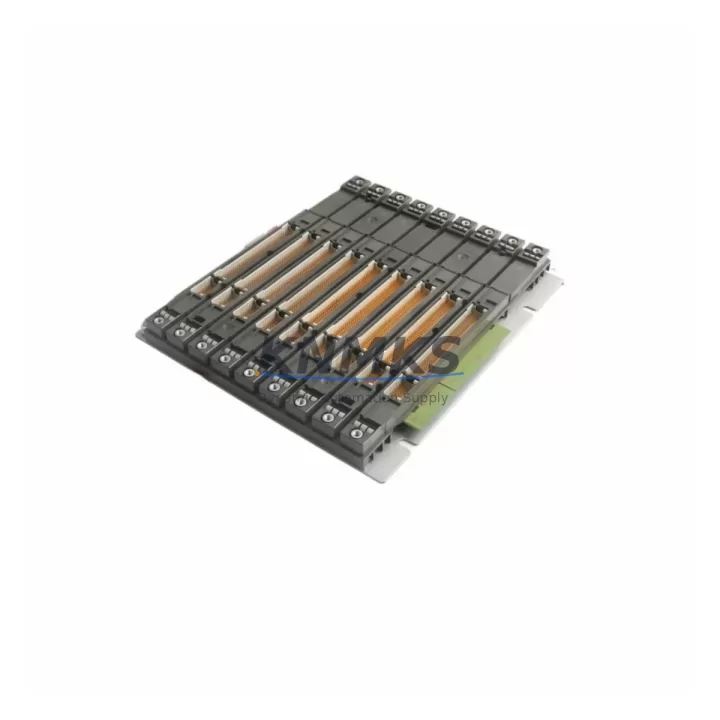
The Siemens 6ES7400-1JA01-0AA0 is the UR2 universal rack for the SIMATIC S7-400 programmable logic controller platform — one of the most widely deployed heavy-duty automation backbones in process industries, automotive manufacturing, power generation, and chemical plants worldwide. As a 9-slot universal rack, it provides the physical and electrical foundation for mounting CPU modules, power supply units, signal modules, and communication processors within the S7-400 control cabinet. When this rack fails or reaches end-of-service life, the entire PLC system goes offline. Maintaining a verified spare on the shelf is the single most effective strategy for minimizing mean time to repair (MTTR) during unplanned shutdowns.
This listing supplies the 6ES7400-1JA01-0AA0 as an original-grade spare part, sourced for long-term maintenance programs, annual overhaul cycles, and emergency replacement scenarios. Every unit undergoes pre-shipment functional inspection and is dispatched with a support terms confirmed by quotation covering defects in materials and workmanship.
Spare Maintenance Table
| Part Number | 6ES7400-1JA01-0AA0 |
| Description | SIMATIC S7-400 UR2 Universal Rack, 9 Slots |
| Brand | Siemens |
| Series | SIMATIC S7-400 |
| Rack Type | Universal Rack (UR2) — accepts CPU, PS, SM, CP, IM modules |
| Slot Count | 9 slots |
| Backplane Bus | P-bus and K-bus integrated |
| Power Supply Interface | Compatible with PS 405 / PS 407 series (e.g., 6ES7405-0DA02-0AA0, 6ES7407-0DA02-0AA0) |
| Mounting | DIN rail or panel mounting |
| Operating Temperature | 0 °C to +60 °C |
| Degree of Protection | IP20 |
| Country of Origin | Germany |
| Weight | Approx. 2,140 g |
| Compatibility | SIMATIC S7-400 CPU 41x series; drop-in replacement for UR2 rack variants |
| Application Environment | Process automation, discrete manufacturing, power distribution, heavy industry |
| Maintenance Recommendation | Inspect backplane connectors and bus contacts annually; replace if corrosion or mechanical wear is detected |
| Support terms | 12 months from date of dispatch |
Maintenance Planning for Continuous Operation
For maintenance engineers managing SIMATIC S7-400 installations, the 6ES7400-1JA01-0AA0 rack is the structural core of the control cabinet. A rack failure is rarely an isolated event — it typically signals stress across the entire power and signal distribution chain. When planning a rack replacement or conducting a scheduled cabinet inspection, the following components should be evaluated concurrently to prevent repeat failures and ensure system integrity after restoration.
Begin with the power supply module. The PS 407 (6ES7407-0DA02-0AA0) or PS 405 series units seat directly into the rack and supply regulated 24 VDC and 5 VDC to all installed modules. A degraded rack with poor backplane contact can cause intermittent power faults that are misdiagnosed as CPU or I/O failures. Verify output voltage stability and inspect the power supply fuse block and input wiring terminals before commissioning the replacement rack.
Next, inspect all signal modules (SM) seated in the rack — including digital input/output modules such as the SM 421 and SM 422 series, and analog modules such as the SM 431 and SM 432. Backplane connector pins on these modules should be checked for oxidation or mechanical deformation. Modules that have been in service for more than five years in high-vibration or high-humidity environments are candidates for proactive replacement during the same maintenance window.
The CPU module — typically a CPU 414, CPU 416, or CPU 417 variant — should be reseated and its firmware version confirmed against the current project configuration after rack replacement. Battery backup modules (6ES7971-0BA00-0AA0 or equivalent) should also be inspected to ensure SRAM data retention is maintained during the transition.
For systems using communication processors (CP) such as the CP 443-1 for PROFINET or CP 441 for serial communication, verify that rack slot assignments and bus addresses are preserved in the hardware configuration (HW Config) before and after replacement. Slot position changes can cause address conflicts that prevent the CPU from entering RUN mode.
If the cabinet includes interface modules (IM) for multi-rack expansion — such as the IM 460 / IM 461 series — inspect the inter-rack cables and connectors. A rack swap is an appropriate time to replace aging expansion cables and verify that the IM module firmware is consistent across all racks in the station.
Finally, review the terminal blocks, cable ducts, and grounding straps within the cabinet. Loose PE connections and degraded cable insulation are common contributors to intermittent faults in aging S7-400 installations. Documenting the cabinet state before and after the rack replacement supports future audits and reduces diagnostic time during the next incident.
Site Replacement Workflow
Step 1 — Pre-replacement preparation: Export the current hardware configuration from STEP 7 or TIA Portal. Record all module slot assignments, I/O addresses, and communication parameters. Photograph the cabinet wiring before disconnection.
Step 2 — Safe shutdown: Place the CPU in STOP mode. Confirm all outputs are de-energized and field devices are in a safe state. Isolate the power supply input. Follow site-specific lockout/tagout (LOTO) procedures.
Step 3 — Module extraction: Remove all modules from the existing rack in sequence, labeling each with its slot number. Handle CPU and memory modules with ESD precautions. Do not remove the battery backup module until the CPU is fully powered down.
Step 4 — Rack removal and installation: Unmount the 6ES7400-1JA01-0AA0 rack from the DIN rail or panel. Install the replacement rack and verify mechanical alignment. Torque mounting screws to specification.
Step 5 — Module reinstallation: Reinstall all modules in their original slot positions. Verify that backplane connectors are fully seated. Reconnect all field wiring, power supply inputs, and communication cables.
Step 6 — Power-up and verification: Restore power supply input. Confirm the CPU enters RUN mode and all I/O modules report healthy status in the diagnostic buffer. Verify communication links to SCADA, HMI panels, and remote I/O stations. Conduct a functional test of critical outputs before returning the system to production.
This workflow is applicable to both emergency replacement during unplanned downtime and scheduled replacement during planned maintenance windows. The 6ES7400-1JA01-0AA0 is a direct drop-in replacement for the UR2 rack form factor, requiring no hardware configuration changes when slot assignments are preserved.
Spare Parts Support FAQ
Q1: Is the 6ES7400-1JA01-0AA0 compatible with all S7-400 CPU and signal modules?
Yes. The UR2 universal rack supports the full range of SIMATIC S7-400 modules including CPU 41x series, PS 405/407 power supplies, SM 4xx signal modules, CP 4xx communication processors, and IM 4xx interface modules. No hardware configuration changes are required when replacing a rack of the same type, provided slot assignments are maintained.
Q2: What pre-shipment testing is performed on this spare part?
Each unit undergoes visual inspection for mechanical integrity, backplane connector condition, and bus contact quality before dispatch. Units showing signs of corrosion, deformation, or prior repair are rejected. A support terms confirmed by quotation is provided from the date of dispatch, covering defects in materials and workmanship under normal operating conditions.
Q3: Can you support long-term supply commitments for maintenance programs?
Yes. We support annual maintenance contracts and multi-year spare parts programs for the SIMATIC S7-400 platform, including end-of-life and discontinued SKUs. Contact our sales team to discuss volume pricing, lead times, and reserved stock arrangements for your facility’s maintenance schedule.
Q4: What is the recommended spare parts strategy for S7-400 rack-based systems?
For critical production lines, we recommend maintaining at least one spare UR2 rack on-site alongside spare power supply and CPU modules. For facilities with multiple S7-400 stations, a centralized spare parts cabinet covering the most common rack, CPU, and I/O module variants significantly reduces MTTR during unplanned outages. Annual inspection of installed racks — focusing on backplane connectors, grounding, and module seating — is recommended as part of a preventive maintenance program.
—
© 2026 KNMKS. All rights reserved.
Original Source: https://knmks.com
Contact: admin@knmks.com | +86 18359268345
Product Identification
- Brand / Ecosystem
-
Siemens
Siemens - Model / Series
-
6ES7400-1JA01-0AA0
SIMATIC Series - Product Family
- PLCs & Controllers
- Availability Status
- Available on request after model and quantity confirmation
- Inquiry Type
- B2B RFQ, replacement inquiry and project spare-part request
- Pre-Quote Check
- Exact SKU, brand, series, quantity, nameplate photos and destination country are checked before quotation
System Path
Where this product fits in the KNMKS automation structure.
Specification & Inquiry Focus
- Control platform
- PLC, PAC and modular controllers
- Common needs
- CPU, rack, power and I/O expansion
- Project support
- Replacement, cabinet build and maintenance
Buyer Confirmation
Information KNMKS checks before replying.
- Exact model
- 6ES7400-1JA01-0AA0
- Brand / ecosystem
- Siemens
- Product family
- PLCs & Controllers
- Application note
- Replacement, maintenance, project build or spare-part list
- Useful photos
- Nameplate, installed unit, cabinet layout or connector side
- Delivery details
- Quantity, destination country and target schedule
Document Support
Files and notes can be confirmed during quotation.
- Product photos or nameplate confirmation when available
- Packing and delivery notes before quotation confirmation
- Support scope and delivery terms confirmed per inquiry
- Export document coordination for qualified B2B requests
Inquiry Support
- Model cross-checking before quotation
- CPU, power, rack and expansion module matching
- Support for replacement and project inquiry
What to Send Us
- Brand and exact model number: Siemens 6ES7400-1JA01-0AA0
- Quantity and required delivery time
- Application, replacement requirement or nameplate photo
- Destination country and shipping preference
RFQ Preparation
This is a product inquiry page built for RFQ communication.
Fast Model Check
Send this model to KNMKS for confirmation.
Include quantity, destination country and photos if this is a maintenance replacement. The inquiry will be saved with a reference number after submission.
Brand & Compatibility Note
KNMKS displays automation product information for well-known industrial brand ecosystems and compatible replacement references. Brand names are used for product identification and compatibility reference only; final availability and commercial terms are confirmed per quotation.
 Manufacturing
 Machine Tools
 Packaging
 Energy & Power



 HMI & Displays
 Servo Systems
 Variable Frequency Drives
 Sensors