
Overview
Siemens 6ES7365-0BA01-0AA0 Migration-Ready Interface Module for Legacy Control Systems
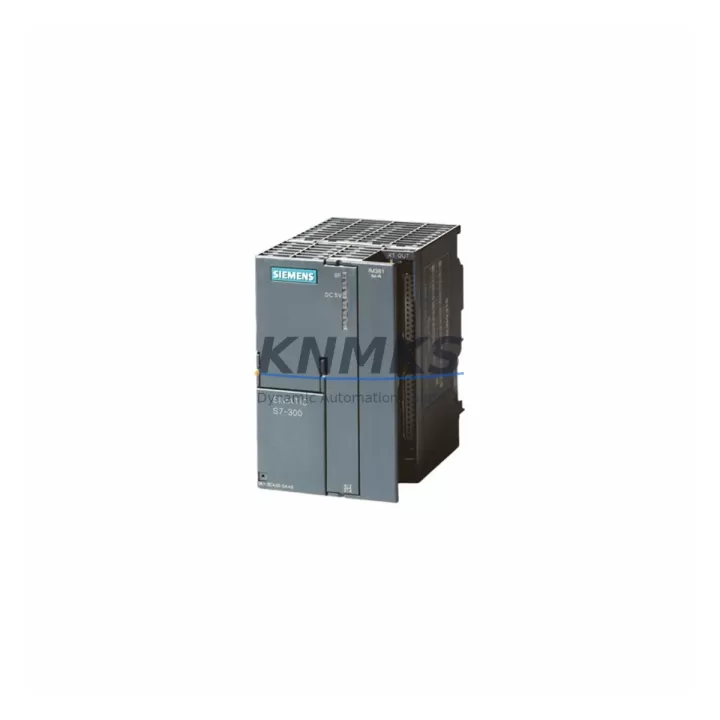
The Siemens 6ES7365-0BA01-0AA0 is the IM365 send/receive interface module designed for multi-rack expansion within the SIMATIC S7-300 automation platform. As Siemens progressively phases out the S7-300 product line in favour of the S7-1500 series, engineering teams managing legacy production lines, process control cabinets, and distributed I/O architectures face increasing pressure to source pre-tested, drop-in replacement modules that preserve existing rack configurations and minimise unplanned downtime. This unit ships pre-tested, carries a support terms confirmed by quotation, and is available from multi-region stock for emergency dispatch or scheduled outage windows.
The 6ES7365-0BA01-0AA0 operates as a paired interface module set, enabling the central rack (CR) to communicate with up to one expansion rack (ER) over a dedicated backplane bus extension cable. Engineers replacing a failed IM365 must confirm the existing backplane cable type and length — typically a 6ES7368-3BG01-0AA0 or equivalent — verify that the central rack CPU (commonly a 6ES7315-2AH14-0AB0 or 6ES7317-2EK14-0AB0) supports the rack configuration, and ensure that slot addressing for all downstream signal modules remains consistent with the existing hardware configuration (HW Config) in STEP 7 or TIA Portal.
Before installation, technicians should document the current rack layout, export the STEP 7 project, and verify that the replacement 6ES7365-0BA01-0AA0 carries the same firmware revision as the outgoing unit. Where firmware versions differ, a controlled download via a PC Adapter USB or CP 5611 MPI/PROFIBUS programming cable is recommended prior to hot-swap to avoid configuration mismatches that could trigger CPU STOP faults on power-up.
Migration Compatibility Table
| Parameter | Specification / Recommendation |
|---|---|
| SKU / Order Number | 6ES7365-0BA01-0AA0 |
| Module Type | IM365 Send Interface Module (paired with IM365 Receive) |
| Series | SIMATIC S7-300 |
| Compatible Rack | S7-300 Central Rack (CR) + Expansion Rack (ER) |
| Max Expansion Racks | 1 expansion rack (ER) per IM365 pair |
| Backplane Interface | S7-300 backplane bus; confirm cable type (6ES7368-3BG01-0AA0 or equivalent) |
| Power Supply Requirement | Supplied via S7-300 rack backplane; verify PS307 or PS305 capacity |
| Communication Compatibility | MPI / PROFIBUS DP via CPU; no independent comms port on IM365 |
| Slot Position | Slot 3 (fixed) in both CR and ER |
| Replacement Recommendation | Direct drop-in for failed or end-of-life 6ES7365-0BA01-0AA0 units |
| Firmware Verification | Match firmware revision before installation; update via STEP 7 / TIA Portal if required |
| HW Config Action | No HW Config change required for same-revision replacement; re-download if revision differs |
| Installation Space | Standard S7-300 DIN rail rack; confirm rail depth and cabinet clearance |
| Pre-Shipment Testing | Yes — functional test completed before dispatch |
| Support terms | 12 months from date of delivery |
Retrofit Planning for Existing Automation Systems
Successful replacement of the 6ES7365-0BA01-0AA0 in an operating S7-300 system requires a structured retrofit plan that accounts for the full control cabinet environment. Begin by auditing the power budget: the PS307 10A power supply module feeding the central rack must have sufficient headroom to support the replacement IM365 alongside all installed SM modules. If the existing power supply is operating near capacity, consider upgrading to a higher-rated PS307 unit before the scheduled outage to avoid nuisance tripping during the post-replacement startup sequence.
Terminal wiring on the IM365 itself is minimal — the module connects exclusively via the S7-300 backplane bus and the dedicated expansion cable — but the signal modules in the expansion rack, such as SM321 32-channel digital input modules and SM332 analogue output modules, must be verified for correct terminal block seating and wiring continuity after the rack is re-energised. Any loose terminal connections in the ER can cause sporadic I/O faults that are difficult to distinguish from interface module errors during initial diagnostics.
For systems where the S7-300 CPU communicates with field devices over PROFIBUS DP, confirm that the CP 342-5 PROFIBUS communication processor or the integrated DP port on the CPU remains correctly addressed after the rack swap. PROFIBUS node addresses are stored in the CPU, not the IM365, so address reassignment is not required; however, the PROFIBUS cable termination resistors at the ER end of the segment should be inspected and confirmed during the outage window.
Where the existing system includes an OP270 or TP177B HMI panel connected via MPI, verify that the MPI network address of the CPU has not been inadvertently altered during the STEP 7 project re-download. HMI screen variable mappings are address-dependent, and any CPU address change will require a corresponding update to the HMI project in WinCC Flexible or TIA Portal before the panel can resume normal operation.
If the retrofit is part of a broader migration from S7-300 to S7-1500, the 6ES7365-0BA01-0AA0 replacement serves as a bridge measure. The long-term migration path typically involves replacing the S7-300 CPU with a CPU 1515-2 PN and transitioning distributed I/O to ET 200SP stations over PROFINET, eliminating the need for IM365 rack expansion entirely. Planning this transition in parallel with the immediate spare replacement reduces total migration cost and shortens the overall project timeline.
Downtime Control During System Migration
Minimising downtime during an IM365 replacement requires preparation that begins well before the maintenance window opens. Export and archive the current STEP 7 or TIA Portal project — including all hardware configuration data, symbol tables, and data blocks — to a secure backup location. Confirm that the replacement 6ES7365-0BA01-0AA0 is on-site and has passed pre-shipment functional testing before scheduling the outage. Last-minute parts sourcing is the single largest cause of extended unplanned downtime in S7-300 retrofit projects, and having a verified spare in hand eliminates this risk entirely.
During the outage, power down the rack in the correct sequence: disable field outputs first via the CPU STOP command, then remove power from the PS307 before extracting the IM365. Re-insert the replacement module, restore power, and observe the CPU diagnostic LEDs. A clean startup will show the SF (system fault) LED extinguishing within the normal boot cycle. If the SF LED remains lit, connect the programming cable and use the STEP 7 hardware diagnostics function to identify the fault source before re-enabling field outputs.
For systems where continuous process control is critical, consider implementing a temporary bypass using a standalone safety relay or a portable I/O module to maintain critical output signals during the swap window. Document all bypass connections and remove them completely before returning the system to automatic mode. This approach has been used successfully in chemical dosing, conveyor control, and HVAC automation applications where even brief output interruptions carry process or safety consequences.
After the replacement is confirmed operational, perform a full I/O force test on all channels in the expansion rack to verify signal integrity across the new IM365 interface. Log the test results and update the site maintenance record with the module serial number, firmware version, and replacement date to support future lifecycle planning and support terms tracking.
Retrofit Support FAQ
Q1: Is the 6ES7365-0BA01-0AA0 a direct replacement for an existing IM365 in my S7-300 system?
Yes. The 6ES7365-0BA01-0AA0 is a direct drop-in replacement for any existing IM365 send module in an S7-300 central rack. No hardware configuration change is required in STEP 7 or TIA Portal provided the firmware revision matches the outgoing unit. If the revision differs, a controlled HW Config re-download is recommended before returning the system to RUN mode.
Q2: What wiring or terminal changes are needed when installing the replacement module?
The IM365 has no field wiring terminals — it connects exclusively via the S7-300 backplane bus and the rack expansion cable. No rewiring is required. However, inspect the expansion cable connector and backplane bus connector on both the CR and ER for corrosion or mechanical damage before re-energising the system.
Q3: Has this unit been tested before shipment, and what support terms is provided?
Yes. Every 6ES7365-0BA01-0AA0 unit shipped by KNMKS undergoes functional pre-shipment testing to verify backplane communication and module identification. All units carry a support terms confirmed by quotation from the date of delivery. In-stock units are available for same-day or next-day dispatch from our regional warehouses to support emergency replacement requirements.
Q4: Can this module be used as a temporary measure during a broader S7-300 to S7-1500 migration?
Yes. The 6ES7365-0BA01-0AA0 is well-suited as a bridge replacement during phased migrations. It restores full rack expansion functionality immediately, allowing production to resume while the longer-term migration to S7-1500 and ET 200SP distributed I/O is planned and executed. This approach is commonly used to decouple emergency spare replacement from the broader modernisation project timeline.
© 2026 KNMKS. All rights reserved.
Original Source: https://knmks.com
Contact: admin@knmks.com | +86 18359268345
Product Identification
- Brand / Ecosystem
-
Siemens
Siemens - Model / Series
-
6ES7365-0BA01-0AA0
SIMATIC Series - Product Family
- PLCs & Controllers
- Availability Status
- Available on request after model and quantity confirmation
- Inquiry Type
- B2B RFQ, replacement inquiry and project spare-part request
- Pre-Quote Check
- Exact SKU, brand, series, quantity, nameplate photos and destination country are checked before quotation
System Path
Where this product fits in the KNMKS automation structure.
Specification & Inquiry Focus
- Control platform
- PLC, PAC and modular controllers
- Common needs
- CPU, rack, power and I/O expansion
- Project support
- Replacement, cabinet build and maintenance
Buyer Confirmation
Information KNMKS checks before replying.
- Exact model
- 6ES7365-0BA01-0AA0
- Brand / ecosystem
- Siemens
- Product family
- PLCs & Controllers
- Application note
- Replacement, maintenance, project build or spare-part list
- Useful photos
- Nameplate, installed unit, cabinet layout or connector side
- Delivery details
- Quantity, destination country and target schedule
Document Support
Files and notes can be confirmed during quotation.
- Product photos or nameplate confirmation when available
- Packing and delivery notes before quotation confirmation
- Support scope and delivery terms confirmed per inquiry
- Export document coordination for qualified B2B requests
Inquiry Support
- Model cross-checking before quotation
- CPU, power, rack and expansion module matching
- Support for replacement and project inquiry
What to Send Us
- Brand and exact model number: Siemens 6ES7365-0BA01-0AA0
- Quantity and required delivery time
- Application, replacement requirement or nameplate photo
- Destination country and shipping preference
RFQ Preparation
This is a product inquiry page built for RFQ communication.
Fast Model Check
Send this model to KNMKS for confirmation.
Include quantity, destination country and photos if this is a maintenance replacement. The inquiry will be saved with a reference number after submission.
Brand & Compatibility Note
KNMKS displays automation product information for well-known industrial brand ecosystems and compatible replacement references. Brand names are used for product identification and compatibility reference only; final availability and commercial terms are confirmed per quotation.
 Manufacturing
 Machine Tools
 Packaging
 Energy & Power



 HMI & Displays
 Servo Systems
 Variable Frequency Drives
 Sensors