
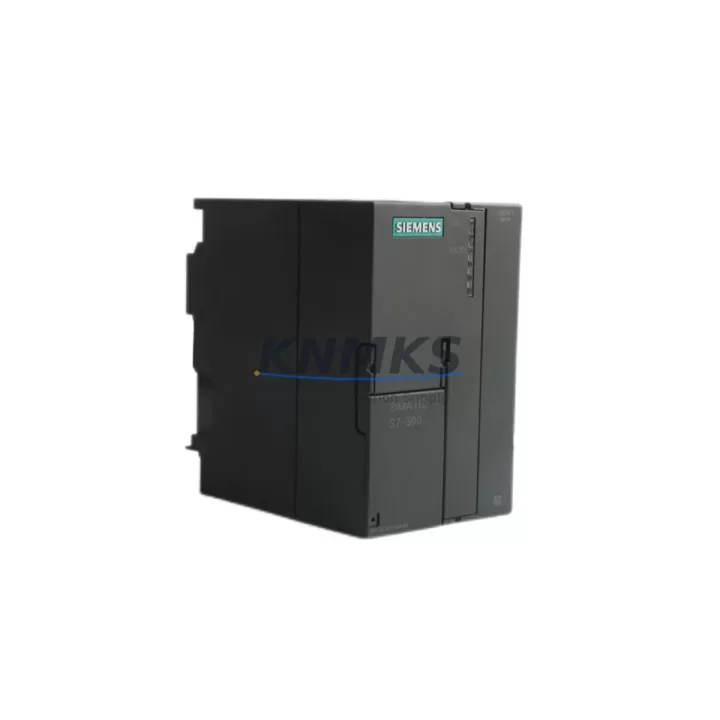
Overview
Siemens 6ES7361-3CA01-0AA0 Migration-Ready IM361 for Legacy Control Systems
The Siemens 6ES7361-3CA01-0AA0 is the IM361 send interface module designed for SIMATIC S7-300 multi-rack configurations. As legacy S7-300 installations approach end-of-service milestones, this module remains a critical component for engineers managing controlled system migrations, rack expansions, and control cabinet upgrades. Whether you are replacing a failed unit in an existing multi-rack line or planning a phased modernization of an aging automation system, the 6ES7361-3CA01-0AA0 provides a verified, drop-in compatible solution that preserves your existing program logic and minimizes unplanned downtime.
This module functions as the send-side interface in a paired IM361/IM360 configuration, enabling communication between the central rack and up to three expansion racks via the SIMATIC S7-300 backplane bus. It is fully compatible with standard S7-300 rail mounting systems and integrates directly with the existing 6ES7360-3AA01-0AA0 IM360 receive interface on the expansion side. When sourcing replacement modules for a multi-rack system, engineers should confirm that both the IM361 and its paired IM360 are available, as mismatched firmware revisions or hardware generations can introduce bus timing issues that are difficult to diagnose under production conditions.
Before installation, verify the power budget of the central rack’s PS307 or PS305 power supply module. The 6ES7361-3CA01-0AA0 draws current from the backplane bus, and in densely populated racks — particularly those running signal modules such as SM321 digital input or SM331 analog input cards alongside communication processors — the total current draw must be recalculated to confirm headroom. Overlooking this step is a common source of intermittent faults during retrofit commissioning.
Migration Compatibility Table
| Parameter | Details |
|---|---|
| SKU / Part Number | 6ES7361-3CA01-0AA0 |
| Module Type | IM361 Send Interface (Central Rack) |
| Compatible System | SIMATIC S7-300 Multi-Rack |
| Paired Receive Module | 6ES7360-3AA01-0AA0 (IM360) |
| Max Expansion Racks | 3 |
| Backplane Bus | S7-300 Standard Rail (DIN EN 50022) |
| Power Supply Compatibility | PS307 / PS305 Series |
| Installation Requirement | Slot 3 of Central Rack (fixed) |
| Communication Protocol | SIMATIC S7-300 Internal Bus |
| Firmware Compatibility | Verify revision match with paired IM360 |
| Replacement Recommendation | Direct drop-in for same SKU; confirm rack generation |
| Commissioning Note | Re-download hardware configuration via STEP 7 or TIA Portal after replacement |
| Support terms | 12 Months |
Retrofit Planning for Existing Automation Systems
Successful integration of the 6ES7361-3CA01-0AA0 into an existing S7-300 system requires a structured pre-installation review. Begin by documenting the current rack layout, including the slot assignments of all installed modules. The IM361 must occupy Slot 3 of the central rack — this is a hardware-enforced requirement and cannot be changed through software configuration. If Slot 3 is currently occupied by another module due to a previous workaround, the rack layout must be revised before the replacement module can be installed.
Terminal wiring between racks is handled through the dedicated interface cable connecting the IM361 to the IM360. Confirm that the existing cable assembly — typically a 368-series connecting cable such as the 6ES7368-3BB01-0AA0 or 6ES7368-3CB01-0AA0 depending on rack separation distance — is undamaged and correctly routed. Cable length selection directly affects signal integrity, and substituting a longer cable than specified can introduce latency on the backplane bus extension.
For systems that also include CP343-1 Ethernet communication processors or CP341 serial communication modules, verify that the rack extension does not disrupt the existing PROFIBUS or Industrial Ethernet topology. In some legacy configurations, the PLC program references specific rack and slot addresses for I/O modules; after replacing the IM361, re-download the hardware configuration from STEP 7 or TIA Portal to ensure the CPU correctly recognizes the restored rack structure. Failure to re-download the hardware configuration is a frequent cause of post-replacement faults where the CPU reports expansion rack unavailability despite correct physical installation.
If the retrofit also involves upgrading the HMI layer — for example, migrating from a TP177 or OP177 panel to a newer KTP700 or KTP900 Basic panel — confirm that the HMI screen tags referencing I/O addresses in the expansion racks remain valid after the rack reconfiguration. Address mapping changes introduced during the retrofit can silently invalidate HMI alarm thresholds and process value displays without generating a CPU fault, making post-commissioning functional testing of the HMI layer essential.
Downtime Control During System Migration
Minimizing production downtime during a rack interface replacement requires preparation that begins well before the maintenance window. The most effective approach is to pre-stage the replacement 6ES7361-3CA01-0AA0 module alongside a verified IM360 receive module, the appropriate connecting cable, and a laptop loaded with the current STEP 7 or TIA Portal project file. Having the hardware configuration backup and the PLC program archive on-hand eliminates the most common sources of extended downtime: waiting for a configuration file to be located or a programming tool to be installed during the maintenance window itself.
Before powering down the rack, document the current CPU operating mode, the status of all I/O modules in the expansion racks, and any active fault codes. This baseline allows the commissioning engineer to distinguish between pre-existing faults and any issues introduced during the replacement. After installing the new IM361 and re-downloading the hardware configuration, perform a controlled CPU restart and monitor the diagnostic buffer for expansion rack recognition errors before returning the system to automatic mode.
For systems where continuous process control is critical, consider whether the affected expansion rack can be temporarily isolated — with field devices placed in manual or safe-state mode — while the central rack interface is replaced. This approach is particularly relevant in process industries where abrupt I/O loss can trigger safety interlocks or process upsets. Coordinating the replacement with the process control team to schedule the work during a planned low-production period further reduces the operational impact of the migration.
All units supplied are subject to pre-shipment functional testing and are covered by a support terms confirmed by quotation from the date of delivery. Stock availability is confirmed at the time of order, and lead times are communicated prior to shipment.
Retrofit Support FAQ
Q: Is the 6ES7361-3CA01-0AA0 a direct replacement for an existing IM361 in my S7-300 system?
A: Yes. The 6ES7361-3CA01-0AA0 is a direct slot-compatible replacement for the IM361 send interface in SIMATIC S7-300 central racks. After physical installation, re-download the hardware configuration from STEP 7 or TIA Portal to restore full rack recognition. No program modifications are required for a like-for-like replacement.
Q: What connecting cable do I need between the IM361 and the IM360 in the expansion rack?
A: The cable selection depends on the physical distance between racks. Common options include the 6ES7368-3BB01-0AA0 (1 m) and 6ES7368-3CB01-0AA0 (2.5 m). Confirm the required length based on your cabinet layout before ordering to avoid signal integrity issues.
Q: How do I verify firmware compatibility between the replacement IM361 and the existing IM360?
A: Check the hardware revision markings on both modules. Siemens IM361/IM360 pairs are generally backward compatible within the same hardware generation, but if the existing IM360 is an early production revision, confirm compatibility with the module documentation or contact our technical support team before installation.
Q: What does the support terms confirmed by quotation cover, and how is it handled?
A: The support terms confirmed by quotation cover manufacturing defects and functional failures under normal operating conditions. All units undergo pre-shipment functional testing. In the event of a support terms claim, contact admin@knmks.com with the order reference and fault description. Replacement or repair is coordinated to minimize your system downtime.
© 2026 KNMKS. All rights reserved.
Original Source: https://knmks.com
Contact: admin@knmks.com | +86 18359268345
Product Identification
- Brand / Ecosystem
-
Siemens
Siemens - Model / Series
-
6ES7361-3CA01-0AA0
SIMATIC Series - Product Family
- PLCs & Controllers
- Availability Status
- Available on request after model and quantity confirmation
- Inquiry Type
- B2B RFQ, replacement inquiry and project spare-part request
- Pre-Quote Check
- Exact SKU, brand, series, quantity, nameplate photos and destination country are checked before quotation
System Path
Where this product fits in the KNMKS automation structure.
Specification & Inquiry Focus
- Control platform
- PLC, PAC and modular controllers
- Common needs
- CPU, rack, power and I/O expansion
- Project support
- Replacement, cabinet build and maintenance
Buyer Confirmation
Information KNMKS checks before replying.
- Exact model
- 6ES7361-3CA01-0AA0
- Brand / ecosystem
- Siemens
- Product family
- PLCs & Controllers
- Application note
- Replacement, maintenance, project build or spare-part list
- Useful photos
- Nameplate, installed unit, cabinet layout or connector side
- Delivery details
- Quantity, destination country and target schedule
Document Support
Files and notes can be confirmed during quotation.
- Product photos or nameplate confirmation when available
- Packing and delivery notes before quotation confirmation
- Support scope and delivery terms confirmed per inquiry
- Export document coordination for qualified B2B requests
Inquiry Support
- Model cross-checking before quotation
- CPU, power, rack and expansion module matching
- Support for replacement and project inquiry
What to Send Us
- Brand and exact model number: Siemens 6ES7361-3CA01-0AA0
- Quantity and required delivery time
- Application, replacement requirement or nameplate photo
- Destination country and shipping preference
RFQ Preparation
This is a product inquiry page built for RFQ communication.
Fast Model Check
Send this model to KNMKS for confirmation.
Include quantity, destination country and photos if this is a maintenance replacement. The inquiry will be saved with a reference number after submission.
Brand & Compatibility Note
KNMKS displays automation product information for well-known industrial brand ecosystems and compatible replacement references. Brand names are used for product identification and compatibility reference only; final availability and commercial terms are confirmed per quotation.
 Manufacturing
 Machine Tools
 Packaging
 Energy & Power



 HMI & Displays
 Servo Systems
 Variable Frequency Drives
 Sensors