
Overview
Siemens 6ES7360-3AA01-0AA0 Migration-Ready Send Interface for Legacy Control Systems
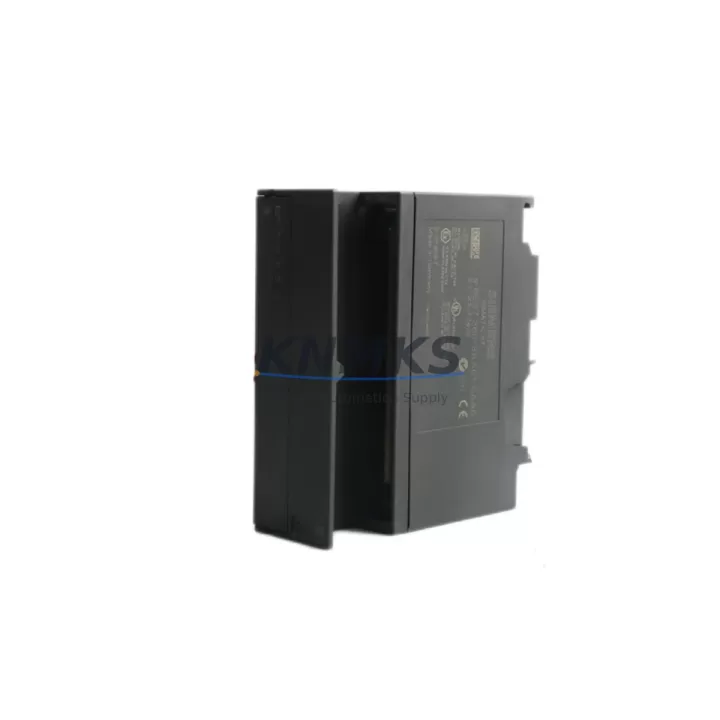
The Siemens 6ES7360-3AA01-0AA0 (IM360) is a Send Interface Module designed for the SIMATIC S7-300 programmable logic controller platform. As legacy S7-300 systems approach end-of-life and spare parts become increasingly scarce, the 6ES7360-3AA01-0AA0 remains a critical component for engineers managing multi-rack expansion configurations in existing automation infrastructure. This module enables the central rack to communicate with up to three expansion racks via the SIMATIC S7-300 backplane bus, making it indispensable in distributed I/O architectures found across manufacturing, process control, and utilities sectors.
Whether you are executing a planned retrofit, responding to an unplanned failure, or building a strategic spare parts inventory to extend system life, the 6ES7360-3AA01-0AA0 provides a direct, drop-in replacement path for aging or failed IM360 units without requiring changes to the existing rack layout, wiring, or control program. Our stock is sourced from verified supply chains, functionally tested prior to dispatch, and covered by a support terms confirmed by quotation.
Migration Compatibility Table
| Parameter | Specification / Retrofit Note |
|---|---|
| Part Number | 6ES7360-3AA01-0AA0 |
| Module Designation | IM360 Send Interface |
| Compatible Platform | SIMATIC S7-300 (Central Rack CR) |
| Rack Slot | Slot 3 of the central rack (fixed) |
| Expansion Racks Supported | Up to 3 expansion racks (ER1–ER3) via IM361 Receive Interface |
| Backplane Bus Interface | SIMATIC S7-300 proprietary backplane bus (K-Bus) |
| Power Supply Requirement | Powered via backplane; no external 24 VDC required |
| Communication Link | Dedicated expansion cable to paired 6ES7361-3CA01-0AA0 (IM361) |
| Installation Footprint | Standard S7-300 DIN rail module; 40 mm width |
| Firmware Compatibility | Compatible with all S7-300 CPU firmware revisions; no firmware update required on replacement |
| Direct Replacement For | 6ES7360-3AA00-0AA0 (earlier hardware revision) |
| Retrofit Recommendation | Replace as paired set with IM361 (6ES7361-3CA01-0AA0) if both show wear or age |
| Commissioning Note | No address configuration required; hardware-detected by CPU automatically |
| Support terms | 12 months from date of shipment |
Retrofit Planning for Existing Automation Systems
Replacing the 6ES7360-3AA01-0AA0 in an operational S7-300 system requires careful pre-shutdown planning to minimize disruption and protect existing program logic. Before removing the failed or aging IM360, engineers should document the current rack configuration using SIMATIC STEP 7 or TIA Portal in S7-300 compatibility mode, capturing the hardware configuration (HW Config) to confirm slot assignments, module addresses, and I/O mapping across all expansion racks.
The IM360 operates exclusively in Slot 3 of the central rack and does not carry a configurable module address — the CPU recognizes it automatically during startup. However, the paired 6ES7361-3CA01-0AA0 (IM361) Receive Interface installed in each expansion rack must be inspected simultaneously. If the IM361 units show signs of age or have accumulated significant operating hours, replacing them as a set during the same maintenance window is strongly recommended to avoid a secondary failure shortly after the primary repair.
During the retrofit, verify the condition of the 6ES7300-0AA00-0AA0 expansion cable connecting the IM360 to each IM361. Cable degradation is a common but overlooked failure mode in long-running S7-300 installations. Inspect connectors for oxidation and cable sheathing for brittleness or cracking.
For systems where the S7-300 central rack also houses a 6ES7307-1EA01-0AA0 PS307 Power Supply Module, confirm that the power budget across all populated slots — including the replacement IM360 — remains within the rated output capacity. Adding or replacing modules is an opportunity to recalculate total current draw on the 5 VDC backplane bus.
If the retrofit is part of a broader migration from S7-300 to S7-1500, the IM360/IM361 expansion architecture does not carry forward to the ET 200MP or S7-1500 platform. In that scenario, the distributed I/O connected to the expansion racks should be migrated to ET 200SP or ET 200MP remote I/O stations communicating over PROFINET, and the existing S7-300 signal modules — including SM321 digital input, SM322 digital output, and SM331/SM332 analog modules — should be mapped to equivalent ET 200SP I/O modules with updated hardware configuration in TIA Portal.
HMI screens built on SIMATIC WinCC flexible or connected via an OP/TP panel using MPI or PROFIBUS DP should be reviewed for tag address compatibility if the CPU is being replaced as part of the same project. Retaining the S7-300 CPU while replacing only the IM360 requires no HMI changes.
Downtime Control During System Migration
Controlled replacement of the 6ES7360-3AA01-0AA0 can typically be completed within a planned maintenance window of two to four hours, depending on system complexity and the number of expansion racks involved. The following approach minimizes risk and protects production continuity.
Prior to shutdown, perform a full online backup of the S7-300 CPU program using STEP 7 or TIA Portal, saving both the program blocks (OB, FB, FC, DB) and the hardware configuration to a secure project archive. Confirm that the backup restores correctly to an offline simulation before proceeding with physical work.
During the replacement, power down the entire rack assembly via the PS307 power supply — do not attempt a hot-swap of the IM360, as the S7-300 backplane bus does not support live module insertion. After seating the replacement 6ES7360-3AA01-0AA0 in Slot 3, reconnect the expansion cables to each IM361 in the correct sequence (ER1 first), then restore power. The CPU will perform an automatic hardware scan and should recognize the new IM360 without requiring a hardware configuration download, provided the replacement module matches the original hardware revision.
If the CPU enters STOP mode after restart, connect a programming device running STEP 7 or TIA Portal, check the diagnostic buffer for fault codes, and confirm that the hardware configuration in the project matches the physical rack layout. In most cases, a configuration download followed by a CPU restart resolves the issue without any program logic changes.
For systems where zero unplanned downtime is critical, maintaining a pre-tested spare 6ES7360-3AA01-0AA0 in local inventory — alongside a spare IM361 and expansion cable — is the most effective risk mitigation strategy. Our team can support standing purchase orders and consignment stock arrangements for high-availability facilities.
Retrofit Support FAQ
Q: Is the 6ES7360-3AA01-0AA0 a direct replacement for the earlier 6ES7360-3AA00-0AA0?
A: Yes. The -3AA01- revision is the direct successor to the -3AA00- hardware revision and is fully backward compatible. No hardware configuration changes are required in STEP 7 or TIA Portal when substituting one for the other.
Q: Do I need to reconfigure the S7-300 hardware configuration after replacing the IM360?
A: In most cases, no. The IM360 is automatically detected by the CPU and does not require a configurable module address. If the CPU enters STOP after replacement, a hardware configuration download from STEP 7 or TIA Portal will resolve the issue.
Q: Is the unit tested before shipment?
A: Yes. Every 6ES7360-3AA01-0AA0 unit is functionally tested prior to dispatch. Units are shipped with protective packaging and include a support terms confirmed by quotation covering manufacturing defects and functional failures under normal operating conditions.
Q: What is the typical lead time and do you hold stock?
A: We maintain ready stock of the 6ES7360-3AA01-0AA0 to support urgent replacement requirements. Standard orders ship within 1–3 business days. For large-quantity or standing orders, contact our sales team to discuss availability and lead time commitments.
© 2026 KNMKS. All rights reserved.
Original Source: https://knmks.com
Contact: admin@knmks.com | +86 18359268345
Product Identification
- Brand / Ecosystem
-
Siemens
Siemens - Model / Series
-
6ES7360-3AA01-0AA0
SIMATIC Series - Product Family
- PLCs & Controllers
- Availability Status
- Available on request after model and quantity confirmation
- Inquiry Type
- B2B RFQ, replacement inquiry and project spare-part request
- Pre-Quote Check
- Exact SKU, brand, series, quantity, nameplate photos and destination country are checked before quotation
System Path
Where this product fits in the KNMKS automation structure.
Specification & Inquiry Focus
- Control platform
- PLC, PAC and modular controllers
- Common needs
- CPU, rack, power and I/O expansion
- Project support
- Replacement, cabinet build and maintenance
Buyer Confirmation
Information KNMKS checks before replying.
- Exact model
- 6ES7360-3AA01-0AA0
- Brand / ecosystem
- Siemens
- Product family
- PLCs & Controllers
- Application note
- Replacement, maintenance, project build or spare-part list
- Useful photos
- Nameplate, installed unit, cabinet layout or connector side
- Delivery details
- Quantity, destination country and target schedule
Document Support
Files and notes can be confirmed during quotation.
- Product photos or nameplate confirmation when available
- Packing and delivery notes before quotation confirmation
- Support scope and delivery terms confirmed per inquiry
- Export document coordination for qualified B2B requests
Inquiry Support
- Model cross-checking before quotation
- CPU, power, rack and expansion module matching
- Support for replacement and project inquiry
What to Send Us
- Brand and exact model number: Siemens 6ES7360-3AA01-0AA0
- Quantity and required delivery time
- Application, replacement requirement or nameplate photo
- Destination country and shipping preference
RFQ Preparation
This is a product inquiry page built for RFQ communication.
Fast Model Check
Send this model to KNMKS for confirmation.
Include quantity, destination country and photos if this is a maintenance replacement. The inquiry will be saved with a reference number after submission.
Brand & Compatibility Note
KNMKS displays automation product information for well-known industrial brand ecosystems and compatible replacement references. Brand names are used for product identification and compatibility reference only; final availability and commercial terms are confirmed per quotation.
 Manufacturing
 Machine Tools
 Packaging
 Energy & Power



 HMI & Displays
 Servo Systems
 Variable Frequency Drives
 Sensors