
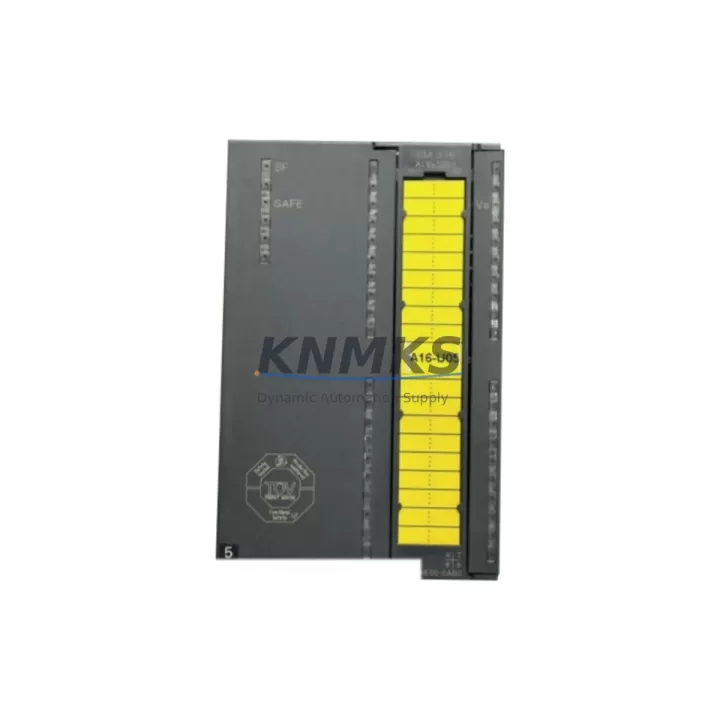
Overview
Siemens 6ES7336-1HE00-0AB0 Migration-Ready F-DI Module: Legacy S7-300 Failsafe System Upgrade & Replacement
The Siemens 6ES7336-1HE00-0AB0 is the SM 336 Failsafe Digital Input module designed for SIMATIC S7-300 safety-integrated automation systems. As legacy S7-300 installations approach end-of-life and original SM 336 units become increasingly difficult to source, this migration-ready replacement module provides a verified drop-in solution for engineers managing safety-critical retrofit projects, control cabinet upgrades, and spare parts lifecycle extension programs. Whether you are replacing a failed unit on a running production line or executing a planned DCS/PLC modernization, the 6ES7336-1HE00-0AB0 delivers the electrical and functional compatibility required to restore system integrity with minimal disruption.
This module supports 24 VDC failsafe digital inputs and integrates directly with F-CPU controllers such as the CPU 315F-2 DP and CPU 317F-2 DP via the PROFIBUS-DP backplane bus. It is fully compatible with STEP 7 Safety Advanced programming environments and supports SIL 2 / SIL 3 safety functions as defined under IEC 61508. For sites running legacy ET 200M distributed I/O racks, the module can also be installed in IM 153-2 interface module configurations, making it a versatile component across both centralized and distributed S7-300 safety architectures.
Migration Compatibility Table
| Parameter | Specification / Retrofit Guidance |
|---|---|
| SKU / Part Number | 6ES7336-1HE00-0AB0 |
| Module Type | SM 336 Failsafe Digital Input (F-DI) |
| Input Channels | 8 x 24 VDC failsafe digital inputs |
| Safety Integrity Level | SIL 2 / SIL 3 per IEC 61508; Cat. 4 per EN 954-1 |
| Compatible Controllers | CPU 315F-2 DP, CPU 317F-2 DP, CPU 319F-3 PN/DP |
| Backplane Interface | S7-300 standard backplane bus; compatible with IM 153-2 for ET 200M |
| Communication Protocol | PROFIBUS-DP (integrated via backplane) |
| Power Supply Requirement | 24 VDC via backplane; verify PS 307 or PS 305 supply capacity before swap |
| Terminal Wiring | 20-pin front connector; existing field wiring can be retained if connector is undamaged |
| Slot / Address Configuration | Module address assigned via STEP 7 HW Config; re-download required after replacement |
| Firmware Compatibility | Verify firmware version matches existing F-CPU firmware baseline; update via STEP 7 if required |
| Installation Space | Standard S7-300 DIN rail slot; 40 mm width; confirm rack slot availability before ordering |
| Replacement Recommendation | Direct drop-in for failed or discontinued SM 336 F-DI units; no rack modification required |
| Commissioning Note | Run F-system acceptance test after installation; validate safety function response times |
| Support terms | support terms confirmed by quotation — covers manufacturing defects and functional failures under normal operating conditions |
Retrofit Planning for Existing Automation Systems
Successful replacement of the 6ES7336-1HE00-0AB0 in a live S7-300 safety system requires a structured pre-installation review. Before removing the failed module, engineers should document the existing front connector wiring layout and photograph terminal assignments to avoid field wiring errors during reinstallation. The 20-pin front connector on the SM 336 is a plug-in type, which means the original connector — along with its field wiring — can typically be transferred directly to the replacement module, significantly reducing rewiring time and the risk of terminal transposition errors.
Power budget verification is a critical step that is frequently overlooked during emergency replacements. The S7-300 rack’s power supply — typically a PS 307 5A or PS 307 10A — must have sufficient reserve capacity to support the replacement module. If the existing power supply is already operating near its rated output, adding or replacing a failsafe module may trigger undervoltage conditions that affect adjacent modules including communication processors and standard I/O modules such as SM 321 digital input or SM 322 digital output units.
For systems using PROFIBUS-DP distributed I/O via an IM 153-2 interface module, the replacement 6ES7336-1HE00-0AB0 must be re-parameterized within the STEP 7 HW Config project. The module’s slot address, F-address, and safety parameters — including the F-monitoring time and channel grouping — must match the original configuration exactly. Any deviation will prevent the F-CPU from accepting the module during startup and will generate a safety fault that locks out the affected safety function. After re-downloading the hardware configuration, engineers should perform a full F-system acceptance test to confirm that all safety functions respond correctly within their defined response time windows.
In control cabinet upgrade scenarios where the S7-300 rack is being partially modernized alongside newer ET 200SP or S7-1500 components, the 6ES7336-1HE00-0AB0 can continue to serve as the failsafe input layer while higher-level communication is handled by a CP 343-1 PROFINET communication processor or a CP 342-5 PROFIBUS master module. This hybrid architecture is common in phased migration projects where full system replacement is not yet feasible due to budget constraints or production schedule limitations. Signal isolators may also be required at the field terminal level if the replacement module is being integrated into a cabinet that previously used a different input voltage range or sensor supply topology.
For sites managing HMI integration, any WinCC or SIMATIC HMI panel connected to the S7-300 CPU via MPI or PROFIBUS should be reviewed to confirm that the HMI screen tags referencing the F-DI module’s input status bits remain valid after the hardware configuration re-download. In some cases, a modified F-address assignment will shift the process image offset, requiring corresponding updates to HMI variable tables and alarm configurations. Programming cables such as the PC Adapter USB A2 or MPI/DP adapter should be on-site during commissioning to allow real-time diagnostics and online monitoring of the replacement module’s status.
Downtime Control During System Migration
Minimizing unplanned downtime during an SM 336 F-DI replacement requires preparation that begins well before the maintenance window opens. The most effective approach is to pre-stage the replacement 6ES7336-1HE00-0AB0 with its F-parameters already loaded offline in STEP 7, so that the hardware configuration download can be completed within minutes of physical installation. This eliminates the need for on-site programming from scratch and reduces the risk of configuration errors under time pressure.
Where the production process permits, the affected safety function should be placed in bypass mode using the F-CPU’s integrated bypass mechanism before the module is removed. This allows the rest of the safety system to continue operating while the failed module is replaced, preventing a full safety shutdown of the production line. Bypass activation must be documented and authorized according to the site’s safety management procedures, and the bypass must be deactivated and the safety function re-validated immediately after the replacement module is confirmed operational.
Original program logic stored in the F-CPU does not need to be modified during a like-for-like module replacement. The safety function blocks (F-FBs) and their associated F-DB data blocks remain intact in the CPU memory. Only the hardware configuration layer requires a re-download, which preserves all existing program logic, PID parameters, interlock conditions, and communication configurations. This is a key advantage of the S7-300 modular architecture — the control program is decoupled from the hardware layer, allowing module-level replacements without touching the application software.
Post-replacement commissioning should include a channel-by-channel input verification using the STEP 7 diagnostic buffer and the module’s LED status indicators. Each of the eight failsafe input channels should be exercised through its full signal range — from de-energized to energized — while monitoring the process image in the online diagnostics view. Any discrepancy between the expected and actual input states must be resolved before the safety bypass is removed and normal production is resumed. All commissioning steps, test results, and sign-off records should be retained as part of the site’s functional safety documentation in accordance with IEC 61511 or the applicable local safety standard.
Retrofit Support FAQ
Q1: Is the 6ES7336-1HE00-0AB0 a direct replacement for the original SM 336 F-DI module in my S7-300 rack?
Yes. The 6ES7336-1HE00-0AB0 is the standard SM 336 Failsafe Digital Input module and installs directly into any available S7-300 rack slot without mechanical modification. The 20-pin front connector from the original module can be transferred to the replacement unit, preserving existing field wiring. A STEP 7 hardware configuration re-download is required to re-establish the module’s F-address and safety parameters.
Q2: What commissioning steps are required after installing the replacement module?
After physical installation and hardware configuration download, perform a full F-system acceptance test as required by IEC 61508 and your site’s functional safety plan. Verify each input channel individually, confirm safety function response times are within specification, check the STEP 7 diagnostic buffer for any fault entries, and validate HMI alarm and status displays. Remove any safety bypass only after all acceptance criteria have been met and documented.
Q3: How do I confirm wiring compatibility before installing the replacement module?
Refer to the original STEP 7 HW Config project and the SM 336 wiring diagram in the module manual (Siemens document A5E00085586). Verify that the field sensor supply voltage, cable shielding, and terminal grouping match the replacement module’s input specifications. For 2-wire and 4-wire sensor configurations, confirm that the channel grouping (1oo1 or 1oo2 evaluation) is correctly set in the F-parameters before downloading the hardware configuration.
Q4: What does the support terms confirmed by quotation cover, and what is the lead time for stock availability?
The support terms confirmed by quotation cover manufacturing defects and functional failures under normal industrial operating conditions, including temperature, vibration, and humidity ranges specified in the module datasheet. Units are pre-tested prior to shipment to confirm basic electrical functionality. Stock availability is maintained across regional warehouses to support urgent replacement requirements. Contact our sales team at admin@knmks.com or +86 18359268345 to confirm current inventory levels and estimated delivery timelines for your location.
© 2026 KNMKS. All rights reserved.
Original Source: https://knmks.com
Contact: admin@knmks.com | +86 18359268345
Product Identification
- Brand / Ecosystem
-
Siemens
Siemens - Model / Series
-
6ES7336-1HE00-0AB0
SIMATIC Series - Product Family
- PLCs & Controllers
- Availability Status
- Available on request after model and quantity confirmation
- Inquiry Type
- B2B RFQ, replacement inquiry and project spare-part request
- Pre-Quote Check
- Exact SKU, brand, series, quantity, nameplate photos and destination country are checked before quotation
System Path
Where this product fits in the KNMKS automation structure.
Specification & Inquiry Focus
- Control platform
- PLC, PAC and modular controllers
- Common needs
- CPU, rack, power and I/O expansion
- Project support
- Replacement, cabinet build and maintenance
Buyer Confirmation
Information KNMKS checks before replying.
- Exact model
- 6ES7336-1HE00-0AB0
- Brand / ecosystem
- Siemens
- Product family
- PLCs & Controllers
- Application note
- Replacement, maintenance, project build or spare-part list
- Useful photos
- Nameplate, installed unit, cabinet layout or connector side
- Delivery details
- Quantity, destination country and target schedule
Document Support
Files and notes can be confirmed during quotation.
- Product photos or nameplate confirmation when available
- Packing and delivery notes before quotation confirmation
- Support scope and delivery terms confirmed per inquiry
- Export document coordination for qualified B2B requests
Inquiry Support
- Model cross-checking before quotation
- CPU, power, rack and expansion module matching
- Support for replacement and project inquiry
What to Send Us
- Brand and exact model number: Siemens 6ES7336-1HE00-0AB0
- Quantity and required delivery time
- Application, replacement requirement or nameplate photo
- Destination country and shipping preference
RFQ Preparation
This is a product inquiry page built for RFQ communication.
Fast Model Check
Send this model to KNMKS for confirmation.
Include quantity, destination country and photos if this is a maintenance replacement. The inquiry will be saved with a reference number after submission.
Brand & Compatibility Note
KNMKS displays automation product information for well-known industrial brand ecosystems and compatible replacement references. Brand names are used for product identification and compatibility reference only; final availability and commercial terms are confirmed per quotation.
 Manufacturing
 Machine Tools
 Packaging
 Energy & Power



 HMI & Displays
 Servo Systems
 Variable Frequency Drives
 Sensors