
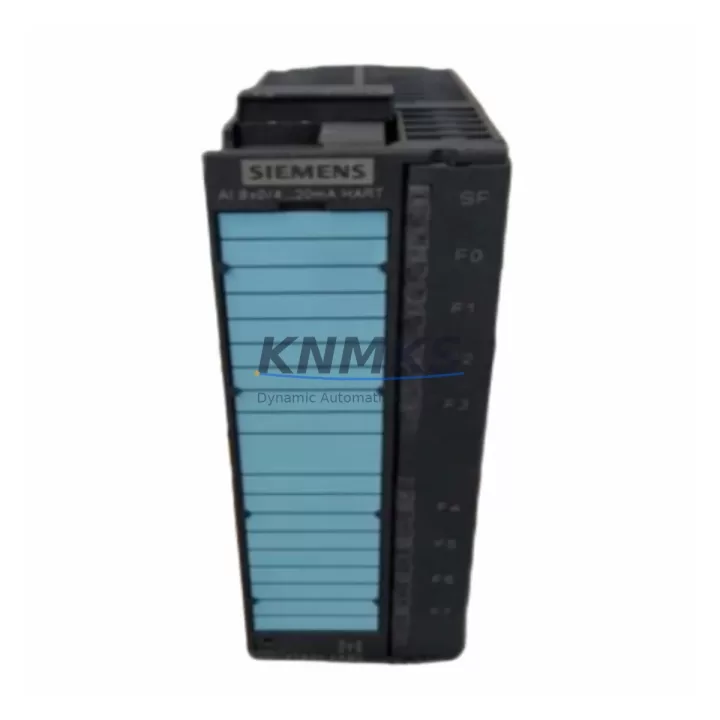
Overview
Siemens 6ES7331-7TF01-0AB0 Migration-Ready Analog Input Module for Legacy Control Systems
The Siemens 6ES7331-7TF01-0AB0 is an SM331 8-channel analog input module designed for the SIMATIC S7-300 platform. As legacy S7-300 systems approach end-of-life and original Siemens supply channels become constrained, this module serves as a direct retrofit replacement for aging or failed analog input cards in existing control cabinets. Each unit is sourced from verified industrial channels, pre-shipment tested for signal accuracy and channel integrity, and backed by a support terms confirmed by quotation — making it a reliable choice for maintenance teams managing unplanned outages or scheduled system upgrades.
The 6ES7331-7TF01-0AB0 supports voltage and current input ranges including ±10V, ±5V, 0–10V, 0–20mA, and 4–20mA, configurable per channel via parameter assignment in STEP 7 or TIA Portal. Its 13-bit resolution and high-speed conversion make it suitable for process control loops, temperature monitoring via external transmitters, and pressure or flow signal acquisition in legacy automation lines. When replacing a failed SM331 variant, engineers must confirm the input range configuration stored in the CPU’s data block and re-parameterize the replacement module accordingly to avoid process deviations at startup.
Before installation, verify that the S7-300 rack — such as the UR2 or UR1 universal rack — has an available slot with sufficient backplane bus capacity. The 6ES7331-7TF01-0AB0 draws 80mA from the 5VDC backplane bus; confirm that the PS307 or PS305 power supply module in the cabinet can sustain total current draw across all installed modules. If the existing power supply is already near capacity, a supplementary load current calculation is required before proceeding.
Terminal wiring must be reproduced exactly from the original module’s wiring diagram. The 40-pin front connector used on the SM331 is field-removable, which simplifies hot-swap procedures during planned maintenance windows. Label all field wiring before disconnection and photograph the terminal layout to ensure accurate reconnection. Pay particular attention to shield grounding and cable routing to prevent EMI interference on sensitive analog channels — a common source of signal drift in retrofit scenarios.
For systems running STEP 7 V5.x, the hardware configuration (HW Config) must be updated to reflect the replacement module’s order number if the slot was previously occupied by a different SM331 variant such as the 6ES7331-7KF02-0AB0 or 6ES7331-1KF02-0AB0. Mismatched hardware configuration entries will cause the CPU to flag a module fault and prevent the analog channels from being read by the control program. After updating HW Config, download the configuration to the CPU and perform a warm restart to clear any pending diagnostics.
In migration projects involving a transition from S7-300 to S7-1500 or ET 200SP platforms, the 6ES7331-7TF01-0AB0 is often retained in the existing S7-300 rack during a phased cutover. During this period, the S7-300 CPU — such as a 6ES7315-2EH14-0AB0 or 6ES7317-2EK14-0AB0 — continues to handle local I/O while the new S7-1500 controller is commissioned in parallel. The analog input data from the SM331 can be forwarded via PROFIBUS DP or MPI to the new controller during the transition phase, preserving process continuity without requiring a full I/O cutover on day one.
For distributed I/O architectures, the SM331 can also be integrated into an ET 200M remote I/O station using an IM153-2 interface module, allowing the analog inputs to be accessed over PROFIBUS DP from a remote CPU. This configuration is common in large-panel retrofits where the main CPU rack is relocated but field wiring cannot be extended. Confirm PROFIBUS address assignments and GSD file compatibility when integrating the module into an existing DP network.
All units supplied are pre-shipment tested for channel-to-channel isolation, input range accuracy, and diagnostic response. Stock is maintained for immediate dispatch to support emergency maintenance scenarios. Each module ships with a support terms confirmed by quotation covering manufacturing defects and functional failures under normal operating conditions.
Migration Compatibility Table
| Parameter | Details |
|---|---|
| SKU / Order Number | 6ES7331-7TF01-0AB0 |
| Module Type | SM331 Analog Input Module |
| Compatible Platform | SIMATIC S7-300, ET 200M (via IM153-2) |
| Number of Channels | 8 channels (configurable per channel) |
| Input Ranges | ±10V, ±5V, 0–10V, 0–20mA, 4–20mA |
| Resolution | 13-bit |
| Backplane Bus Current Draw | 80mA @ 5VDC |
| Front Connector | 40-pin removable (not included, reuse existing) |
| Communication Interface | S7-300 backplane bus (PROFIBUS DP via IM153-2) |
| Common Replacement Variants | 6ES7331-7KF02-0AB0, 6ES7331-1KF02-0AB0 |
| Programming Software | STEP 7 V5.x, TIA Portal (via legacy support) |
| Installation Space | Standard S7-300 single slot |
| Retrofit Recommendation | Direct slot replacement; re-parameterization required |
| Pre-Shipment Testing | Channel isolation, input accuracy, diagnostic response |
| Support terms | 12 months from date of shipment |
Retrofit Planning for Existing Automation Systems
A successful retrofit using the 6ES7331-7TF01-0AB0 requires a structured pre-installation review. Begin by auditing the existing S7-300 rack configuration: document all installed modules by slot position, including the CPU (e.g., 6ES7315-2EH14-0AB0), digital input/output modules (SM321/SM322), and any existing SM331 analog input cards. Confirm that the rack’s power supply — typically a PS307 10A or 5A unit — has sufficient reserve current for the replacement module.
If the control cabinet includes a CP343-1 Ethernet communication processor or a CP342-5 PROFIBUS master, verify that the network configuration remains unaffected by the module swap. In systems where the analog input data feeds a PID control loop or a SCADA historian, coordinate with the control room team to place the loop in manual mode before removing the failed module. This prevents process upsets caused by loss of the process variable signal during the swap interval.
For cabinets that also house an OP277 or TP177B HMI panel connected via MPI, confirm that the HMI tag database references the correct DB addresses for the analog input values. If the replacement module is parameterized with a different input range than the original, the scaled engineering unit values in the HMI may require adjustment to reflect the correct process range. This is a common oversight in rapid replacement scenarios that leads to incorrect process readings on the operator panel after restart.
In systems using signal isolators or loop-powered transmitters on the analog input channels, verify that the isolator output range matches the module’s configured input range. Mismatched ranges between field transmitters and the SM331 input configuration are a frequent source of calibration errors after module replacement. A brief loop check on each channel using a process calibrator before returning the system to automatic mode is strongly recommended.
Downtime Control During System Migration
Minimizing downtime during an SM331 replacement requires preparation before the maintenance window begins. Export the current STEP 7 project from the programming device and archive it to a secure location before any hardware changes are made. This ensures that the original program logic, hardware configuration, and symbol table are preserved and can be restored if the replacement procedure encounters unexpected issues.
During the module swap, the CPU should be placed in STOP mode to prevent partial analog reads from triggering process alarms or actuator responses. After installing the 6ES7331-7TF01-0AB0, update the hardware configuration in HW Config to match the new module’s order number, compile, and download to the CPU. Perform a memory reset only if required by the diagnostic state — unnecessary memory resets will clear retentive data and force a cold restart of the control program.
Once the CPU is returned to RUN mode, monitor the diagnostic buffer for any module-related faults and verify that all eight analog input channels are reading within expected process ranges. Compare live readings against the historian or DCS trend data from before the failure to confirm signal integrity. Document the replacement date, module serial number, and post-installation test results in the maintenance log for support terms and audit purposes.
For planned migration projects with extended timelines, consider maintaining a spare 6ES7331-7TF01-0AB0 on-site as a cold standby. Given the end-of-life status of many S7-300 components, securing a verified spare in advance significantly reduces the risk of extended downtime caused by supply chain delays during future failures.
Retrofit Support FAQ
Q: Is the 6ES7331-7TF01-0AB0 a direct replacement for the 6ES7331-7KF02-0AB0?
A: Both are SM331 analog input modules for the S7-300 platform, but they differ in channel count and input range configuration. The 7TF01 variant supports 8 channels with high-resolution 13-bit conversion, while the 7KF02 supports 8 channels with different parameterization options. A hardware configuration update in STEP 7 HW Config is required when substituting one variant for another, and the input range parameters must be re-verified to match the field wiring.
Q: What pre-shipment testing is performed on each unit?
A: Each 6ES7331-7TF01-0AB0 is tested for channel-to-channel isolation integrity, input signal accuracy across the full configured range, and correct diagnostic response to simulated fault conditions. Test results are retained internally and available upon request for quality audit purposes.
Q: How long does it take to commission the replacement module after installation?
A: For a like-for-like replacement in an existing S7-300 rack with an unchanged hardware configuration, commissioning typically takes 30–60 minutes including wiring verification, HW Config download, and channel loop checks. If the hardware configuration requires modification or the input ranges need re-parameterization, allow an additional 1–2 hours for testing and validation.
Q: What support terms coverage applies to this module?
A: All units are covered by a support terms confirmed by quotation from the date of shipment. The support terms covers manufacturing defects and functional failures under normal operating conditions. Support requests require the module to be returned with a description of the fault condition and the maintenance log entry documenting the installation date and environment.
© 2026 KNMKS. All rights reserved.
Original Source: https://knmks.com
Contact: admin@knmks.com | +86 18359268345
Product Identification
- Brand / Ecosystem
-
Siemens
Siemens - Model / Series
-
6ES7331-7TF01-0AB0
SIMATIC Series - Product Family
- PLCs & Controllers
- Availability Status
- Available on request after model and quantity confirmation
- Inquiry Type
- B2B RFQ, replacement inquiry and project spare-part request
- Pre-Quote Check
- Exact SKU, brand, series, quantity, nameplate photos and destination country are checked before quotation
System Path
Where this product fits in the KNMKS automation structure.
Specification & Inquiry Focus
- Control platform
- PLC, PAC and modular controllers
- Common needs
- CPU, rack, power and I/O expansion
- Project support
- Replacement, cabinet build and maintenance
Buyer Confirmation
Information KNMKS checks before replying.
- Exact model
- 6ES7331-7TF01-0AB0
- Brand / ecosystem
- Siemens
- Product family
- PLCs & Controllers
- Application note
- Replacement, maintenance, project build or spare-part list
- Useful photos
- Nameplate, installed unit, cabinet layout or connector side
- Delivery details
- Quantity, destination country and target schedule
Document Support
Files and notes can be confirmed during quotation.
- Product photos or nameplate confirmation when available
- Packing and delivery notes before quotation confirmation
- Support scope and delivery terms confirmed per inquiry
- Export document coordination for qualified B2B requests
Inquiry Support
- Model cross-checking before quotation
- CPU, power, rack and expansion module matching
- Support for replacement and project inquiry
What to Send Us
- Brand and exact model number: Siemens 6ES7331-7TF01-0AB0
- Quantity and required delivery time
- Application, replacement requirement or nameplate photo
- Destination country and shipping preference
RFQ Preparation
This is a product inquiry page built for RFQ communication.
Fast Model Check
Send this model to KNMKS for confirmation.
Include quantity, destination country and photos if this is a maintenance replacement. The inquiry will be saved with a reference number after submission.
Brand & Compatibility Note
KNMKS displays automation product information for well-known industrial brand ecosystems and compatible replacement references. Brand names are used for product identification and compatibility reference only; final availability and commercial terms are confirmed per quotation.
 Manufacturing
 Machine Tools
 Packaging
 Energy & Power



 HMI & Displays
 Servo Systems
 Variable Frequency Drives
 Sensors