
Overview
Siemens 6ES7331-7SF00-0AB0 Migration-Ready Analog Input Module for Legacy Control Systems
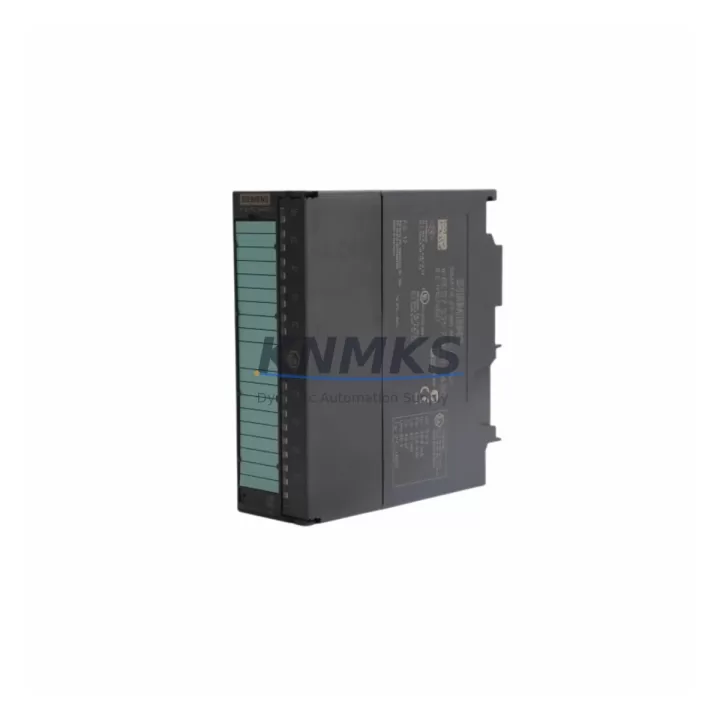
The Siemens 6ES7331-7SF00-0AB0 is an SM331 series 8-channel analog input module designed for the SIMATIC S7-300 programmable logic controller platform. As legacy S7-300 systems approach end-of-life and original Siemens supply channels become constrained, this module remains a critical component for facilities managing long-running production lines, process control cabinets, and distributed automation architectures. Whether you are executing a like-for-like spare part replacement or planning a phased retrofit of an aging control system, the 6ES7331-7SF00-0AB0 provides a verified drop-in solution with full backward compatibility for existing S7-300 rack installations.
This module supports voltage and current signal inputs across multiple measurement ranges, making it suitable for temperature transmitters, pressure sensors, flow meters, and other field instruments commonly wired into legacy process control panels. Before installation, engineers should confirm the existing front connector wiring, verify the module slot address in the hardware configuration (HW Config) within STEP 7 or TIA Portal, and check that the CPU firmware version supports the SM331 module family. Incorrect slot addressing or mismatched configuration files are among the most common causes of startup delays during module replacement.
Migration Compatibility Table
| Parameter | Details |
|---|---|
| Compatible Rack | SIMATIC S7-300 standard rail (DIN rail mount) |
| Slot Compatibility | Any analog module slot in S7-300 rack; address set via HW Config |
| Front Connector | 40-pin front connector (order separately if not included) |
| Signal Types | Voltage (±10V, ±5V, 1–5V), Current (0–20mA, 4–20mA), Thermocouple, RTD |
| Channels | 8 analog inputs (configurable per channel) |
| Communication | S7-300 backplane bus (not PROFIBUS or PROFINET — CPU handles network) |
| Replacement For | 6ES7331-7SF00-0AB0 (same SKU), compatible with SM331 family slots |
| Programming Tool | SIMATIC STEP 7 v5.x / TIA Portal (with S7-300 support package) |
| Firmware | No field firmware update required; hardware revision verified pre-shipment |
| Installation Space | Standard S7-300 single-slot width |
| Support terms | 12 months from shipment date |
| Pre-Shipment Test | Function and channel integrity verified before dispatch |
Retrofit Planning for Existing Automation Systems
When integrating the 6ES7331-7SF00-0AB0 into an existing S7-300 control cabinet, the retrofit scope typically extends beyond the analog input module itself. Engineers should audit the power supply capacity — the PS307 or PS305 power supply modules must provide sufficient current headroom for the expanded or replaced I/O configuration. If the rack is near capacity, a UR2 or UR1 expansion rack with an IM360/IM361 interface module pair may be required to accommodate additional modules without disrupting the existing backplane bus.
For systems where the CPU315-2 DP or CPU314 is still in service, the hardware configuration exported from STEP 7 must be updated to reflect the new module’s slot position and channel parameterization. Technicians should back up the existing STEP 7 project before making any hardware configuration changes. If the control system also includes a CP343-1 Ethernet communication processor or a CP342-5 PROFIBUS master, these modules should remain undisturbed during the analog input replacement to avoid communication interruptions to SCADA or DCS upstream systems.
In cabinets where an OP7 or TP177 HMI panel is connected via MPI, the HMI screen tags linked to analog input addresses should be verified after the module swap. Address offsets can shift if the module is inserted into a different slot than the original. Confirming the process image input (PII) address in the symbol table before going live prevents unexpected HMI display errors during commissioning.
For facilities managing multiple S7-300 stations across a plant floor, maintaining a buffer stock of SM331 analog input modules — alongside SM321 digital input modules and SM322 digital output modules — reduces mean time to repair (MTTR) during unplanned outages. A single failed analog input channel on a critical loop can halt production; having a pre-tested replacement on the shelf is the most effective downtime mitigation strategy available for legacy S7-300 infrastructure.
Downtime Control During System Migration
Minimizing downtime during an analog input module replacement on a live S7-300 system requires a structured approach. First, document all existing front connector wiring using the terminal assignment diagram from the original project. Label each wire before disconnecting the front connector — the 40-pin connector on the SM331 carries all field wiring, and reconnection errors are a leading cause of post-replacement faults.
Second, export and archive the current STEP 7 hardware configuration and program blocks (OBs, FBs, FCs, DBs) before any physical intervention. If the CPU is in RUN mode, switching to STOP should be coordinated with the process control team to ensure safe state conditions are established for all field devices connected to the analog inputs.
Third, after physical installation, perform a cold restart of the CPU and monitor the diagnostic buffer for any module fault entries. The SM331 will self-parameterize based on the stored hardware configuration. If channel-specific errors appear, verify that the measurement type and range set in HW Config match the field instrument signal type. Once all channels report healthy status in the online diagnostics view, the system can be returned to RUN mode and the process resumed. Total replacement time for a prepared technician with a pre-tested module is typically under 30 minutes.
Retrofit Support FAQ
Q: Is the 6ES7331-7SF00-0AB0 a direct replacement for the same SKU from the original Siemens production run?
A: Yes. This is the same model number. The module is functionally equivalent and installs into the same S7-300 rack slot without hardware modification. Pre-shipment testing confirms channel integrity and backplane communication before dispatch.
Q: Do I need to modify my STEP 7 program after replacing this module?
A: In most cases, no program modification is required if the replacement module is installed in the same rack slot. The hardware configuration in STEP 7 should already reference this module type. If the slot position changes, update the HW Config and re-download to the CPU.
Q: What wiring checks should I perform before powering up after installation?
A: Verify that the 40-pin front connector is correctly seated, that all field signal wires are reconnected to their original terminals, and that the measurement type (voltage/current/RTD) matches the channel parameterization in HW Config. Check the 24VDC supply to the module via the backplane and confirm no short-circuit conditions on any input channel.
Q: What does the support terms confirmed by quotation cover?
A: The support terms confirmed by quotation cover manufacturing defects and functional failures under normal operating conditions from the shipment date. Each unit is tested prior to dispatch. For support requests or technical support, contact our sales team directly.
© 2026 KNMKS. All rights reserved.
Original Source: https://knmks.com
Contact: admin@knmks.com | +86 18359268345
Product Identification
- Brand / Ecosystem
-
Siemens
Siemens - Model / Series
-
6ES7331-7SF00-0AB0
SIMATIC Series - Product Family
- PLCs & Controllers
- Availability Status
- Available on request after model and quantity confirmation
- Inquiry Type
- B2B RFQ, replacement inquiry and project spare-part request
- Pre-Quote Check
- Exact SKU, brand, series, quantity, nameplate photos and destination country are checked before quotation
System Path
Where this product fits in the KNMKS automation structure.
Specification & Inquiry Focus
- Control platform
- PLC, PAC and modular controllers
- Common needs
- CPU, rack, power and I/O expansion
- Project support
- Replacement, cabinet build and maintenance
Buyer Confirmation
Information KNMKS checks before replying.
- Exact model
- 6ES7331-7SF00-0AB0
- Brand / ecosystem
- Siemens
- Product family
- PLCs & Controllers
- Application note
- Replacement, maintenance, project build or spare-part list
- Useful photos
- Nameplate, installed unit, cabinet layout or connector side
- Delivery details
- Quantity, destination country and target schedule
Document Support
Files and notes can be confirmed during quotation.
- Product photos or nameplate confirmation when available
- Packing and delivery notes before quotation confirmation
- Support scope and delivery terms confirmed per inquiry
- Export document coordination for qualified B2B requests
Inquiry Support
- Model cross-checking before quotation
- CPU, power, rack and expansion module matching
- Support for replacement and project inquiry
What to Send Us
- Brand and exact model number: Siemens 6ES7331-7SF00-0AB0
- Quantity and required delivery time
- Application, replacement requirement or nameplate photo
- Destination country and shipping preference
RFQ Preparation
This is a product inquiry page built for RFQ communication.
Fast Model Check
Send this model to KNMKS for confirmation.
Include quantity, destination country and photos if this is a maintenance replacement. The inquiry will be saved with a reference number after submission.
Brand & Compatibility Note
KNMKS displays automation product information for well-known industrial brand ecosystems and compatible replacement references. Brand names are used for product identification and compatibility reference only; final availability and commercial terms are confirmed per quotation.
 Manufacturing
 Machine Tools
 Packaging
 Energy & Power



 HMI & Displays
 Servo Systems
 Variable Frequency Drives
 Sensors