
Overview
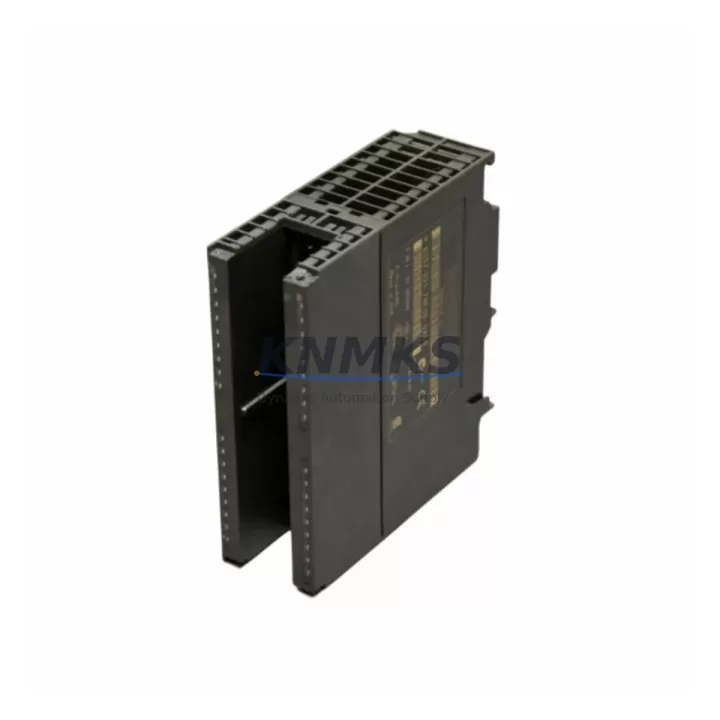
Siemens 6ES7331-7NF00-0AB0 Spare Part for Factory Uptime
The Siemens 6ES7331-7NF00-0AB0 is an 8-channel analog input module designed for the SIMATIC S7-300 programmable logic controller platform. In industrial maintenance environments, this module is a critical spare part for process control panels, machine automation cabinets, and continuous production lines where analog signal acquisition — including current (4–20 mA), voltage (±10 V), thermocouple, and RTD inputs — must remain uninterrupted. Procurement engineers and maintenance teams managing aging S7-300 systems rely on verified original stock of the 6ES7331-7NF00-0AB0 to eliminate unplanned downtime caused by analog input channel failures, signal drift, or module-level faults.
At KNMKS, every unit of the 6ES7331-7NF00-0AB0 is sourced from authorized industrial supply chains, individually inspected, and dispatched with a support terms confirmed by quotation. Pre-shipment functional testing covers channel integrity, input range accuracy, and backplane communication to ensure the module performs correctly upon installation — reducing the risk of repeat failures and secondary troubleshooting on the production floor.
Spare Maintenance Table
| Parameter | Specification |
|---|---|
| Part Number | 6ES7331-7NF00-0AB0 |
| Brand | Siemens |
| Series | SIMATIC S7-300 |
| Module Type | Analog Input Module (SM 331) |
| Number of Channels | 8 channels (configurable in pairs) |
| Input Types | Voltage, Current (4–20 mA), Thermocouple, RTD (Pt100/Pt200) |
| Resolution | Up to 15 bits + sign |
| Supply Voltage | DC 24 V (via S7-300 backplane) |
| Backplane Interface | S7-300 standard rail (DIN rail mounting) |
| Compatibility | S7-300 CPUs: CPU 312–CPU 319; ET 200M distributed I/O |
| Operating Temperature | 0 °C to +60 °C |
| Protection Class | IP20 |
| Origin | Germany |
| Support terms | 12 Months |
| Condition | Original, Pre-tested before dispatch |
| Maintenance Recommendation | Replace immediately upon channel fault alarm; inspect wiring and shielding on replacement |
Maintenance Planning for Continuous Operation
When a 6ES7331-7NF00-0AB0 analog input module fails or shows degraded channel performance, experienced maintenance engineers know that the fault rarely exists in isolation. A thorough site inspection should accompany every module replacement to prevent recurrence and protect adjacent components in the same control cabinet.
Begin by verifying the DC 24 V power supply feeding the S7-300 rack — a Siemens PS 307 or equivalent power supply module should be checked for output voltage stability and ripple, as undervoltage conditions accelerate analog module wear. Inspect the S7-300 backplane bus connector (e.g., the bus connector between the CPU and SM 331 slot) for oxidation or mechanical damage, since a degraded bus connection can cause intermittent analog read errors that mimic module failure.
Review the front connector wiring on the 6ES7331-7NF00-0AB0 — particularly shielding continuity on analog signal cables. Unshielded or improperly grounded cables introduce noise that corrupts 4–20 mA and thermocouple readings. If the plant uses signal isolators (such as Siemens SITRANS or equivalent DIN-rail isolators) between field transmitters and the analog input module, inspect these for drift or failure as well.
For S7-300 systems with distributed I/O, also check the IM 360/361 interface modules used to expand the rack — a failing interface module can cause all SM modules in the expansion rack to report faults simultaneously. In cabinets where the 6ES7331-7NF00-0AB0 coexists with SM 332 analog output modules or SM 321/SM 322 digital I/O modules, verify that the total current draw on the backplane does not exceed the power supply rating after module replacement.
Maintenance planners should also review the CPU 315-2 DP or CPU 317-2 PN/DP diagnostic buffer for hardware fault entries logged prior to the analog module failure — these entries often reveal upstream causes such as PROFIBUS communication errors, watchdog timeouts, or rack power events. Keeping a minimum of one spare 6ES7331-7NF00-0AB0 per production line, alongside a spare PS 307 5A power supply module, is a proven strategy for reducing mean time to repair (MTTR) in S7-300-based automation systems.
Site Replacement Workflow
Replacing the 6ES7331-7NF00-0AB0 on-site is a straightforward procedure when the correct spare is available and the replacement follows a structured workflow:
- Safe isolation: Place the S7-300 CPU in STOP mode via the mode selector switch or STEP 7 / TIA Portal online interface. Confirm all outputs are de-energized before opening the cabinet.
- Front connector removal: Disconnect the 40-pin front connector from the faulty SM 331 module. The front connector retains all field wiring, so no rewiring is required on the replacement module — this is a key advantage of the S7-300 modular design that minimizes downtime.
- Module extraction: Release the module locking screw and slide the 6ES7331-7NF00-0AB0 off the DIN rail. Note the slot position for correct reinstallation.
- Replacement installation: Insert the new 6ES7331-7NF00-0AB0 into the same slot. Reconnect the front connector. The module address is determined by slot position, so no hardware addressing is required.
- Parameter download: If the CPU uses a memory card with the hardware configuration stored, the replacement module will be automatically parameterized on power-up. Otherwise, download the hardware configuration from STEP 7 or TIA Portal to restore channel settings (input type, range, integration time).
- Functional verification: Switch the CPU to RUN mode and verify analog input values in the process image. Check all 8 channels against known field transmitter signals to confirm correct operation before resuming production.
This workflow is compatible with both legacy STEP 7 V5.x environments and modern TIA Portal V15+ projects, ensuring the 6ES7331-7NF00-0AB0 replacement integrates seamlessly into existing S7-300 system configurations without requiring software migration or hardware redesign.
Spare Parts Support FAQ
Q1: Is the 6ES7331-7NF00-0AB0 still available as a new original part?
Yes. KNMKS maintains stock of original Siemens 6ES7331-7NF00-0AB0 modules sourced from authorized industrial distributors. Although Siemens has introduced successor platforms (S7-1500), the S7-300 series remains widely deployed and the SM 331 analog input modules continue to be available as original spare parts for system maintenance and life extension programs.
Q2: How do I verify compatibility before ordering?
The 6ES7331-7NF00-0AB0 is compatible with all standard S7-300 CPUs (CPU 312 through CPU 319) and ET 200M distributed I/O stations using the IM 153-x interface module. Confirm your rack’s power supply capacity and available slot position. If you are replacing an older SM 331 variant (e.g., 6ES7331-7KF02-0AB0), note that channel configuration and parameterization may differ — contact our technical team at admin@knmks.com for compatibility verification.
Q3: What testing is performed before shipment?
Every 6ES7331-7NF00-0AB0 unit dispatched by KNMKS undergoes pre-shipment functional testing including backplane communication verification, per-channel input range accuracy check, and visual inspection for physical damage. Test records are available upon request. All units are shipped with ESD-protective packaging to prevent damage in transit.
Q4: What does the support terms confirmed by quotation cover?
The support terms confirmed by quotation cover manufacturing defects and functional failures under normal operating conditions as specified in the Siemens SM 331 product manual. It does not cover damage resulting from incorrect installation, overvoltage events, or environmental conditions outside the rated operating range. In the event of a support terms claim, KNMKS provides replacement or repair with priority dispatch to minimize production impact. For long-term supply agreements or blanket orders, contact our procurement team directly.
© 2026 KNMKS. All rights reserved.
Original Source: https://knmks.com
Contact: admin@knmks.com | +86 18359268345
Product Identification
- Brand / Ecosystem
-
Siemens
Siemens - Model / Series
-
6ES7331-7NF00-0AB0
SIMATIC Series - Product Family
- PLCs & Controllers
- Availability Status
- Available on request after model and quantity confirmation
- Inquiry Type
- B2B RFQ, replacement inquiry and project spare-part request
- Pre-Quote Check
- Exact SKU, brand, series, quantity, nameplate photos and destination country are checked before quotation
System Path
Where this product fits in the KNMKS automation structure.
Specification & Inquiry Focus
- Control platform
- PLC, PAC and modular controllers
- Common needs
- CPU, rack, power and I/O expansion
- Project support
- Replacement, cabinet build and maintenance
Buyer Confirmation
Information KNMKS checks before replying.
- Exact model
- 6ES7331-7NF00-0AB0
- Brand / ecosystem
- Siemens
- Product family
- PLCs & Controllers
- Application note
- Replacement, maintenance, project build or spare-part list
- Useful photos
- Nameplate, installed unit, cabinet layout or connector side
- Delivery details
- Quantity, destination country and target schedule
Document Support
Files and notes can be confirmed during quotation.
- Product photos or nameplate confirmation when available
- Packing and delivery notes before quotation confirmation
- Support scope and delivery terms confirmed per inquiry
- Export document coordination for qualified B2B requests
Inquiry Support
- Model cross-checking before quotation
- CPU, power, rack and expansion module matching
- Support for replacement and project inquiry
What to Send Us
- Brand and exact model number: Siemens 6ES7331-7NF00-0AB0
- Quantity and required delivery time
- Application, replacement requirement or nameplate photo
- Destination country and shipping preference
RFQ Preparation
This is a product inquiry page built for RFQ communication.
Fast Model Check
Send this model to KNMKS for confirmation.
Include quantity, destination country and photos if this is a maintenance replacement. The inquiry will be saved with a reference number after submission.
Brand & Compatibility Note
KNMKS displays automation product information for well-known industrial brand ecosystems and compatible replacement references. Brand names are used for product identification and compatibility reference only; final availability and commercial terms are confirmed per quotation.
 Manufacturing
 Machine Tools
 Packaging
 Energy & Power



 HMI & Displays
 Servo Systems
 Variable Frequency Drives
 Sensors