
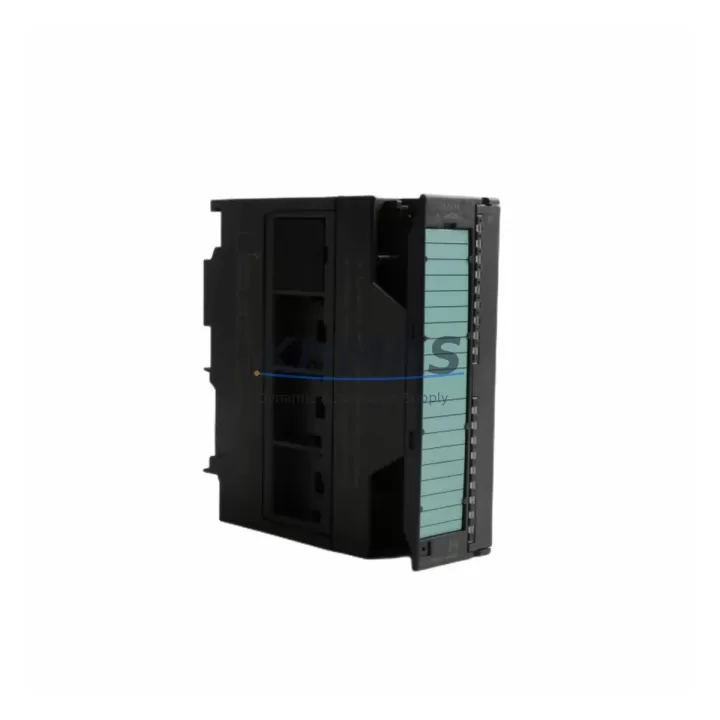
Overview
Siemens 6ES7331-7KB02-0AB0 SM331 Spare Part: Precision Analog Input for Factory Uptime
The Siemens 6ES7331-7KB02-0AB0 is an 8-channel analog input module from the SIMATIC S7-300 SM331 series, engineered for high-precision signal acquisition in demanding industrial environments. As a maintenance-proven spare part, it is a critical component in process control, machine automation, and continuous production lines where analog measurement accuracy directly impacts output quality and system reliability. Whether you are managing a scheduled annual overhaul, responding to an unplanned fault, or building a strategic spare parts inventory, the 6ES7331-7KB02-0AB0 delivers the compatibility and performance required to restore operations with minimal downtime.
Maintenance engineers and procurement teams working with legacy and active S7-300 installations recognize the SM331 series as a long-lifecycle module with broad deployment across chemical, automotive, food processing, and energy sectors. Sourcing a verified original spare — with full electrical testing prior to shipment and a documented support terms confirmed by quotation — eliminates the risk of counterfeit components and ensures seamless integration into existing control cabinet configurations.
Spare Maintenance Table
| Parameter | Specification |
|---|---|
| Part Number | 6ES7331-7KB02-0AB0 |
| Series | SIMATIC S7-300 SM331 |
| Module Type | Analog Input Module |
| Channels | 8 Analog Inputs (configurable per channel group) |
| Input Types | Voltage (±10V, ±5V, ±2.5V, 1–5V), Current (0–20mA, 4–20mA, ±20mA), Resistance, Thermocouple, RTD |
| Resolution | Up to 15 bits + sign |
| Conversion Time | Approx. 52 ms per channel (at 50 Hz interference suppression) |
| Supply Voltage | DC 24V (via backplane bus) |
| Isolation | Galvanic isolation between channels and backplane |
| Installation | DIN rail, S7-300 backplane (UR1/UR2/UR2-H) |
| Operating Temperature | 0°C to +60°C |
| Dimensions (W×H×D) | 40 × 125 × 120 mm |
| Weight | Approx. 200 g |
| Origin | Germany |
| Compatibility | S7-300 CPU 312–319, ET 200M distributed I/O |
| Maintenance Recommendation | Inspect signal wiring, shielding, and front connector (6ES7392-1BM01-0AA0) at each replacement |
| Support terms | 12 Months from shipment date |
Maintenance Planning for Continuous Operation
When replacing the 6ES7331-7KB02-0AB0 in a live S7-300 control cabinet, a disciplined maintenance workflow extends beyond the module swap itself. Experienced field engineers treat each analog input module replacement as an opportunity to audit the surrounding electrical environment and prevent secondary failures.
Power Supply Integrity: Verify the 24VDC rail supplying the S7-300 rack — typically a Siemens SITOP PSU100S or PSU200M — is within tolerance (20.4–28.8VDC). Voltage ripple or transient spikes are a leading cause of premature analog module degradation. Replace any power supply showing output deviation greater than ±2%.
Front Connector and Signal Wiring: The SM331 uses a 40-pin front connector (6ES7392-1BM01-0AA0). Inspect all screw terminals for corrosion, loose crimps, and correct shielding termination. Analog signal cables should be individually shielded and grounded at one end only to prevent ground loops that introduce measurement noise.
Backplane and Rack Condition: Inspect the S7-300 backplane bus connector for bent pins or oxidation. A damaged backplane segment can cause intermittent communication faults that mimic module failure. If the rack has been in service for more than 10 years, consider stocking a spare UR2 rack (6ES7390-1AB85-0AA0) as part of your long-term continuity plan.
Adjacent I/O Modules: During the replacement window, perform a visual and functional check on neighboring digital output modules such as the SM322 6ES7322-1BH01-0AA0 and digital input modules like the SM321 6ES7321-1BH02-0AA0. Shared power bus faults can affect multiple modules simultaneously.
Signal Isolators and Barriers: For installations where field sensors are located in hazardous areas or at long cable runs, inspect any inline signal isolators or Zener barriers connected upstream of the SM331 inputs. Degraded isolators introduce offset errors that are often misdiagnosed as module faults.
Communication and CPU Health: After module replacement, use STEP 7 or TIA Portal to perform a hardware configuration download and verify the CPU — such as the CPU 315-2 DP (6ES7315-2AH14-0AB0) — recognizes the new module without fault codes. Check the MPI/PROFIBUS DP network for address conflicts if the module is used in an ET 200M distributed configuration.
Maintaining a minimum stock of one 6ES7331-7KB02-0AB0 per production line, alongside a spare front connector and a tested power supply unit, reduces mean time to repair (MTTR) from hours to under 30 minutes in most field scenarios.
Site Replacement Workflow
Step 1 — Isolation and Safety: Follow your site LOTO (Lockout/Tagout) procedure. De-energize the 24VDC supply to the affected rack segment. Do not hot-swap the SM331 unless your CPU firmware and hardware revision explicitly support it — verify in the module’s hardware manual.
Step 2 — Front Connector Removal: Unlock and remove the 40-pin front connector (6ES7392-1BM01-0AA0), keeping all wiring intact. Label each terminal group before disconnection if the connector will be transferred to the new module.
Step 3 — Module Extraction: Release the DIN rail locking tab and slide the module out of the backplane slot. Note the slot position — the S7-300 hardware configuration is slot-dependent.
Step 4 — New Module Installation: Insert the 6ES7331-7KB02-0AB0 into the same slot. Ensure the backplane bus connector engages fully. Reattach the front connector and verify all terminal screws are torqued to specification (0.5–0.6 Nm).
Step 5 — Power-Up and Verification: Restore 24VDC power. Observe the module’s SF and EXTF LEDs — both should be off after a successful hardware configuration download. Use STEP 7 diagnostic buffer or TIA Portal online diagnostics to confirm all 8 channels are reading within expected engineering unit ranges.
Step 6 — Documentation: Record the replacement date, new module serial number, and any wiring changes in your maintenance log. Update your spare parts inventory to trigger reorder of a replacement unit, maintaining your minimum stock level.
This workflow is compatible with both direct S7-300 rack installations and ET 200M distributed I/O configurations, ensuring the same procedure applies across multi-cabinet and remote I/O deployments.
Spare Parts Support FAQ
Q1: Is the 6ES7331-7KB02-0AB0 still available as a new original part, or only as refurbished stock?
The 6ES7331-7KB02-0AB0 is available as original new-old-stock (NOS) and factory-refurbished units. All units supplied by KNMKS are electrically tested prior to shipment and include a support terms confirmed by quotation from the shipment date. Refurbished units undergo full channel calibration verification and are supplied with a test report on request.
Q2: How do I confirm compatibility before ordering for my specific S7-300 configuration?
The SM331 6ES7331-7KB02-0AB0 is compatible with all S7-300 CPUs (312 through 319 series) and ET 200M IM 153-x interface modules. Confirm your rack type (UR1, UR2, or UR2-H) and CPU firmware version. If your installation uses a specific channel configuration (e.g., thermocouple or RTD inputs), verify the front connector wiring matches the new module’s channel group assignments. Contact admin@knmks.com with your CPU order number and existing hardware configuration file for pre-order compatibility confirmation.
Q3: What is the recommended spare parts inventory strategy for S7-300 analog input modules?
For production lines with more than four SM331 modules installed, maintain a minimum of one spare unit per line. For critical continuous-process applications (chemical, pharmaceutical, energy), a 1:4 ratio (one spare per four installed modules) is the industry standard. Pair each spare SM331 with a spare front connector (6ES7392-1BM01-0AA0) and a pre-labeled wiring diagram to enable sub-30-minute replacement by any qualified technician.
Q4: Does KNMKS support long-term supply for discontinued or end-of-life Siemens S7-300 modules?
Yes. KNMKS maintains a dedicated inventory program for legacy SIMATIC S7-300 components, including SM331, SM321, SM322, and SM332 series modules. Long-term supply agreements are available for OEMs and maintenance contractors requiring guaranteed stock over 12–36 month horizons. All shipments include pre-shipment electrical testing, and a support terms confirmed by quotation is standard. Contact admin@knmks.com or +86 18359268345 to discuss volume pricing and supply continuity terms.
© 2026 KNMKS. All rights reserved.
Original Source: https://knmks.com
Contact: admin@knmks.com | +86 18359268345
Product Identification
- Brand / Ecosystem
-
Siemens
Siemens - Model / Series
-
6ES7331-7KB02-0AB0
SIMATIC Series - Product Family
- PLCs & Controllers
- Availability Status
- Available on request after model and quantity confirmation
- Inquiry Type
- B2B RFQ, replacement inquiry and project spare-part request
- Pre-Quote Check
- Exact SKU, brand, series, quantity, nameplate photos and destination country are checked before quotation
System Path
Where this product fits in the KNMKS automation structure.
Specification & Inquiry Focus
- Control platform
- PLC, PAC and modular controllers
- Common needs
- CPU, rack, power and I/O expansion
- Project support
- Replacement, cabinet build and maintenance
Buyer Confirmation
Information KNMKS checks before replying.
- Exact model
- 6ES7331-7KB02-0AB0
- Brand / ecosystem
- Siemens
- Product family
- PLCs & Controllers
- Application note
- Replacement, maintenance, project build or spare-part list
- Useful photos
- Nameplate, installed unit, cabinet layout or connector side
- Delivery details
- Quantity, destination country and target schedule
Document Support
Files and notes can be confirmed during quotation.
- Product photos or nameplate confirmation when available
- Packing and delivery notes before quotation confirmation
- Support scope and delivery terms confirmed per inquiry
- Export document coordination for qualified B2B requests
Inquiry Support
- Model cross-checking before quotation
- CPU, power, rack and expansion module matching
- Support for replacement and project inquiry
What to Send Us
- Brand and exact model number: Siemens 6ES7331-7KB02-0AB0
- Quantity and required delivery time
- Application, replacement requirement or nameplate photo
- Destination country and shipping preference
RFQ Preparation
This is a product inquiry page built for RFQ communication.
Fast Model Check
Send this model to KNMKS for confirmation.
Include quantity, destination country and photos if this is a maintenance replacement. The inquiry will be saved with a reference number after submission.
Brand & Compatibility Note
KNMKS displays automation product information for well-known industrial brand ecosystems and compatible replacement references. Brand names are used for product identification and compatibility reference only; final availability and commercial terms are confirmed per quotation.
 Manufacturing
 Machine Tools
 Packaging
 Energy & Power



 HMI & Displays
 Servo Systems
 Variable Frequency Drives
 Sensors