
Overview
Siemens 6ES7331-7KB01-0AB0 Migration-Ready Analog Input for Legacy S7-300 Control Systems
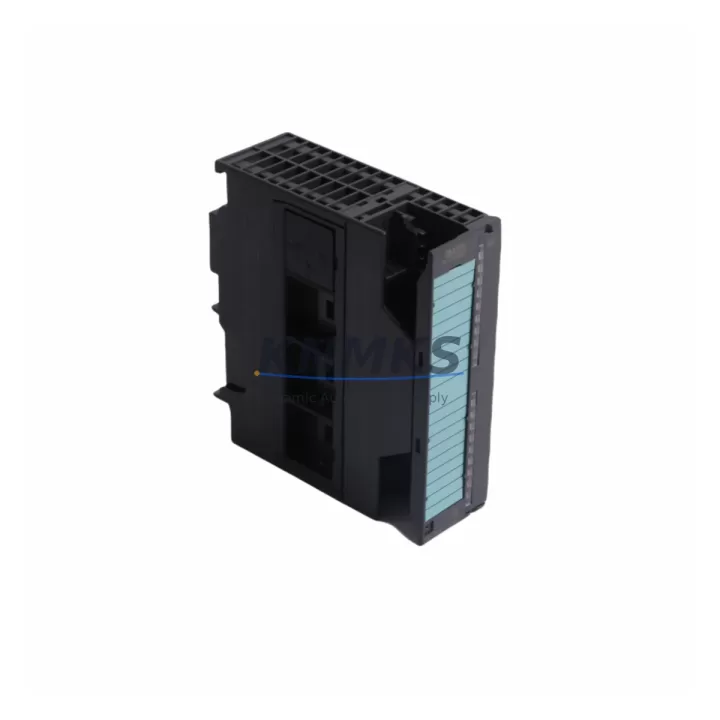
The Siemens 6ES7331-7KB01-0AB0 is an SM331 series 8-channel analog input module designed for the S7-300 programmable logic controller platform. As legacy S7-300 installations approach end-of-life and original spare parts become increasingly difficult to source, this migration-ready module provides a direct drop-in replacement path for facilities managing aging DCS and PLC infrastructure. Whether your plant is executing a phased modernization, responding to an unplanned module failure, or building a strategic spare parts inventory, the 6ES7331-7KB01-0AB0 delivers the electrical and functional compatibility required to restore control continuity without rewriting existing ladder logic or reconfiguring PROFIBUS network topology.
This module supports voltage and current input ranges configurable per channel, making it suitable for a wide range of field instrumentation including thermocouples, RTDs, pressure transmitters, and flow sensors already wired into legacy S7-300 control cabinets. The 12-bit resolution and configurable measurement ranges allow engineers to maintain signal fidelity during the transition from obsolete modules without recalibrating field devices. Each unit undergoes pre-shipment functional testing to verify channel accuracy, terminal integrity, and backplane communication before dispatch, reducing the risk of commissioning delays on the plant floor.
For facilities running mixed-generation S7-300 racks, the 6ES7331-7KB01-0AB0 installs directly onto standard S7-300 mounting rails alongside modules such as the SM321 digital input module, SM322 digital output module, and CP343-1 PROFIBUS communication processor. No rack modification or additional bus connectors are required. The module address is assigned through STEP 7 or TIA Portal hardware configuration, and existing GSD files and hardware catalog entries remain valid, eliminating the need to rebuild the hardware configuration from scratch during a hot-swap replacement scenario.
When planning a retrofit involving the 6ES7331-7KB01-0AB0, engineers should verify the power budget of the existing PS307 power supply module, as adding or replacing analog input modules can affect the 5 VDC backplane load. Terminal wiring should be confirmed against the original SM331 wiring diagram, particularly for differential versus single-ended input configurations. If the legacy installation used shielded twisted-pair cables terminated at the front connector, the same front connector can typically be reused, reducing rewiring time during the maintenance window. Module slot addressing must be confirmed in the STEP 7 hardware configuration to ensure the CPU recognizes the replacement module at the correct I/O address range without generating a configuration mismatch fault.
For sites migrating from S7-300 to S7-1500 or ET 200MP distributed I/O architectures, the 6ES7331-7KB01-0AB0 serves as an interim solution that maintains production continuity while the migration project is staged across multiple shutdown windows. During this transition, the existing PROFIBUS DP network connecting the S7-300 CPU to remote I/O stations, HMI panels, and drives remains fully operational, allowing engineers to migrate individual control loops without disrupting the broader automation network. HMI screen tags referencing analog input addresses should be reviewed and updated in WinCC or TP series panels to reflect any address changes introduced during the hardware reconfiguration.
All units are dispatched from multi-region stock with a support terms confirmed by quotation covering manufacturing defects and functional failures under normal operating conditions. Global shipping is available with typical lead times suitable for both planned maintenance schedules and emergency replacement scenarios.
Migration Compatibility Table
| Parameter | 6ES7331-7KB01-0AB0 (This Unit) | Legacy / Replaced Module |
|---|---|---|
| Module Series | SM331 Analog Input | SM331 (earlier firmware revisions) |
| Number of Channels | 8 channels | 8 channels |
| Input Types | Voltage, Current, TC, RTD (configurable per channel) | Voltage, Current (limited range) |
| Resolution | 12-bit + sign | 12-bit |
| Backplane Interface | S7-300 standard backplane bus | S7-300 standard backplane bus |
| Front Connector | 40-pin screw terminal (reusable) | 40-pin screw terminal |
| PROFIBUS Compatibility | Via CP343-1 / CPU 315-2 DP | Via CP343-1 / CPU 315-2 DP |
| Power Consumption (5 VDC) | Verify against PS307 budget | Confirm existing load |
| STEP 7 / TIA Portal | Fully supported (hardware catalog) | Supported (legacy GSD) |
| Installation Space | Standard S7-300 slot width | Standard S7-300 slot width |
| Firmware Compatibility | Compatible with CPU 314/315/317 series | CPU 314/315 series |
| Replacement Recommendation | Direct drop-in; verify slot address in HW Config | — |
| Pre-Shipment Testing | Yes — channel accuracy and backplane communication verified | — |
| Support terms | 12 months from dispatch | — |
Retrofit Planning for Existing Automation Systems
Successful integration of the 6ES7331-7KB01-0AB0 into an existing S7-300 control cabinet requires a structured pre-retrofit assessment. Begin by auditing the current rack layout to confirm available slot positions and verify that the PS307 power supply module can support the additional 5 VDC backplane current draw introduced by the replacement module. In installations where multiple SM331 or SM332 analog output modules are already installed, the cumulative backplane load should be calculated against the PS307 rated output before proceeding.
Terminal wiring is a critical checkpoint. The 40-pin front connector used by the 6ES7331-7KB01-0AB0 is compatible with the standard S7-300 front connector, allowing the existing field wiring harness to be transferred directly to the replacement module without cutting or re-terminating cables. Engineers should inspect terminal screws for corrosion and verify that shielding connections are intact, particularly in environments with high electromagnetic interference from variable frequency drives or motor starters installed in the same control cabinet.
For systems using a CP343-1 PROFIBUS communication processor to connect the S7-300 rack to a supervisory SCADA system or distributed I/O network, no changes to the PROFIBUS configuration are required when replacing an analog input module within the same rack. The CP343-1 continues to handle all network communication transparently. However, if the retrofit involves relocating the module to a different slot, the I/O address assignment in the STEP 7 hardware configuration must be updated and downloaded to the CPU before restarting the control program.
HMI panels connected via MPI or PROFIBUS, such as TP series or MP series operator panels running WinCC flexible, reference analog input values by their configured I/O addresses. Any slot change that modifies the module’s base address will require corresponding tag updates in the HMI project to prevent display errors or alarm misfires during post-retrofit commissioning. Signal isolators installed between field transmitters and the SM331 front connector should also be verified for input range compatibility, particularly if the replacement module is configured for a different voltage or current range than the original.
For larger retrofit projects involving multiple racks or remote ET 200M distributed I/O stations connected via IM153 interface modules, the 6ES7331-7KB01-0AB0 can also be deployed in ET 200M configurations, extending its applicability beyond centralized S7-300 racks to distributed field panels. This flexibility makes it a practical choice for phased modernization programs where central and remote I/O are upgraded in separate maintenance windows.
Downtime Control During System Migration
Minimizing unplanned downtime during analog input module replacement requires preparation that begins well before the maintenance window opens. The most effective approach is to export and archive the current STEP 7 or TIA Portal project, including the hardware configuration and all program blocks, before removing the legacy module. This ensures that the original program logic, I/O address assignments, and CPU configuration can be restored immediately if an unexpected issue arises during the swap.
Where process conditions allow, the replacement should be performed during a planned shutdown rather than under emergency conditions. Pre-staging the 6ES7331-7KB01-0AB0 with the correct front connector wiring completed on the bench — using the original wiring diagram as reference — reduces the time the control system spends offline. Once the module is installed and the front connector is seated, the CPU can be restarted in STOP mode to allow the hardware configuration to be verified before returning the system to RUN mode.
For processes where continuous control is critical, consider using the CPU’s force table to hold critical output states at safe values during the module swap interval. This prevents uncontrolled actuator movement caused by the CPU detecting a hardware configuration fault during the brief period when the module is absent from the rack. After the replacement module is installed and recognized by the CPU, force values should be released and analog input readings verified against known field conditions before returning the loop to automatic control.
Post-replacement commissioning should include a channel-by-channel verification of analog input readings against calibrated reference signals or known process values. Any offset or scaling discrepancy should be corrected in the STEP 7 analog input scaling parameters rather than by adjusting field transmitter calibration, preserving the integrity of the existing instrumentation loop. Document the replacement event, including the module serial number, installation date, and commissioning test results, to support future maintenance planning and support requests.
Retrofit Support FAQ
Q: Is the 6ES7331-7KB01-0AB0 a direct replacement for earlier SM331 analog input modules in S7-300 racks?
A: Yes. The 6ES7331-7KB01-0AB0 is mechanically and electrically compatible with the standard S7-300 backplane and uses the same 40-pin front connector as earlier SM331 variants. In most cases, the existing front connector and field wiring can be transferred directly to the replacement module. Verify the slot address in the STEP 7 hardware configuration after installation to confirm the CPU recognizes the module at the correct I/O address.
Q: What pre-shipment testing is performed on each unit?
A: Each 6ES7331-7KB01-0AB0 unit undergoes functional testing prior to dispatch, including verification of all 8 analog input channels for signal accuracy, front connector terminal integrity, and backplane communication. Test results confirm the module meets Siemens SM331 performance specifications before shipment.
Q: How do I confirm wiring compatibility before installing the replacement module?
A: Compare the terminal assignment diagram for the 6ES7331-7KB01-0AB0 against the original SM331 wiring documentation for your installation. Pay particular attention to the input type configuration (voltage vs. current, differential vs. single-ended) and the position of the measurement type selector switch on the module front. If the original module used shielded cables with shield termination at the front connector, the same termination method applies to the replacement unit.
Q: What support terms and stock availability terms apply?
A: The 6ES7331-7KB01-0AB0 is supplied with a support terms confirmed by quotation covering manufacturing defects and functional failures under normal operating conditions. Multi-region stock is maintained to support both planned procurement and emergency replacement requirements, with global dispatch available. Contact the sales team to confirm current stock levels and lead times for your region.
© 2026 KNMKS. All rights reserved.
Original Source: https://knmks.com
Contact: admin@knmks.com | +86 18359268345
Product Identification
- Brand / Ecosystem
-
Siemens
Siemens - Model / Series
-
6ES7331-7KB01-0AB0
SIMATIC Series - Product Family
- PLCs & Controllers
- Availability Status
- Available on request after model and quantity confirmation
- Inquiry Type
- B2B RFQ, replacement inquiry and project spare-part request
- Pre-Quote Check
- Exact SKU, brand, series, quantity, nameplate photos and destination country are checked before quotation
System Path
Where this product fits in the KNMKS automation structure.
Specification & Inquiry Focus
- Control platform
- PLC, PAC and modular controllers
- Common needs
- CPU, rack, power and I/O expansion
- Project support
- Replacement, cabinet build and maintenance
Buyer Confirmation
Information KNMKS checks before replying.
- Exact model
- 6ES7331-7KB01-0AB0
- Brand / ecosystem
- Siemens
- Product family
- PLCs & Controllers
- Application note
- Replacement, maintenance, project build or spare-part list
- Useful photos
- Nameplate, installed unit, cabinet layout or connector side
- Delivery details
- Quantity, destination country and target schedule
Document Support
Files and notes can be confirmed during quotation.
- Product photos or nameplate confirmation when available
- Packing and delivery notes before quotation confirmation
- Support scope and delivery terms confirmed per inquiry
- Export document coordination for qualified B2B requests
Inquiry Support
- Model cross-checking before quotation
- CPU, power, rack and expansion module matching
- Support for replacement and project inquiry
What to Send Us
- Brand and exact model number: Siemens 6ES7331-7KB01-0AB0
- Quantity and required delivery time
- Application, replacement requirement or nameplate photo
- Destination country and shipping preference
RFQ Preparation
This is a product inquiry page built for RFQ communication.
Fast Model Check
Send this model to KNMKS for confirmation.
Include quantity, destination country and photos if this is a maintenance replacement. The inquiry will be saved with a reference number after submission.
Brand & Compatibility Note
KNMKS displays automation product information for well-known industrial brand ecosystems and compatible replacement references. Brand names are used for product identification and compatibility reference only; final availability and commercial terms are confirmed per quotation.
 Manufacturing
 Machine Tools
 Packaging
 Energy & Power



 HMI & Displays
 Servo Systems
 Variable Frequency Drives
 Sensors