
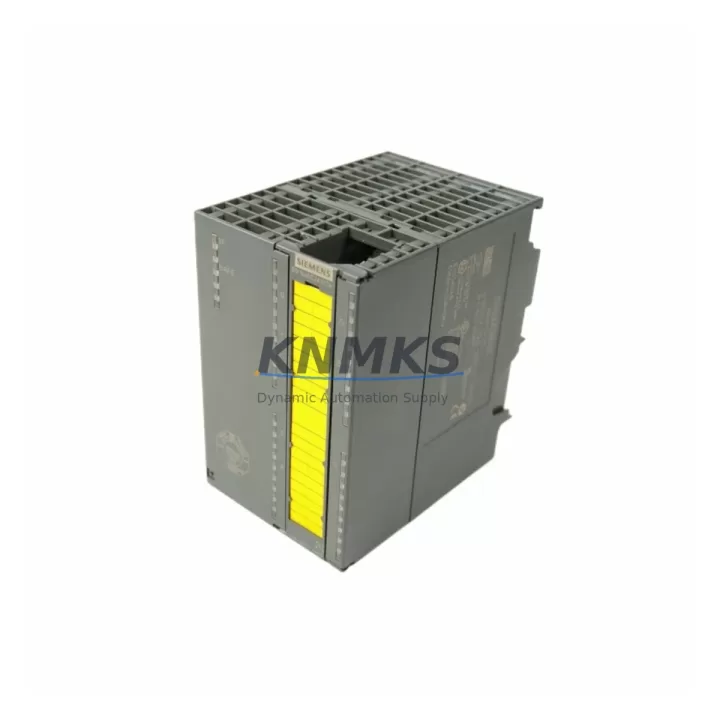
Overview
Siemens 6ES7326-2BF01-0AB0 Spare Part for SM326 Uptime
The Siemens 6ES7326-2BF01-0AB0 is an SM326 F-DO (Fail-safe Digital Output) module designed for integration into Siemens SIMATIC S7-300 safety-oriented control systems. As a certified fail-safe output module, it plays a critical role in emergency shutdown circuits, safety interlock systems, and process protection loops across manufacturing, chemical, oil & gas, and heavy industrial environments. Maintaining a verified spare of this module in your parts inventory is one of the most effective strategies for reducing unplanned downtime and protecting production continuity.
For maintenance engineers managing aging S7-300 safety architectures, the 6ES7326-2BF01-0AB0 represents a high-priority line item on any annual spare parts review. Its role in safety-rated output control means that a failed module can trigger a full system safe-state, halting production until a replacement is sourced, tested, and installed. Having a pre-tested, shelf-ready unit eliminates the sourcing delay that typically extends emergency downtime from hours to days.
Procurement engineers sourcing this module should verify compatibility with the installed S7-300 rack configuration, confirm the firmware revision aligns with the existing CPU and F-runtime environment, and ensure the replacement unit ships with full factory documentation. All units supplied by KNMKS are inspected prior to dispatch, include a support terms confirmed by quotation, and are traceable to verified supply channels.
Spare Maintenance Table
| Parameter | Specification |
|---|---|
| Part Number | 6ES7326-2BF01-0AB0 |
| Series | SM326 (SIMATIC S7-300 Fail-Safe) |
| Module Type | F-DO — Fail-Safe Digital Output Module |
| Output Channels | 8 x fail-safe digital outputs (2-channel evaluation) |
| Output Voltage | 24 V DC |
| Output Current per Channel | 2 A |
| Safety Integrity Level | SIL 3 (IEC 61508), Category 4 (EN 954-1) |
| Backplane Bus | SIMATIC S7-300 standard backplane |
| Compatible CPUs | S7-300 F-CPUs (e.g. CPU 315F-2 PN/DP, CPU 317F-2 DP) |
| Operating Temperature | 0 °C to +60 °C |
| Dimensions (W×H×D) | 40 × 125 × 120 mm |
| Weight | Approx. 500 g |
| Country of Origin | Germany |
| Installation | DIN rail, S7-300 rack slot |
| Certification | CE, UL, TÜV |
| Support terms | 12 Months (KNMKS) |
| Condition | Original, tested before shipment |
Maintenance Planning for Continuous Operation
When scheduling a planned replacement or responding to an unplanned failure of the 6ES7326-2BF01-0AB0, a thorough site inspection of the surrounding control cabinet is essential. Maintenance teams should not limit their scope to the failed module alone — the root cause of F-DO module failure is frequently found in adjacent components.
Begin by inspecting the 24 V DC power supply feeding the S7-300 rack. Voltage ripple or transient spikes from an aging SITOP PSU or equivalent industrial power supply can stress output driver circuits over time, leading to premature module failure. Verify output voltage stability under load before installing the replacement 6ES7326-2BF01-0AB0.
Next, check the S7-300 backplane and rack assembly. Loose bus connectors or oxidized backplane contacts are a common source of intermittent communication faults that can be misdiagnosed as module failure. Clean and reseat all bus connectors before commissioning the new module.
Inspect the SM326 F-DI input module (e.g. 6ES7326-1BK02-0AB0) paired with this F-DO in the safety loop. In many safety architectures, the F-DI and F-DO modules operate as a matched pair within the same F-runtime group. A degraded F-DI module can generate spurious safe-state triggers that appear as F-DO faults.
Review the terminal block wiring and field device connections on the output side. Corroded terminals, loose ferrules, or undersized cable cross-sections on the actuator circuits (solenoid valves, contactors, safety relays) can cause output overcurrent events that damage the module’s output drivers. Replace any suspect terminals and verify cable ratings against the 2 A per channel specification.
For systems using PROFIBUS DP communication, verify the DP segment termination and cable integrity. A degraded PROFIBUS network can cause the F-CPU to lose communication with the SM326 module, triggering unnecessary safe-state events. Check the DP master (e.g. CP 342-5 or integrated CPU DP port) and all network repeaters in the segment.
Finally, review the fuse and circuit protection on each output channel. Blown channel fuses are a leading indicator of field-side wiring faults. Replace fuses only after identifying and correcting the underlying cause, and document all fuse replacements in the maintenance log for future trend analysis.
Site Replacement Workflow
Step 1 — Safe-State Confirmation: Before removing the 6ES7326-2BF01-0AB0, confirm the safety system has entered a defined safe state and all controlled actuators (valves, drives, contactors) are de-energized. Do not bypass safety interlocks during module replacement.
Step 2 — Module Identification: Record the existing module’s firmware version, slot address, and F-address parameters from the STEP 7 or TIA Portal project. These parameters must be replicated exactly on the replacement module to avoid F-runtime configuration mismatches.
Step 3 — Physical Replacement: Disconnect the front connector, remove the module from the rack, and install the replacement 6ES7326-2BF01-0AB0. Reconnect the front connector and verify all terminal connections are secure.
Step 4 — F-Address Assignment: Using STEP 7 HW Config or TIA Portal, assign the correct F-address to the new module. Confirm the F-address matches the project configuration before downloading.
Step 5 — Acceptance Test: Perform a channel-by-channel functional test of all 8 output channels. Verify safe-state behavior by simulating a fault condition and confirming correct de-energization of all connected actuators. Document test results per your site’s safety management system requirements.
Step 6 — Return to Service: After successful acceptance testing, release the system from safe state and monitor the first production cycle for any residual faults. Update the maintenance record with the replacement date, module serial number, and test results.
Spare Parts Support FAQ
Q1: Is the 6ES7326-2BF01-0AB0 still available as a new original part?
This module is part of the SIMATIC S7-300 product family, which Siemens has announced for phase-out. While new stock availability may be limited through standard distribution channels, KNMKS maintains verified inventory sourced from authorized supply chains. All units are inspected and tested prior to shipment. For long-term supply planning, we recommend securing a minimum of 2–3 units as strategic spares.
Q2: How do I verify compatibility before installation?
Compatibility depends on your S7-300 F-CPU type, the STEP 7 or TIA Portal project version, and the F-runtime configuration. Confirm that your CPU supports the SM326 F-DO module and that the F-address range is correctly configured. If you share your project’s HW Config export, our technical team can assist with pre-installation compatibility verification at no charge.
Q3: What does the support terms confirmed by quotation cover?
The KNMKS support terms confirmed by quotation cover manufacturing defects and functional failures under normal operating conditions as specified in the Siemens datasheet. It does not cover damage caused by incorrect installation, overvoltage events, or field wiring faults. In the event of a support terms claim, KNMKS will arrange replacement or repair within agreed lead times to minimize your downtime exposure.
Q4: Can KNMKS support long-term supply for fleet maintenance programs?
Yes. For customers managing multiple S7-300 safety systems across multiple sites, KNMKS offers scheduled supply agreements to ensure consistent availability of critical spare parts including the 6ES7326-2BF01-0AB0 and related SM326 series modules. Contact our sales team to discuss volume pricing, lead time commitments, and consignment stock options.
© 2026 KNMKS. All rights reserved.
Original Source: https://knmks.com
Contact: admin@knmks.com | +86 18359268345
Product Identification
- Brand / Ecosystem
-
Siemens
Siemens - Model / Series
-
6ES7326-2BF01-0AB0
SIMATIC Series - Product Family
- PLCs & Controllers
- Availability Status
- Available on request after model and quantity confirmation
- Inquiry Type
- B2B RFQ, replacement inquiry and project spare-part request
- Pre-Quote Check
- Exact SKU, brand, series, quantity, nameplate photos and destination country are checked before quotation
System Path
Where this product fits in the KNMKS automation structure.
Specification & Inquiry Focus
- Control platform
- PLC, PAC and modular controllers
- Common needs
- CPU, rack, power and I/O expansion
- Project support
- Replacement, cabinet build and maintenance
Buyer Confirmation
Information KNMKS checks before replying.
- Exact model
- 6ES7326-2BF01-0AB0
- Brand / ecosystem
- Siemens
- Product family
- PLCs & Controllers
- Application note
- Replacement, maintenance, project build or spare-part list
- Useful photos
- Nameplate, installed unit, cabinet layout or connector side
- Delivery details
- Quantity, destination country and target schedule
Document Support
Files and notes can be confirmed during quotation.
- Product photos or nameplate confirmation when available
- Packing and delivery notes before quotation confirmation
- Support scope and delivery terms confirmed per inquiry
- Export document coordination for qualified B2B requests
Inquiry Support
- Model cross-checking before quotation
- CPU, power, rack and expansion module matching
- Support for replacement and project inquiry
What to Send Us
- Brand and exact model number: Siemens 6ES7326-2BF01-0AB0
- Quantity and required delivery time
- Application, replacement requirement or nameplate photo
- Destination country and shipping preference
RFQ Preparation
This is a product inquiry page built for RFQ communication.
Fast Model Check
Send this model to KNMKS for confirmation.
Include quantity, destination country and photos if this is a maintenance replacement. The inquiry will be saved with a reference number after submission.
Brand & Compatibility Note
KNMKS displays automation product information for well-known industrial brand ecosystems and compatible replacement references. Brand names are used for product identification and compatibility reference only; final availability and commercial terms are confirmed per quotation.
 Manufacturing
 Machine Tools
 Packaging
 Energy & Power



 HMI & Displays
 Servo Systems
 Variable Frequency Drives
 Sensors