
Overview
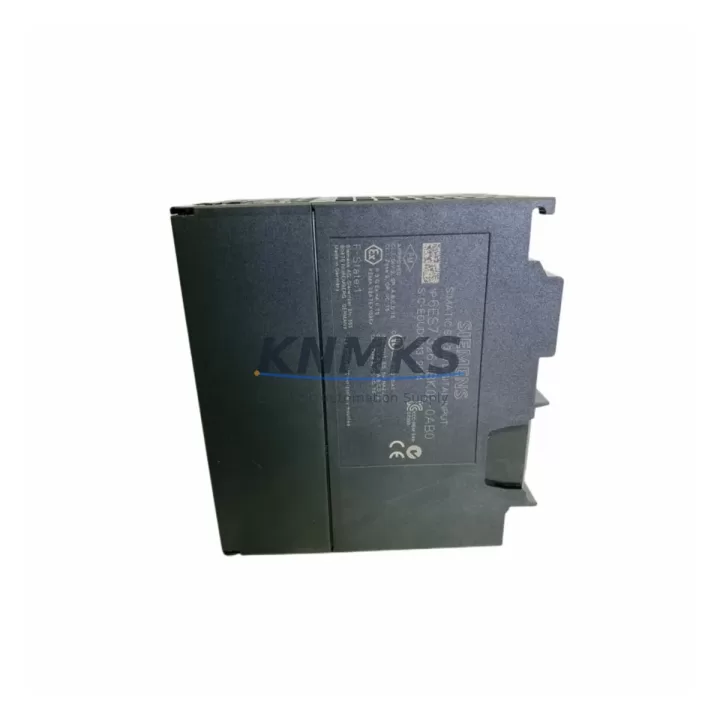
Siemens 6ES7326-1BK02-0AB0 Maintenance-Proven Spare Part for Factory Uptime
The Siemens 6ES7326-1BK02-0AB0 is an SM326 F-DI 24×24VDC Failsafe Digital Input Module designed for SIMATIC S7-300 safety-integrated systems. As a critical component in safety-rated control architectures, this module handles up to 24 failsafe digital input channels and is widely deployed in process automation, machine safety, and hazardous-area control panels across manufacturing, chemical, oil & gas, and automotive industries. Sourced as an original Siemens spare, every unit shipped by KNMKS undergoes pre-delivery functional verification and is backed by a support terms confirmed by quotation.
For maintenance engineers managing aging S7-300 installations, the 6ES7326-1BK02-0AB0 represents a direct, drop-in replacement that preserves existing safety program integrity without requiring hardware reconfiguration or safety validation rework. Procurement engineers benefit from confirmed long-term stock availability, competitive lead times, and documented traceability — reducing the risk of sourcing counterfeit or non-original components from unverified channels.
Spare Maintenance Table
| Parameter | Specification |
|---|---|
| Part Number | 6ES7326-1BK02-0AB0 |
| Series | SM326 / SIMATIC S7-300 |
| Module Type | Failsafe Digital Input (F-DI) |
| Input Channels | 24 × 24 VDC |
| Safety Category | SIL 3 / Cat. 4 / PL e |
| Input Voltage | 24 VDC (nominal) |
| Backplane Interface | S7-300 standard rail |
| Compatibility | SIMATIC S7-300, ET 200M (with IM 153-2) |
| Origin | Germany |
| Condition | Original, New or Tested Surplus |
| Pre-shipment Test | Functional verification included |
| Support terms | 12 Months |
| Maintenance Interval | Inspect every 12–24 months or per plant schedule |
| Operating Temperature | 0 °C to +60 °C |
| Mounting | DIN rail, S7-300 standard backplane |
Maintenance Planning for Continuous Operation
When replacing the 6ES7326-1BK02-0AB0 in a live S7-300 safety system, a structured inspection of the surrounding electrical environment is essential to prevent repeat failures and ensure the replacement module operates within its rated parameters from day one.
Begin with the 24 VDC power supply rail feeding the SM326 module. Voltage ripple or transient spikes beyond the module’s tolerance can cause nuisance trips or latent damage. Verify the output of the associated PS 307 or SITOP power supply (e.g., 6EP1334-2BA20) is stable and within specification before inserting the replacement module. A degraded power supply is a common root cause of repeated F-DI module failures that goes undetected during routine fault isolation.
Next, inspect the S7-300 backplane bus connector and the rail segment where the module seats. Oxidized or mechanically stressed bus connectors can cause intermittent communication faults that are misdiagnosed as module failures. If the system has been in service for more than five years, consider replacing the bus connectors as a preventive measure alongside the F-DI module.
Review the SM326 F-DO output module (such as the 6ES7326-2BF41-0AB0) paired in the same safety loop. Failsafe input and output modules operate as a coordinated pair in SIL-rated circuits; a degraded F-DO can generate diagnostic alarms that appear to originate from the input side. Confirm the F-DO module’s diagnostic buffer is clear before closing out the maintenance work order.
Check all field wiring and terminal blocks connected to the 24-channel input array. Loose terminations, corroded ferrules, or undersized conductors are frequent contributors to channel-level faults in high-density input modules. Use a calibrated loop tester to verify continuity and insulation resistance on each input circuit before re-energizing.
For systems using IM 153-2 interface modules in ET 200M distributed I/O configurations, confirm the PROFIBUS DP address and GSD file version are correctly configured in the hardware catalog. A mismatch between the configured and actual module order number will prevent the CPU from accepting the replacement module without a hardware configuration download.
Finally, review the CPU 315F or CPU 317F safety CPU diagnostic buffer for any pre-existing F-DI channel passivation events. Clearing passivation and performing a safety-integrated acknowledgment cycle is a mandatory step after any F-DI module replacement in a safety program — failure to complete this step will leave the associated safety function in a degraded state even after the hardware is correctly installed.
Site Replacement Workflow
Step 1 — Isolate and de-energize: Follow your plant’s lockout/tagout procedure. Remove the 24 VDC field supply to the SM326 module before extraction. Do not hot-swap failsafe modules without confirming the safety CPU has passivated the affected channels.
Step 2 — Document the existing configuration: Record the module slot position, bus connector orientation, and any parameter assignments in STEP 7 or TIA Portal before removal. Photograph the wiring layout on the front connector.
Step 3 — Extract and inspect: Remove the front connector (retain wiring intact), slide out the 6ES7326-1BK02-0AB0, and inspect the backplane bus connector for damage or contamination.
Step 4 — Insert the replacement module: Seat the new 6ES7326-1BK02-0AB0 on the rail, reconnect the bus connector, and reattach the front connector. Confirm the module order number matches the hardware configuration in your project.
Step 5 — Power-up and diagnostics: Re-energize the 24 VDC supply. Monitor the CPU diagnostic buffer and the module’s SF/DIAG LEDs. Perform the safety-integrated acknowledgment in STEP 7 or TIA Portal to release passivated channels.
Step 6 — Functional test: Activate each field input signal and verify correct channel response in the process image. Document the test results in your maintenance management system before returning the system to production.
This workflow minimizes downtime, preserves safety program integrity, and ensures the replacement module is fully validated before resuming automated production.
Spare Parts Support FAQ
Q1: Is the 6ES7326-1BK02-0AB0 still available as a new original part?
A: Yes. KNMKS maintains stock of original Siemens 6ES7326-1BK02-0AB0 modules sourced through verified supply channels. Each unit is individually tested prior to shipment. Contact admin@knmks.com for current availability and lead time confirmation.
Q2: What is covered under the support terms confirmed by quotation?
A: All units supplied by KNMKS carry a support terms confirmed by quotation covering manufacturing defects and functional failures under normal operating conditions. Support requests are supported with replacement or refund. Damage caused by incorrect installation, overvoltage, or unauthorized modification is excluded.
Q3: Can this module replace earlier SM326 F-DI variants in an existing S7-300 rack?
A: The 6ES7326-1BK02-0AB0 is the current production revision of the SM326 F-DI 24×24VDC. It is backward-compatible with earlier hardware revisions in the same slot position. A hardware configuration update in STEP 7 or TIA Portal may be required if the project was originally configured with an earlier order number. KNMKS technical support can advise on compatibility verification before purchase.
Q4: Do you support long-term supply agreements for MRO and annual maintenance contracts?
A: Yes. KNMKS supports blanket purchase orders and long-term supply agreements for maintenance, repair, and operations (MRO) programs. Reserved stock arrangements are available for customers with recurring annual demand. Contact +86 18359268345 or admin@knmks.com to discuss terms.
© 2026 KNMKS. All rights reserved.
Original Source: https://knmks.com
Contact: admin@knmks.com | +86 18359268345
Product Identification
- Brand / Ecosystem
-
Siemens
Siemens - Model / Series
-
6ES7326-1BK02-0AB0
SIMATIC Series - Product Family
- PLCs & Controllers
- Availability Status
- Available on request after model and quantity confirmation
- Inquiry Type
- B2B RFQ, replacement inquiry and project spare-part request
- Pre-Quote Check
- Exact SKU, brand, series, quantity, nameplate photos and destination country are checked before quotation
System Path
Where this product fits in the KNMKS automation structure.
Specification & Inquiry Focus
- Control platform
- PLC, PAC and modular controllers
- Common needs
- CPU, rack, power and I/O expansion
- Project support
- Replacement, cabinet build and maintenance
Buyer Confirmation
Information KNMKS checks before replying.
- Exact model
- 6ES7326-1BK02-0AB0
- Brand / ecosystem
- Siemens
- Product family
- PLCs & Controllers
- Application note
- Replacement, maintenance, project build or spare-part list
- Useful photos
- Nameplate, installed unit, cabinet layout or connector side
- Delivery details
- Quantity, destination country and target schedule
Document Support
Files and notes can be confirmed during quotation.
- Product photos or nameplate confirmation when available
- Packing and delivery notes before quotation confirmation
- Support scope and delivery terms confirmed per inquiry
- Export document coordination for qualified B2B requests
Inquiry Support
- Model cross-checking before quotation
- CPU, power, rack and expansion module matching
- Support for replacement and project inquiry
What to Send Us
- Brand and exact model number: Siemens 6ES7326-1BK02-0AB0
- Quantity and required delivery time
- Application, replacement requirement or nameplate photo
- Destination country and shipping preference
RFQ Preparation
This is a product inquiry page built for RFQ communication.
Fast Model Check
Send this model to KNMKS for confirmation.
Include quantity, destination country and photos if this is a maintenance replacement. The inquiry will be saved with a reference number after submission.
Brand & Compatibility Note
KNMKS displays automation product information for well-known industrial brand ecosystems and compatible replacement references. Brand names are used for product identification and compatibility reference only; final availability and commercial terms are confirmed per quotation.
 Manufacturing
 Machine Tools
 Packaging
 Energy & Power



 HMI & Displays
 Servo Systems
 Variable Frequency Drives
 Sensors