
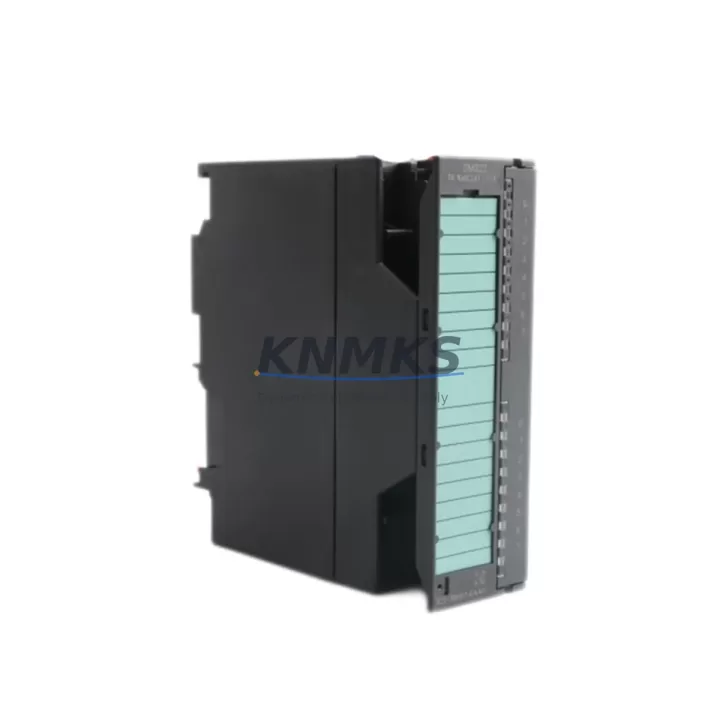
Overview
Siemens 6ES7322-1BH01-0AA0 Spare Part for SM322 Uptime
The Siemens 6ES7322-1BH01-0AA0 is an SM322 series digital output module designed for the SIMATIC S7-300 PLC platform. With 16 digital outputs rated at 24 VDC / 0.5 A per channel, this module is a critical field-replaceable unit in discrete control applications across manufacturing, process automation, and utilities. Sourced as an original spare, each unit is inspected and tested prior to shipment, backed by a support terms confirmed by quotation, and available for fast dispatch to minimize unplanned downtime.
Maintenance engineers and procurement teams managing S7-300 control cabinets rely on having a verified replacement for the 6ES7322-1BH01-0AA0 on the shelf. Output module failures — whether caused by load-side short circuits, surge events, or end-of-life degradation — can halt an entire production line. Stocking this module as a ready spare is a proven strategy for reducing mean time to repair (MTTR) and protecting factory uptime commitments.
Spare Maintenance Table
| Parameter | Specification |
|---|---|
| SKU / Part Number | 6ES7322-1BH01-0AA0 |
| Series | SIMATIC S7-300 — SM322 |
| Module Type | Digital Output (DO) |
| Number of Outputs | 16 × 24 VDC |
| Output Current | 0.5 A per channel |
| Total Current (per group) | 4 A |
| Supply Voltage | 24 VDC (L+) |
| Isolation | Optocoupler (galvanic isolation, group-based) |
| Backplane Interface | S7-300 standard rail / bus connector |
| Dimensions (W×H×D) | 40 × 125 × 120 mm |
| Operating Temperature | 0 °C to +60 °C |
| Mounting | DIN rail, S7-300 profile rail |
| Origin | Germany |
| Compatibility | SIMATIC S7-300 CPU 31x series, ET 200M |
| Support terms | 12 Months |
| Condition | Original, factory-tested before shipment |
Maintenance Planning for Continuous Operation
When replacing the 6ES7322-1BH01-0AA0 in a live S7-300 rack, a structured inspection of the surrounding electrical environment is essential to prevent repeat failures and confirm system integrity.
Begin with the 24 VDC load power supply feeding the output module’s L+ terminal. A degraded or undersized power supply — such as a Siemens SITOP PSU100S or equivalent — can cause intermittent output faults that mimic module failure. Verify output voltage under load and check for ripple or voltage drop before commissioning the replacement module.
Inspect the SM321 digital input module (e.g., 6ES7321-1BH02-0AA0) in the same rack. Input and output modules in the same control loop often experience correlated wear, particularly in high-cycle applications. A faulty input signal can mask the root cause of an output module trip.
Check the front connector and field wiring on the 40-pin front connector. Loose terminals, corroded contacts, or overloaded conductors are common causes of channel-level failures. Re-torque all terminals to specification and inspect for discoloration or heat damage.
Review the S7-300 CPU module (e.g., CPU 315-2 DP, 6ES7315-2AH14-0AB0) diagnostic buffer for any recorded hardware faults associated with the output module slot. The CPU logs module removal, insertion, and channel-level errors — this data is critical for root cause analysis before returning the system to production.
Evaluate the SM374 simulation module or analog output modules in adjacent slots if the control cabinet handles mixed signal types. Cross-contamination of 24 VDC and analog signal commons is a known source of output module damage in mixed-signal racks.
Finally, inspect the bus connector (6ES7390-0AA00-0AA0) between modules. A cracked or improperly seated bus connector causes intermittent communication errors that can be misdiagnosed as module failure. Replace any connector showing mechanical stress or discoloration.
Site Replacement Workflow
The 6ES7322-1BH01-0AA0 is a hot-swap-capable module on S7-300 racks equipped with active bus modules, but standard installations require a controlled power-down sequence. Follow these steps to minimize downtime and ensure a clean handover:
1. Document current configuration. Before removal, use STEP 7 or TIA Portal to export the hardware configuration and note the module’s slot address, I/O address range, and any configured diagnostics or process alarms.
2. De-energize the load circuit. Switch off the 24 VDC load supply to the output module. Do not rely solely on the CPU’s output disable command — physically isolate the load power to protect field devices and personnel.
3. Remove the front connector. The 40-pin front connector retains field wiring and can be transferred directly to the replacement module. Label all wires before removal if the connector is not keyed or if wiring documentation is incomplete.
4. Swap the module. Slide the 6ES7322-1BH01-0AA0 out of the rail slot and insert the replacement. The module address is slot-based in S7-300 — no re-parameterization is required if the replacement is the same order number.
5. Restore and verify. Re-energize the load supply, bring the CPU online, and force-test each output channel using the STEP 7 variable table or TIA Portal watch table. Confirm all field devices respond correctly before releasing the line to production.
This workflow supports a typical replacement time of under 30 minutes for a trained maintenance technician, making the 6ES7322-1BH01-0AA0 one of the most field-serviceable modules in the S7-300 family.
Spare Parts Support FAQ
Q: Is the 6ES7322-1BH01-0AA0 compatible with all S7-300 CPUs?
A: Yes. The SM322 digital output modules are compatible with all standard S7-300 CPUs (CPU 312 through CPU 319) and with ET 200M distributed I/O stations. Slot addressing is automatic based on rack position — no firmware matching is required.
Q: What testing is performed before shipment?
A: Each unit undergoes functional verification including power-on self-test, output channel actuation, and isolation check. Units that fail any test are quarantined and not shipped. A test report is available upon request for critical procurement.
Q: Can this module replace older SM322 variants such as the 6ES7322-1BH00-0AA0?
A: The -1BH01- revision is the current production version and is a direct functional replacement for the -1BH00- variant in most applications. Verify your hardware configuration file in STEP 7 or TIA Portal to confirm slot compatibility before installation.
Q: What is the long-term supply outlook for this part?
A: KNMKS maintains stock of the 6ES7322-1BH01-0AA0 to support legacy S7-300 installations. We offer long-term supply agreements for maintenance contracts and annual MRO procurement programs. Contact our team to discuss volume pricing and reserved stock arrangements.
© 2026 KNMKS. All rights reserved.
Original Source: https://knmks.com
Contact: admin@knmks.com | +86 18359268345
Product Identification
- Brand / Ecosystem
-
Siemens
Siemens - Model / Series
-
6ES7322-1BH01-0AA0
SIMATIC Series - Product Family
- PLCs & Controllers
- Availability Status
- Available on request after model and quantity confirmation
- Inquiry Type
- B2B RFQ, replacement inquiry and project spare-part request
- Pre-Quote Check
- Exact SKU, brand, series, quantity, nameplate photos and destination country are checked before quotation
System Path
Where this product fits in the KNMKS automation structure.
Specification & Inquiry Focus
- Control platform
- PLC, PAC and modular controllers
- Common needs
- CPU, rack, power and I/O expansion
- Project support
- Replacement, cabinet build and maintenance
Buyer Confirmation
Information KNMKS checks before replying.
- Exact model
- 6ES7322-1BH01-0AA0
- Brand / ecosystem
- Siemens
- Product family
- PLCs & Controllers
- Application note
- Replacement, maintenance, project build or spare-part list
- Useful photos
- Nameplate, installed unit, cabinet layout or connector side
- Delivery details
- Quantity, destination country and target schedule
Document Support
Files and notes can be confirmed during quotation.
- Product photos or nameplate confirmation when available
- Packing and delivery notes before quotation confirmation
- Support scope and delivery terms confirmed per inquiry
- Export document coordination for qualified B2B requests
Inquiry Support
- Model cross-checking before quotation
- CPU, power, rack and expansion module matching
- Support for replacement and project inquiry
What to Send Us
- Brand and exact model number: Siemens 6ES7322-1BH01-0AA0
- Quantity and required delivery time
- Application, replacement requirement or nameplate photo
- Destination country and shipping preference
RFQ Preparation
This is a product inquiry page built for RFQ communication.
Fast Model Check
Send this model to KNMKS for confirmation.
Include quantity, destination country and photos if this is a maintenance replacement. The inquiry will be saved with a reference number after submission.
Brand & Compatibility Note
KNMKS displays automation product information for well-known industrial brand ecosystems and compatible replacement references. Brand names are used for product identification and compatibility reference only; final availability and commercial terms are confirmed per quotation.
 Manufacturing
 Machine Tools
 Packaging
 Energy & Power



 HMI & Displays
 Servo Systems
 Variable Frequency Drives
 Sensors