
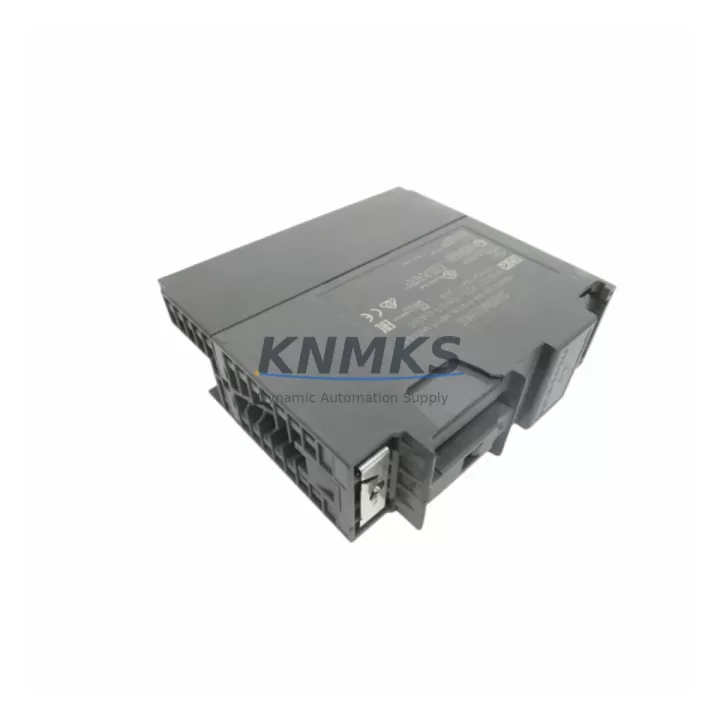
Overview
Siemens 6ES7321-7BH01-0AB0 Migration-Ready DI16 for Legacy S7-300 Control Systems
The Siemens 6ES7321-7BH01-0AB0 is a 16-channel digital input module from the SIMATIC S7-300 SM321 series, rated for DC 24V field signals. Designed for high-density I/O applications in legacy distributed control architectures, this module remains one of the most widely deployed input cards across process automation, machine tool control, and discrete manufacturing lines built on the S7-300 platform. As original production of this module has been discontinued by Siemens, sourcing a verified, tested replacement has become a critical priority for maintenance engineers managing aging control cabinets.
This listing supplies the 6ES7321-7BH01-0AB0 as a direct drop-in replacement for existing S7-300 racks. Each unit is pre-tested for channel integrity, input threshold response, and backplane communication before shipment. The module slots into any standard S7-300 mounting rail alongside companion modules such as the 6ES7322-1BH01-0AA0 digital output module and the 6ES7307-1EA01-0AA0 PS307 power supply, preserving the original rack layout without mechanical modification.
Migration Compatibility Table
| Parameter | 6ES7321-7BH01-0AB0 (This Unit) | Retrofit Notes |
|---|---|---|
| Module Type | SM321 Digital Input, 16-channel | Direct slot replacement in S7-300 rack |
| Input Voltage | DC 24V (IEC Type 1) | Verify field wiring voltage before swap |
| Backplane Interface | S7-300 P-bus / K-bus | Compatible with all S7-300 central racks and expansion racks (IM 360/361/365) |
| Terminal Wiring | 40-pin front connector (not included) | Retain original front connector; re-seat without rewiring |
| Module Address | Assigned by slot position | No address switch; address inherited from rack slot — no program change required |
| Firmware | Factory-loaded, no field update needed | Compatible with STEP 7 V5.x and TIA Portal (S7-300 mode) |
| Communication Protocol | S7-300 backplane bus (proprietary) | No protocol migration required for like-for-like swap |
| Installation Space | Standard S7-300 single-slot width (40mm) | Confirm cabinet rail clearance if adjacent modules are wide-body |
| Replacement Path | Direct: 6ES7321-7BH01-0AB0 → 6ES7321-7BH01-0AB0 | Cross-upgrade path to ET 200SP or S7-1500 requires I/O mapping and HMI screen revision |
| Support terms | 12 Months | Covers manufacturing defects; DOA replacement within 7 days |
Retrofit Planning for Existing Automation Systems
Replacing the 6ES7321-7BH01-0AB0 in an operational S7-300 system requires a structured pre-swap checklist to avoid unplanned downtime and configuration drift. Before removing the module, engineers should document the current slot assignment in the STEP 7 hardware configuration (HW Config) and confirm that the CPU — typically a 6ES7315-2AG10-0AB0 or similar S7-300 CPU — has the project backed up to a PG/PC or memory card.
Power supply capacity is the first verification point. The 6ES7307-1EA01-0AA0 PS307 5A power supply supports up to 5A on the 24VDC bus; adding or swapping input modules should not push total rack current beyond this limit. Calculate the aggregate current draw of all installed modules — including any 6ES7321-1BH02-0AA0 SM321 DI32 modules or 6ES7331-7KF02-0AB0 analog input modules in the same rack — before proceeding.
Terminal wiring on the 40-pin front connector should be photographed and labeled before disconnection. The connector body retains its wiring harness and can be transferred directly to the replacement module, eliminating rewiring risk. If the existing connector shows signs of corrosion or terminal fatigue, replacement with a new Siemens 6ES7392-1AM00-0AA0 front connector is recommended before re-energizing the rack.
For systems where the S7-300 communicates upstream via PROFIBUS DP — using a 6ES7315-2AG10-0AB0 CPU with integrated DP port or a 6GK7343-1EX30-0XE0 CP343-1 Ethernet module — no communication reconfiguration is needed for a like-for-like module swap. The digital input addresses remain fixed by slot position, and the PLC program logic requires no modification. However, if the retrofit is part of a broader migration toward PROFINET or an ET 200SP distributed I/O architecture, the HMI screens built on WinCC or a TP700 Comfort panel will require I/O tag remapping to reflect the new module addresses.
Installation space should be confirmed in the control cabinet before ordering. The 6ES7321-7BH01-0AB0 occupies a single 40mm slot on the S7-300 DIN rail. If adjacent slots are occupied by wide-body modules or cable ducts restrict access, plan the physical swap sequence accordingly to avoid disturbing neighboring modules during installation.
Downtime Control During System Migration
Minimizing production interruption during a module swap on a live S7-300 system depends on preparation quality. The recommended approach is to perform the swap during a scheduled maintenance window rather than under emergency conditions. Before the window opens, stage the replacement 6ES7321-7BH01-0AB0 on the bench, verify its channel response with a 24VDC test source, and confirm the front connector wiring map against the as-built drawings.
During the swap, the CPU should be placed in STOP mode via the mode selector switch or STEP 7 online interface. This protects the output states of companion modules — such as the 6ES7322-1BH01-0AA0 DO16 module controlling field actuators — from toggling during the I/O bus interruption caused by module removal. Once the replacement module is seated and the front connector re-attached, the CPU can be returned to RUN mode. The S7-300 performs an automatic module recognition cycle on startup; no manual address assignment or firmware download is required.
For systems where continuous control is mandatory, consider using a hot-standby CPU configuration or temporarily routing critical input signals through a spare channel on an adjacent 6ES7321-1BH02-0AA0 DI32 module while the primary slot is serviced. This approach maintains signal continuity for safety-critical interlocks without requiring a full system shutdown.
Post-swap commissioning should include a channel-by-channel input verification using the STEP 7 Variable Monitor or TIA Portal Watch Table, confirming that all 16 input channels respond correctly to field signals before returning the system to automatic operation. Document the swap date, module serial number, and test results in the maintenance log to support future lifecycle planning and support requests.
Retrofit Support FAQ
Q1: Is the 6ES7321-7BH01-0AB0 a direct replacement for other SM321 variants?
The 6ES7321-7BH01-0AB0 is a direct slot replacement for other 16-channel DC24V SM321 variants such as the 6ES7321-1BH02-0AA0 in most applications, provided the field wiring voltage and input type (IEC Type 1) are compatible. For 32-channel or AC input variants, a wiring adapter or program modification may be required. Confirm the channel count and input voltage rating before substituting across SM321 part numbers.
Q2: What commissioning steps are required after installation?
After seating the module and re-attaching the front connector, power the rack and place the CPU in RUN mode. Use STEP 7 HW Config or TIA Portal to perform an online comparison — the system should recognize the module automatically with no configuration download required for a like-for-like swap. Verify all 16 channels using the Variable Monitor by toggling field signals and confirming the corresponding input bits change state. No firmware update is needed.
Q3: How is the module tested before shipment?
Each 6ES7321-7BH01-0AB0 unit is tested for backplane communication integrity, individual channel input response at DC 24V, and LED indicator function prior to packaging. Units that fail any test parameter are quarantined and not shipped. A test report is available upon request for quality-critical applications.
Q4: What support terms and supply terms apply?
All units are covered by a support terms confirmed by quotation against manufacturing defects from the date of shipment. Dead-on-arrival (DOA) units are eligible for express replacement within 7 business days of confirmed fault report. Stock is maintained for immediate dispatch; lead time for in-stock units is typically 1–3 business days. Contact admin@knmks.com or +86 18359268345 for availability confirmation and volume pricing.
© 2026 KNMKS. All rights reserved.
Original Source: https://knmks.com
Contact: admin@knmks.com | +86 18359268345
Product Identification
- Brand / Ecosystem
-
Siemens
Siemens - Model / Series
-
6ES7321-7BH01-0AB0
SIMATIC Series - Product Family
- PLCs & Controllers
- Availability Status
- Available on request after model and quantity confirmation
- Inquiry Type
- B2B RFQ, replacement inquiry and project spare-part request
- Pre-Quote Check
- Exact SKU, brand, series, quantity, nameplate photos and destination country are checked before quotation
System Path
Where this product fits in the KNMKS automation structure.
Specification & Inquiry Focus
- Control platform
- PLC, PAC and modular controllers
- Common needs
- CPU, rack, power and I/O expansion
- Project support
- Replacement, cabinet build and maintenance
Buyer Confirmation
Information KNMKS checks before replying.
- Exact model
- 6ES7321-7BH01-0AB0
- Brand / ecosystem
- Siemens
- Product family
- PLCs & Controllers
- Application note
- Replacement, maintenance, project build or spare-part list
- Useful photos
- Nameplate, installed unit, cabinet layout or connector side
- Delivery details
- Quantity, destination country and target schedule
Document Support
Files and notes can be confirmed during quotation.
- Product photos or nameplate confirmation when available
- Packing and delivery notes before quotation confirmation
- Support scope and delivery terms confirmed per inquiry
- Export document coordination for qualified B2B requests
Inquiry Support
- Model cross-checking before quotation
- CPU, power, rack and expansion module matching
- Support for replacement and project inquiry
What to Send Us
- Brand and exact model number: Siemens 6ES7321-7BH01-0AB0
- Quantity and required delivery time
- Application, replacement requirement or nameplate photo
- Destination country and shipping preference
RFQ Preparation
This is a product inquiry page built for RFQ communication.
Fast Model Check
Send this model to KNMKS for confirmation.
Include quantity, destination country and photos if this is a maintenance replacement. The inquiry will be saved with a reference number after submission.
Brand & Compatibility Note
KNMKS displays automation product information for well-known industrial brand ecosystems and compatible replacement references. Brand names are used for product identification and compatibility reference only; final availability and commercial terms are confirmed per quotation.
 Manufacturing
 Machine Tools
 Packaging
 Energy & Power



 HMI & Displays
 Servo Systems
 Variable Frequency Drives
 Sensors