
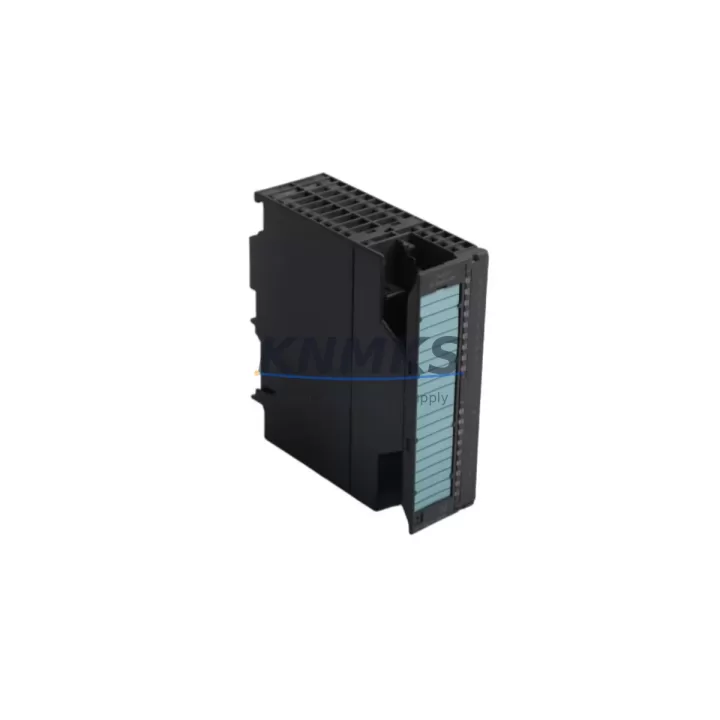
Overview
Siemens 6ES7321-1BH10-0AA0 Migration-Ready DI for S7-300: Legacy System Retrofit & Compatibility Upgrade
The Siemens 6ES7321-1BH10-0AA0 is a 16-channel, 24 VDC digital input module designed for the SIMATIC S7-300 programmable logic controller platform. As legacy S7-300 installations approach end-of-life and original Siemens production allocations tighten, plant engineers and maintenance teams increasingly rely on migration-ready replacement units to sustain production continuity without committing to a full control system overhaul. This module slots directly into the S7-300 rack, occupying a standard single-slot footprint, and communicates over the S7-300 backplane bus — making it a transparent drop-in for aging or failed original units.
Each unit supplied is sourced from verified industrial channels, subjected to pre-shipment functional testing under simulated field conditions, and backed by a support terms confirmed by quotation. Stock is maintained across multiple regional warehouses to support emergency dispatch requirements, minimizing unplanned downtime for critical process lines.
Migration Compatibility Table
| Parameter | 6ES7321-1BH10-0AA0 (This Unit) | Retrofit / Upgrade Notes |
|---|---|---|
| Input Channels | 16 × 24 VDC digital inputs | Direct replacement for same-channel-count S7-300 DI modules |
| Input Voltage Range | 24 VDC (15–30 V operating range) | Verify field wiring voltage; no rewiring required for standard 24 VDC loops |
| Backplane Interface | S7-300 backplane bus connector | Compatible with all standard S7-300 racks (e.g., UR1, UR2, ER1, ER2) |
| Slot Position | Slots 4–11 (standard I/O slots) | Retain original slot address in STEP 7 / TIA Portal hardware configuration |
| Terminal Wiring | 20-pin front connector (40-pin compatible) | Reuse existing front connector and field wiring harness without modification |
| Communication Protocol | S7-300 internal backplane (MPI/PROFIBUS via CPU) | No protocol migration required; CPU handles all upstream communication |
| STEP 7 / TIA Portal | Fully supported in STEP 7 v5.x and TIA Portal V13+ | No program changes required; hardware config re-download may be needed |
| Firmware | No field-upgradeable firmware | No firmware action required on replacement |
| Installation Space | Single slot, standard S7-300 module width | No cabinet modification required |
| Pre-Shipment Testing | Yes — functional I/O verification | Reduces on-site commissioning time |
| Support terms | 12 Months | Covers functional defects under normal operating conditions |
Retrofit Planning for Existing Automation Systems
Replacing the 6ES7321-1BH10-0AA0 in an operating S7-300 system requires a structured approach that accounts for the broader control cabinet architecture. Before removal, engineers should document the existing front connector wiring layout and confirm that the 24 VDC supply rail — typically sourced from a dedicated PS 307 power supply module or equivalent — delivers stable voltage within the 15–30 V operating window. Voltage deviations caused by aging power supply modules are a common but overlooked cause of intermittent input faults that are misdiagnosed as module failure.
In multi-rack configurations using IM 360/IM 361 interface modules for rack expansion, verify that the replacement DI module is assigned to the correct rack and slot address in the STEP 7 hardware configuration. Mismatched slot assignments will generate hardware fault OBs (OB 86) and prevent the CPU from entering RUN mode. If the installation uses a CPU 315-2 DP or CPU 317-2 DP with PROFIBUS DP field devices, confirm that the DP master configuration and GSD files remain unaffected by the module swap — the 6ES7321-1BH10-0AA0 itself does not participate in the DP network, but adjacent DP slave modules sharing the same rack may require a configuration re-download.
For systems where the S7-300 CPU communicates upstream via MPI to a SIMATIC HMI panel (such as a TP177 or MP277 operator panel), no HMI screen modifications are required for a like-for-like DI module replacement. However, if the retrofit is part of a broader migration from S7-300 to S7-1500, engineers should plan for I/O address remapping in TIA Portal and verify that any existing SCL or LAD program blocks referencing the original input byte addresses are updated accordingly. Signal isolators or marshalling terminals in the field junction box should also be inspected to confirm that input signal conditioning remains within the module’s specified threshold levels.
Where the control cabinet includes SM 321 or SM 322 mixed I/O expansions alongside this DI module, the replacement sequence should follow a slot-by-slot approach to avoid disrupting adjacent module addressing. Keeping a spare SM 321 DI 16×24VDC unit on-site as a hot standby is a recognized best practice for high-availability lines where unplanned module failure cannot be tolerated.
Downtime Control During System Migration
Minimizing production downtime during a DI module replacement on an active S7-300 system depends on preparation quality and the availability of a pre-tested replacement unit. The recommended procedure begins with a controlled CPU STOP, followed by removal of the front connector — which retains all field wiring — before extracting the module from the rack. Because the front connector is keyed and wiring-retentive, the replacement module can be inserted and the connector reattached without any rewiring, reducing physical swap time to under five minutes in most installations.
After reinsertion, the CPU should be returned to RUN mode and the diagnostic buffer (accessible via STEP 7 online functions or TIA Portal device diagnostics) reviewed to confirm that no new hardware faults are logged. If the system uses a CP 343-1 Ethernet communication processor for SCADA connectivity, verify that the SCADA system’s I/O tag mapping reflects the correct input byte addresses before resuming automated production sequences. For lines where a brief CPU STOP is not acceptable, consider scheduling the replacement during a planned maintenance window and pre-staging the replacement module with its front connector pre-wired and labeled to match the original installation.
Pre-shipment testing of each 6ES7321-1BH10-0AA0 unit ensures that the module is verified functional before it reaches the site, eliminating the risk of installing a defective replacement and extending the outage. Combined with the support terms confirmed by quotation coverage, this approach provides a defensible risk mitigation strategy for maintenance managers responsible for production continuity on legacy S7-300 lines.
Retrofit Support FAQ
Q: Is the 6ES7321-1BH10-0AA0 a direct drop-in replacement for the original Siemens module?
A: Yes. This unit uses the same backplane connector, slot footprint, and front connector interface as the original S7-300 SM 321 DI 16×24VDC module. No hardware configuration changes are required in STEP 7 or TIA Portal for a like-for-like replacement, though a hardware configuration re-download is recommended to clear any latched fault states in the CPU diagnostic buffer.
Q: Does the replacement module require any wiring changes at the terminal level?
A: No. The existing front connector and all field wiring can be transferred directly to the replacement module. Confirm that the front connector coding key is correctly positioned before reinsertion to prevent connector misalignment.
Q: How is compatibility with PROFIBUS DP and MPI networks verified?
A: The 6ES7321-1BH10-0AA0 communicates exclusively via the S7-300 backplane bus and does not participate directly in PROFIBUS DP or MPI network addressing. Compatibility is determined by the CPU and communication processors (e.g., CP 342-5 for PROFIBUS DP). No additional network configuration is required for this module replacement.
Q: What does the support terms confirmed by quotation cover, and is pre-shipment testing included?
A: Every unit undergoes functional pre-shipment testing covering input channel verification and backplane interface integrity. The support terms confirmed by quotation cover functional defects arising under normal operating conditions. Units are available from stock for immediate dispatch to support emergency replacement requirements.
© 2026 KNMKS. All rights reserved.
Original Source: https://knmks.com
Contact: admin@knmks.com | +86 18359268345
Product Identification
- Brand / Ecosystem
-
Siemens
Siemens - Model / Series
-
6ES7321-1BH10-0AA0
SIMATIC Series - Product Family
- PLCs & Controllers
- Availability Status
- Available on request after model and quantity confirmation
- Inquiry Type
- B2B RFQ, replacement inquiry and project spare-part request
- Pre-Quote Check
- Exact SKU, brand, series, quantity, nameplate photos and destination country are checked before quotation
System Path
Where this product fits in the KNMKS automation structure.
Specification & Inquiry Focus
- Control platform
- PLC, PAC and modular controllers
- Common needs
- CPU, rack, power and I/O expansion
- Project support
- Replacement, cabinet build and maintenance
Buyer Confirmation
Information KNMKS checks before replying.
- Exact model
- 6ES7321-1BH10-0AA0
- Brand / ecosystem
- Siemens
- Product family
- PLCs & Controllers
- Application note
- Replacement, maintenance, project build or spare-part list
- Useful photos
- Nameplate, installed unit, cabinet layout or connector side
- Delivery details
- Quantity, destination country and target schedule
Document Support
Files and notes can be confirmed during quotation.
- Product photos or nameplate confirmation when available
- Packing and delivery notes before quotation confirmation
- Support scope and delivery terms confirmed per inquiry
- Export document coordination for qualified B2B requests
Inquiry Support
- Model cross-checking before quotation
- CPU, power, rack and expansion module matching
- Support for replacement and project inquiry
What to Send Us
- Brand and exact model number: Siemens 6ES7321-1BH10-0AA0
- Quantity and required delivery time
- Application, replacement requirement or nameplate photo
- Destination country and shipping preference
RFQ Preparation
This is a product inquiry page built for RFQ communication.
Fast Model Check
Send this model to KNMKS for confirmation.
Include quantity, destination country and photos if this is a maintenance replacement. The inquiry will be saved with a reference number after submission.
Brand & Compatibility Note
KNMKS displays automation product information for well-known industrial brand ecosystems and compatible replacement references. Brand names are used for product identification and compatibility reference only; final availability and commercial terms are confirmed per quotation.
 Manufacturing
 Machine Tools
 Packaging
 Energy & Power



 HMI & Displays
 Servo Systems
 Variable Frequency Drives
 Sensors