
Overview
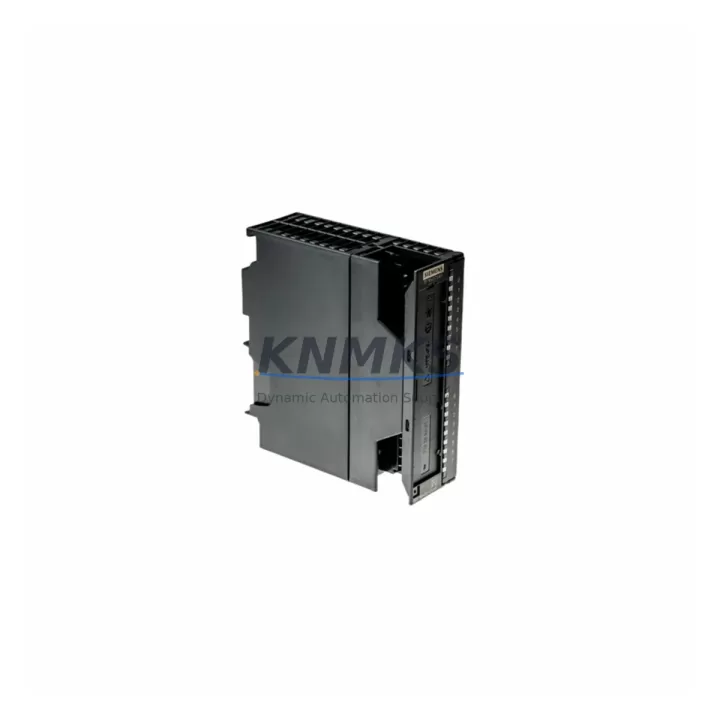
Siemens 6ES7321-1BH02-0AA0 Migration-Ready DI Module for Legacy Control Systems
The Siemens 6ES7321-1BH02-0AA0 is a 16-channel digital input module rated at DC 24V, designed for the SIMATIC S7-300 series. As legacy S7-300 installations approach end-of-support milestones, this module remains a critical component for facilities executing phased control system migrations, emergency spare replacements, and production line retrofits. Each unit supplied by KNMKS is pre-tested, carries a support terms confirmed by quotation, and is dispatched from multi-region stock to minimize lead times during unplanned outages or scheduled maintenance windows.
Engineering teams managing aging SIMATIC S7-300 racks frequently encounter obsolescence challenges when sourcing the 6ES7321-1BH02-0AA0. This module occupies a single slot on the S7-300 rail and interfaces directly with the CPU via the backplane bus — no additional bus connector adapter is required when replacing a like-for-like unit. Before installation, technicians should verify the existing SM 321 signal module slot assignment in STEP 7 or TIA Portal, confirm the 24VDC supply rail capacity on the power supply module (such as the 6ES7307-1EA01-0AA0 PS 307), and cross-check the terminal block wiring layout against the original I/O address mapping to avoid address conflicts during hot-swap or cold-restart commissioning.
For sites running mixed-generation racks that include both S7-300 CPUs (e.g., 6ES7315-2AG10-0AB0 CPU 315-2 DP) and legacy IM 360/361 interface modules for multi-rack expansion, the 6ES7321-1BH02-0AA0 integrates without firmware modification. The module’s 16 isolated input channels support standard IEC 61131-2 Type 1/3 sensors, making it compatible with existing field wiring from proximity switches, pushbuttons, and relay contacts without re-termination.
Migration Compatibility Table
| Parameter | Details |
|---|---|
| SKU / Part Number | 6ES7321-1BH02-0AA0 |
| Module Type | SM 321 Digital Input, 16 × DC 24V |
| Compatible Platform | SIMATIC S7-300 (all CPU variants) |
| Backplane Interface | S7-300 bus connector (included) |
| Input Voltage | DC 24V (IEC 61131-2 Type 1 / Type 3) |
| Channel Count | 16 digital inputs |
| Installation | Single-slot, DIN rail, S7-300 rack |
| Communication | S7-300 internal backplane bus (PROFIBUS-DP via CPU) |
| Replaces / Supersedes | 6ES7321-1BH01-0AA0 (earlier revision) |
| Programming Tool | STEP 7 V5.x / TIA Portal V13+ |
| Firmware Requirement | No module firmware update required |
| Commissioning Note | Verify I/O address in HW Config; re-download if slot changed |
| Support terms | 12 months from shipment date |
| Pre-Shipment Test | Yes — functional I/O verification performed |
| Origin | Germany |
Retrofit Planning for Existing Automation Systems
A successful retrofit of the 6ES7321-1BH02-0AA0 into an existing S7-300 installation requires a structured pre-migration checklist. Begin by auditing the rack layout: confirm available slot positions, verify that the 6ES7390-1AE80-0AA0 rail length accommodates the replacement module without displacing adjacent analog input modules (e.g., 6ES7331-7KF02-0AB0 SM 331 AI 8×13Bit) or output modules. Document the current terminal block wiring using the existing I/O list before disconnecting any field cables.
Power budget verification is essential. The 6ES7321-1BH02-0AA0 draws 60mA from the 5VDC backplane supply. If the rack is already near the power supply module’s rated output — particularly on older installations using the 6ES7307-1BA01-0AA0 PS 307 2A — adding or replacing modules may require upgrading to a higher-capacity supply. Confirm total current draw across all installed modules before finalizing the replacement plan.
For systems communicating over PROFIBUS-DP via a CP 342-5 communications processor or a DP-capable CPU, no changes to the network topology are required when replacing the DI module. However, if the site is migrating from S7-300 to S7-1500 as part of a broader platform upgrade, the 6ES7321-1BH02-0AA0 can serve as a bridge module during Phase 1 — maintaining existing field wiring and I/O logic while the new ET 200MP IM 155-5 DP ST distributed I/O infrastructure is commissioned in parallel. This phased approach eliminates the need for a full cutover shutdown and allows incremental validation of migrated program blocks.
Signal isolation requirements should also be reviewed. In environments with high electrical noise from variable frequency drives or large motor starters, inserting a signal isolator or surge protection terminal between field devices and the module inputs reduces the risk of spurious input signals corrupting the control logic. Coordinate with the HMI team to confirm that any WinCC or SIMATIC HMI panel screens referencing the affected I/O addresses are updated to reflect the new slot assignment if the module is relocated within the rack.
Downtime Control During System Migration
Minimizing production downtime during a DI module replacement on an active S7-300 system requires careful sequencing. Where the CPU supports partial online download (available on CPU 315-2 DP and higher), technicians can pre-configure the replacement module in HW Config and download only the hardware configuration delta — avoiding a full CPU stop-restart cycle. For CPUs that require a complete STOP/RUN transition, schedule the replacement during a planned maintenance window and prepare a backup of the current STEP 7 project, including all DB, FC, and FB blocks, before beginning.
Preserve the original program logic by exporting the S7 project archive (.s7p or .zap13) prior to any hardware changes. If the module slot address changes, update the symbolic address table and re-compile all affected OBs before downloading. Retain the original terminal block wiring diagram and verify each field signal with a multimeter before re-enabling the CPU. For sites with redundant control paths, consider keeping the legacy module energized on a secondary rack while the primary rack is serviced — this maintains field signal continuity and protects process control integrity during the transition.
Post-installation, perform a structured commissioning check: force each of the 16 input channels individually in STEP 7 Monitor mode, confirm signal state matches the physical field device, and log the results in the site commissioning record. This step is mandatory for facilities operating under IEC 61511 functional safety requirements or ISO 9001 quality management systems.
Retrofit Support FAQ
Q1: Is the 6ES7321-1BH02-0AA0 a direct drop-in replacement for the 6ES7321-1BH01-0AA0?
Yes. The -0AA0 revision suffix indicates a hardware revision update with full backward compatibility. Terminal pinout, slot dimensions, backplane connector, and I/O address behavior are identical. No changes to the STEP 7 hardware configuration are required when replacing -1BH01 with -1BH02.
Q2: Does the module require any firmware update before installation?
No. The 6ES7321-1BH02-0AA0 carries no user-updatable firmware. It is configured entirely through the STEP 7 or TIA Portal hardware configuration. Simply insert the module, download the HW Config if the slot assignment has changed, and perform a CPU restart.
Q3: What pre-shipment testing is performed on each unit?
Every 6ES7321-1BH02-0AA0 supplied by KNMKS undergoes functional I/O verification prior to dispatch — all 16 input channels are exercised under DC 24V test conditions to confirm correct signal detection and backplane communication. A test report is available on request. Each unit ships with a support terms confirmed by quotation from the date of shipment.
Q4: Can this module be used in an ET 200M distributed I/O station?
Yes. The 6ES7321-1BH02-0AA0 is compatible with the ET 200M distributed I/O system when used with an IM 153-x interface module. This configuration is commonly used in migration projects where the S7-300 CPU is being relocated to a central cabinet while field I/O remains distributed across the plant floor, reducing cable runs and simplifying the transition to a PROFIBUS-DP or PROFINET architecture.
© 2026 KNMKS. All rights reserved.
Original Source: https://knmks.com
Contact: admin@knmks.com | +86 18359268345
Product Identification
- Brand / Ecosystem
-
Siemens
Siemens - Model / Series
-
6ES7321-1BH02-0AA0
SIMATIC Series - Product Family
- PLCs & Controllers
- Availability Status
- Available on request after model and quantity confirmation
- Inquiry Type
- B2B RFQ, replacement inquiry and project spare-part request
- Pre-Quote Check
- Exact SKU, brand, series, quantity, nameplate photos and destination country are checked before quotation
System Path
Where this product fits in the KNMKS automation structure.
Specification & Inquiry Focus
- Control platform
- PLC, PAC and modular controllers
- Common needs
- CPU, rack, power and I/O expansion
- Project support
- Replacement, cabinet build and maintenance
Buyer Confirmation
Information KNMKS checks before replying.
- Exact model
- 6ES7321-1BH02-0AA0
- Brand / ecosystem
- Siemens
- Product family
- PLCs & Controllers
- Application note
- Replacement, maintenance, project build or spare-part list
- Useful photos
- Nameplate, installed unit, cabinet layout or connector side
- Delivery details
- Quantity, destination country and target schedule
Document Support
Files and notes can be confirmed during quotation.
- Product photos or nameplate confirmation when available
- Packing and delivery notes before quotation confirmation
- Support scope and delivery terms confirmed per inquiry
- Export document coordination for qualified B2B requests
Inquiry Support
- Model cross-checking before quotation
- CPU, power, rack and expansion module matching
- Support for replacement and project inquiry
What to Send Us
- Brand and exact model number: Siemens 6ES7321-1BH02-0AA0
- Quantity and required delivery time
- Application, replacement requirement or nameplate photo
- Destination country and shipping preference
RFQ Preparation
This is a product inquiry page built for RFQ communication.
Fast Model Check
Send this model to KNMKS for confirmation.
Include quantity, destination country and photos if this is a maintenance replacement. The inquiry will be saved with a reference number after submission.
Brand & Compatibility Note
KNMKS displays automation product information for well-known industrial brand ecosystems and compatible replacement references. Brand names are used for product identification and compatibility reference only; final availability and commercial terms are confirmed per quotation.
 Manufacturing
 Machine Tools
 Packaging
 Energy & Power



 HMI & Displays
 Servo Systems
 Variable Frequency Drives
 Sensors