
Overview
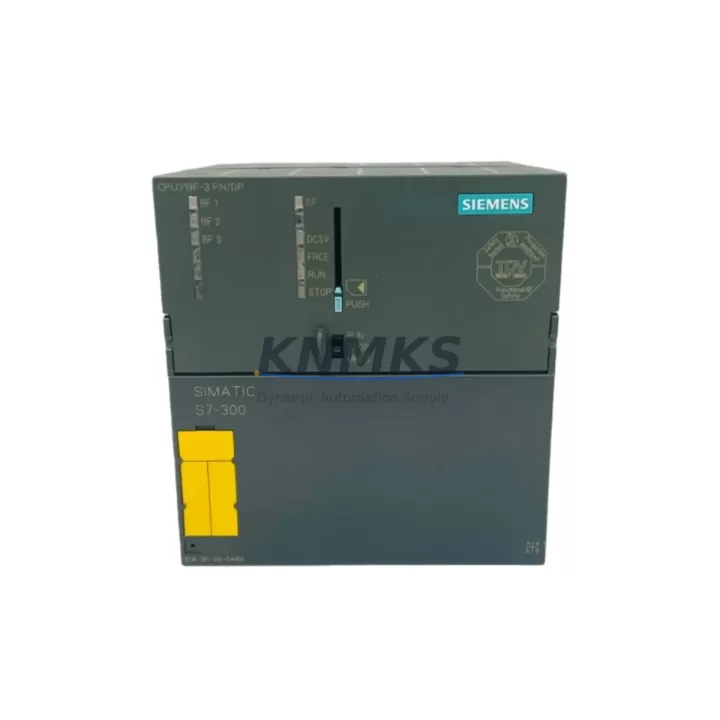
Siemens 6ES7318-3FL00-0AB0 Spare Part for Factory Uptime
The Siemens 6ES7318-3FL00-0AB0 is the CPU 318F-2 DP/PN — a high-performance, fail-safe central processing unit designed for the SIMATIC S7-300 modular PLC platform. As a maintenance-proven spare part, this CPU module supports continuous factory operation in safety-critical environments including energy generation, petrochemical processing, automotive manufacturing, and infrastructure control systems. With integrated MPI, PROFIBUS-DP, and PROFINET interfaces, the 6ES7318-3FL00-0AB0 delivers the communication flexibility required for modern distributed control architectures. Every unit supplied by KNMKS is sourced from verified channels, tested before dispatch, and covered by a support terms confirmed by quotation — ensuring your maintenance team can restore operations with confidence and minimal downtime.
Spare Maintenance Table
| SKU / Part Number | 6ES7318-3FL00-0AB0 |
| Product Series | SIMATIC S7-300 |
| Module Type | CPU 318F-2 DP/PN (Fail-Safe) |
| Brand / Manufacturer | Siemens |
| Origin | Germany (DE) |
| Communication Interfaces | MPI, PROFIBUS-DP (2×), PROFINET (1×) |
| Safety Function | PROFIsafe integrated (IEC 61508 SIL 3 / EN 954-1 Cat. 4) |
| Working Memory | 512 KB (expandable via MMC) |
| Supply Voltage | DC 24 V (via backplane bus from PS 307 or PS 305) |
| Operating Temperature | 0 °C to +60 °C |
| Mounting | DIN rail, S7-300 rack (UR1, UR2, ER1, ER2) |
| Compatible Racks | S7-300 standard and expansion racks; up to 32 modules per station |
| Programming Software | STEP 7 V5.x / TIA Portal (with legacy support) |
| Condition | Original, tested before dispatch |
| Support terms | 12 Months |
| Typical Application | Safety-critical process control, emergency shutdown systems (ESD), factory automation |
Maintenance Planning for Continuous Operation
When scheduling a replacement or inspection of the 6ES7318-3FL00-0AB0, maintenance engineers should treat this as a system-level event rather than a single-module swap. The CPU 318F-2 DP/PN sits at the heart of the S7-300 control station, and its replacement directly affects every connected I/O module, communication link, and safety circuit.
Begin by verifying the PS 307 power supply module (e.g., 6ES7307-1EA01-0AA0 or 6ES7307-1KA02-0AA0) — confirm output voltage is stable at DC 24 V and that the power supply can sustain the full rack load after the new CPU is installed. A degraded power supply is a common root cause of CPU faults that are misdiagnosed as CPU failures.
Inspect all SM 321/SM 322 digital I/O modules and SM 331/SM 332 analog I/O modules in the rack. After a CPU replacement, I/O module addressing and parameter assignments must be re-validated in STEP 7 or TIA Portal. Pay particular attention to any F-SM fail-safe I/O modules (such as the SM 326 F-DI or SM 336 F-AI) that participate in PROFIsafe safety functions — these require re-pairing with the new CPU’s F-address configuration.
Check the CP 343-1 or CP 343-1 Advanced PROFINET communication processor if your station uses a dedicated CP for Ethernet connectivity. Confirm that the MAC address and IP configuration are correctly assigned post-replacement. Similarly, review any IM 360/IM 361 interface modules used for rack expansion — these must be re-initialized if the CPU firmware version changes.
For stations using PROFIBUS-DP field devices (drives, remote I/O, valve terminals), verify that the DP master configuration in the CPU matches the physical network topology. Bus termination resistors, cable shielding, and baud rate settings should be confirmed before restarting the DP network. If the station includes a DP/PA coupler or DP/PA link for FOUNDATION Fieldbus or HART instruments, these segments must be re-commissioned after CPU replacement.
Do not overlook signal isolators and surge protection modules installed on analog input channels — these components are often overlooked during CPU replacement but can cause signal drift or measurement errors if damaged. Fuse holders and miniature circuit breakers (MCBs) protecting the 24 V DC supply rail should also be inspected and replaced if showing signs of thermal stress.
Finally, if the control cabinet includes an HMI panel (such as a SIMATIC TP700 or OP 177B) communicating via MPI or PROFINET, confirm that the HMI project’s PLC connection settings reference the correct CPU IP address or MPI station number after replacement. A brief HMI reconnection test should be part of the post-replacement commissioning checklist.
Site Replacement Workflow
Step 1 — Pre-Replacement Preparation: Back up the current CPU program using a SIMATIC Memory Card (MMC) or via STEP 7 / TIA Portal online backup. Document the current MPI address, PROFIBUS-DP master configuration, PROFINET device name, and IP address. Photograph the rack layout and wiring before removal.
Step 2 — Safe Isolation: Switch the CPU to STOP mode. Confirm all safety outputs are de-energized and that the ESD system has acknowledged the maintenance state. Isolate the 24 V DC supply to the rack via the PS 307 power supply switch. Do not remove the CPU while the rack is powered.
Step 3 — Module Removal: Release the CPU locking mechanism and slide the module out of slot 2 (standard CPU slot in S7-300 racks). Remove the MMC from the old CPU and retain it — the program and configuration data are stored on the MMC and will be transferred to the replacement unit.
Step 4 — Replacement Installation: Insert the MMC into the new 6ES7318-3FL00-0AB0. Slide the module into slot 2 and secure the locking mechanism. Reconnect the MPI/PROFIBUS-DP sub-D connectors and PROFINET RJ45 cables. Restore 24 V DC power via the PS 307.
Step 5 — Commissioning and Verification: Switch the CPU to RUN mode. Confirm the STOP/RUN LED transitions to steady green. Verify all I/O modules report no faults in the diagnostic buffer. Re-validate PROFIsafe F-address assignments for all fail-safe I/O modules. Perform a functional test of all safety circuits before returning the system to production.
Step 6 — Documentation: Update the maintenance log with the replacement date, new module serial number, firmware version, and technician name. Archive the updated STEP 7 / TIA Portal project with the new CPU configuration.
Spare Parts Support FAQ
Q1: Is the 6ES7318-3FL00-0AB0 still available as a new original spare part?
The Siemens S7-300 series has reached end-of-sale status, but original spare parts including the 6ES7318-3FL00-0AB0 remain available through authorized industrial spare parts suppliers. KNMKS maintains stock of this module to support legacy system maintenance and life extension programs. All units are sourced from verified supply channels and are not refurbished or remanufactured.
Q2: How do I verify compatibility before installation?
Confirm that your existing S7-300 rack (UR1, UR2, ER1, or ER2) and power supply (PS 307 or PS 305) are compatible with the CPU 318F-2 DP/PN. Check the STEP 7 hardware configuration to ensure the CPU order number matches 6ES7318-3FL00-0AB0. If your station uses PROFIsafe F-I/O modules, verify that the F-address range and safety program are compatible with the replacement CPU’s firmware version.
Q3: What testing is performed before dispatch?
Every 6ES7318-3FL00-0AB0 unit supplied by KNMKS undergoes functional testing prior to dispatch. This includes power-on verification, communication interface checks (MPI, PROFIBUS-DP, PROFINET), and diagnostic buffer review. Units are shipped in anti-static packaging with inspection documentation. A support terms confirmed by quotation is provided from the date of dispatch.
Q4: Can KNMKS support long-term supply commitments for this module?
Yes. KNMKS supports procurement engineers with long-term supply agreements for critical spare parts including the 6ES7318-3FL00-0AB0. We recommend maintaining at least one cold-standby unit in your spare parts inventory for S7-300 CPU modules, given the extended lead times associated with end-of-sale Siemens products. Contact our team to discuss annual supply contracts, consignment stock arrangements, or multi-site procurement programs.
© 2026 KNMKS. All rights reserved.
Original Source: https://knmks.com
Contact: admin@knmks.com | +86 18359268345
Product Identification
- Brand / Ecosystem
-
Siemens
Siemens - Model / Series
-
6ES7318-3FL00-0AB0
SIMATIC Series - Product Family
- PLCs & Controllers
- Availability Status
- Available on request after model and quantity confirmation
- Inquiry Type
- B2B RFQ, replacement inquiry and project spare-part request
- Pre-Quote Check
- Exact SKU, brand, series, quantity, nameplate photos and destination country are checked before quotation
System Path
Where this product fits in the KNMKS automation structure.
Specification & Inquiry Focus
- Control platform
- PLC, PAC and modular controllers
- Common needs
- CPU, rack, power and I/O expansion
- Project support
- Replacement, cabinet build and maintenance
Buyer Confirmation
Information KNMKS checks before replying.
- Exact model
- 6ES7318-3FL00-0AB0
- Brand / ecosystem
- Siemens
- Product family
- PLCs & Controllers
- Application note
- Replacement, maintenance, project build or spare-part list
- Useful photos
- Nameplate, installed unit, cabinet layout or connector side
- Delivery details
- Quantity, destination country and target schedule
Document Support
Files and notes can be confirmed during quotation.
- Product photos or nameplate confirmation when available
- Packing and delivery notes before quotation confirmation
- Support scope and delivery terms confirmed per inquiry
- Export document coordination for qualified B2B requests
Inquiry Support
- Model cross-checking before quotation
- CPU, power, rack and expansion module matching
- Support for replacement and project inquiry
What to Send Us
- Brand and exact model number: Siemens 6ES7318-3FL00-0AB0
- Quantity and required delivery time
- Application, replacement requirement or nameplate photo
- Destination country and shipping preference
RFQ Preparation
This is a product inquiry page built for RFQ communication.
Fast Model Check
Send this model to KNMKS for confirmation.
Include quantity, destination country and photos if this is a maintenance replacement. The inquiry will be saved with a reference number after submission.
Brand & Compatibility Note
KNMKS displays automation product information for well-known industrial brand ecosystems and compatible replacement references. Brand names are used for product identification and compatibility reference only; final availability and commercial terms are confirmed per quotation.
 Manufacturing
 Machine Tools
 Packaging
 Energy & Power



 HMI & Displays
 Servo Systems
 Variable Frequency Drives
 Sensors