
Overview
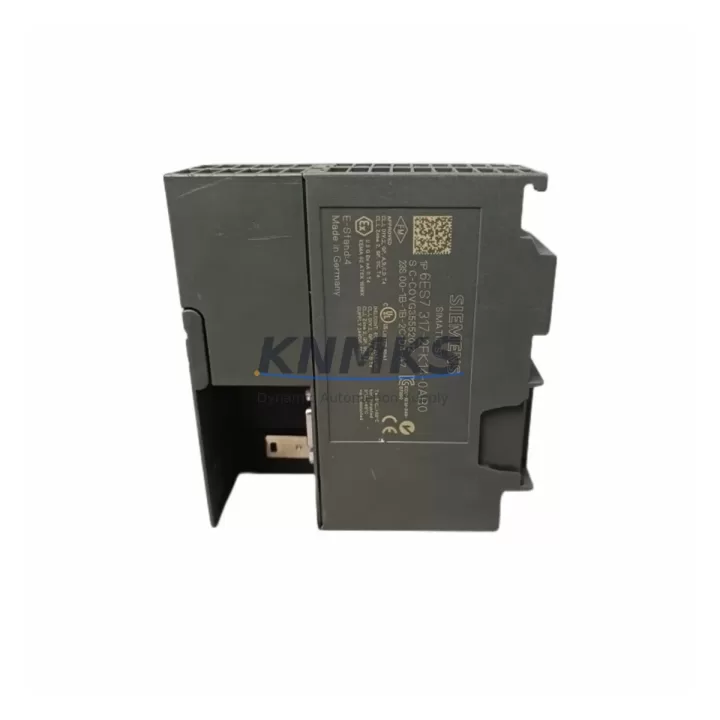
SIEMENS 6ES7317-2FK14-0AB0 Maintenance-Proven Spare Part for Factory Uptime
The SIEMENS 6ES7317-2FK14-0AB0 is a fail-safe CPU module from the SIMATIC S7-300 series, designed for safety-critical automation environments where unplanned downtime carries significant operational and safety risk. As a CPU 317F-2 DP/PN variant, it integrates PROFIBUS DP and PROFINET IO interfaces in a single unit, making it a central controller for distributed I/O architectures across process plants, manufacturing lines, and utility infrastructure. Maintenance engineers managing aging S7-300 control cabinets rely on this module as a primary replacement target during both scheduled overhauls and emergency fault recovery scenarios.
Sourcing a verified original 6ES7317-2FK14-0AB0 is the first step in any structured spare parts strategy for S7-300-based systems. This module is pre-shipment tested, firmware-verified, and dispatched with a support terms confirmed by quotation, ensuring that replacement units arrive ready for immediate commissioning without the risk of introducing secondary faults into a live control system. Whether you are managing a single-line PLC cabinet or a multi-zone safety-instrumented system, having this CPU on the shelf eliminates the most critical single point of failure in your S7-300 architecture.
Spare Maintenance Table
| Part Number | 6ES7317-2FK14-0AB0 |
| Brand | SIEMENS |
| Series | SIMATIC S7-300 |
| Module Type | Fail-Safe CPU (CPU 317F-2 DP/PN) |
| Communication Interfaces | PROFIBUS DP (Master/Slave) + PROFINET IO (Controller) |
| Working Memory | 1 MB (expandable via MMC) |
| Safety Integrity Level | SIL 3 (IEC 61508), Category 4 (EN 954-1) |
| Supply Voltage | 24 V DC (via PS 307 or equivalent power supply module) |
| Operating Temperature | 0 °C to +60 °C |
| Mounting | DIN rail, S7-300 standard rack (UR1/UR2) |
| Firmware Compatibility | STEP 7 V5.x / TIA Portal (via legacy migration) |
| Origin | Germany |
| Condition | Original, Pre-Shipment Tested |
| Support terms | 12 Months |
| Dispatch | Global, delivery details confirmed by RFQ Available |
Maintenance Planning for Continuous Operation
When replacing the 6ES7317-2FK14-0AB0 in a live S7-300 cabinet, a disciplined maintenance checklist prevents secondary failures and reduces total downtime. The CPU module does not operate in isolation — it depends on a chain of upstream and downstream components that must be inspected and verified before and after the swap.
Begin with the PS 307 power supply module (or equivalent 24 V DC rail supply). A degraded power supply is one of the most common root causes of CPU faults in S7-300 systems; verify output voltage stability under load before inserting the replacement CPU. Next, inspect the IM 360/361 interface modules if the system uses expansion racks — a faulty interface module can cause the new CPU to report rack communication errors immediately after startup, masking the actual fault source.
For distributed I/O connected via PROFIBUS DP, check the ET 200M or ET 200S remote I/O stations and their associated SM 321/SM 322 digital I/O modules. Bus termination resistors and cable shielding on the PROFIBUS segment should be verified, as impedance mismatches frequently cause intermittent communication faults that are misdiagnosed as CPU failures. On the PROFINET side, inspect the managed switch or SCALANCE X device connecting the CPU to the IO controller network — firmware mismatches or port configuration errors can prevent the new CPU from establishing IO connections.
Safety-circuit integrity is critical for the 317F-2 variant. Inspect the F-SM fail-safe signal modules (such as SM 326 F DI or SM 336 F AI) connected to the safety program. Verify that the F-address assignments and safety parameters stored on the MMC (Micro Memory Card) are current and match the installed F-SM configuration. The MMC itself should be treated as a consumable spare — keep a programmed backup card in your spare parts kit alongside the CPU module.
Finally, review the CP 343-1 or CP 343-5 communication processors if the cabinet includes dedicated Ethernet or PROFIBUS CP modules for SCADA or historian connectivity. These modules retain independent configuration and may require re-parameterization after a CPU replacement, particularly if the CPU’s MPI address or PROFIBUS node address has changed.
Site Replacement Workflow
A structured on-site replacement of the 6ES7317-2FK14-0AB0 minimizes downtime and eliminates the risk of configuration loss. Follow this sequence for a controlled swap:
Step 1 — Backup: Before powering down, use STEP 7 or TIA Portal to upload the current program from the CPU to the programming device. Also create a physical backup of the MMC contents. If the CPU is non-responsive, the MMC may still contain a valid program image that can be transferred directly to the replacement unit.
Step 2 — Power isolation: Switch the PS 307 power supply to OFF. Verify 0 V on the CPU backplane connector using a calibrated multimeter before proceeding. Do not rely solely on the CPU status LED — a failed CPU may not accurately reflect backplane power state.
Step 3 — Module extraction: Release the CPU from the DIN rail mounting and disconnect the MPI/DP interface cable. Note the slot position (Slot 2 is standard for S7-300 CPUs) and the rack address configuration.
Step 4 — MMC transfer: Remove the MMC from the failed CPU and inspect it for physical damage. If the card is intact, insert it into the replacement 6ES7317-2FK14-0AB0. The CPU will boot from the MMC program on first power-up, eliminating the need for a full download in most cases.
Step 5 — Commissioning: Power up the PS 307 and observe the CPU startup sequence. Confirm RUN/STOP LED behavior, check PROFIBUS and PROFINET link indicators, and verify that all F-SM modules report safe state before releasing the system to production. Document the replacement date, firmware version, and MMC serial number in the cabinet maintenance log.
Spare Parts Support FAQ
Q: Is the 6ES7317-2FK14-0AB0 still available as a new original part?
A: Yes. We maintain stock of original SIEMENS 6ES7317-2FK14-0AB0 units sourced through authorized industrial supply channels. Each unit is pre-shipment tested and ships with a support terms confirmed by quotation. Long-term supply continuity is supported for customers with annual maintenance contracts or blanket purchase orders.
Q: Can this CPU replace an older 6ES7317-2FK13-0AB0 or 6ES7317-2EK14-0AB0 without reprogramming?
A: The 6ES7317-2FK14-0AB0 is hardware-compatible with the S7-300 rack and shares the same slot footprint as earlier 317F variants. However, firmware version differences may require a STEP 7 project update to match the new CPU’s object version. We recommend verifying compatibility in your STEP 7 HW Config before site installation. Our technical team can assist with compatibility confirmation prior to dispatch.
Q: What pre-shipment testing is performed on each unit?
A: Every 6ES7317-2FK14-0AB0 undergoes power-on functional verification, communication interface testing (PROFIBUS DP and PROFINET IO), and firmware version confirmation before dispatch. Units that fail any test parameter are quarantined and not shipped. A test report is available upon request for quality-critical procurement processes.
Q: How should I manage inventory for this CPU in a multi-line S7-300 facility?
A: For facilities operating three or more S7-300 lines using the 317F-2 CPU, we recommend maintaining a minimum of one cold-standby unit per five CPUs in service, with a programmed MMC backup for each line. Annual inventory review aligned with your planned maintenance schedule ensures that replacement units are available before failure events occur, rather than after. We support consignment stock arrangements for high-volume maintenance programs.
© 2026 KNMKS. All rights reserved.
Original Source: https://knmks.com
Contact: admin@knmks.com | +86 18359268345
Product Identification
- Brand / Ecosystem
-
SIEMENS
Siemens - Model / Series
-
6ES7317-2FK14-0AB0
SIMATIC Series - Product Family
- PLCs & Controllers
- Availability Status
- Available on request after model and quantity confirmation
- Inquiry Type
- B2B RFQ, replacement inquiry and project spare-part request
- Pre-Quote Check
- Exact SKU, brand, series, quantity, nameplate photos and destination country are checked before quotation
System Path
Where this product fits in the KNMKS automation structure.
Specification & Inquiry Focus
- Control platform
- PLC, PAC and modular controllers
- Common needs
- CPU, rack, power and I/O expansion
- Project support
- Replacement, cabinet build and maintenance
Buyer Confirmation
Information KNMKS checks before replying.
- Exact model
- 6ES7317-2FK14-0AB0
- Brand / ecosystem
- SIEMENS
- Product family
- PLCs & Controllers
- Application note
- Replacement, maintenance, project build or spare-part list
- Useful photos
- Nameplate, installed unit, cabinet layout or connector side
- Delivery details
- Quantity, destination country and target schedule
Document Support
Files and notes can be confirmed during quotation.
- Product photos or nameplate confirmation when available
- Packing and delivery notes before quotation confirmation
- Support scope and delivery terms confirmed per inquiry
- Export document coordination for qualified B2B requests
Inquiry Support
- Model cross-checking before quotation
- CPU, power, rack and expansion module matching
- Support for replacement and project inquiry
What to Send Us
- Brand and exact model number: SIEMENS 6ES7317-2FK14-0AB0
- Quantity and required delivery time
- Application, replacement requirement or nameplate photo
- Destination country and shipping preference
RFQ Preparation
This is a product inquiry page built for RFQ communication.
Fast Model Check
Send this model to KNMKS for confirmation.
Include quantity, destination country and photos if this is a maintenance replacement. The inquiry will be saved with a reference number after submission.
Brand & Compatibility Note
KNMKS displays automation product information for well-known industrial brand ecosystems and compatible replacement references. Brand names are used for product identification and compatibility reference only; final availability and commercial terms are confirmed per quotation.
 Manufacturing
 Machine Tools
 Packaging
 Energy & Power



 HMI & Displays
 Servo Systems
 Variable Frequency Drives
 Sensors