
Overview
Siemens 6ES7315-2FJ14-0AB0 Maintenance-Proven Spare Part for Factory Uptime
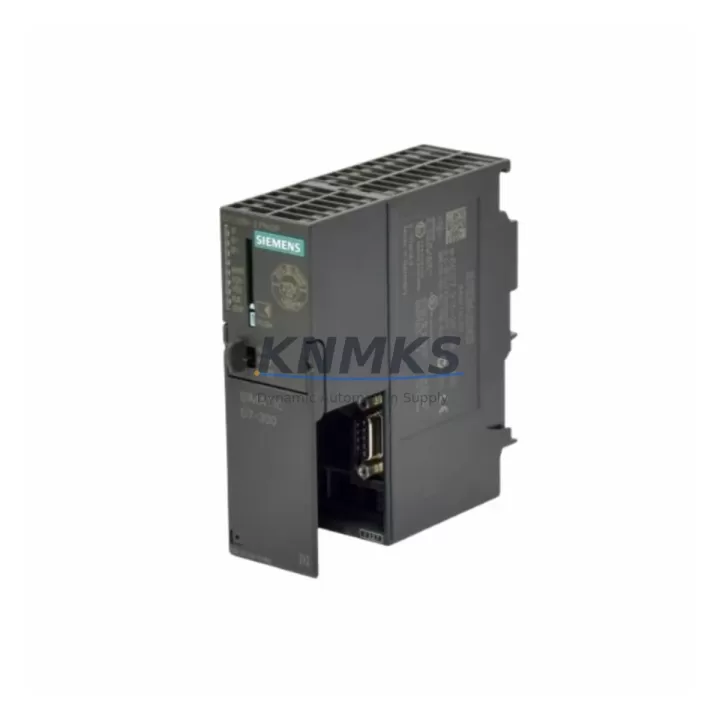
The Siemens 6ES7315-2FJ14-0AB0 is a CPU315F-2 PN/DP Fail-Safe central processing unit designed for the SIMATIC S7-300 programmable logic controller platform. As a safety-rated CPU with integrated PROFINET and PROFIBUS-DP interfaces, this module serves as the control core in safety-instrumented systems across automotive assembly, chemical processing, power generation, and discrete manufacturing environments. Maintaining a verified spare of the 6ES7315-2FJ14-0AB0 in your site inventory is a fundamental risk-reduction measure — CPU failures in safety-critical lines can trigger full production shutdowns, and sourcing a replacement under emergency conditions introduces lead-time risk, configuration mismatch, and extended MTTR.
This listing supplies an original Siemens 6ES7315-2FJ14-0AB0 unit, pre-shipment tested, firmware-verified, and backed by a support terms confirmed by quotation. Each unit is inspected for physical integrity, communication port function, and firmware revision compatibility before dispatch. Long-term supply commitment is available for customers managing multi-year maintenance contracts or phased system upgrades.
Spare Maintenance Table
| Parameter | Specification |
|---|---|
| Part Number | 6ES7315-2FJ14-0AB0 |
| Description | CPU315F-2 PN/DP, Fail-Safe CPU for SIMATIC S7-300 |
| Series | SIMATIC S7-300 |
| Communication Interfaces | PROFINET (PN), PROFIBUS-DP (DP), MPI |
| Safety Rating | IEC 61508 SIL 3 / EN 954-1 Cat. 4 / IEC 62061 SIL CL 3 |
| Work Memory | 512 KB (program + data) |
| Load Memory | 8 MB (integrated Flash) |
| Supply Voltage | DC 24 V (via backplane bus from PS 307 or equivalent) |
| Operating Temperature | 0 °C to +60 °C |
| Mounting | DIN rail, S7-300 rack (UR1, UR2, UR2-H, CR2, CR3) |
| Dimensions (W×H×D) | 80 × 125 × 130 mm |
| Weight | Approx. 500 g |
| Origin | Germany |
| Compatibility | SIMATIC S7-300 racks; replaces 6ES7315-2FH14-0AB0, 6ES7315-2FG10-0AB0 |
| Firmware | Verified prior to shipment |
| Support terms | 12 Months from date of shipment |
| Condition | Original, pre-shipment tested |
Maintenance Planning for Continuous Operation
When replacing or inspecting the 6ES7315-2FJ14-0AB0 in a SIMATIC S7-300 control cabinet, a structured approach to adjacent components significantly reduces the risk of repeat failures and unplanned downtime. Maintenance engineers should treat a CPU replacement as a cabinet-level inspection event, not an isolated swap.
Begin with the power supply module — the Siemens PS 307 (6ES7307 series) is the standard 24 VDC supply for S7-300 racks. Verify output voltage stability under load before reinstalling the CPU. A degraded power supply is a common root cause of intermittent CPU faults and memory errors. If the PS 307 shows ripple or voltage sag, replace it concurrently to avoid a second shutdown event.
Inspect the PROFIBUS-DP communication cable and connectors (typically 6XV1830 series shielded cable with 9-pin Sub-D connectors). Damaged shielding or loose termination resistors on the DP network can cause the CPU to log communication faults immediately after restart. Verify bus termination at both ends of the segment.
For systems using PROFINET, check the Industrial Ethernet switch or managed switch (such as Siemens SCALANCE X series) connected to the CPU’s PN port. Port configuration, VLAN settings, and cable integrity should be confirmed before the new CPU is brought online.
Review the SM 321 / SM 322 digital I/O modules installed in the same rack. Slot addressing and module parameters are stored in the CPU project; after a CPU swap, verify that the hardware configuration in STEP 7 or TIA Portal matches the physical rack layout exactly. Any mismatch will prevent the CPU from entering RUN mode.
For fail-safe applications, inspect the F-SM (Fail-Safe Signal Modules) — such as the SM 326 F-DI or SM 336 F-AI — and confirm that F-address assignments and safety program CRC values are consistent with the replacement CPU’s safety program download. A mismatch in F-parameters will trigger a safety shutdown.
Finally, check the SIMATIC Micro Memory Card (MMC) — the 6ES7315-2FJ14-0AB0 requires an MMC for program storage. Confirm the card is seated correctly, is not write-protected, and contains the correct firmware and project backup. Keeping a pre-programmed spare MMC in your maintenance kit eliminates one variable during emergency recovery.
Site Replacement Workflow
Step 1 — Pre-replacement preparation: Back up the current CPU project from STEP 7 or TIA Portal to a secure engineering workstation. Export the hardware configuration, safety program, and F-parameters. Confirm the replacement 6ES7315-2FJ14-0AB0 firmware revision matches or is compatible with the existing project. If upgrading firmware, review the Siemens compatibility matrix for the specific safety program version.
Step 2 — Safe isolation: Follow site LOTO (Lockout/Tagout) procedures. Place the CPU in STOP mode via the mode selector switch before powering down the rack. For fail-safe systems, confirm that all F-peripherals have acknowledged the safe state before proceeding.
Step 3 — Physical swap: Remove the MMC from the existing CPU before extraction. Install the replacement 6ES7315-2FJ14-0AB0 into the same rack slot. Insert the MMC (or a pre-programmed spare MMC) into the new CPU. Reconnect MPI, PROFIBUS-DP, and PROFINET cables in the correct port positions.
Step 4 — Commissioning and verification: Power up the rack and observe the CPU’s LED status sequence. Download the project if required. Perform a safety program acceptance test per IEC 62061 / IEC 61511 site procedures. Confirm all F-SM modules report safe state correctly and that the CPU enters RUN-P mode without fault.
Step 5 — Documentation: Record the replacement date, firmware version, MMC serial number, and technician ID in the site maintenance log. Update the spare parts inventory to reflect the consumed unit and initiate a reorder to restore buffer stock.
This workflow is compatible with legacy S7-300 racks and supports a direct drop-in replacement for earlier CPU315F-2 variants (6ES7315-2FH14-0AB0, 6ES7315-2FG10-0AB0), minimizing engineering rework and reducing total downtime to under two hours in most site configurations.
Spare Parts Support FAQ
Q1: What is the support terms coverage for the 6ES7315-2FJ14-0AB0?
Each unit is covered by a support terms confirmed by quotation from the date of shipment. The support terms covers manufacturing defects and functional failures under normal operating conditions. Units are pre-shipment tested for communication interface function, firmware integrity, and physical condition before dispatch. Support requests are processed with priority to minimize site downtime.
Q2: How do I verify compatibility before installation?
Confirm that your existing rack is an S7-300 UR1, UR2, UR2-H, CR2, or CR3 type. Check the STEP 7 or TIA Portal hardware configuration for the CPU slot assignment and ensure the project was compiled for a CPU315F-2 PN/DP variant. Verify the SIMATIC MMC capacity matches the project size. If your existing project was created for an earlier CPU315F-2 firmware, a firmware compatibility check against the Siemens product lifecycle matrix is recommended before installation.
Q3: Can you support long-term or multi-unit procurement for maintenance contracts?
Yes. Long-term supply agreements are available for customers managing multi-year maintenance schedules or operating multiple S7-300 installations. Volume pricing, reserved stock allocation, and scheduled delivery programs can be arranged. Contact the sales team to discuss annual blanket orders or consignment stock options tailored to your site’s MTTR targets.
Q4: What pre-shipment testing is performed on each unit?
Each 6ES7315-2FJ14-0AB0 undergoes functional power-on testing, PROFINET and PROFIBUS-DP port verification, MMC slot function check, and firmware revision confirmation. Units that do not pass all test criteria are quarantined and not dispatched. A test record is available upon request for quality documentation purposes.
© 2026 KNMKS. All rights reserved.
Original Source: https://knmks.com
Contact: admin@knmks.com | +86 18359268345
Product Identification
- Brand / Ecosystem
-
Siemens
Siemens - Model / Series
-
6ES7315-2FJ14-0AB0
SIMATIC Series - Product Family
- PLCs & Controllers
- Availability Status
- Available on request after model and quantity confirmation
- Inquiry Type
- B2B RFQ, replacement inquiry and project spare-part request
- Pre-Quote Check
- Exact SKU, brand, series, quantity, nameplate photos and destination country are checked before quotation
System Path
Where this product fits in the KNMKS automation structure.
Specification & Inquiry Focus
- Control platform
- PLC, PAC and modular controllers
- Common needs
- CPU, rack, power and I/O expansion
- Project support
- Replacement, cabinet build and maintenance
Buyer Confirmation
Information KNMKS checks before replying.
- Exact model
- 6ES7315-2FJ14-0AB0
- Brand / ecosystem
- Siemens
- Product family
- PLCs & Controllers
- Application note
- Replacement, maintenance, project build or spare-part list
- Useful photos
- Nameplate, installed unit, cabinet layout or connector side
- Delivery details
- Quantity, destination country and target schedule
Document Support
Files and notes can be confirmed during quotation.
- Product photos or nameplate confirmation when available
- Packing and delivery notes before quotation confirmation
- Support scope and delivery terms confirmed per inquiry
- Export document coordination for qualified B2B requests
Inquiry Support
- Model cross-checking before quotation
- CPU, power, rack and expansion module matching
- Support for replacement and project inquiry
What to Send Us
- Brand and exact model number: Siemens 6ES7315-2FJ14-0AB0
- Quantity and required delivery time
- Application, replacement requirement or nameplate photo
- Destination country and shipping preference
RFQ Preparation
This is a product inquiry page built for RFQ communication.
Fast Model Check
Send this model to KNMKS for confirmation.
Include quantity, destination country and photos if this is a maintenance replacement. The inquiry will be saved with a reference number after submission.
Brand & Compatibility Note
KNMKS displays automation product information for well-known industrial brand ecosystems and compatible replacement references. Brand names are used for product identification and compatibility reference only; final availability and commercial terms are confirmed per quotation.
 Manufacturing
 Machine Tools
 Packaging
 Energy & Power



 HMI & Displays
 Servo Systems
 Variable Frequency Drives
 Sensors