
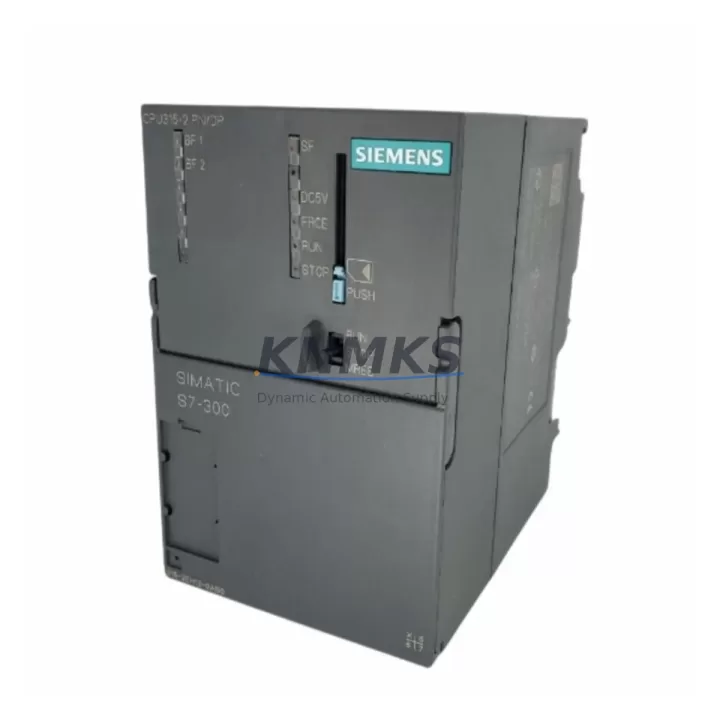
Overview
Siemens 6ES7315-2EH13-0AB0 Migration-Ready CPU for Legacy S7-300 Systems
The Siemens 6ES7315-2EH13-0AB0 (CPU 315-2 DP) is a high-performance central processing unit designed for the SIMATIC S7-300 programmable logic controller platform. As legacy S7-300 installations approach end-of-life and original spare parts become increasingly scarce, the 6ES7315-2EH13-0AB0 serves as a proven migration-ready replacement that preserves existing program logic, backplane wiring, and PROFIBUS DP communication architecture without requiring a full system redesign.
This CPU module integrates seamlessly into existing S7-300 racks, supporting the standard DIN rail mounting profile and the S7-300 backplane bus interface. Engineers undertaking control cabinet upgrades or legacy line retrofits can install this unit as a direct substitute for earlier CPU 315 variants, maintaining compatibility with existing SM (signal) modules, CP (communication) modules, and FM (function) modules already installed in the rack. The onboard PROFIBUS DP master/slave interface ensures uninterrupted communication with field devices, distributed I/O stations, and HMI panels already configured in the plant network.
For facilities managing multi-line automation environments, the 6ES7315-2EH13-0AB0 supports program memory up to 256 KB, enabling retention of complex ladder logic, function block diagrams, and structured text routines developed over years of production operation. This eliminates the need for full reprogramming during migration, significantly reducing engineering hours and commissioning risk.
Migration Compatibility Table
| Parameter | Specification / Compatibility |
|---|---|
| SKU / Part Number | 6ES7315-2EH13-0AB0 |
| Product Series | SIMATIC S7-300 |
| CPU Type | CPU 315-2 DP |
| Backplane Interface | S7-300 standard backplane bus (compatible with all S7-300 racks) |
| Communication Interface | MPI + PROFIBUS DP (master/slave) |
| Program Memory | 256 KB (work memory) |
| Power Supply Requirement | 24 VDC via PS 307 or PS 305 power supply module |
| Installation Format | DIN rail, S7-300 rack slot 2 |
| Compatible Racks | UR1, UR2, ER1, ER2 expansion racks |
| Firmware Compatibility | Compatible with STEP 7 V5.x and TIA Portal via legacy project import |
| Replacement Scope | Direct replacement for CPU 315-2 DP earlier firmware variants |
| Commissioning Tool | STEP 7 V5.5 SP4 or higher; PC adapter USB / MPI cable required |
| Country of Origin | Germany |
| Support terms | 12 months from date of shipment |
Retrofit Planning for Existing Automation Systems
Successful integration of the 6ES7315-2EH13-0AB0 into a legacy control environment requires systematic pre-installation verification across several critical dimensions. Before powering down the existing CPU, engineers should document the current rack configuration, including the slot assignments of all installed SM 321/SM 322 digital I/O modules, SM 331/SM 332 analog I/O modules, and any CP 342-5 or CP 343-1 communication processors already in service. This documentation forms the baseline for post-installation address mapping verification.
Power supply capacity is a primary concern during any CPU swap. The existing PS 307 5A or PS 307 10A power supply module must be confirmed to provide sufficient current headroom for the replacement CPU plus all co-installed modules. The 6ES7315-2EH13-0AB0 draws approximately 800 mA from the backplane bus; total rack current consumption should be recalculated before commissioning to avoid undervoltage faults during startup.
Terminal wiring on the existing signal modules does not require modification during a CPU-only replacement, as the S7-300 backplane bus handles all inter-module communication. However, the PROFIBUS DP connector (9-pin Sub-D) on the new CPU must be re-terminated with the correct bus termination resistors at the first and last nodes of the PROFIBUS segment. Failure to verify termination is a common cause of communication faults following CPU replacement in multi-drop PROFIBUS networks connecting field devices such as ET 200S distributed I/O stations or TP 177B HMI panels.
Module addressing and hardware configuration must be re-downloaded to the replacement CPU using STEP 7 or TIA Portal. The hardware configuration (HW Config) file from the original project should be loaded, verified against the physical rack layout, and compiled before downloading. If the original project was developed under an earlier STEP 7 version, a project upgrade step may be required. The PC adapter USB A2 or MPI/PROFIBUS programming cable provides the necessary MPI connection for initial program download before the PROFIBUS network is re-enabled.
For control cabinets where space is constrained, confirm that the physical dimensions of the 6ES7315-2EH13-0AB0 match the slot width of the existing CPU position in the rack. The standard S7-300 CPU form factor is maintained, but cable routing for the MPI connector and PROFIBUS DP port should be verified against cabinet door clearance before final installation.
Downtime Control During System Migration
Minimizing production downtime during a CPU replacement requires a structured migration sequence. Prior to the maintenance window, a full backup of the existing CPU program — including all data blocks (DBs), organization blocks (OBs), function blocks (FBs), and system data — should be uploaded to the programming device and archived. This backup serves as the recovery baseline if commissioning issues arise with the replacement unit.
The recommended migration sequence is: (1) upload and archive the existing program; (2) power down the rack via the PS 307 power supply; (3) remove the existing CPU from slot 2; (4) install the 6ES7315-2EH13-0AB0 and reconnect the MPI and PROFIBUS DP cables; (5) power up and download the hardware configuration; (6) download the program blocks; (7) perform a CPU restart and verify I/O status via the diagnostic buffer. This sequence, when executed by a qualified automation engineer, typically achieves a complete CPU swap within a two- to four-hour maintenance window.
Retentive data areas — including retain-marked data blocks and memory bits — should be pre-documented, as these values are lost during a cold restart on the new CPU. For processes where retentive setpoints or counters are operationally critical, a manual re-entry procedure or a data block initialization routine should be prepared in advance. HMI screens connected via PROFIBUS DP or MPI will resume normal operation automatically once the CPU reaches RUN mode and the communication links are re-established, provided the HMI project configuration (panel type, connection parameters, and tag addresses) remains unchanged.
Post-installation, a structured functional test covering all I/O channels, interlocks, and communication links should be completed before returning the line to production. This test protocol, combined with the support terms confirmed by quotation coverage on the replacement CPU, provides a documented risk mitigation framework for maintenance and reliability teams.
Retrofit Support FAQ
Q1: Is the 6ES7315-2EH13-0AB0 a direct drop-in replacement for earlier CPU 315-2 DP variants?
Yes. The 6ES7315-2EH13-0AB0 is mechanically and electrically compatible with the S7-300 rack backplane bus and maintains the same slot 2 installation position. Existing signal modules, communication modules, and terminal wiring do not require modification. The hardware configuration must be re-downloaded after installation.
Q2: What programming cable is required for initial commissioning?
An MPI-compatible programming cable — such as the PC Adapter USB A2 or a standard MPI/PROFIBUS cable — is required to establish the initial connection between the programming device and the CPU MPI port. STEP 7 V5.5 SP4 or higher, or TIA Portal with the appropriate legacy project import, is recommended for program download and hardware configuration.
Q3: Does this unit ship pre-tested, and what support terms is provided?
Yes. Each 6ES7315-2EH13-0AB0 unit undergoes functional testing prior to shipment, including power-on verification and communication port checks. A support terms confirmed by quotation from the date of shipment is provided, covering manufacturing defects and functional failures under normal operating conditions. Support terms support is coordinated through admin@knmks.com.
Q4: Is inventory available for immediate shipment, and what are the lead times?
Stock availability is maintained for this SKU to support urgent replacement and planned maintenance schedules. Standard lead time for in-stock units is 3–7 business days for international shipments. For volume orders or scheduled procurement programs, contact the sales team directly to confirm allocation and delivery timelines.
© 2026 KNMKS. All rights reserved.
Original Source: https://knmks.com
Contact: admin@knmks.com | +86 18359268345
Product Identification
- Brand / Ecosystem
-
Siemens
Siemens - Model / Series
-
6ES7315-2EH13-0AB0
SIMATIC Series - Product Family
- PLCs & Controllers
- Availability Status
- Available on request after model and quantity confirmation
- Inquiry Type
- B2B RFQ, replacement inquiry and project spare-part request
- Pre-Quote Check
- Exact SKU, brand, series, quantity, nameplate photos and destination country are checked before quotation
System Path
Where this product fits in the KNMKS automation structure.
Specification & Inquiry Focus
- Control platform
- PLC, PAC and modular controllers
- Common needs
- CPU, rack, power and I/O expansion
- Project support
- Replacement, cabinet build and maintenance
Buyer Confirmation
Information KNMKS checks before replying.
- Exact model
- 6ES7315-2EH13-0AB0
- Brand / ecosystem
- Siemens
- Product family
- PLCs & Controllers
- Application note
- Replacement, maintenance, project build or spare-part list
- Useful photos
- Nameplate, installed unit, cabinet layout or connector side
- Delivery details
- Quantity, destination country and target schedule
Document Support
Files and notes can be confirmed during quotation.
- Product photos or nameplate confirmation when available
- Packing and delivery notes before quotation confirmation
- Support scope and delivery terms confirmed per inquiry
- Export document coordination for qualified B2B requests
Inquiry Support
- Model cross-checking before quotation
- CPU, power, rack and expansion module matching
- Support for replacement and project inquiry
What to Send Us
- Brand and exact model number: Siemens 6ES7315-2EH13-0AB0
- Quantity and required delivery time
- Application, replacement requirement or nameplate photo
- Destination country and shipping preference
RFQ Preparation
This is a product inquiry page built for RFQ communication.
Fast Model Check
Send this model to KNMKS for confirmation.
Include quantity, destination country and photos if this is a maintenance replacement. The inquiry will be saved with a reference number after submission.
Brand & Compatibility Note
KNMKS displays automation product information for well-known industrial brand ecosystems and compatible replacement references. Brand names are used for product identification and compatibility reference only; final availability and commercial terms are confirmed per quotation.
 Manufacturing
 Machine Tools
 Packaging
 Energy & Power



 HMI & Displays
 Servo Systems
 Variable Frequency Drives
 Sensors