
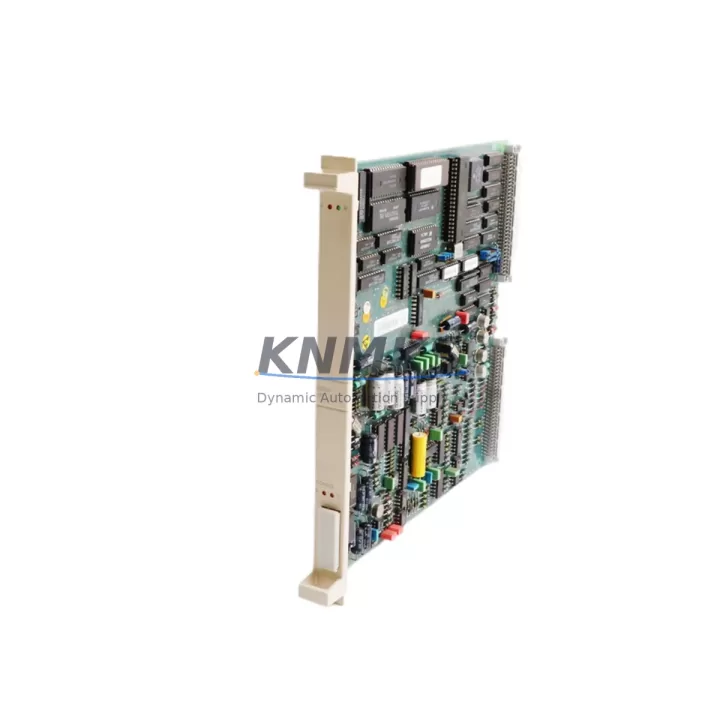
Overview
Siemens 6ES7315-2AH14-0AB0 Maintenance-Proven Spare Part for Factory Uptime
The Siemens 6ES7315-2AH14-0AB0 is a CPU 315-2 PN/DP central processing unit designed for the SIMATIC S7-300 programmable logic controller platform — one of the most widely deployed automation architectures in global manufacturing, process control, and utility infrastructure. For maintenance engineers managing aging S7-300 control cabinets, this CPU module represents a critical spare that directly determines whether a production line resumes within hours or remains idle for days.
At KNMKS, every 6ES7315-2AH14-0AB0 unit is sourced from verified supply channels, functionally tested prior to dispatch, and shipped with a support terms confirmed by quotation. We maintain long-term stock to support both emergency breakdown orders and planned annual maintenance procurement cycles.
Spare Maintenance Table
| Parameter | Specification |
|---|---|
| Part Number | 6ES7315-2AH14-0AB0 |
| Description | CPU 315-2 PN/DP |
| Series | SIMATIC S7-300 |
| Brand | Siemens |
| Communication Interfaces | PROFINET (PN), PROFIBUS-DP (MPI/DP) |
| Work Memory | 256 KB |
| Processing Speed (Bit) | 0.05 µs |
| Digital I/O (max) | 16,384 / 16,384 |
| Analog I/O (max) | 1,024 / 1,024 |
| Supply Voltage | 24 V DC (via PS module) |
| Operating Temperature | 0 °C to +60 °C |
| Mounting | DIN rail, S7-300 standard rack |
| Origin | Germany |
| Compatibility | SIMATIC S7-300 racks with standard PS 307 power supply modules |
| Firmware | Compatible with STEP 7 V5.x and TIA Portal (via migration) |
| Support terms | 12 Months |
| Condition | Original, tested before shipment |
Maintenance Planning for Continuous Operation
When a CPU 315-2 PN/DP fails or is flagged during a scheduled inspection, the replacement process rarely ends with the CPU alone. Experienced maintenance engineers know that a CPU fault is often symptomatic of broader stress across the control cabinet. Before returning the system to production, a thorough inspection of adjacent components is essential to prevent repeat failures and unplanned downtime.
The 6ES7315-2AH14-0AB0 operates in conjunction with a Siemens PS 307 power supply module (such as the 6ES7307-1EA01-0AA0 or 6ES7307-1KA02-0AA0), which provides the regulated 24 V DC rail the CPU depends on. A degraded or overloaded power supply is a common root cause of CPU instability — always verify output voltage and ripple before commissioning a replacement CPU.
The S7-300 backplane bus connects the CPU to all installed signal modules (SM), including digital input/output modules (e.g., SM 321, SM 322) and analog I/O modules (e.g., SM 331, SM 332). Inspect the backplane bus connectors for oxidation, mechanical damage, or loose seating. A faulty bus connector can cause intermittent I/O faults that are misdiagnosed as CPU errors.
For systems using PROFIBUS-DP field communication, inspect the DP port termination resistors, cable shielding continuity, and bus connector integrity. Degraded PROFIBUS cables or improperly terminated segments will cause communication faults immediately after CPU replacement. Similarly, for PROFINET-connected systems, verify switch port configuration, IP address assignments, and device name consistency in the hardware configuration.
If the control cabinet includes CP 343-1 or CP 343-1 Advanced communication processors, confirm that their firmware and configuration remain compatible with the replacement CPU’s firmware version. Mismatched firmware between the CPU and communication processors is a frequent source of post-replacement startup failures.
Relay output modules and intermediate relay assemblies in the output circuit should be inspected for contact wear, especially in high-cycle applications. A failed relay can cause field device faults that appear as CPU or I/O errors in the diagnostic buffer. Fuse holders and miniature circuit breakers protecting the 24 V DC distribution rail should also be checked — a nuisance trip or a degraded fuse can cause partial power loss that mimics CPU failure.
For facilities running Siemens OP/TP HMI panels connected via MPI or PROFIBUS, confirm that the HMI project’s CPU address and communication parameters match the replacement unit’s configuration. An address conflict will prevent the HMI from establishing communication and may be misread as a CPU fault by operators.
Maintaining a minimum stock of one 6ES7315-2AH14-0AB0 CPU alongside a PS 307 power supply module, a set of bus connectors, and critical SM I/O modules is a recognized best practice for facilities operating S7-300-based production lines. This spare kit approach reduces mean time to repair (MTTR) from days to hours and is strongly recommended for lines where downtime cost exceeds the value of the spare inventory.
Site Replacement Workflow
Step 1 — Pre-replacement documentation: Before removing the failed CPU, record the PROFIBUS/PROFINET address, IP configuration, device name, and any active diagnostic codes from the CPU’s LED status and STEP 7 / TIA Portal diagnostic buffer. Photograph the wiring and module slot positions.
Step 2 — Power isolation: De-energize the rack via the PS 307 power supply module. Confirm 0 V DC on the 24 V rail using a calibrated multimeter before touching any module.
Step 3 — Module removal: Release the CPU’s front connector and bus connector. Slide the module off the DIN rail. Note the memory card (MMC) — the program resides on the Micro Memory Card, not in the CPU itself. Transfer the MMC to the replacement unit.
Step 4 — Replacement installation: Mount the 6ES7315-2AH14-0AB0 onto the rack, seat the bus connector firmly, and reconnect the front connector. Insert the MMC. Re-energize the PS module.
Step 5 — Startup verification: Confirm the CPU transitions to RUN mode. Check PROFIBUS/PROFINET communication status LEDs. Verify all I/O modules report OK in the diagnostic buffer. Perform a functional test of critical outputs before releasing the line to production.
Step 6 — Documentation update: Record the replacement date, new unit serial number, and any configuration changes in the maintenance log. Update the spare parts inventory accordingly.
This workflow is compatible with direct replacement of earlier S7-300 CPU 315-2 DP variants, provided the MMC program is compatible with the 6ES7315-2AH14-0AB0 firmware. In most cases, no reprogramming is required — the MMC carries the full user program and hardware configuration.
Spare Parts Support FAQ
Q1: Is the 6ES7315-2AH14-0AB0 a direct replacement for earlier CPU 315-2 DP models?
In most applications, yes. The 6ES7315-2AH14-0AB0 (CPU 315-2 PN/DP) adds PROFINET capability over earlier DP-only variants. The hardware configuration in STEP 7 or TIA Portal must be updated to reflect the new order number, but the user program on the MMC transfers without modification in the majority of cases. Always verify the hardware configuration before returning to production.
Q2: How do you verify compatibility before shipment?
Each unit undergoes a functional power-on test and communication interface check prior to dispatch. Units are inspected for physical integrity, firmware version, and absence of fault history. A test report is available upon request for critical procurement orders.
Q3: What is your long-term supply commitment for this part number?
KNMKS maintains ongoing stock of the 6ES7315-2AH14-0AB0 and actively sources from multiple verified channels to support long-term maintenance contracts. For facilities requiring guaranteed annual supply, we offer reserved stock agreements. Contact admin@knmks.com to discuss volume and lead-time requirements.
Q4: What does the support terms confirmed by quotation cover?
The support terms confirmed by quotation cover functional failure under normal operating conditions. It does not cover damage resulting from incorrect installation, overvoltage events, or physical mishandling. In the event of a support terms claim, KNMKS provides a replacement unit or documented resolution support following return and inspection of the original part. Support terms support is available directly via admin@knmks.com or +86 18359268345.
© 2026 KNMKS. All rights reserved.
Original Source: https://knmks.com
Contact: admin@knmks.com | +86 18359268345
Product Identification
- Brand / Ecosystem
-
Siemens
Siemens - Model / Series
-
DSXW110 57120001-PG
SIMATIC Series - Product Family
- PLCs & Controllers
- Availability Status
- Available on request after model and quantity confirmation
- Inquiry Type
- B2B RFQ, replacement inquiry and project spare-part request
- Pre-Quote Check
- Exact SKU, brand, series, quantity, nameplate photos and destination country are checked before quotation
System Path
Where this product fits in the KNMKS automation structure.
Specification & Inquiry Focus
- Control platform
- PLC, PAC and modular controllers
- Common needs
- CPU, rack, power and I/O expansion
- Project support
- Replacement, cabinet build and maintenance
Buyer Confirmation
Information KNMKS checks before replying.
- Exact model
- DSXW110 57120001-PG
- Brand / ecosystem
- Siemens
- Product family
- PLCs & Controllers
- Application note
- Replacement, maintenance, project build or spare-part list
- Useful photos
- Nameplate, installed unit, cabinet layout or connector side
- Delivery details
- Quantity, destination country and target schedule
Document Support
Files and notes can be confirmed during quotation.
- Product photos or nameplate confirmation when available
- Packing and delivery notes before quotation confirmation
- Support scope and delivery terms confirmed per inquiry
- Export document coordination for qualified B2B requests
Inquiry Support
- Model cross-checking before quotation
- CPU, power, rack and expansion module matching
- Support for replacement and project inquiry
What to Send Us
- Brand and exact model number: Siemens DSXW110 57120001-PG
- Quantity and required delivery time
- Application, replacement requirement or nameplate photo
- Destination country and shipping preference
RFQ Preparation
This is a product inquiry page built for RFQ communication.
Fast Model Check
Send this model to KNMKS for confirmation.
Include quantity, destination country and photos if this is a maintenance replacement. The inquiry will be saved with a reference number after submission.
Brand & Compatibility Note
KNMKS displays automation product information for well-known industrial brand ecosystems and compatible replacement references. Brand names are used for product identification and compatibility reference only; final availability and commercial terms are confirmed per quotation.
 Manufacturing
 Machine Tools
 Packaging
 Energy & Power



 HMI & Displays
 Servo Systems
 Variable Frequency Drives
 Sensors