
Overview
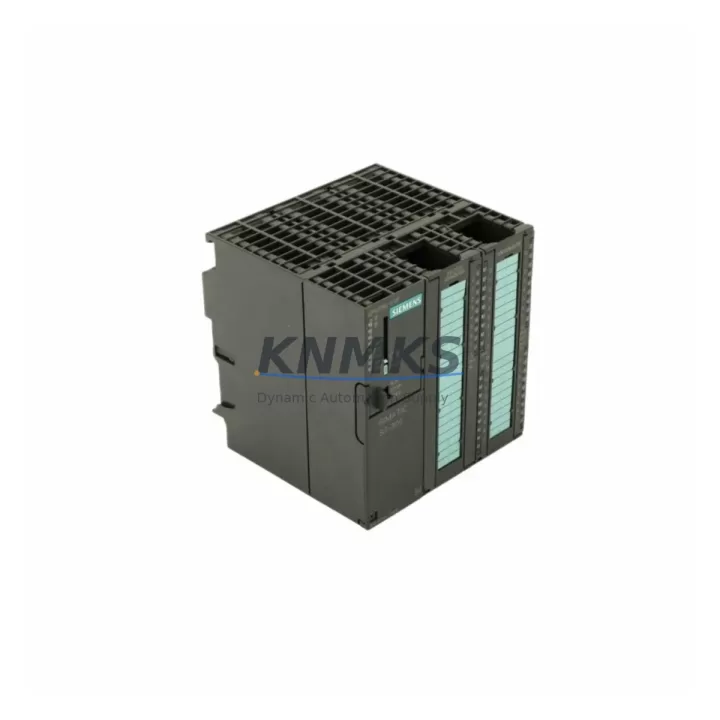
Siemens 6ES7314-6CH04-0AB0 Spare Part for Factory Uptime
The Siemens 6ES7314-6CH04-0AB0 — commercially designated as the CPU 314C-2 DP — is a compact, high-integration central processing unit within the SIMATIC S7-300 programmable logic controller family. Engineered for demanding industrial environments, this CPU integrates onboard digital and analog I/O alongside a PROFIBUS-DP master/slave interface, making it a cornerstone component in process automation, discrete manufacturing, and hybrid control architectures. For maintenance engineers managing aging S7-300 installations, securing a verified, pre-tested spare of the 6ES7314-6CH04-0AB0 is a critical element of any uptime protection strategy.
Our stock of the 6ES7314-6CH04-0AB0 is sourced from authorized channels and subjected to full functional verification prior to dispatch. Each unit ships with a support terms confirmed by quotation and is supported by long-term supply commitment — ensuring your procurement team can plan ahead without exposure to last-minute sourcing risk. Whether you are responding to an unplanned CPU fault, building a strategic spare inventory, or executing a scheduled annual overhaul, this unit is ready for immediate deployment.
Spare Maintenance Table
| Part Number | 6ES7314-6CH04-0AB0 |
| Designation | CPU 314C-2 DP |
| Brand | Siemens |
| Series | SIMATIC S7-300 |
| Product Type | PLC CPU Module |
| Onboard Digital I/O | 24 DI / 16 DO |
| Onboard Analog I/O | 4 AI / 2 AO |
| Communication Interface | PROFIBUS-DP Master/Slave (integrated) |
| MPI Interface | Yes (programming and HMI connection) |
| Work Memory | 192 KB |
| Supply Voltage | 24 V DC (via PS module on DIN rail) |
| Operating Temperature | 0 °C to +60 °C |
| Mounting | DIN rail, S7-300 standard rack (UR1/UR2) |
| Country of Origin | Germany |
| Compatibility | SIMATIC S7-300 racks; compatible with SM, CP, FM expansion modules |
| Programming Software | STEP 7 V5.x / TIA Portal (with legacy support) |
| Pre-Shipment Testing | Full functional verification completed |
| Support terms | 12 Months |
| Supply Availability | Long-term stock; global dispatch |
Maintenance Planning for Continuous Operation
When the 6ES7314-6CH04-0AB0 is flagged during a control cabinet inspection or fails during production, the replacement scope rarely ends at the CPU alone. A disciplined maintenance engineer will use the event as an opportunity to audit the surrounding components that share the same power rail, backplane bus, and field wiring infrastructure.
Begin with the PS 307 power supply module (e.g., 6ES7307-1EA01-0AA0 or 6ES7307-1KA02-0AA0) mounted on the same DIN rail. A degraded power supply is a common root cause of intermittent CPU faults and should be load-tested before the new CPU is commissioned. Next, inspect the S7-300 rack (UR1 or UR2) backplane bus connectors for oxidation or mechanical damage — a faulty backplane can corrupt communication between the CPU and expansion modules even after a CPU swap.
Review the SM 321 digital input modules and SM 322 digital output modules connected to the CPU’s local rack. If the CPU fault was preceded by I/O errors or field signal anomalies, individual SM modules may have sustained damage from voltage transients. Similarly, check any SM 331 or SM 332 analog I/O modules for calibration drift or channel failures — these are frequently overlooked during emergency CPU replacements but are critical for process accuracy.
For installations using the integrated PROFIBUS-DP port, verify the PROFIBUS network termination resistors and cable shielding integrity. A damaged DP segment can prevent the replacement CPU from establishing communication with remote I/O stations, ET 200 distributed peripherals, or third-party PROFIBUS slaves. If the site uses an IM 360/361 interface module for multi-rack expansion, inspect the rack interconnect cables for continuity.
Finally, confirm that the MPI programming cable or PC adapter used for STEP 7 connectivity is functional before attempting to load the program backup onto the replacement CPU. Maintaining a current program backup on a Siemens MMC (Micro Memory Card) — such as the 6ES7953-8LF31-0AA0 — is strongly recommended as part of any S7-300 spare parts strategy, as it enables rapid program restore without a connected programming device.
Site Replacement Workflow
Step 1 — Isolate and document: Place the S7-300 rack in STOP mode via the CPU mode selector. Record the current CPU operating mode, fault LEDs (SF, BF, DC5V, FRCE, RUN, STOP), and any active diagnostics visible in STEP 7 or the HMI. Photograph the wiring and module slot assignments before removal.
Step 2 — Backup program and data: If the CPU is still partially functional, use STEP 7 or TIA Portal to upload the current program blocks (OBs, FBs, FCs, DBs) and system data to the programming device. Verify the MMC contains the latest program version. If the MMC is intact, it can be transferred directly to the replacement unit.
Step 3 — Remove the faulty CPU: Power down the rack via the PS module. Disconnect the MPI/PROFIBUS connectors and the 24 V DC supply connector. Slide the CPU out of slot 2 (standard CPU slot in S7-300 racks). Retain the MMC from the faulty unit if it contains a valid program.
Step 4 — Install the replacement 6ES7314-6CH04-0AB0: Insert the replacement CPU into slot 2. Reconnect the MPI/PROFIBUS connectors and 24 V DC supply. Insert the MMC with the verified program. Power up the rack and observe the LED sequence — the CPU should transition from STOP to RUN after successful program loading.
Step 5 — Verify I/O and PROFIBUS communication: Use STEP 7 online diagnostics to confirm all SM modules are recognized and all PROFIBUS DP slaves are communicating. Check analog channel values against known process references. Confirm HMI connectivity via MPI or PROFIBUS before releasing the system to production.
Step 6 — Update maintenance records: Log the replacement date, serial number of the installed unit, and any observations from the fault investigation. Schedule a follow-up inspection of the PS module and backplane within 30 days.
Spare Parts Support FAQ
Q1: Is the 6ES7314-6CH04-0AB0 compatible with all S7-300 racks and expansion modules?
Yes. The CPU 314C-2 DP is designed for the standard S7-300 DIN rail rack system (UR1, UR2) and is compatible with the full range of S7-300 signal modules (SM 321, SM 322, SM 331, SM 332), function modules (FM), and communication processors (CP). Ensure the rack firmware and STEP 7 hardware configuration match the installed module set before going online.
Q2: What is included in the pre-shipment testing process?
Each 6ES7314-6CH04-0AB0 unit undergoes full power-on functional verification, including CPU startup sequence validation, onboard I/O channel checks, and PROFIBUS-DP interface testing. Units that do not pass all test criteria are not dispatched. A test report is available upon request for quality-critical procurement processes.
Q3: How should I manage long-term spare inventory for S7-300 CPUs given Siemens’ product lifecycle status?
The S7-300 series has entered the phase-out stage of its lifecycle. Siemens recommends migration to the S7-1500 platform for new projects, but the 6ES7314-6CH04-0AB0 remains in active use across thousands of installed sites globally. We recommend holding a minimum of one verified spare CPU per critical production line, supplemented by a stocked MMC with the current program backup. Our long-term supply commitment ensures availability for planned procurement cycles of 12–24 months.
Q4: What is covered under the support terms confirmed by quotation, and what is the process for support requests?
The support terms confirmed by quotation cover functional failure under normal operating conditions, including CPU startup failure, onboard I/O malfunction, and PROFIBUS-DP interface faults not caused by external wiring damage or incorrect installation. To initiate a support terms claim, contact our technical support team with the unit serial number, fault description, and installation date. Replacement or repair is processed within agreed lead times to minimize your production exposure.
© 2026 KNMKS. All rights reserved.
Original Source: https://knmks.com
Contact: admin@knmks.com | +86 18359268345
Product Identification
- Brand / Ecosystem
-
Siemens
Siemens - Model / Series
-
6ES7314-6CH04-0AB0
SIMATIC Series - Product Family
- PLCs & Controllers
- Availability Status
- Available on request after model and quantity confirmation
- Inquiry Type
- B2B RFQ, replacement inquiry and project spare-part request
- Pre-Quote Check
- Exact SKU, brand, series, quantity, nameplate photos and destination country are checked before quotation
System Path
Where this product fits in the KNMKS automation structure.
Specification & Inquiry Focus
- Control platform
- PLC, PAC and modular controllers
- Common needs
- CPU, rack, power and I/O expansion
- Project support
- Replacement, cabinet build and maintenance
Buyer Confirmation
Information KNMKS checks before replying.
- Exact model
- 6ES7314-6CH04-0AB0
- Brand / ecosystem
- Siemens
- Product family
- PLCs & Controllers
- Application note
- Replacement, maintenance, project build or spare-part list
- Useful photos
- Nameplate, installed unit, cabinet layout or connector side
- Delivery details
- Quantity, destination country and target schedule
Document Support
Files and notes can be confirmed during quotation.
- Product photos or nameplate confirmation when available
- Packing and delivery notes before quotation confirmation
- Support scope and delivery terms confirmed per inquiry
- Export document coordination for qualified B2B requests
Inquiry Support
- Model cross-checking before quotation
- CPU, power, rack and expansion module matching
- Support for replacement and project inquiry
What to Send Us
- Brand and exact model number: Siemens 6ES7314-6CH04-0AB0
- Quantity and required delivery time
- Application, replacement requirement or nameplate photo
- Destination country and shipping preference
RFQ Preparation
This is a product inquiry page built for RFQ communication.
Fast Model Check
Send this model to KNMKS for confirmation.
Include quantity, destination country and photos if this is a maintenance replacement. The inquiry will be saved with a reference number after submission.
Brand & Compatibility Note
KNMKS displays automation product information for well-known industrial brand ecosystems and compatible replacement references. Brand names are used for product identification and compatibility reference only; final availability and commercial terms are confirmed per quotation.
 Manufacturing
 Machine Tools
 Packaging
 Energy & Power



 HMI & Displays
 Servo Systems
 Variable Frequency Drives
 Sensors