
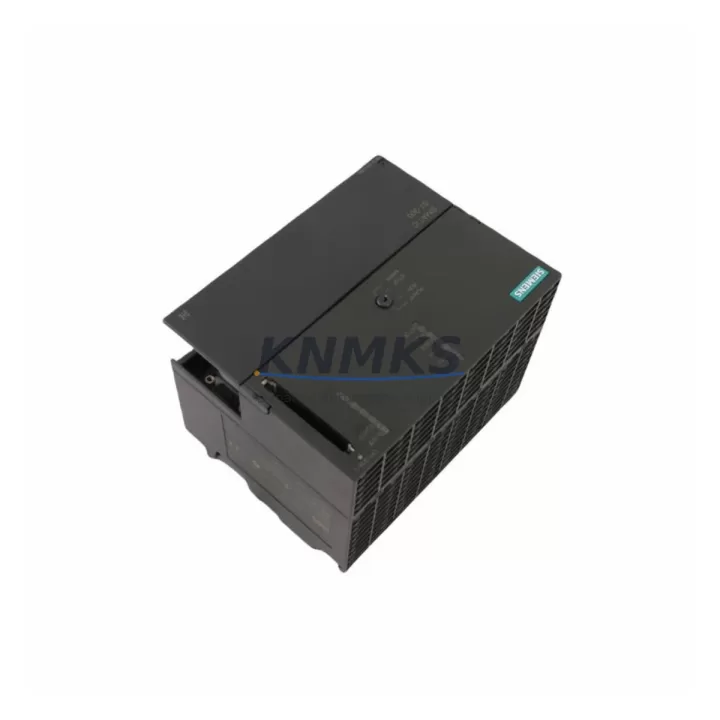
Overview
Siemens 6ES7314-6BH04-0AB0 Maintenance-Proven Spare Part for Factory Uptime
The Siemens 6ES7314-6BH04-0AB0 is a compact CPU module from the SIMATIC S7-300 series, engineered for demanding industrial automation environments. As a maintenance-proven spare part, it is a critical component for factories, process plants, and manufacturing lines that depend on continuous PLC-based control. Whether you are managing a scheduled annual overhaul, responding to an unplanned fault, or building a strategic spare parts inventory, the 6ES7314-6BH04-0AB0 delivers the original Siemens performance and compatibility your system requires.
This CPU integrates onboard PROFIBUS-DP and MPI interfaces, enabling direct communication with distributed I/O, drives, and HMI panels without additional communication modules. Its compact design fits standard S7-300 rail mounting configurations, making it a direct drop-in replacement for aging or failed units in existing control cabinets. Every unit supplied by KNMKS is sourced from verified channels, inspected, and tested prior to shipment, backed by a support terms confirmed by quotation to support your maintenance planning and procurement risk control.
Spare Maintenance Table
| Parameter | Specification |
|---|---|
| SKU / Part Number | 6ES7314-6BH04-0AB0 |
| Brand | Siemens |
| Series | SIMATIC S7-300 |
| Product Type | Compact CPU Module |
| Onboard Interfaces | MPI (187.5 kbps – 12 Mbps), PROFIBUS-DP Master/Slave |
| Working Memory | 128 KB (expandable via memory card) |
| Digital I/O (Onboard) | 24 DI / 16 DO |
| Analog I/O (Onboard) | 4 AI / 2 AO |
| Supply Voltage | 24 V DC (via PS module on rail) |
| Operating Temperature | 0 °C to +60 °C |
| Mounting | DIN Rail (S7-300 standard profile rail) |
| Compatibility | S7-300 backplane, SM modules, CP modules, FM modules |
| Programming Software | STEP 7 V5.x / TIA Portal (with legacy support) |
| Origin | Germany |
| Pre-shipment Testing | Yes – functional test performed before dispatch |
| Support terms | 12 Months from date of shipment |
Maintenance Planning for Continuous Operation
When a 6ES7314-6BH04-0AB0 CPU failure occurs or is anticipated during a planned shutdown, maintenance engineers should treat the replacement as an opportunity to audit the entire control cabinet. The CPU does not operate in isolation — its performance depends on the health of every connected component in the S7-300 rack and the wider electrical circuit.
Begin with the power supply module. The Siemens 6ES7307-1EA01-0AA0 (PS 307 5A) or equivalent PS 307 series power supply feeds the S7-300 backplane rail. A degraded or undersized power supply is a common root cause of intermittent CPU faults and should be inspected or replaced alongside the CPU. Check output voltage stability under load before reinstalling the new CPU.
Next, inspect the S7-300 backplane bus connector (6ES7390-1AE80-0AA0 or equivalent profile rail section). Corroded or mechanically damaged bus connectors cause communication errors between the CPU and signal modules (SMs). These connectors are low-cost but high-impact components that are frequently overlooked during fault isolation.
Review all SM321/SM322 digital input/output modules connected to the rack. Since the 6ES7314-6BH04-0AB0 has onboard I/O, verify that the onboard channel assignments do not conflict with expansion SM modules after the CPU swap. Check wiring terminal blocks and fuse protection on each I/O circuit — blown fuses on 24 V DC field circuits are a common secondary fault that can mask the original CPU failure.
For systems using PROFIBUS-DP, inspect the PROFIBUS network termination resistors and cable shielding at both ends of the segment. A CPU replacement is the ideal time to verify bus topology integrity, especially in older installations where cable degradation may have gone undetected. If the system uses a CP 342-5 or CP 343-1 communication processor, confirm that the module firmware and GSD files are compatible with the replacement CPU’s firmware version.
Where the S7-300 system interfaces with an HMI panel (such as a Siemens TP700 Comfort or MP277), verify MPI/PROFIBUS address settings after CPU replacement. HMI connection parameters are stored in the HMI project and must match the CPU’s configured MPI address. A mismatch will result in communication loss between the operator panel and the PLC, which can appear as a new fault unrelated to the original CPU failure.
Finally, for installations in harsh environments, check signal isolators and surge protection devices on analog input circuits connected to the onboard AI channels of the 6ES7314-6BH04-0AB0. Voltage transients from field instrumentation are a leading cause of analog input damage and can shorten CPU service life if not properly protected.
Site Replacement Workflow
Replacing the 6ES7314-6BH04-0AB0 in the field follows a structured process to minimize downtime and ensure system compatibility. Before beginning, confirm that the replacement unit carries the same firmware version as the original, or that your STEP 7 / TIA Portal project is compatible with the firmware version of the new unit. Firmware mismatches can prevent the CPU from loading the user program correctly.
Step 1 – Backup: Use STEP 7 or TIA Portal to upload and save the current program from the existing CPU (if still functional) to a PC or memory card. Store the backup in a secure location before powering down.
Step 2 – Power Down: Isolate the control cabinet from mains supply. Verify zero voltage on the PS module output before touching any rack components.
Step 3 – Module Removal: Disconnect the MPI/PROFIBUS cable and any front connector wiring from the CPU. Remove the CPU from the rail by releasing the mounting screws and sliding it off the bus connector.
Step 4 – Installation: Slide the replacement 6ES7314-6BH04-0AB0 onto the bus connector and secure it to the rail. Reconnect the front connector and communication cables. Ensure the memory card (if used) is transferred from the old unit or a pre-loaded card is inserted.
Step 5 – Power-Up and Test: Restore power and observe the CPU LED status. The SF (System Fault) and BF (Bus Fault) LEDs should extinguish within the normal startup sequence. Download the program if required and switch the CPU to RUN mode. Verify all I/O signals and PROFIBUS communication before returning the system to production.
This workflow supports rapid recovery from unplanned outages and is equally applicable to scheduled maintenance windows, reducing total downtime to under 30 minutes for experienced technicians with a pre-staged spare unit.
Spare Parts Support FAQ
Q1: Is the 6ES7314-6BH04-0AB0 compatible with all S7-300 rack configurations?
Yes. The 6ES7314-6BH04-0AB0 is designed for the standard S7-300 profile rail and is compatible with all S7-300 signal modules (SM), function modules (FM), and communication processors (CP) that use the S7-300 backplane bus. It can be used as a direct replacement for earlier 6ES7314-6BH04 variants, subject to firmware and project compatibility verification in STEP 7 or TIA Portal.
Q2: How do you verify the unit before shipment, and what does the support terms confirmed by quotation cover?
Every 6ES7314-6BH04-0AB0 unit undergoes a functional power-on test and communication interface check before dispatch. The support terms confirmed by quotation cover manufacturing defects and functional failures under normal operating conditions. It does not cover damage caused by incorrect installation, overvoltage, or environmental conditions outside the specified operating range. Support requests are supported by KNMKS with replacement or repair at no additional cost.
Q3: Can you supply this part on a long-term or blanket order basis for ongoing maintenance programs?
Yes. KNMKS supports long-term supply agreements for maintenance teams and procurement engineers managing multi-site or multi-year spare parts programs. We maintain stock of the 6ES7314-6BH04-0AB0 and related S7-300 components to support scheduled and emergency requirements. Contact our team at admin@knmks.com to discuss volume pricing, lead times, and consignment stock arrangements.
Q4: What should I check if the replacement CPU shows a fault LED after installation?
An SF (System Fault) LED after installation typically indicates a program load error, memory card incompatibility, or a hardware configuration mismatch. Verify that the memory card is correctly seated and contains a valid program. Check the STEP 7 / TIA Portal hardware configuration matches the physical rack layout. A BF (Bus Fault) LED indicates a PROFIBUS-DP communication issue — check cable termination, bus address settings, and slave device status. If faults persist, contact KNMKS technical support for remote diagnostic assistance.
© 2026 KNMKS. All rights reserved.
Original Source: https://knmks.com
Contact: admin@knmks.com | +86 18359268345
Product Identification
- Brand / Ecosystem
-
Siemens
Siemens - Model / Series
-
6ES7314-6BH04-0AB0
SIMATIC Series - Product Family
- PLCs & Controllers
- Availability Status
- Available on request after model and quantity confirmation
- Inquiry Type
- B2B RFQ, replacement inquiry and project spare-part request
- Pre-Quote Check
- Exact SKU, brand, series, quantity, nameplate photos and destination country are checked before quotation
System Path
Where this product fits in the KNMKS automation structure.
Specification & Inquiry Focus
- Control platform
- PLC, PAC and modular controllers
- Common needs
- CPU, rack, power and I/O expansion
- Project support
- Replacement, cabinet build and maintenance
Buyer Confirmation
Information KNMKS checks before replying.
- Exact model
- 6ES7314-6BH04-0AB0
- Brand / ecosystem
- Siemens
- Product family
- PLCs & Controllers
- Application note
- Replacement, maintenance, project build or spare-part list
- Useful photos
- Nameplate, installed unit, cabinet layout or connector side
- Delivery details
- Quantity, destination country and target schedule
Document Support
Files and notes can be confirmed during quotation.
- Product photos or nameplate confirmation when available
- Packing and delivery notes before quotation confirmation
- Support scope and delivery terms confirmed per inquiry
- Export document coordination for qualified B2B requests
Inquiry Support
- Model cross-checking before quotation
- CPU, power, rack and expansion module matching
- Support for replacement and project inquiry
What to Send Us
- Brand and exact model number: Siemens 6ES7314-6BH04-0AB0
- Quantity and required delivery time
- Application, replacement requirement or nameplate photo
- Destination country and shipping preference
RFQ Preparation
This is a product inquiry page built for RFQ communication.
Fast Model Check
Send this model to KNMKS for confirmation.
Include quantity, destination country and photos if this is a maintenance replacement. The inquiry will be saved with a reference number after submission.
Brand & Compatibility Note
KNMKS displays automation product information for well-known industrial brand ecosystems and compatible replacement references. Brand names are used for product identification and compatibility reference only; final availability and commercial terms are confirmed per quotation.
 Manufacturing
 Machine Tools
 Packaging
 Energy & Power



 HMI & Displays
 Servo Systems
 Variable Frequency Drives
 Sensors