
Overview
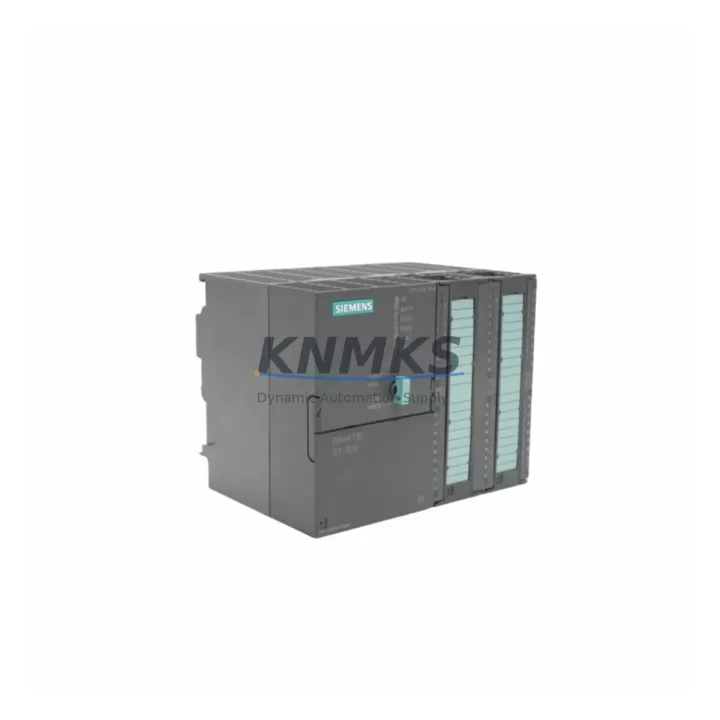
Siemens 6ES7314-5AE03-0AB0 Migration-Ready CPU for Legacy S7-300 Control Systems
The Siemens 6ES7314-5AE03-0AB0 (CPU 314C-2 DP) is a compact, high-performance central processing unit designed for the SIMATIC S7-300 programmable logic controller platform. As legacy S7-300 installations approach end-of-support milestones, engineering teams managing aging production lines, process control cabinets, and distributed automation networks increasingly rely on verified replacement units to maintain operational continuity. This module is stocked, pre-tested, and dispatched globally with a support terms confirmed by quotation, making it a dependable solution for both emergency replacements and planned retrofit projects.
The CPU 314C-2 DP integrates onboard digital and analog I/O alongside a PROFIBUS DP master/slave interface, reducing the need for additional communication modules in space-constrained control cabinets. Its compatibility with the standard S7-300 backplane and rail mounting system means that replacement teams can swap the unit without modifying existing rack geometry or terminal wiring layouts — a critical advantage when minimizing planned downtime windows.
Migration Compatibility Table
| Parameter | Details |
|---|---|
| SKU / Order Number | 6ES7314-5AE03-0AB0 |
| Series | SIMATIC S7-300 |
| CPU Designation | CPU 314C-2 DP |
| Communication Interface | PROFIBUS DP (Master / Slave), MPI |
| Onboard I/O | 24 DI / 16 DO / 4 AI / 2 AO |
| Backplane Compatibility | Standard S7-300 rail and bus connector |
| Power Supply Requirement | 24 V DC via PS 307 or equivalent S7-300 PSU |
| Programming Software | STEP 7 v5.x / TIA Portal (with compatibility mode) |
| Firmware Compatibility | Verify firmware version before program restore |
| Installation Space | Standard S7-300 slot; confirm rack slot availability |
| Replacement Recommendation | Direct replacement for CPU 314C-2 DP variants; verify order suffix |
| Commissioning Note | Restore STEP 7 project, verify DB/FB addresses, re-test PROFIBUS node IDs |
| Support terms | 12 months from dispatch date |
| Pre-Shipment Testing | Yes — functional test completed before dispatch |
| Origin | Germany |
Retrofit Planning for Existing Automation Systems
Successful replacement of the 6ES7314-5AE03-0AB0 in an active S7-300 installation requires a structured pre-retrofit checklist. Before removing the existing CPU, engineers should document the current PROFIBUS DP network topology, including all slave node addresses assigned to distributed I/O stations such as ET 200M or ET 200S remote I/O racks. These node assignments must be preserved in the replacement unit’s hardware configuration to avoid communication faults on restart.
Power supply capacity is a frequent oversight in retrofit projects. The existing PS 307 5A or PS 307 10A power supply module must be verified against the total current draw of the replacement CPU plus all installed signal modules — SM 321 digital input modules, SM 322 digital output modules, and any SM 331 or SM 332 analog I/O modules mounted in the same rack. If the existing PSU is operating near its rated capacity, a parallel or upgraded supply should be planned before the retrofit window opens.
Terminal wiring on the CPU’s onboard I/O connector block should be photographed and labeled before disconnection. The 6ES7314-5AE03-0AB0 uses a front connector that can be transferred to the replacement unit, preserving field wiring without re-termination — provided the connector is in serviceable condition. For installations where the front connector shows wear or corrosion, a new connector should be sourced alongside the CPU.
Where the existing control cabinet also houses a CP 342-5 PROFIBUS communication processor or an IM 360/IM 361 interface module for multi-rack expansion, these modules remain in place and do not require replacement during a CPU swap. However, their configuration data within the STEP 7 hardware catalog must match the replacement CPU’s firmware version to avoid GSD file conflicts during online configuration download.
For sites running HMI panels connected via MPI — such as TP 177B or MP 277 operator panels — the MPI address of the replacement CPU must be set identically to the outgoing unit before the HMI connection is re-established. Mismatched MPI addresses are a common cause of post-retrofit HMI communication failures that extend unplanned downtime beyond the maintenance window.
Downtime Control During System Migration
Minimizing production interruption during a CPU replacement begins with a complete offline backup of the existing STEP 7 project, including all organization blocks (OB1, OB35, OB100), function blocks, data blocks, and the hardware configuration file. This backup should be validated on an engineering workstation before the physical swap begins. If the site operates a redundant or hot-standby architecture using a CP 343-1 Ethernet module for SCADA connectivity, the network parameters and IP address assignments must be documented and re-applied to the replacement CPU’s configuration before going online.
During the physical swap, the S7-300 rack should be de-energized at the PS 307 supply rather than at the main cabinet breaker, allowing other control circuits in the cabinet to remain live where process safety permits. The replacement 6ES7314-5AE03-0AB0 should be inserted into the same slot position as the outgoing unit, with the bus connector seated firmly before the front cover is closed. After power restoration, the CPU will enter STOP mode pending program download — this is expected behavior and should not be interpreted as a fault condition.
Program restore via STEP 7 or TIA Portal should be performed with the CPU in STOP mode. After download, a controlled transition to RUN mode allows the engineering team to monitor the PROFIBUS DP diagnostic buffer and verify that all slave stations report “OK” status before releasing the line to production. Any residual faults in the diagnostic buffer should be cleared and root-caused before sign-off. Total planned downtime for a prepared CPU swap on a single-rack S7-300 system typically ranges from 2 to 4 hours, depending on program complexity and the number of PROFIBUS nodes requiring re-initialization.
Retrofit Support FAQ
Q: Is the 6ES7314-5AE03-0AB0 a direct replacement for other CPU 314C-2 DP variants?
A: The 6ES7314-5AE03-0AB0 is a specific firmware revision of the CPU 314C-2 DP. It is mechanically and electrically compatible with other CPU 314C-2 DP order numbers in the S7-300 family, but firmware version differences may require a STEP 7 hardware configuration update before program download. Always verify the order suffix and firmware level against your existing project’s hardware catalog entry.
Q: Can the existing front connector and field wiring be reused on the replacement CPU?
A: Yes. The S7-300 front connector system is designed for transfer between modules of the same type. Remove the front connector from the outgoing CPU and attach it to the replacement unit. Inspect the connector for bent pins or corrosion before reuse. If the connector is damaged, a replacement front connector should be installed and field wiring re-terminated according to the original wiring diagram.
Q: What commissioning checks are required after installing the replacement CPU?
A: After program download and transition to RUN mode, verify: (1) all PROFIBUS DP slave stations are communicating without bus faults; (2) MPI-connected HMI panels are displaying live process data; (3) analog I/O channels are reading within expected engineering unit ranges; (4) the CPU diagnostic buffer shows no active faults. Document the commissioning results and retain a copy of the restored STEP 7 project as the new baseline.
Q: What does the support terms confirmed by quotation cover, and how is stock availability managed?
A: Every 6ES7314-5AE03-0AB0 unit dispatched by KNMKS carries a support terms confirmed by quotation covering functional defects identified under normal operating conditions. Units are pre-tested before dispatch to confirm CPU startup, I/O channel integrity, and PROFIBUS DP interface operation. Multi-region stock is maintained to support both emergency same-week dispatch and scheduled outage planning. Contact admin@knmks.com or +86 18359268345 to confirm current stock levels and lead times for your project.
© 2026 KNMKS. All rights reserved.
Original Source: https://knmks.com
Contact: admin@knmks.com | +86 18359268345
Product Identification
- Brand / Ecosystem
-
Siemens
Siemens - Model / Series
-
6ES7314-5AE03-0AB0
SIMATIC Series - Product Family
- PLCs & Controllers
- Availability Status
- Available on request after model and quantity confirmation
- Inquiry Type
- B2B RFQ, replacement inquiry and project spare-part request
- Pre-Quote Check
- Exact SKU, brand, series, quantity, nameplate photos and destination country are checked before quotation
System Path
Where this product fits in the KNMKS automation structure.
Specification & Inquiry Focus
- Control platform
- PLC, PAC and modular controllers
- Common needs
- CPU, rack, power and I/O expansion
- Project support
- Replacement, cabinet build and maintenance
Buyer Confirmation
Information KNMKS checks before replying.
- Exact model
- 6ES7314-5AE03-0AB0
- Brand / ecosystem
- Siemens
- Product family
- PLCs & Controllers
- Application note
- Replacement, maintenance, project build or spare-part list
- Useful photos
- Nameplate, installed unit, cabinet layout or connector side
- Delivery details
- Quantity, destination country and target schedule
Document Support
Files and notes can be confirmed during quotation.
- Product photos or nameplate confirmation when available
- Packing and delivery notes before quotation confirmation
- Support scope and delivery terms confirmed per inquiry
- Export document coordination for qualified B2B requests
Inquiry Support
- Model cross-checking before quotation
- CPU, power, rack and expansion module matching
- Support for replacement and project inquiry
What to Send Us
- Brand and exact model number: Siemens 6ES7314-5AE03-0AB0
- Quantity and required delivery time
- Application, replacement requirement or nameplate photo
- Destination country and shipping preference
RFQ Preparation
This is a product inquiry page built for RFQ communication.
Fast Model Check
Send this model to KNMKS for confirmation.
Include quantity, destination country and photos if this is a maintenance replacement. The inquiry will be saved with a reference number after submission.
Brand & Compatibility Note
KNMKS displays automation product information for well-known industrial brand ecosystems and compatible replacement references. Brand names are used for product identification and compatibility reference only; final availability and commercial terms are confirmed per quotation.
 Manufacturing
 Machine Tools
 Packaging
 Energy & Power



 HMI & Displays
 Servo Systems
 Variable Frequency Drives
 Sensors