
Overview
Siemens 6ES7314-1AG14-0AB0 Migration-Ready CPU for Legacy S7-300: Retrofit and Compatibility Upgrade
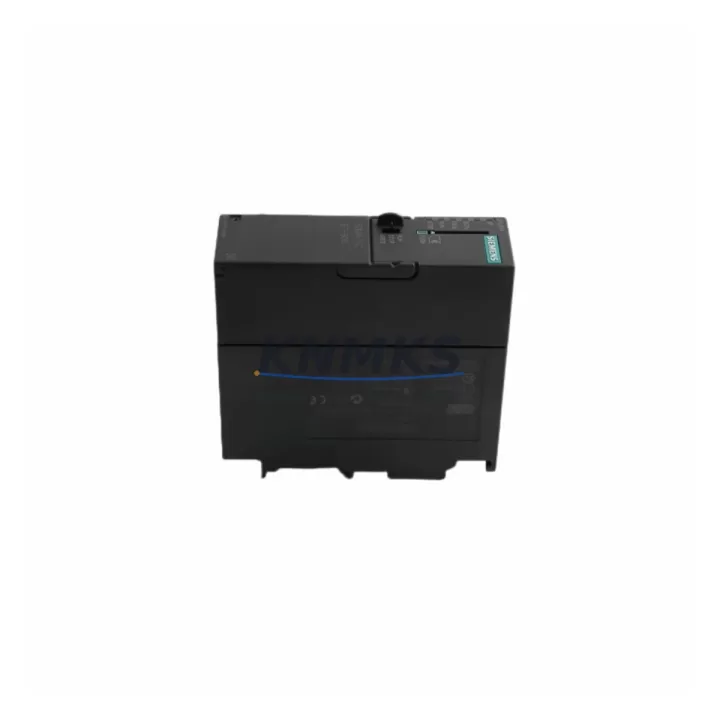
The Siemens 6ES7314-1AG14-0AB0 is a CPU 314 central processing unit designed for the SIMATIC S7-300 modular PLC platform. As legacy S7-300 installations approach end-of-life and OEM support windows close, this module serves as the primary migration-ready replacement for discontinued CPU variants including the 6ES7314-1AE04-0AB0 and 6ES7314-1AF11-0AB0. Engineers undertaking control cabinet upgrades, production line retrofits, or system recovery projects will find this CPU a reliable anchor for preserving existing program logic while extending operational life by years.
Before committing to a swap, the retrofit team must verify several critical parameters. Power supply capacity on the existing S7-300 rack must support the CPU 314 load profile — the PS 307 5A or PS 307 10A power supply modules are the standard companions in this platform. Terminal wiring on the front connector does not apply directly to the CPU itself, but all connected signal modules — SM 321 digital input, SM 322 digital output, and SM 331/SM 332 analog I/O modules — must be re-addressed if the slot configuration changes. Backplane interface compatibility is native within the S7-300 rack family, so the CPU slots into any standard S7-300 rail without mechanical modification.
Module addressing must be reviewed in STEP 7 or TIA Portal before the cutover. The 6ES7314-1AG14-0AB0 supports MPI communication natively and can be integrated into PROFIBUS DP networks via the CP 342-5 communications processor if the existing line uses distributed I/O or remote ET 200 stations. Program compatibility between the outgoing CPU and this replacement should be validated at the block level — OBs, FBs, FCs, and DBs compiled under STEP 7 v5.5 or later are generally transferable without recompilation, but the firmware version on the replacement unit must be confirmed against the project’s hardware configuration file.
HMI screen mappings connected via MPI or PROFIBUS to a SIMATIC TP or MP panel series require no tag remapping if the CPU address remains unchanged. Communication links to SCADA systems via CP 343-1 Ethernet modules should be tested in simulation mode before live cutover to confirm that the IP address table and connection definitions in NetPro remain intact. Installation space on the DIN rail must accommodate the CPU 314 width profile alongside existing modules — measure the rack slot count and confirm no adjacent module encroaches on the CPU’s memory card slot access.
Firmware version alignment is a common source of commissioning delay. The 6ES7314-1AG14-0AB0 ships with a defined firmware baseline; if the project requires a specific version for compatibility with older IM 360/IM 361 interface modules used in multi-rack configurations, the firmware must be updated via the SIMATIC Micro Memory Card before installation. On-site commissioning should follow a structured sequence: rack power-up, CPU STOP mode verification, program download via MPI adapter (PC Adapter USB or CP 5611), transition to RUN mode, and I/O force test before releasing to production.
Migration Compatibility Table
| Parameter | 6ES7314-1AG14-0AB0 (This Unit) | Legacy / Replaced Models |
|---|---|---|
| Series | SIMATIC S7-300 | SIMATIC S7-300 |
| CPU Type | CPU 314 | CPU 314 (earlier firmware revisions) |
| Backplane Interface | S7-300 standard rail | Compatible — no mechanical change |
| Communication | MPI (integrated); PROFIBUS via CP 342-5 | MPI native; PROFIBUS via CP module |
| Program Memory | 96 KB work memory | Varies by prior revision |
| Memory Card | SIMATIC Micro Memory Card (MMC) | MMC — same slot format |
| Power Supply Compatibility | PS 307 5A / 10A | Same — no change required |
| I/O Module Compatibility | SM 321, SM 322, SM 331, SM 332 | Full compatibility retained |
| Installation Space | Standard S7-300 slot width | Direct slot replacement |
| Firmware Update Method | Via MMC before installation | Same procedure |
| Replacement Recommendation | Direct drop-in for CPU 314 variants | Verify firmware and MMC version |
| Commissioning Tool | STEP 7 v5.5+ / TIA Portal | STEP 7 v5.4+ compatible |
| Support terms | support terms confirmed by quotation — pre-shipment tested, verified functional | |
Retrofit Planning for Existing Automation Systems
A successful S7-300 retrofit begins with a complete rack audit. Document every module in the existing rack: the PS 307 power supply, the CPU slot, all SM 321 and SM 322 digital I/O modules, any SM 331 or SM 332 analog modules, and the position of any CP 342-5 PROFIBUS or CP 343-1 Ethernet communications processors. This inventory becomes the baseline for the new hardware configuration file in STEP 7 or TIA Portal.
The 6ES7314-1AG14-0AB0 integrates directly into this existing rack structure. If the legacy system uses an IM 360 interface module to connect expansion racks, verify that the interface module firmware is compatible with the replacement CPU’s firmware level. In multi-rack systems, the IM 361 on the expansion rack must also be checked. For systems using ET 200M distributed I/O connected via PROFIBUS DP, the CP 342-5 module remains in place and its GSD file configuration in the hardware catalog does not need to change.
Signal isolation requirements should be reviewed for any analog input channels connected to SM 331 modules. If the legacy CPU was operating with a specific analog filter setting stored in the hardware configuration, that setting must be re-entered after the CPU swap. Programming cables — typically a PC Adapter USB or a CP 5611 card — should be prepared and tested before the maintenance window opens to avoid delays during the live cutover.
Downtime Control During System Migration
Minimizing downtime during a CPU swap on an active S7-300 line requires preparation that begins days before the maintenance window. The existing program must be uploaded from the running CPU and archived with a full hardware configuration export. This backup, stored on a SIMATIC Micro Memory Card or a PC-based project archive, is the recovery point if the cutover encounters an unexpected issue.
During the swap, the rack should be powered down at the PS 307 supply level — not at the main cabinet breaker — to protect the I/O modules and field wiring from transient voltages. The replacement 6ES7314-1AG14-0AB0 is inserted into the same CPU slot. The pre-loaded MMC with the archived program is inserted before power-up. On first power-up, the CPU performs a self-test and loads the program from the MMC automatically, reducing manual download time to near zero.
After the CPU reaches STOP mode, a forced I/O test should be performed channel by channel on critical outputs before transitioning to RUN. HMI panels connected via MPI will reconnect automatically once the CPU address is confirmed. SCADA communication via the CP 343-1 Ethernet module will resume as soon as the CPU enters RUN and the Ethernet connection is re-established. A structured commissioning checklist — covering power-up, STOP verification, program load confirmation, I/O force test, RUN transition, HMI reconnect, and SCADA link verification — keeps the cutover window predictable and the production impact minimal.
Retrofit Support FAQ
Q1: Is the 6ES7314-1AG14-0AB0 a direct replacement for earlier CPU 314 variants?
Yes. The 6ES7314-1AG14-0AB0 is the current production revision of the CPU 314 for the SIMATIC S7-300 platform and is a direct slot-compatible replacement for earlier CPU 314 order numbers including the 6ES7314-1AE04-0AB0 and 6ES7314-1AF11-0AB0. Program logic compiled under STEP 7 v5.4 or later is transferable. Firmware version on the replacement unit should be confirmed against the existing hardware configuration before download.
Q2: What commissioning steps are required after installation?
After physical installation, insert the pre-loaded SIMATIC Micro Memory Card, power up the rack via the PS 307 supply, and allow the CPU to complete its self-test sequence. Connect the programming cable (PC Adapter USB or CP 5611), open the project in STEP 7 or TIA Portal, and perform an online comparison between the loaded program and the archived project. Conduct a forced I/O test on critical channels before transitioning the CPU to RUN mode. Verify MPI and PROFIBUS communication links and confirm HMI panel connectivity.
Q3: Does this unit ship pre-tested, and what support terms is provided?
Yes. Every 6ES7314-1AG14-0AB0 unit is pre-shipment tested under power to verify CPU operation, memory integrity, and communication port function before dispatch. All units are covered by a support terms confirmed by quotation from the date of shipment. Support terms coverage includes functional failure under normal operating conditions and excludes physical damage caused by incorrect installation or overvoltage events.
Q4: Is stock available for immediate dispatch, and what are the lead times?
Stock is maintained in our warehouse for immediate dispatch. Orders confirmed before the daily cut-off are processed the same business day. For bulk retrofit projects requiring multiple CPU units, SM I/O modules, or PS 307 power supplies, contact our sales team to confirm available quantity and consolidated shipment scheduling. Lead times for non-stocked configurations are confirmed at the time of order.
© 2026 KNMKS. All rights reserved.
Original Source: https://knmks.com
Contact: admin@knmks.com | +86 18359268345
Product Identification
- Brand / Ecosystem
-
Siemens
Siemens - Model / Series
-
6ES7314-1AG14-0AB0
SIMATIC Series - Product Family
- PLCs & Controllers
- Availability Status
- Available on request after model and quantity confirmation
- Inquiry Type
- B2B RFQ, replacement inquiry and project spare-part request
- Pre-Quote Check
- Exact SKU, brand, series, quantity, nameplate photos and destination country are checked before quotation
System Path
Where this product fits in the KNMKS automation structure.
Specification & Inquiry Focus
- Control platform
- PLC, PAC and modular controllers
- Common needs
- CPU, rack, power and I/O expansion
- Project support
- Replacement, cabinet build and maintenance
Buyer Confirmation
Information KNMKS checks before replying.
- Exact model
- 6ES7314-1AG14-0AB0
- Brand / ecosystem
- Siemens
- Product family
- PLCs & Controllers
- Application note
- Replacement, maintenance, project build or spare-part list
- Useful photos
- Nameplate, installed unit, cabinet layout or connector side
- Delivery details
- Quantity, destination country and target schedule
Document Support
Files and notes can be confirmed during quotation.
- Product photos or nameplate confirmation when available
- Packing and delivery notes before quotation confirmation
- Support scope and delivery terms confirmed per inquiry
- Export document coordination for qualified B2B requests
Inquiry Support
- Model cross-checking before quotation
- CPU, power, rack and expansion module matching
- Support for replacement and project inquiry
What to Send Us
- Brand and exact model number: Siemens 6ES7314-1AG14-0AB0
- Quantity and required delivery time
- Application, replacement requirement or nameplate photo
- Destination country and shipping preference
RFQ Preparation
This is a product inquiry page built for RFQ communication.
Fast Model Check
Send this model to KNMKS for confirmation.
Include quantity, destination country and photos if this is a maintenance replacement. The inquiry will be saved with a reference number after submission.
Brand & Compatibility Note
KNMKS displays automation product information for well-known industrial brand ecosystems and compatible replacement references. Brand names are used for product identification and compatibility reference only; final availability and commercial terms are confirmed per quotation.
 Manufacturing
 Machine Tools
 Packaging
 Energy & Power



 HMI & Displays
 Servo Systems
 Variable Frequency Drives
 Sensors