
Overview
Siemens 6ES7313-6CG04-0AB0 Maintenance-Proven Spare Part for Factory Uptime
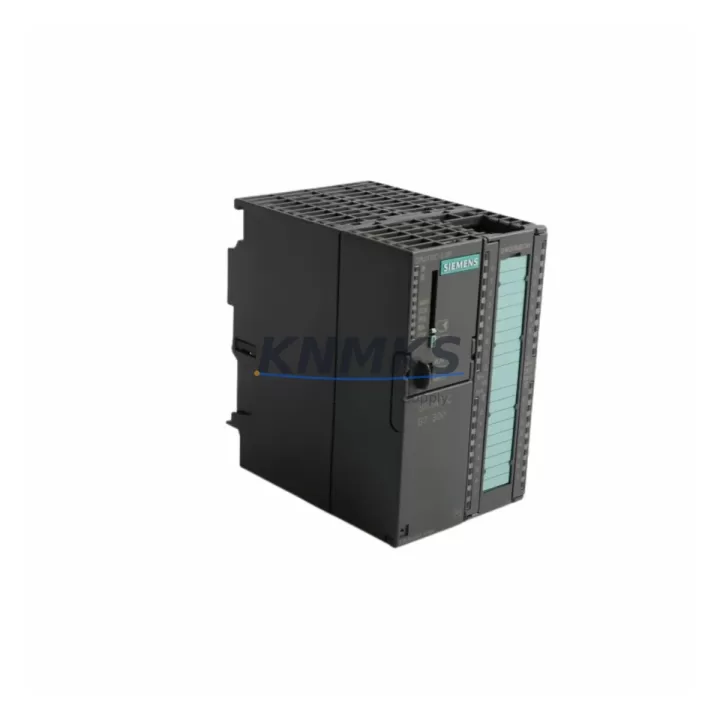
The Siemens 6ES7313-6CG04-0AB0 is a CPU 313C-2 DP module within the SIMATIC S7-300 programmable logic controller family — one of the most widely deployed control platforms in discrete manufacturing, process automation, and utility infrastructure worldwide. As production lines age and OEM support windows close, maintaining a verified stock of this CPU module becomes a critical element of any industrial maintenance strategy. This listing provides original, pre-shipment tested units backed by a support terms confirmed by quotation, with long-term supply commitment to support both emergency replacement and planned annual overhaul cycles.
The 6ES7313-6CG04-0AB0 integrates a compact CPU with onboard digital I/O and a PROFIBUS DP master/slave interface, making it a versatile controller for distributed automation architectures. Its 192 KB working memory and MPI/PROFIBUS DP communication capability allow it to serve as the central processing node in mid-complexity S7-300 racks, coordinating I/O expansion modules, intelligent field devices, and HMI panels without requiring an additional communications processor. For maintenance engineers managing legacy S7-300 installations, this CPU represents a direct, configuration-compatible replacement that minimises re-engineering time during unplanned downtime events.
Spare Maintenance Table
| Parameter | Specification |
|---|---|
| Part Number | 6ES7313-6CG04-0AB0 |
| Product Family | SIMATIC S7-300 |
| Module Type | CPU 313C-2 DP (Compact CPU with DP Interface) |
| Working Memory | 192 KB (program + data) |
| Onboard Digital I/O | 16 DI / 16 DO (integrated) |
| Communication Interface | MPI + PROFIBUS DP (Master/Slave) |
| PROFIBUS DP Speed | Up to 12 Mbit/s |
| Supply Voltage | 24 V DC (via PS module on rack) |
| Operating Temperature | 0 °C to +60 °C |
| Mounting | S7-300 DIN rail rack (standard profile) |
| Country of Origin | Germany |
| Firmware Compatibility | STEP 7 V5.x / TIA Portal (via legacy project migration) |
| Replacement Compatibility | Direct replacement for 6ES7313-6CG04-0AB0; cross-check with 6ES7313-6CE01-0AB0 / 6ES7313-6CF03-0AB0 for earlier revisions |
| Support terms | 12 Months from shipment date |
| Pre-Shipment Testing | Power-on functional verification performed before dispatch |
| Supply Commitment | Long-term availability; suitable for multi-unit blanket orders |
Maintenance Planning for Continuous Operation
When replacing the 6ES7313-6CG04-0AB0 in a live S7-300 rack, a disciplined inspection of the surrounding electrical environment is essential to prevent repeat failures and ensure a stable return to production. Maintenance engineers should treat a CPU replacement as an opportunity to audit the full control cabinet, not merely swap the module.
Begin with the power supply module — typically a 6ES7307-1BA01-0AA0 or equivalent S7-300 PS 307 unit — and verify output voltage stability under load. A degraded power supply is a common root cause of CPU faults and memory corruption events. Measure the 24 V DC rail with a calibrated meter before inserting the replacement CPU.
Inspect the backplane bus connector on the rack itself. The S7-300 uses a passive backplane, and physical damage or oxidation on the bus connector pins can cause intermittent communication faults that are misdiagnosed as CPU failures. If the rack has been in service for more than five years, consider replacing the bus connectors as a preventive measure alongside the CPU.
For installations using PROFIBUS DP distributed I/O — such as ET 200S or ET 200M remote stations connected via 6ES7972-0BA52-0XA0 PROFIBUS connectors — verify the DP network termination resistors at both ends of the segment. A missing or failed terminator will cause the new CPU to report DP slave communication errors immediately after startup, which can be mistaken for a faulty replacement unit.
Check all signal cables connected to the onboard I/O terminals. The 6ES7313-6CG04-0AB0 integrates 16 digital inputs and 16 digital outputs directly on the module front connector. Inspect the 6ES7392-1AJ00-0AA0 front connector for terminal tightness, insulation condition, and correct wire labelling. Loose terminals on high-cycle I/O points are a frequent source of nuisance faults in older installations.
If the control cabinet includes relay output modules such as the 6ES7322-1BH01-0AA0 SM 322 digital output module, inspect the relay contacts for wear, especially on outputs driving inductive loads. Relay degradation can cause voltage spikes that stress the CPU’s I/O interface. Installing surge suppressors on inductive loads is recommended as part of the restoration work.
For systems with an HMI panel — such as a TP700 Comfort or MP377 connected via MPI — verify the MPI address assignment after CPU replacement. The new CPU must be configured with the same MPI address as the original to restore HMI communication without requiring panel reconfiguration. Confirm this in the STEP 7 hardware configuration before downloading the project.
Procurement engineers planning annual maintenance budgets should consider holding a minimum of one spare 6ES7313-6CG04-0AB0 unit per production line. For facilities operating multiple S7-300 racks, a centralised spare parts inventory covering the CPU, power supply, and at least one digital I/O module per rack type significantly reduces mean time to repair (MTTR) during unplanned outages. Long-term supply agreements are available for multi-unit requirements.
Site Replacement Workflow
Step 1 — Backup existing program: Before powering down, use STEP 7 or TIA Portal to upload the current CPU program and hardware configuration to the programming device. Verify the backup is complete and readable. Do not proceed without a confirmed backup.
Step 2 — Power down and isolate: Switch the PS module to OFF and lock out the incoming supply per site LOTO procedures. Wait for the CPU RUN/STOP LED to extinguish before touching the module.
Step 3 — Remove the failed CPU: Disconnect the MPI/DP cable and the front connector. Release the module mounting screws and slide the CPU off the backplane bus connector. Note the slot position — the CPU must be reinstalled in slot 2 of the S7-300 rack.
Step 4 — Inspect and clean: Inspect the backplane bus connector pins for damage or contamination. Clean with dry compressed air if required. Do not use solvents on the backplane.
Step 5 — Install replacement unit: Slide the 6ES7313-6CG04-0AB0 onto the backplane bus connector in slot 2. Secure the mounting screws. Reconnect the front connector and MPI/DP cable. Verify the PROFIBUS DP address switch settings match the original configuration.
Step 6 — Power on and download: Restore power via the PS module. Set the CPU mode switch to STOP. Download the backed-up hardware configuration and program from the programming device. Verify no hardware configuration errors are reported in STEP 7 diagnostics.
Step 7 — Functional verification: Switch the CPU to RUN. Monitor the diagnostic buffer for the first 10 minutes of operation. Verify all DP slaves are communicating, all I/O signals are responding correctly, and the HMI panel is displaying live data. Document the replacement in the site maintenance log.
This workflow is applicable to direct replacement of earlier CPU 313C-2 DP revisions. If migrating from a significantly older firmware revision, consult the STEP 7 hardware catalogue for any configuration parameter differences before downloading.
Spare Parts Support FAQ
Q1: Is the 6ES7313-6CG04-0AB0 compatible with earlier S7-300 CPU 313C-2 DP revisions?
The 6ES7313-6CG04-0AB0 (revision 04) is the current production revision of the CPU 313C-2 DP. It is generally hardware-compatible with earlier revisions such as the 6ES7313-6CF03-0AB0 and 6ES7313-6CE01-0AB0 when used with the same STEP 7 hardware configuration. However, firmware revision differences may require a hardware configuration update in STEP 7 before downloading. Always verify the hardware catalogue entry matches the installed revision to avoid configuration mismatch errors.
Q2: What pre-shipment testing is performed on each unit?
Each 6ES7313-6CG04-0AB0 unit undergoes a power-on functional verification prior to dispatch. This includes confirmation of LED status indicators, MPI communication response, and absence of hardware fault codes in the diagnostic buffer. Units that do not pass this verification are not shipped. Test records are available on request for quality-critical procurement requirements.
Q3: What support terms and long-term supply terms apply?
All units are covered by a support terms confirmed by quotation from the shipment date, covering hardware defects under normal operating conditions. For facilities requiring ongoing supply of S7-300 spare parts, long-term supply agreements and blanket order arrangements are available. Contact the sales team to discuss volume pricing, lead time commitments, and multi-SKU spare parts packages for S7-300 maintenance programmes.
Q4: How should this spare part be stored if not immediately installed?
Store the 6ES7313-6CG04-0AB0 in its original anti-static packaging in a dry environment at 0 °C to +40 °C with relative humidity below 75% (non-condensing). Avoid storage near strong electromagnetic fields or corrosive atmospheres. Inspect the unit annually if held in long-term storage, and perform a power-on verification before installation if the unit has been stored for more than 24 months.
© 2026 KNMKS. All rights reserved.
Original Source: https://knmks.com
Contact: admin@knmks.com | +86 18359268345
Product Identification
- Brand / Ecosystem
-
Siemens
Siemens - Model / Series
-
6ES7313-6CG04-0AB0
SIMATIC Series - Product Family
- PLCs & Controllers
- Availability Status
- Available on request after model and quantity confirmation
- Inquiry Type
- B2B RFQ, replacement inquiry and project spare-part request
- Pre-Quote Check
- Exact SKU, brand, series, quantity, nameplate photos and destination country are checked before quotation
System Path
Where this product fits in the KNMKS automation structure.
Specification & Inquiry Focus
- Control platform
- PLC, PAC and modular controllers
- Common needs
- CPU, rack, power and I/O expansion
- Project support
- Replacement, cabinet build and maintenance
Buyer Confirmation
Information KNMKS checks before replying.
- Exact model
- 6ES7313-6CG04-0AB0
- Brand / ecosystem
- Siemens
- Product family
- PLCs & Controllers
- Application note
- Replacement, maintenance, project build or spare-part list
- Useful photos
- Nameplate, installed unit, cabinet layout or connector side
- Delivery details
- Quantity, destination country and target schedule
Document Support
Files and notes can be confirmed during quotation.
- Product photos or nameplate confirmation when available
- Packing and delivery notes before quotation confirmation
- Support scope and delivery terms confirmed per inquiry
- Export document coordination for qualified B2B requests
Inquiry Support
- Model cross-checking before quotation
- CPU, power, rack and expansion module matching
- Support for replacement and project inquiry
What to Send Us
- Brand and exact model number: Siemens 6ES7313-6CG04-0AB0
- Quantity and required delivery time
- Application, replacement requirement or nameplate photo
- Destination country and shipping preference
RFQ Preparation
This is a product inquiry page built for RFQ communication.
Fast Model Check
Send this model to KNMKS for confirmation.
Include quantity, destination country and photos if this is a maintenance replacement. The inquiry will be saved with a reference number after submission.
Brand & Compatibility Note
KNMKS displays automation product information for well-known industrial brand ecosystems and compatible replacement references. Brand names are used for product identification and compatibility reference only; final availability and commercial terms are confirmed per quotation.
 Manufacturing
 Machine Tools
 Packaging
 Energy & Power



 HMI & Displays
 Servo Systems
 Variable Frequency Drives
 Sensors