
Overview
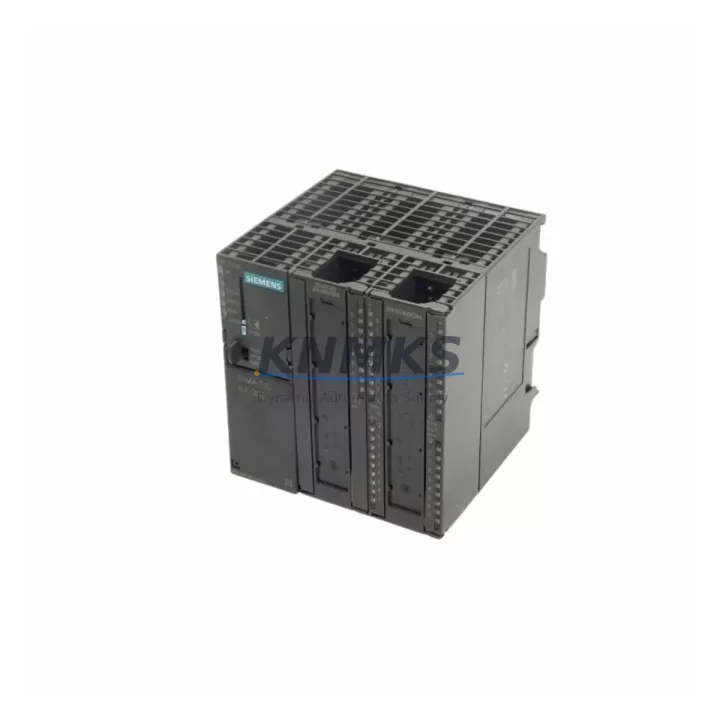
Siemens 6ES7313-5BF03-0AB0 Migration-Ready CPU for Legacy S7-300 Control Systems
The Siemens 6ES7313-5BF03-0AB0 is a compact CPU module from the SIMATIC S7-300 series, designed for integration into legacy automation environments where continuity, compatibility, and minimal downtime are critical. As production lines age and original control hardware approaches end-of-life, this CPU provides a verified drop-in replacement path for facilities operating older S7-300 racks — including those originally built around the 6ES7313-5BE03-0AB0 and 6ES7313-5BF00-0AB0 predecessors.
With 24 digital inputs and 16 digital outputs integrated on-board, the 6ES7313-5BF03-0AB0 reduces the need for additional I/O expansion in space-constrained control cabinets. Its MPI and Profibus DP interface supports direct communication with existing HMI panels, distributed I/O nodes, and programming devices without requiring protocol conversion or network reconfiguration. For plants running STEP 7 V5.x programs, the CPU accepts existing project uploads with minimal adaptation, preserving original ladder logic, function block diagrams, and data block structures.
Before installation, engineers should verify power supply capacity on the existing S7-300 rack — particularly when replacing an older CPU variant that may have drawn different current from the PS 307 or PS 305 power supply modules. Terminal wiring on the integrated I/O connector must be confirmed against the original wiring diagram, as pin assignments for digital inputs and outputs are consistent across the BF-series but should be validated against the site-specific panel drawing. Backplane slot addressing must also be confirmed: the CPU occupies slot 2 by default, and any downstream SM 321 digital input modules, SM 322 digital output modules, or CP 343-1 communication processors must retain their original slot assignments to avoid address conflicts in the loaded program.
For systems using Profibus DP, the station address configured in the CPU must match the address stored in the original hardware configuration. If the HMI — such as a TP 177B or MP 277 panel — communicates via MPI, the existing MPI address and baud rate settings should be preserved in the replacement CPU’s hardware configuration before going online. Firmware version compatibility between the CPU and any connected ET 200M distributed I/O stations or IM 153 interface modules should be reviewed in advance to prevent bus faults during commissioning.
Installation space in the control cabinet should be measured prior to ordering. The 6ES7313-5BF03-0AB0 occupies a standard S7-300 rail slot and is mechanically compatible with existing DIN rail mounting configurations. No additional mounting hardware is required for a like-for-like swap.
Migration Compatibility Table
| Parameter | 6ES7313-5BF03-0AB0 | Notes / Retrofit Guidance |
|---|---|---|
| Series | SIMATIC S7-300 | Direct rack-compatible with all S7-300 rail configurations |
| Integrated I/O | 24 DI / 16 DO (24 VDC) | Verify terminal wiring against original panel drawing before power-on |
| Communication Interface | MPI + Profibus DP (Master/Slave) | Retain original MPI/DP station address from replaced CPU |
| Programming Software | STEP 7 V5.4 and above | Existing STEP 7 projects upload without structural changes in most cases |
| Backplane Interface | Standard S7-300 backplane bus | Slot 2 default; downstream SM/CP modules retain original slot addresses |
| Power Supply Compatibility | 24 VDC via S7-300 PS module | Confirm PS 307 / PS 305 current capacity before replacement |
| Firmware | V2.6 (factory default) | Check IM 153 / ET 200M firmware compatibility before going online |
| Mounting | Standard S7-300 DIN rail | No additional hardware required for like-for-like swap |
| Replaces | 6ES7313-5BE03-0AB0, 6ES7313-5BF00-0AB0 | Functional equivalent; verify hardware configuration in STEP 7 |
| Support terms | 12 Months | Covers manufacturing defects; pre-shipment functional test included |
Retrofit Planning for Existing Automation Systems
Retrofit projects involving the 6ES7313-5BF03-0AB0 typically occur within broader control cabinet upgrades where multiple components are being refreshed simultaneously. In these scenarios, the CPU replacement is often coordinated with the renewal of adjacent modules to reduce cumulative downtime across multiple maintenance windows.
Power distribution within the cabinet should be reviewed early in the planning phase. If the existing PS 307 5A power supply module is approaching its service life, replacing it alongside the CPU eliminates a secondary failure risk during the post-retrofit commissioning period. Similarly, if the rack includes aging SM 321 or SM 322 signal modules with known contact wear or diagnostic fault histories, scheduling their replacement during the same maintenance window reduces the number of planned outages.
For systems with distributed I/O connected via Profibus DP, the CP 343-1 communication processor — if present — should be checked for firmware compatibility with the replacement CPU. In installations where the control network also includes a CP 343-1 Lean or CP 343-1 Advanced for Ethernet connectivity to SCADA or MES systems, the existing IP address configuration and connection parameters should be documented before the CPU is removed, as these settings are stored in the CPU’s hardware configuration and will need to be reloaded after replacement.
HMI integration is another area requiring pre-retrofit verification. Panels communicating via MPI — including TP 277 and MP 377 series — should have their project files backed up and the MPI address confirmed. If the site uses WinCC flexible or TIA Portal-based HMI projects, the communication driver settings should be reviewed to ensure compatibility with the replacement CPU’s firmware version.
Signal isolators installed between field devices and the CPU’s integrated I/O terminals should be documented as part of the wiring verification process. In older installations, signal conditioning modules may have been added to handle non-standard sensor outputs, and their presence affects the effective input signal range seen by the CPU’s digital input channels.
Programming cables — such as the PC Adapter USB or MPI/Profibus adapter — should be prepared and tested before the maintenance window begins. Having a verified programming connection ready before the CPU swap reduces the risk of extended downtime caused by communication setup issues during the commissioning phase.
Downtime Control During System Migration
Minimizing production downtime during a CPU replacement requires structured preparation before the maintenance window opens. The most effective approach begins with a full backup of the existing CPU’s program, hardware configuration, and data blocks using STEP 7 or TIA Portal, stored on a local engineering station and verified for completeness before the physical swap begins.
Where possible, the replacement 6ES7313-5BF03-0AB0 should be pre-configured offline — hardware configuration loaded, MPI/DP address set, and program downloaded — so that the on-site swap is limited to physical installation and a single online connection test. This approach reduces the active maintenance window to the time required for mechanical removal, installation, and functional verification, rather than including programming and configuration steps in the critical path.
During the swap, the original CPU’s memory card should be inspected. If the program was stored on a Siemens MMC (Micro Memory Card), it can be transferred directly to the replacement CPU, provided the firmware version is compatible. This eliminates the need for a programming cable connection in some configurations and further reduces commissioning time.
After power-on, the first verification step should confirm that all Profibus DP slaves — including any ET 200S or ET 200M stations — have established communication without bus faults. The CPU’s diagnostic buffer should be reviewed for any startup errors before releasing the system to production. Field I/O signals should be verified against the original I/O list before the system is returned to automatic mode.
All units supplied are pre-shipment tested for functional operation prior to dispatch. The support terms confirmed by quotation cover manufacturing defects and provides a defined support path if issues arise during or after commissioning.
Retrofit Support FAQ
Q: Is the 6ES7313-5BF03-0AB0 a direct replacement for the 6ES7313-5BE03-0AB0?
A: Yes. The 6ES7313-5BF03-0AB0 is the functional successor to the 6ES7313-5BE03-0AB0 within the S7-300 CPU 313C family. The hardware configuration in STEP 7 should be updated to reflect the new order number, but the program logic, I/O addressing, and communication settings are compatible without structural changes in most standard applications.
Q: What pre-shipment testing is performed before dispatch?
A: Each unit undergoes a functional power-on test to verify CPU startup, integrated I/O response, and communication interface operation before shipment. Units that do not pass functional verification are not dispatched. A support terms confirmed by quotation is provided from the date of shipment.
Q: Do I need to reconfigure the Profibus DP network after replacing the CPU?
A: In most cases, no. If the replacement CPU is configured with the same DP master address and the existing hardware configuration is reloaded, the Profibus DP network will resume normal operation. Station addresses on connected slaves — including ET 200M and ET 200S nodes — do not need to be changed.
Q: Is long-term inventory availability confirmed for this SKU?
A: Yes. Stock is maintained specifically to support legacy S7-300 installations with long-term spare parts requirements. Availability can be confirmed prior to order placement. For volume requirements or scheduled maintenance contracts, contact the sales team directly to discuss supply commitments.
© 2026 KNMKS. All rights reserved.
Original Source: https://knmks.com
Contact: admin@knmks.com | +86 18359268345
Product Identification
- Brand / Ecosystem
-
Siemens
Siemens - Model / Series
-
6ES7313-5BF03-0AB0
SIMATIC Series - Product Family
- PLCs & Controllers
- Availability Status
- Available on request after model and quantity confirmation
- Inquiry Type
- B2B RFQ, replacement inquiry and project spare-part request
- Pre-Quote Check
- Exact SKU, brand, series, quantity, nameplate photos and destination country are checked before quotation
System Path
Where this product fits in the KNMKS automation structure.
Specification & Inquiry Focus
- Control platform
- PLC, PAC and modular controllers
- Common needs
- CPU, rack, power and I/O expansion
- Project support
- Replacement, cabinet build and maintenance
Buyer Confirmation
Information KNMKS checks before replying.
- Exact model
- 6ES7313-5BF03-0AB0
- Brand / ecosystem
- Siemens
- Product family
- PLCs & Controllers
- Application note
- Replacement, maintenance, project build or spare-part list
- Useful photos
- Nameplate, installed unit, cabinet layout or connector side
- Delivery details
- Quantity, destination country and target schedule
Document Support
Files and notes can be confirmed during quotation.
- Product photos or nameplate confirmation when available
- Packing and delivery notes before quotation confirmation
- Support scope and delivery terms confirmed per inquiry
- Export document coordination for qualified B2B requests
Inquiry Support
- Model cross-checking before quotation
- CPU, power, rack and expansion module matching
- Support for replacement and project inquiry
What to Send Us
- Brand and exact model number: Siemens 6ES7313-5BF03-0AB0
- Quantity and required delivery time
- Application, replacement requirement or nameplate photo
- Destination country and shipping preference
RFQ Preparation
This is a product inquiry page built for RFQ communication.
Fast Model Check
Send this model to KNMKS for confirmation.
Include quantity, destination country and photos if this is a maintenance replacement. The inquiry will be saved with a reference number after submission.
Brand & Compatibility Note
KNMKS displays automation product information for well-known industrial brand ecosystems and compatible replacement references. Brand names are used for product identification and compatibility reference only; final availability and commercial terms are confirmed per quotation.
 Manufacturing
 Machine Tools
 Packaging
 Energy & Power



 HMI & Displays
 Servo Systems
 Variable Frequency Drives
 Sensors