
Overview
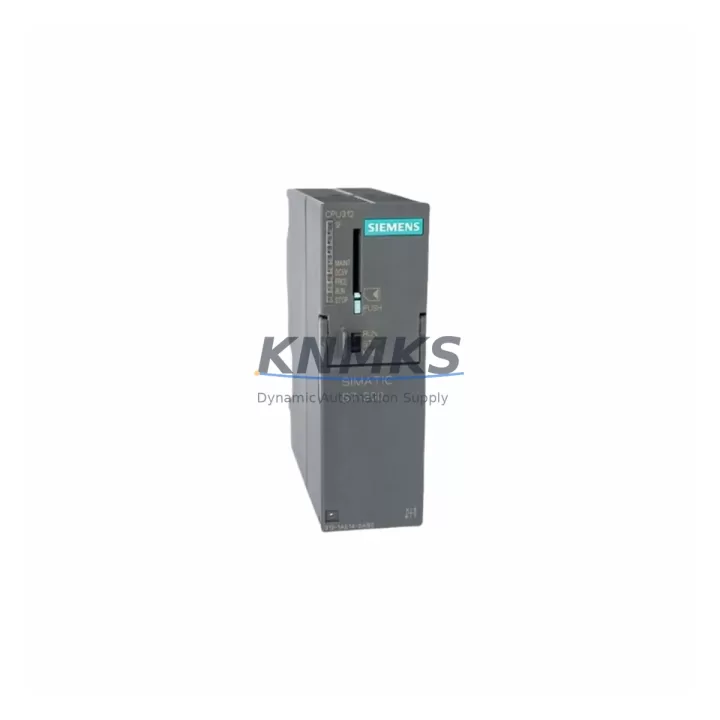
Siemens 6ES7312-1AE13-0AB0 Maintenance-Proven Spare Part for Factory Uptime
The Siemens 6ES7312-1AE13-0AB0 is the CPU 312 central processing unit for the SIMATIC S7-300 modular PLC platform — one of the most widely deployed programmable logic controllers in discrete manufacturing, process automation, and utility infrastructure worldwide. As original production of this CPU series approaches end-of-life, maintenance engineers and spare parts procurement teams face increasing pressure to secure verified replacement units that can be installed without re-engineering the control architecture. This listing provides a pre-tested, original-specification 6ES7312-1AE13-0AB0 unit, dispatched from multi-region stock with a support terms confirmed by quotation and full pre-shipment functional verification.
Whether you are managing a scheduled annual shutdown, responding to an unplanned CPU fault, or building a strategic spare parts buffer for a critical production line, the 6ES7312-1AE13-0AB0 is a direct drop-in replacement for existing S7-300 rack installations. The unit retains full compatibility with STEP 7 programming software, existing MMC memory cards, and the standard S7-300 backplane bus — meaning your engineering team can restore operation without modifying the existing program, I/O configuration, or network topology.
Spare Maintenance Table
| Parameter | Specification |
|---|---|
| Part Number / SKU | 6ES7312-1AE13-0AB0 |
| Product Series | SIMATIC S7-300 |
| Module Type | CPU 312 — Central Processing Unit |
| Brand / Manufacturer | Siemens AG |
| Country of Origin | Germany (DE) |
| Working Memory | 32 KB (integrated) |
| Load Memory | MMC (Micro Memory Card) — external, up to 8 MB |
| Processing Speed | 0.1 ms / 1000 binary instructions |
| Digital I/O (integrated) | None — expansion via SM modules on S7-300 backplane |
| Communication Interfaces | MPI (Multi-Point Interface), 187.5 kbps |
| Power Supply Voltage | 24 V DC (via PS 307 or equivalent S7-300 power supply module) |
| Operating Temperature | 0 °C to +60 °C (horizontal installation) |
| Protection Class | IP20 |
| Backplane Compatibility | S7-300 standard rail (DIN rail mounting) |
| Programming Software | SIMATIC STEP 7 V5.x / TIA Portal (S7-300 mode) |
| Firmware Version | V2.6 (as per original Siemens specification) |
| Dimensions (W × H × D) | 40 mm × 125 mm × 130 mm |
| Weight | Approx. 1,210 g (with MMC) |
| Pre-Shipment Testing | Yes — functional power-on and communication verification |
| Support terms | 12 Months from date of dispatch |
| Condition | Original spare — new or refurbished to OEM specification |
| Dispatch | Multi-region stock — global express shipping available |
Maintenance Planning for Continuous Operation
When a 6ES7312-1AE13-0AB0 CPU fault is identified — whether through a STOP LED indication, a STEP 7 diagnostic buffer alarm, or a complete loss of program execution — the replacement workflow extends beyond the CPU module itself. A disciplined maintenance engineer will treat a CPU failure as a trigger for a broader cabinet inspection to prevent secondary failures from compounding downtime.
Begin with the PS 307 power supply module (e.g., 6ES7307-1BA01-0AA0 or 6ES7307-1EA01-0AA0): verify output voltage stability at 24 V DC under load, check for capacitor aging, and confirm the module is not operating at thermal limits. A degraded power supply is a common root cause of intermittent CPU resets and should be replaced proactively if the unit has been in service for more than five years.
Next, inspect the S7-300 backplane bus connector and rail mounting. Loose or corroded bus connectors between the CPU and adjacent signal modules (SM 321 digital input, SM 322 digital output, SM 331 analog input) can cause sporadic I/O errors that are misdiagnosed as CPU faults. Clean and reseat all bus connectors during the replacement window.
The MMC (Micro Memory Card) — typically a 6ES7953-8LF31-0AA0 or equivalent — stores the user program and retentive data. Before removing the faulty CPU, extract the MMC and verify its integrity using a known-good CPU or a card reader. If the MMC is more than seven years old or shows read errors, replace it as part of the same maintenance event to avoid a program loss incident after the new CPU is installed.
For sites using CP 343-1 Ethernet communication processors or IM 360/361 interface modules for multi-rack expansion, confirm that these modules resume normal communication after the CPU replacement. MPI network topology and Profibus DP master configurations stored in the CPU may need to be reloaded from the STEP 7 project archive if the MMC was not transferred.
Finally, check 24 V DC branch circuit fuses and miniature circuit breakers feeding the S7-300 rack. A CPU failure caused by a transient overvoltage or short circuit may have stressed upstream protection components. Replace any fuse that shows signs of thermal discoloration, and verify MCB trip curves are appropriate for the installed load.
Site Replacement Workflow
Step 1 — Isolate and document. Place the CPU in STOP mode via the mode selector switch (if accessible) or via STEP 7 online functions. Record the current diagnostic buffer contents and note the last program cycle time. Photograph the cabinet layout and all wiring labels before any disassembly.
Step 2 — Remove the MMC. With power removed from the rack, extract the Micro Memory Card from the CPU slot. Label and store it securely. This card contains the user program and will be transferred to the replacement unit.
Step 3 — Remove the faulty CPU. Disconnect the MPI/Profibus connector from the CPU front panel. Unscrew the CPU from the DIN rail and slide it off the backplane bus connector. Inspect the bus connector pins for damage or corrosion before installing the replacement.
Step 4 — Install the 6ES7312-1AE13-0AB0 replacement. Slide the new CPU onto the backplane bus connector, secure to the DIN rail, and insert the MMC. Reconnect the MPI cable. Apply power and observe the LED sequence: RUN (green) should illuminate after a brief startup cycle. If STOP (yellow) or SF (red) LEDs remain active, connect STEP 7 and review the diagnostic buffer for configuration mismatches.
Step 5 — Verify I/O and communications. Perform a full I/O force test on critical digital and analog channels. Confirm Profibus DP slave communication is re-established for all connected drives, valve positioners, and remote I/O stations. Document the replacement in the site maintenance log with the new unit serial number and support terms expiry date.
Spare Parts Support FAQ
Q1: Is the 6ES7312-1AE13-0AB0 still available as a new original unit, or only as refurbished stock?
Both new original and refurbished-to-OEM-specification units are available depending on current stock. All units — regardless of condition classification — undergo pre-shipment functional testing including power-on verification and MPI communication check. Each unit is dispatched with a support terms confirmed by quotation from the date of shipment. Contact admin@knmks.com to confirm current stock condition and lead time.
Q2: Can I use the 6ES7312-1AE13-0AB0 as a direct replacement for earlier CPU 312 variants such as the 6ES7312-1AD10-0AB0?
The 6ES7312-1AE13-0AB0 (firmware V2.6) is the latest hardware revision of the CPU 312 and is backward-compatible with earlier S7-300 rack configurations. The user program stored on the MMC is transferable without modification in most cases. However, if the original project was compiled under an older STEP 7 version, a recompile and download may be required to resolve firmware-level differences. Always verify compatibility against your specific STEP 7 project version before site installation.
Q3: What is the recommended spare parts inventory strategy for sites running multiple S7-300 racks?
For sites with three or more S7-300 racks in production-critical applications, a minimum of one CPU 312 spare per five racks is recommended, supplemented by one PS 307 power supply spare and one MMC per rack. For high-availability lines, consider holding a pre-configured hot-spare CPU with the current program version loaded on a dedicated MMC — this reduces restoration time to under 30 minutes. Long-term supply agreements are available through KNMKS to lock pricing and guarantee stock reservation for 12–24 month horizons.
Q4: How does KNMKS verify the unit before shipment, and what documentation is provided?
Every 6ES7312-1AE13-0AB0 unit undergoes a structured pre-shipment test protocol: visual inspection for physical damage, power-on test at rated 24 V DC, LED status verification (RUN mode), and MPI communication handshake test. Units that pass all checks are packaged in anti-static ESD-safe materials with desiccant. A test report and support terms certificate (12 months from dispatch date) are included with each shipment. Export documentation and customs declarations are prepared for international orders upon request.
© 2026 KNMKS. All rights reserved.
Original Source: https://knmks.com
Contact: admin@knmks.com | +86 18359268345
Product Identification
- Brand / Ecosystem
-
Siemens
Siemens - Model / Series
-
6ES7312-1AE13-0AB0
SIMATIC Series - Product Family
- PLCs & Controllers
- Availability Status
- Available on request after model and quantity confirmation
- Inquiry Type
- B2B RFQ, replacement inquiry and project spare-part request
- Pre-Quote Check
- Exact SKU, brand, series, quantity, nameplate photos and destination country are checked before quotation
System Path
Where this product fits in the KNMKS automation structure.
Specification & Inquiry Focus
- Control platform
- PLC, PAC and modular controllers
- Common needs
- CPU, rack, power and I/O expansion
- Project support
- Replacement, cabinet build and maintenance
Buyer Confirmation
Information KNMKS checks before replying.
- Exact model
- 6ES7312-1AE13-0AB0
- Brand / ecosystem
- Siemens
- Product family
- PLCs & Controllers
- Application note
- Replacement, maintenance, project build or spare-part list
- Useful photos
- Nameplate, installed unit, cabinet layout or connector side
- Delivery details
- Quantity, destination country and target schedule
Document Support
Files and notes can be confirmed during quotation.
- Product photos or nameplate confirmation when available
- Packing and delivery notes before quotation confirmation
- Support scope and delivery terms confirmed per inquiry
- Export document coordination for qualified B2B requests
Inquiry Support
- Model cross-checking before quotation
- CPU, power, rack and expansion module matching
- Support for replacement and project inquiry
What to Send Us
- Brand and exact model number: Siemens 6ES7312-1AE13-0AB0
- Quantity and required delivery time
- Application, replacement requirement or nameplate photo
- Destination country and shipping preference
RFQ Preparation
This is a product inquiry page built for RFQ communication.
Fast Model Check
Send this model to KNMKS for confirmation.
Include quantity, destination country and photos if this is a maintenance replacement. The inquiry will be saved with a reference number after submission.
Brand & Compatibility Note
KNMKS displays automation product information for well-known industrial brand ecosystems and compatible replacement references. Brand names are used for product identification and compatibility reference only; final availability and commercial terms are confirmed per quotation.
 Manufacturing
 Machine Tools
 Packaging
 Energy & Power



 HMI & Displays
 Servo Systems
 Variable Frequency Drives
 Sensors