
Overview
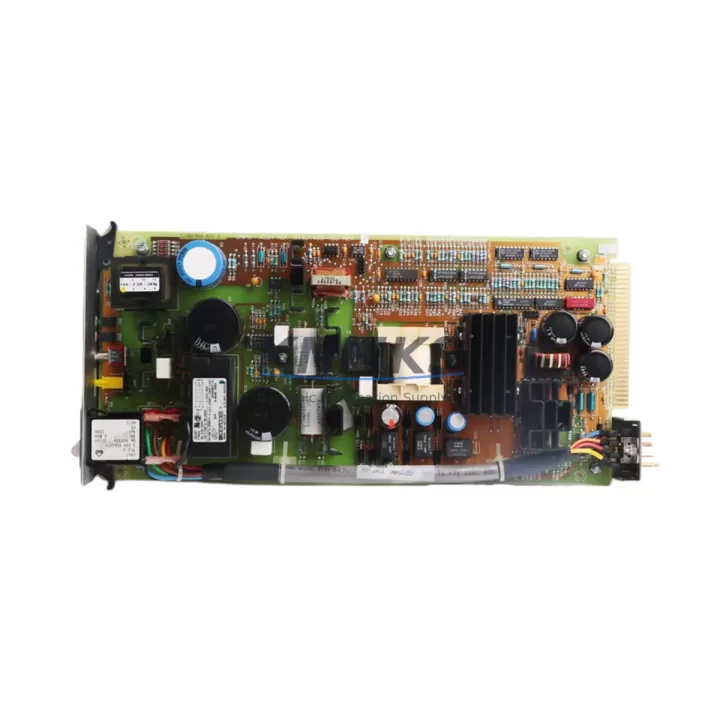
Siemens 6ES7307-1EA01-0AA0 Maintenance-Proven Spare Part for Factory Uptime
The Siemens 6ES7307-1EA01-0AA0 is the PS307 5A regulated DC power supply module purpose-built for the SIMATIC S7-300 programmable logic controller platform. In industrial maintenance environments — from automotive assembly lines to chemical processing plants — this module is the backbone of the S7-300 control cabinet’s power architecture. When this unit fails or degrades, the entire PLC rack loses its regulated 24 VDC supply, triggering an immediate production halt. Stocking a verified original spare is not optional; it is a core element of any responsible maintenance strategy for facilities running SIMATIC S7-300 systems.
At KNMKS, every 6ES7307-1EA01-0AA0 unit is sourced from authorized supply chains, individually inspected, and function-tested before dispatch. We support maintenance engineers and procurement teams across manufacturing, utilities, and process industries who need a reliable, long-term supply partner — not a one-time transaction. Our support terms confirmed by quotation and documented test-before-ship process give procurement engineers the confidence to approve this part for critical spare inventories.
Spare Maintenance Table
| Part Number | 6ES7307-1EA01-0AA0 |
| Series / Family | PS307 / SIMATIC S7-300 |
| Brand | Siemens |
| Module Type | Regulated DC Power Supply Module |
| Input Voltage | 120/230 VAC (wide-range), 50/60 Hz |
| Output Voltage | 24 VDC (regulated) |
| Output Current | 5 A |
| Output Power | 120 W |
| Mounting | DIN Rail (S7-300 standard rail) |
| Country of Origin | Germany |
| Protection Class | IP20 |
| Operating Temperature | 0 °C to +60 °C |
| Compatibility | SIMATIC S7-300 racks; replaces 6ES7307-1EA00-0AA0 |
| Installation | Slot 1 of S7-300 rack; no bus connector required |
| Maintenance Recommendation | Inspect output voltage under load annually; replace if ripple exceeds spec or output drops below 23.5 VDC |
| Support terms | 12 Months — KNMKS Verified |
Maintenance Planning for Continuous Operation
A power supply failure in an S7-300 cabinet rarely occurs in isolation. When the 6ES7307-1EA01-0AA0 is flagged for replacement during a scheduled shutdown or emergency callout, experienced maintenance engineers treat it as a trigger for a broader cabinet inspection. The 24 VDC bus fed by this PS307 module powers not only the CPU — such as the 6ES7315-2AG10-0AB0 CPU315-2 DP — but also the distributed I/O modules, signal modules, and any 24 VDC field devices wired through the cabinet.
During the same maintenance window, it is standard practice to verify the condition of the S7-300 backplane rail and bus connectors, since a degraded power supply often masks underlying connector oxidation or micro-arcing. The SM321 digital input modules and SM322 digital output modules in the same rack should be checked for correct 24 VDC supply voltage at their field terminals. If the cabinet includes a CP343-1 Ethernet communication module or a CP342-5 PROFIBUS module, their power draw should be re-verified against the PS307’s 5 A capacity to confirm the load budget remains within specification after any recent I/O expansion.
For cabinets with 24 VDC relay output circuits, the intermediate relay modules — commonly Phoenix Contact or Weidmüller DIN rail relays — should be inspected for coil resistance and contact wear, as a failing power supply can cause relay chatter that accelerates contact erosion. Terminal blocks and wire ferrules on the 24 VDC distribution bus should be torque-checked, particularly in high-vibration environments. If the installation includes a SITOP power supply as a redundant or supplementary 24 VDC source, its output should be cross-checked against the PS307 output to confirm proper load sharing or switchover behavior.
Procurement engineers building annual MRO spare parts lists for S7-300 systems should consider stocking the 6ES7307-1EA01-0AA0 alongside the CPU module, at least one SM321 input module, one SM322 output module, and the relevant bus connectors (6ES7390-1AE80-0AA0). This combination covers the most statistically frequent failure points in an aging S7-300 rack and supports a complete rack restoration within a single maintenance shift.
Site Replacement Workflow
1. Pre-Replacement Verification: Confirm the incoming AC supply voltage matches the PS307 input range (120 or 230 VAC). Check the AC input fuse on the cabinet’s incoming power strip before assuming the PS307 has failed — a blown fuse is a common misdiagnosis. Measure the existing PS307 output with a calibrated multimeter; output below 23.5 VDC under load confirms module degradation.
2. Safe Isolation: De-energize the AC input to the PS307 at the cabinet’s main isolator. Do not rely solely on the PS307’s internal on/off switch. Allow 30 seconds for internal capacitors to discharge before handling the module.
3. Module Removal: The 6ES7307-1EA01-0AA0 mounts in Slot 1 of the S7-300 rail. Loosen the two front-panel screws, disconnect the AC input wiring from the screw terminals, and slide the module off the DIN rail. Note the AC input wiring configuration (L, N, PE) before disconnection.
4. Replacement Installation: Mount the new 6ES7307-1EA01-0AA0 onto the DIN rail in Slot 1. Reconnect AC input wiring to the correct terminals — L (Line), N (Neutral), PE (Protective Earth) — and torque to the terminal specification. Re-energize and measure output voltage before reconnecting the CPU and I/O modules.
5. System Restart and Verification: Power up the S7-300 rack and confirm the CPU transitions from STOP to RUN. Verify all I/O modules report correctly in the hardware configuration. Check the STEP 7 or TIA Portal diagnostic buffer for any new fault entries. Document the replacement in the cabinet’s maintenance log with the new module’s serial number and installation date.
This workflow is compatible with both the predecessor 6ES7307-1EA00-0AA0 and the current 6ES7307-1EA01-0AA0, making it suitable for legacy system upgrades without requiring hardware reconfiguration.
Spare Parts Support FAQ
Q1: Is the 6ES7307-1EA01-0AA0 a direct replacement for the 6ES7307-1EA00-0AA0?
Yes. The -1EA01- revision is the current production version and is a direct functional and mechanical replacement for the earlier -1EA00- variant. No firmware changes or hardware reconfiguration are required. The module installs in the same Slot 1 position on any standard S7-300 DIN rail.
Q2: How does KNMKS verify the condition of spare units before shipping?
Each 6ES7307-1EA01-0AA0 unit undergoes a pre-shipment functional test: AC input energization, output voltage measurement under rated load (5 A / 24 VDC), ripple and regulation check, and visual inspection of terminals and housing. A test record is available on request. All units are dispatched with a support terms confirmed by quotation covering manufacturing defects and functional failure under normal operating conditions.
Q3: What is the recommended inventory strategy for facilities running multiple S7-300 racks?
For facilities with three or more S7-300 racks, we recommend maintaining a minimum of one 6ES7307-1EA01-0AA0 per five racks as a rotating hot spare. For critical production lines where downtime cost exceeds USD 5,000 per hour, a one-to-one spare ratio is justified. KNMKS supports blanket purchase orders and scheduled replenishment programs to help procurement teams maintain optimal stock levels without capital overcommitment.
Q4: Can KNMKS support long-term supply for end-of-life S7-300 systems?
Yes. The SIMATIC S7-300 platform has a large installed base globally, and KNMKS maintains a dedicated inventory program for S7-300 spare parts including power supplies, CPU modules, and I/O modules. We provide supply continuity commitments for customers managing legacy system life extension programs, with lead times and pricing confirmed at order placement. Contact our technical sales team to discuss your specific fleet requirements.
—
© 2026 KNMKS. All rights reserved.
Original Source: https://knmks.com
Contact: admin@knmks.com | +86 18359268345
Product Identification
- Brand / Ecosystem
-
Siemens
Siemens - Model / Series
-
51401497-100
SIMATIC Series - Product Family
- PLCs & Controllers
- Availability Status
- Available on request after model and quantity confirmation
- Inquiry Type
- B2B RFQ, replacement inquiry and project spare-part request
- Pre-Quote Check
- Exact SKU, brand, series, quantity, nameplate photos and destination country are checked before quotation
System Path
Where this product fits in the KNMKS automation structure.
Specification & Inquiry Focus
- Control platform
- PLC, PAC and modular controllers
- Common needs
- CPU, rack, power and I/O expansion
- Project support
- Replacement, cabinet build and maintenance
Buyer Confirmation
Information KNMKS checks before replying.
- Exact model
- 51401497-100
- Brand / ecosystem
- Siemens
- Product family
- PLCs & Controllers
- Application note
- Replacement, maintenance, project build or spare-part list
- Useful photos
- Nameplate, installed unit, cabinet layout or connector side
- Delivery details
- Quantity, destination country and target schedule
Document Support
Files and notes can be confirmed during quotation.
- Product photos or nameplate confirmation when available
- Packing and delivery notes before quotation confirmation
- Support scope and delivery terms confirmed per inquiry
- Export document coordination for qualified B2B requests
Inquiry Support
- Model cross-checking before quotation
- CPU, power, rack and expansion module matching
- Support for replacement and project inquiry
What to Send Us
- Brand and exact model number: Siemens 51401497-100
- Quantity and required delivery time
- Application, replacement requirement or nameplate photo
- Destination country and shipping preference
RFQ Preparation
This is a product inquiry page built for RFQ communication.
Fast Model Check
Send this model to KNMKS for confirmation.
Include quantity, destination country and photos if this is a maintenance replacement. The inquiry will be saved with a reference number after submission.
Brand & Compatibility Note
KNMKS displays automation product information for well-known industrial brand ecosystems and compatible replacement references. Brand names are used for product identification and compatibility reference only; final availability and commercial terms are confirmed per quotation.
 Manufacturing
 Machine Tools
 Packaging
 Energy & Power



 HMI & Displays
 Servo Systems
 Variable Frequency Drives
 Sensors