
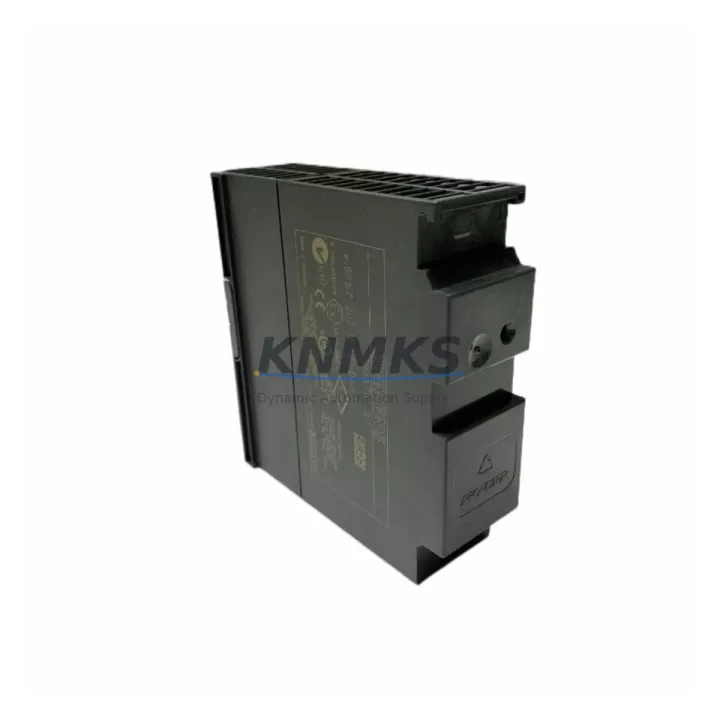
Overview
Siemens 6ES7307-1BA01-0AA0 Maintenance-Proven Spare Part for Factory Uptime
The Siemens 6ES7307-1BA01-0AA0 is a PS307 series regulated power supply module designed for the SIMATIC S7-300 programmable logic controller platform. Rated at 24VDC / 2A output with a wide-range AC input (120/230VAC), this module provides stable, low-ripple DC power to the S7-300 CPU, signal modules, and interface modules mounted on the DIN-rail rack. For maintenance engineers managing aging S7-300 control cabinets, keeping a verified spare of the 6ES7307-1BA01-0AA0 on the shelf is a fundamental uptime strategy — power supply failures are among the most common root causes of unplanned PLC shutdowns in continuous process and discrete manufacturing environments.
At KNMKS, every 6ES7307-1BA01-0AA0 unit is sourced from authorized supply chains, individually tested under load prior to shipment, and backed by a support terms confirmed by quotation. We support maintenance teams and procurement engineers across automotive, food & beverage, chemical, water treatment, and general factory automation sectors who require fast, reliable access to original Siemens spare parts without the lead-time risk of OEM direct orders.
Spare Maintenance Table
| Part Number | 6ES7307-1BA01-0AA0 |
| Series | PS307 — SIMATIC S7-300 Power Supply |
| Brand | Siemens |
| Output Voltage | 24VDC regulated |
| Output Current | 2A continuous |
| Input Voltage | 120 / 230VAC, 50/60Hz (wide-range) |
| Power Rating | 48W |
| Mounting | S7-300 DIN-rail rack, Slot 1 (leftmost) |
| Dimensions (W×H×D) | 50 × 125 × 120 mm (approx.) |
| Protection Class | IP20 |
| Operating Temperature | 0°C to +60°C |
| Compatibility | SIMATIC S7-300 CPU 31x series, IM 360/361/365 interface modules, SM 321/322/323/331/332/334 signal modules |
| Origin | Germany (DE) |
| Condition | Original, factory-tested before shipment |
| Support terms | 12 months from date of shipment |
| Maintenance Recommendation | Replace every 8–10 years or upon output voltage deviation >±2%, excessive heat, or LED fault indication |
Maintenance Planning for Continuous Operation
When a 6ES7307-1BA01-0AA0 power supply fails or shows signs of degradation — output voltage drift, thermal shutdown, or the green LED extinguishing under load — the impact extends beyond the power module itself. A systematic cabinet inspection is essential before and after replacement to prevent repeat failures and ensure the restored system is fully stable.
AC Input Side: Inspect the upstream circuit breaker and input fusing. A blown fuse or tripped breaker upstream of the PS307 is often the first indicator of an overload condition that caused the power supply to fail. Verify that the AC input wiring terminals are torqued to specification and free of oxidation — loose connections generate heat that accelerates module aging.
24VDC Load Bus: After installing the replacement 6ES7307-1BA01-0AA0, measure the 24VDC output under full rack load before powering the CPU. If the S7-300 rack is fully populated with SM 321 digital input modules, SM 322 digital output modules, or SM 331/332 analog I/O modules, confirm that the total current draw does not exceed the 2A rating of the PS307 2A variant. Racks with higher I/O density may require the 6ES7307-1EA01-0AA0 (5A) or 6ES7307-1KA02-0AA0 (10A) variants — a common oversight during emergency replacements that leads to premature failure of the new module.
CPU and Backplane: While the rack is de-energized, inspect the S7-300 backplane bus connector for bent pins or contamination. A damaged bus connector can cause intermittent CPU faults that are misdiagnosed as power supply issues. If the site runs a CPU 315-2 DP or CPU 317-2 PN/DP, verify that the PROFIBUS or PROFINET communication cables are properly shielded and grounded — RF interference from nearby VFDs or contactors can corrupt communication and trigger spurious CPU STOP states that appear power-related.
Interface and Communication Modules: If the S7-300 station uses an IM 360 / IM 361 expansion rack interface, inspect the inter-rack cable and confirm the expansion rack power supply (typically a second PS307 unit) is also within specification. Multi-rack S7-300 systems with a single failing PS307 in an expansion rack are frequently misdiagnosed as CPU or IM faults.
Signal Isolation and Field Wiring: For analog I/O applications, check signal isolators and barriers connected to SM 331 or SM 332 modules. A degraded 24VDC supply rail can introduce noise into analog signal chains, causing erratic process readings before the power supply fully fails. Replacing the PS307 often resolves analog drift issues that were previously attributed to sensor calibration problems.
Relay Outputs and Terminal Blocks: Inspect relay output modules (SM 322 relay variants) and associated terminal blocks for signs of arcing or contact wear. Relay coil inrush current contributes to PS307 load peaks — if the cabinet contains a high density of relay outputs, consider adding a secondary 24VDC supply or a SITOP PSU100S buffer module to stabilize the bus during switching transients.
Maintaining a minimum stock of one 6ES7307-1BA01-0AA0 per S7-300 station — or one unit per three to five stations for larger facilities — is a proven procurement strategy that eliminates the 2–6 week OEM lead time risk during unplanned outages. KNMKS maintains standing inventory of PS307 series modules and can support blanket purchase orders for multi-site maintenance programs.
Site Replacement Workflow
Step 1 — Pre-Replacement Verification: Before removing the failed PS307, record the CPU operating mode (RUN/STOP), note any active fault codes on the CPU diagnostic LED display, and photograph the wiring layout on the power supply terminals. Confirm the replacement 6ES7307-1BA01-0AA0 matches the exact order number — the suffix -0AA0 denotes the standard version; do not substitute with the -0AB0 or other sub-variants without confirming compatibility with your CPU firmware version.
Step 2 — Safe Isolation: Switch off the upstream AC circuit breaker and verify zero voltage at the PS307 AC input terminals using a calibrated multimeter. Wait a minimum of 60 seconds for internal capacitors to discharge before disconnecting wiring.
Step 3 — Module Exchange: Disconnect the AC input wiring (L1, N, PE) and the 24VDC output wiring (M, L+). Slide the PS307 module off the DIN rail. Install the replacement 6ES7307-1BA01-0AA0, reconnect wiring in reverse order, and verify terminal torque. Confirm the voltage selector switch (if present on your unit) is set to the correct AC input voltage for your site.
Step 4 — Power-Up and Validation: Restore AC power and measure the 24VDC output at the terminal block before powering the CPU. Acceptable range: 24VDC ±1%. Power the CPU and confirm it transitions to RUN mode. Check all I/O module status LEDs and verify field signals are within expected ranges. Document the replacement in the cabinet maintenance log with date, technician name, and new module serial number.
Step 5 — System Handover: Notify the process control team that the S7-300 station has been restored. If the CPU was in STOP mode prior to replacement, confirm with the process engineer before issuing a RUN command — some processes require a controlled restart sequence to avoid equipment damage.
Spare Parts Support FAQ
Q1: Is the 6ES7307-1BA01-0AA0 still available as a new original part, or is it discontinued?
The 6ES7307-1BA01-0AA0 is a mature Siemens product within the PS307 series. While Siemens has introduced newer power supply platforms, the PS307 2A module remains available through authorized spare parts channels. KNMKS maintains stock of original units and can advise on long-term availability and recommended stocking quantities for your maintenance program. Contact us at admin@knmks.com for current lead times and volume pricing.
Q2: How do I verify compatibility between the 6ES7307-1BA01-0AA0 and my existing S7-300 rack configuration?
The PS307 2A module is compatible with all standard S7-300 DIN-rail racks and CPU 31x series processors. Compatibility verification requires confirming that the total 24VDC current draw of all installed signal modules and the CPU does not exceed 2A. For racks with more than 4–6 populated I/O slots, we recommend calculating the actual load from the module datasheets or upgrading to the 5A variant (6ES7307-1EA01-0AA0). KNMKS technical support can assist with load calculations prior to your order.
Q3: What pre-shipment testing does KNMKS perform on the 6ES7307-1BA01-0AA0?
Every unit shipped by KNMKS is tested under rated load conditions to verify output voltage regulation, ripple, and thermal performance before packaging. Units that do not meet Siemens specification are quarantined and not shipped. A test record is available upon request. All units are covered by a support terms confirmed by quotation from the date of shipment, covering defects in materials and workmanship under normal operating conditions.
Q4: Can KNMKS support long-term or blanket purchase orders for PS307 spare parts?
Yes. KNMKS supports scheduled delivery agreements and blanket POs for maintenance teams managing multiple S7-300 stations or multi-site facilities. We can reserve stock against your annual maintenance plan and provide consistent pricing across order cycles. Contact our sales team at admin@knmks.com or +86 18359268345 to discuss your requirements.
© 2026 KNMKS. All rights reserved.
Original Source: https://knmks.com
Contact: admin@knmks.com | +86 18359268345
Product Identification
- Brand / Ecosystem
-
Siemens
Siemens - Model / Series
-
6ES7307-1BA01-0AA0
SIMATIC Series - Product Family
- PLCs & Controllers
- Availability Status
- Available on request after model and quantity confirmation
- Inquiry Type
- B2B RFQ, replacement inquiry and project spare-part request
- Pre-Quote Check
- Exact SKU, brand, series, quantity, nameplate photos and destination country are checked before quotation
System Path
Where this product fits in the KNMKS automation structure.
Specification & Inquiry Focus
- Control platform
- PLC, PAC and modular controllers
- Common needs
- CPU, rack, power and I/O expansion
- Project support
- Replacement, cabinet build and maintenance
Buyer Confirmation
Information KNMKS checks before replying.
- Exact model
- 6ES7307-1BA01-0AA0
- Brand / ecosystem
- Siemens
- Product family
- PLCs & Controllers
- Application note
- Replacement, maintenance, project build or spare-part list
- Useful photos
- Nameplate, installed unit, cabinet layout or connector side
- Delivery details
- Quantity, destination country and target schedule
Document Support
Files and notes can be confirmed during quotation.
- Product photos or nameplate confirmation when available
- Packing and delivery notes before quotation confirmation
- Support scope and delivery terms confirmed per inquiry
- Export document coordination for qualified B2B requests
Inquiry Support
- Model cross-checking before quotation
- CPU, power, rack and expansion module matching
- Support for replacement and project inquiry
What to Send Us
- Brand and exact model number: Siemens 6ES7307-1BA01-0AA0
- Quantity and required delivery time
- Application, replacement requirement or nameplate photo
- Destination country and shipping preference
RFQ Preparation
This is a product inquiry page built for RFQ communication.
Fast Model Check
Send this model to KNMKS for confirmation.
Include quantity, destination country and photos if this is a maintenance replacement. The inquiry will be saved with a reference number after submission.
Brand & Compatibility Note
KNMKS displays automation product information for well-known industrial brand ecosystems and compatible replacement references. Brand names are used for product identification and compatibility reference only; final availability and commercial terms are confirmed per quotation.
 Manufacturing
 Machine Tools
 Packaging
 Energy & Power



 HMI & Displays
 Servo Systems
 Variable Frequency Drives
 Sensors