
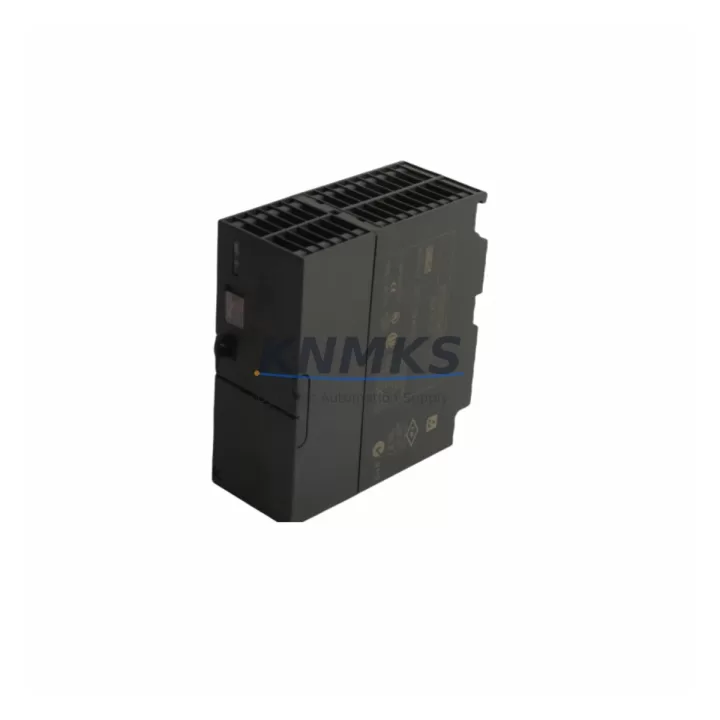
Overview
Siemens 6ES7307-1BA00-0AA0 Migration-Ready PS307 for Legacy S7-300: Reliable Power for Aging Control Systems
The Siemens 6ES7307-1BA00-0AA0 is a 24 VDC / 2 A regulated power supply module from the SIMATIC S7-300 PS307 series, purpose-built to deliver stable, filtered DC power to S7-300 CPU racks and distributed I/O assemblies. As legacy S7-300 installations approach end-of-life and OEM support windows close, this module has become a critical retrofit component for engineers managing aging control cabinets across manufacturing, process automation, and infrastructure sectors.
Whether you are replacing a failed unit in an active production line, building a spare parts buffer for a multi-year maintenance contract, or executing a phased migration from an obsolete control platform, the 6ES7307-1BA00-0AA0 provides a direct, drop-in power solution with no firmware changes, no rack reconfiguration, and no CPU re-addressing required. Every unit shipped by KNMKS undergoes pre-shipment functional verification and is backed by a support terms confirmed by quotation.
Migration Compatibility Table
| Parameter | Specification / Retrofit Guidance |
|---|---|
| SKU / Part Number | 6ES7307-1BA00-0AA0 |
| Series | SIMATIC S7-300 PS307 |
| Output Voltage | 24 VDC regulated |
| Output Current | 2 A |
| Input Voltage | 120 / 230 VAC (auto-ranging) |
| Rack Compatibility | S7-300 standard rail (DIN 35 mm); slots 1 of UR1, UR2, ER1, ER2 expansion racks |
| Backplane Interface | Direct bus connector — no address assignment required |
| Terminal Wiring | Screw-type terminals; L+, M, PE — verify existing cable cross-section (min. 1.5 mm²) |
| Communication Compatibility | Passive power module — compatible with all S7-300 CPUs (314, 315, 317, 319 series) and PROFIBUS DP / MPI configurations |
| Replacement Recommendation | Direct replacement for 6ES7307-1BA00-0AA0; verify load budget if replacing 6ES7307-1EA00-0AA0 (5 A variant) |
| Commissioning Notes | No CPU re-boot sequence required; confirm 24 VDC output under load before reconnecting I/O modules |
| Firmware | No firmware — hardware module only; no version conflicts |
| Installation Space | 1 slot width on S7-300 rail; confirm cabinet depth ≥ 130 mm |
| Support terms | 12 months from shipment date — KNMKS standard |
Retrofit Planning for Existing Automation Systems
Replacing the 6ES7307-1BA00-0AA0 in a live S7-300 installation requires a structured approach that accounts for the full power budget of the rack. The PS307 2A module supplies 24 VDC to the backplane bus, powering the CPU and any signal modules installed in the same rack. Before removal, engineers should audit the total current draw of all installed modules — including digital input modules such as the SM 321 (6ES7321-1BH02-0AA0), analog input modules such as the SM 331 (6ES7331-7KF02-0AA0), and any communication processors such as the CP 342-5 for PROFIBUS DP connectivity. If the aggregate load approaches or exceeds 2 A, the 5 A variant (6ES7307-1EA00-0AA0) should be evaluated as the replacement target instead.
For installations where the S7-300 CPU communicates via MPI or PROFIBUS DP to an HMI panel — such as a SIMATIC TP177 or MP277 — the communication link must be verified to remain stable during the power module swap. In most cases, a controlled shutdown of the CPU followed by a cold restart after module replacement is sufficient to restore the PROFIBUS segment without requiring re-parameterization of the DP master configuration in STEP 7 or TIA Portal.
Where the S7-300 rack feeds distributed ET 200M I/O stations via PROFIBUS DP, the IM 153-2 interface module on each ET 200M station should be confirmed as operational after power restoration. Signal isolation between the 24 VDC supply rail and field wiring should also be verified, particularly in installations where signal isolators or intrinsic safety barriers are installed between the S7-300 I/O modules and field instruments.
If the retrofit is part of a broader migration from S7-300 to S7-1500, the 6ES7307-1BA00-0AA0 can serve as an interim power supply in a hybrid rack configuration while the new S7-1500 CPU and its associated PM 70W 120/230VAC power module are commissioned in parallel. This staged approach allows engineers to validate the new control logic in TIA Portal V16 or later without interrupting the existing production sequence.
Downtime Control During System Migration
Minimizing unplanned downtime during a power supply replacement in an S7-300 system depends on three factors: pre-staging the replacement module, preserving the CPU program, and maintaining field control continuity during the switchover window.
Before initiating the swap, the CPU program should be backed up to a memory card (MMC) or uploaded to the STEP 7 project via the MPI/PROFIBUS programming cable (PC Adapter USB or CP 5611). This ensures that even in the event of a CPU battery failure during the power interruption, the program can be restored without re-downloading from the engineering station. The 6ES7307-1BA00-0AA0 does not retain any program data — it is a pure power module — so the replacement itself carries no risk of program loss, provided the CPU memory card is intact.
For processes where even a brief interruption is critical, a temporary 24 VDC UPS or buffer module can be connected to the backplane supply terminals to maintain CPU power during the physical module swap. Once the new 6ES7307-1BA00-0AA0 is seated and the terminal wiring is reconnected, output voltage should be confirmed with a calibrated multimeter before the CPU is returned to RUN mode. Field I/O should be brought online sequentially to avoid inrush current spikes that could trigger the module’s internal overload protection.
KNMKS ships all units with pre-shipment functional test documentation. Each 6ES7307-1BA00-0AA0 is verified for output voltage accuracy, ripple, and short-circuit protection response before dispatch, reducing the risk of commissioning failures on-site and supporting the goal of single-visit retrofit completion.
Retrofit Support FAQ
Q1: Is the 6ES7307-1BA00-0AA0 a direct replacement for all PS307 variants?
The 6ES7307-1BA00-0AA0 (2 A output) is a direct replacement for units of the same part number. It is not a direct replacement for the 6ES7307-1EA00-0AA0 (5 A) or 6ES7307-1KA00-0AA0 (10 A) variants. Always verify the total current load of your S7-300 rack before selecting the replacement module. If your existing installation uses the 5 A or 10 A variant, contact KNMKS for the correct replacement SKU.
Q2: Does replacing the power supply require re-downloading the CPU program?
No. The PS307 is a passive power module with no program storage. Provided the CPU memory card (MMC) is intact and the CPU battery (if fitted) has not discharged during the outage, the program will be retained. As a precaution, always back up the CPU program via STEP 7 or TIA Portal before beginning any hardware replacement.
Q3: What wiring checks are required before installation?
Verify that the AC input wiring (L, N, PE) meets the module’s input voltage range (120/230 VAC auto-ranging) and that the conductor cross-section is appropriate for the installation’s upstream fusing. On the DC output side, confirm that the 24 VDC terminal connections (L+, M) are correctly polarized and that the cable cross-section supports the 2 A rated output. Inspect the screw terminals for corrosion or loose connections before re-energizing.
Q4: What does the support terms confirmed by quotation cover, and how does KNMKS handle DOA units?
All 6ES7307-1BA00-0AA0 units supplied by KNMKS are covered by a support terms confirmed by quotation from the date of shipment. The support terms covers manufacturing defects and functional failures under normal operating conditions. In the event of a dead-on-arrival (DOA) unit, KNMKS will arrange priority replacement shipment after receipt of the failed unit and review of the pre-shipment test record. Contact admin@knmks.com with your order reference and fault description to initiate a support terms claim.
© 2026 KNMKS. All rights reserved.
Original Source: https://knmks.com
Contact: admin@knmks.com | +86 18359268345
Product Identification
- Brand / Ecosystem
-
Siemens
Siemens - Model / Series
-
6ES7307-1BA00-0AA0
SIMATIC Series - Product Family
- PLCs & Controllers
- Availability Status
- Available on request after model and quantity confirmation
- Inquiry Type
- B2B RFQ, replacement inquiry and project spare-part request
- Pre-Quote Check
- Exact SKU, brand, series, quantity, nameplate photos and destination country are checked before quotation
System Path
Where this product fits in the KNMKS automation structure.
Specification & Inquiry Focus
- Control platform
- PLC, PAC and modular controllers
- Common needs
- CPU, rack, power and I/O expansion
- Project support
- Replacement, cabinet build and maintenance
Buyer Confirmation
Information KNMKS checks before replying.
- Exact model
- 6ES7307-1BA00-0AA0
- Brand / ecosystem
- Siemens
- Product family
- PLCs & Controllers
- Application note
- Replacement, maintenance, project build or spare-part list
- Useful photos
- Nameplate, installed unit, cabinet layout or connector side
- Delivery details
- Quantity, destination country and target schedule
Document Support
Files and notes can be confirmed during quotation.
- Product photos or nameplate confirmation when available
- Packing and delivery notes before quotation confirmation
- Support scope and delivery terms confirmed per inquiry
- Export document coordination for qualified B2B requests
Inquiry Support
- Model cross-checking before quotation
- CPU, power, rack and expansion module matching
- Support for replacement and project inquiry
What to Send Us
- Brand and exact model number: Siemens 6ES7307-1BA00-0AA0
- Quantity and required delivery time
- Application, replacement requirement or nameplate photo
- Destination country and shipping preference
RFQ Preparation
This is a product inquiry page built for RFQ communication.
Fast Model Check
Send this model to KNMKS for confirmation.
Include quantity, destination country and photos if this is a maintenance replacement. The inquiry will be saved with a reference number after submission.
Brand & Compatibility Note
KNMKS displays automation product information for well-known industrial brand ecosystems and compatible replacement references. Brand names are used for product identification and compatibility reference only; final availability and commercial terms are confirmed per quotation.
 Manufacturing
 Machine Tools
 Packaging
 Energy & Power



 HMI & Displays
 Servo Systems
 Variable Frequency Drives
 Sensors