
Overview
Siemens 6ES7288-7DP01-0AA0 Maintenance-Proven Spare Part for Factory Uptime
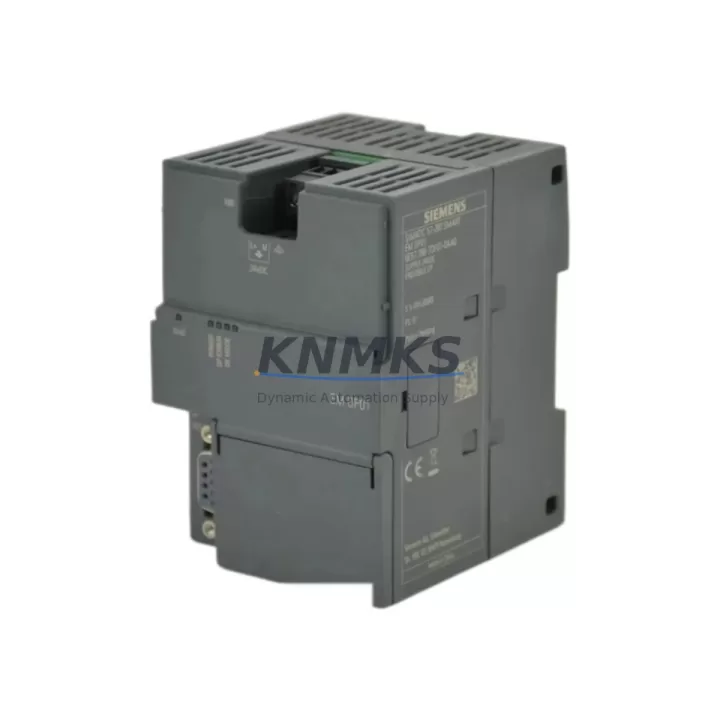
The Siemens 6ES7288-7DP01-0AA0 is a PROFIBUS-DP slave communication module designed for the S7-200 SMART PLC series. In industrial automation environments where continuous production is non-negotiable, maintaining a verified stock of this module is a critical element of any preventive maintenance program. Whether you are managing a discrete manufacturing line, a packaging system, or a process control cabinet, the 6ES7288-7DP01-0AA0 serves as the communication backbone between the S7-200 SMART CPU and PROFIBUS-DP master networks — making its availability directly tied to your plant’s uptime.
At KNMKS, every unit of the 6ES7288-7DP01-0AA0 is sourced from authorized channels, individually inspected, and function-tested prior to shipment. Our inventory is maintained for long-term supply continuity, ensuring that maintenance engineers and procurement teams can source this module reliably — even as the S7-200 SMART platform matures into its extended lifecycle phase.
Spare Maintenance Table
| Parameter | Specification |
|---|---|
| Part Number (SKU) | 6ES7288-7DP01-0AA0 |
| Brand | Siemens |
| Series | S7-200 SMART |
| Module Type | PROFIBUS-DP Slave Communication Module |
| Communication Protocol | PROFIBUS-DP (EN 50170) |
| Baud Rate | 9.6 kbps – 12 Mbps (auto-detect) |
| Max I/O Data | Up to 128 bytes input / 128 bytes output |
| Supply Voltage | 5 VDC (via S7-200 SMART backplane bus) |
| Operating Temperature | 0°C to +55°C |
| Storage Temperature | -40°C to +70°C |
| Protection Rating | IP20 |
| Mounting | Direct expansion on S7-200 SMART CPU (right-side slot) |
| Origin | Germany |
| Compatibility | S7-200 SMART CPU SR20, SR30, SR40, SR60, ST20, ST30, ST40, ST60 |
| Maintenance Recommendation | Inspect connector pins and bus interface annually; replace if communication errors persist after firmware check |
| Support terms | 12 Months from shipment date |
Maintenance Planning for Continuous Operation
When a PROFIBUS-DP communication fault is traced to the 6ES7288-7DP01-0AA0, experienced maintenance engineers know that replacing the module alone is rarely sufficient for a complete root-cause resolution. A thorough cabinet inspection should accompany every module swap to prevent repeat failures and ensure the restored system operates reliably through the next maintenance cycle.
Begin by verifying the S7-200 SMART CPU (such as the CPU SR40 or CPU ST60) for firmware version compatibility and any active diagnostic flags that may have been masked by the communication fault. Next, inspect the 24 VDC power supply module feeding the control cabinet — voltage ripple or transient spikes are a common root cause of PROFIBUS communication instability and can damage the DP module’s bus interface over time. A replacement power supply from the same cabinet BOM should be kept in the spare parts inventory alongside the 6ES7288-7DP01-0AA0.
Check all PROFIBUS-DP bus connectors and termination resistors at both ends of the network segment. Corroded or improperly terminated connectors are frequently misdiagnosed as module failures. While the cabinet is open, inspect the S7-200 SMART digital I/O expansion modules (such as the EM DE08 or EM QR16) for signs of overheating or relay contact wear, particularly on high-cycle outputs. These modules share the same backplane bus and can introduce noise that degrades PROFIBUS signal integrity.
For systems integrating HMI panels — such as the Siemens SMART LINE series or third-party touch panels communicating via RS485/PPI — verify that the HMI communication cable shielding is intact and that the PPI/MPI port on the CPU is not reporting errors. In older installations, a failing signal isolator between the HMI and the CPU serial port can cause cascading communication alarms that appear to originate from the PROFIBUS segment.
Finally, review the cabinet’s fuse and circuit protection components. Miniature circuit breakers and fuse holders protecting the 24 VDC bus should be tested for proper trip characteristics. A nuisance trip or a slow-blow fuse that has degraded over years of thermal cycling can cause intermittent power interruptions to the DP module — symptoms that are often mistaken for a faulty 6ES7288-7DP01-0AA0 before the actual cause is identified.
Procurement engineers should consider stocking the 6ES7288-7DP01-0AA0 in quantities of two to three units per production line, particularly for facilities running multi-shift operations where overnight sourcing is not feasible. Pairing this with a spare CPU module and at least one expansion I/O module creates a minimum viable spare kit that covers the majority of S7-200 SMART unplanned downtime scenarios.
Site Replacement Workflow
Step 1 — Isolate and document: Before removing the 6ES7288-7DP01-0AA0, place the S7-200 SMART CPU in STOP mode via the STEP 7 Micro/WIN SMART programming software. Record the current PROFIBUS station address configured on the module (accessible via the DP module’s rotary address switches or software configuration). Photograph the wiring and connector orientation for reference during reinstallation.
Step 2 — Physical replacement: Power down the control cabinet at the main isolator. Remove the PROFIBUS-DP bus connector from the module, then release the module from the CPU expansion slot by pressing the release tab and sliding it free. Insert the replacement 6ES7288-7DP01-0AA0, ensuring the backplane bus connector is fully seated. Set the station address to match the original configuration using the rotary switches on the new module.
Step 3 — Reconnect and verify: Reconnect the PROFIBUS-DP bus connector. Restore cabinet power and switch the CPU to RUN mode. Monitor the DP module’s BF (Bus Fault) LED — it should extinguish within a few seconds as the module joins the PROFIBUS network. Use STEP 7 Micro/WIN SMART to confirm that all configured DP slave devices are communicating without errors.
Step 4 — System validation: Run a short production cycle or I/O force test to confirm that all field devices on the PROFIBUS segment are responding correctly. Log the replacement in the equipment maintenance record, noting the date, replaced part number, and any associated findings from the cabinet inspection. This documentation supports support requests and future failure trend analysis.
This workflow is compatible with all S7-200 SMART CPU variants and does not require re-downloading the user program, provided the CPU memory has not been cleared. The replacement process typically takes 20–40 minutes for a trained technician, making the 6ES7288-7DP01-0AA0 one of the faster field-replaceable units in the S7-200 SMART system architecture.
Spare Parts Support FAQ
Q1: Is the 6ES7288-7DP01-0AA0 compatible with all S7-200 SMART CPU models?
Yes. The 6ES7288-7DP01-0AA0 is compatible with all standard S7-200 SMART CPU variants, including the SR20, SR30, SR40, SR60, ST20, ST30, ST40, and ST60. It occupies one expansion slot on the right side of the CPU and communicates via the internal backplane bus. No additional configuration is required beyond setting the PROFIBUS station address and configuring the DP slave parameters in STEP 7 Micro/WIN SMART.
Q2: What pre-shipment testing does KNMKS perform on this module?
Every 6ES7288-7DP01-0AA0 unit shipped by KNMKS undergoes a functional verification test that includes power-on self-test confirmation, backplane bus communication check, and PROFIBUS-DP network join test at multiple baud rates. Units that do not pass all test criteria are quarantined and not offered for sale. A test report is available upon request for critical procurement orders.
Q3: What is the support terms coverage and what does it include?
KNMKS provides a support terms confirmed by quotation from the date of shipment on all 6ES7288-7DP01-0AA0 units. The support terms covers manufacturing defects and functional failures under normal operating conditions. It does not cover damage resulting from incorrect installation, overvoltage events, or physical impact. In the event of a support terms claim, KNMKS will arrange for replacement shipment after receiving and inspecting the returned unit.
Q4: Can KNMKS support long-term or blanket purchase orders for this module?
Yes. KNMKS maintains dedicated inventory for the 6ES7288-7DP01-0AA0 to support customers with annual maintenance contracts, multi-site operations, and OEM service programs. Blanket purchase orders with scheduled delivery releases are accepted, and priority allocation can be arranged for customers with critical uptime requirements. Contact our sales team to discuss volume pricing and supply commitment terms.
© 2026 KNMKS. All rights reserved.
Original Source: https://knmks.com
Contact: admin@knmks.com | +86 18359268345
Product Identification
- Brand / Ecosystem
-
Siemens
Siemens - Model / Series
-
6ES7288-7DP01-0AA0
SIMATIC Series - Product Family
- PLCs & Controllers
- Availability Status
- Available on request after model and quantity confirmation
- Inquiry Type
- B2B RFQ, replacement inquiry and project spare-part request
- Pre-Quote Check
- Exact SKU, brand, series, quantity, nameplate photos and destination country are checked before quotation
System Path
Where this product fits in the KNMKS automation structure.
Specification & Inquiry Focus
- Control platform
- PLC, PAC and modular controllers
- Common needs
- CPU, rack, power and I/O expansion
- Project support
- Replacement, cabinet build and maintenance
Buyer Confirmation
Information KNMKS checks before replying.
- Exact model
- 6ES7288-7DP01-0AA0
- Brand / ecosystem
- Siemens
- Product family
- PLCs & Controllers
- Application note
- Replacement, maintenance, project build or spare-part list
- Useful photos
- Nameplate, installed unit, cabinet layout or connector side
- Delivery details
- Quantity, destination country and target schedule
Document Support
Files and notes can be confirmed during quotation.
- Product photos or nameplate confirmation when available
- Packing and delivery notes before quotation confirmation
- Support scope and delivery terms confirmed per inquiry
- Export document coordination for qualified B2B requests
Inquiry Support
- Model cross-checking before quotation
- CPU, power, rack and expansion module matching
- Support for replacement and project inquiry
What to Send Us
- Brand and exact model number: Siemens 6ES7288-7DP01-0AA0
- Quantity and required delivery time
- Application, replacement requirement or nameplate photo
- Destination country and shipping preference
RFQ Preparation
This is a product inquiry page built for RFQ communication.
Fast Model Check
Send this model to KNMKS for confirmation.
Include quantity, destination country and photos if this is a maintenance replacement. The inquiry will be saved with a reference number after submission.
Brand & Compatibility Note
KNMKS displays automation product information for well-known industrial brand ecosystems and compatible replacement references. Brand names are used for product identification and compatibility reference only; final availability and commercial terms are confirmed per quotation.
 Manufacturing
 Machine Tools
 Packaging
 Energy & Power



 HMI & Displays
 Servo Systems
 Variable Frequency Drives
 Sensors