
Overview
Siemens 6ES7288-2DR08-0AA0 Maintenance-Proven Spare Part for Factory Uptime
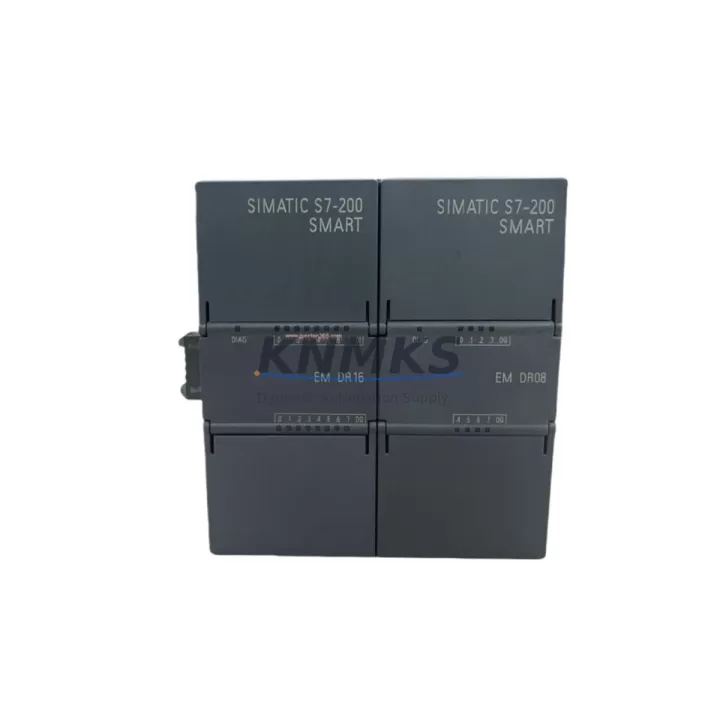
The Siemens 6ES7288-2DR08-0AA0 is an 8-channel relay digital output (DO) expansion module designed for the S7-200 SMART PLC series. As a maintenance-proven spare part, it is a critical component in factory automation environments where continuous operation and rapid fault recovery are non-negotiable. Whether you are managing a scheduled annual overhaul, responding to an unplanned line stoppage, or building a strategic spare parts inventory, the 6ES7288-2DR08-0AA0 delivers the relay switching reliability and system compatibility that maintenance and procurement engineers depend on.
Each unit supplied by KNMKS is sourced as an original Siemens component, individually inspected, and function-tested prior to dispatch. With a support terms confirmed by quotation and documented compatibility with the S7-200 SMART CPU family, this module supports both direct replacement of failed units and proactive stock replenishment programs for facilities running legacy or long-lifecycle automation systems.
Spare Maintenance Table
| Parameter | Specification |
|---|---|
| Part Number / SKU | 6ES7288-2DR08-0AA0 |
| Brand | Siemens |
| Series | S7-200 SMART Expansion Module |
| Output Type | Relay Digital Output (DO) |
| Number of Output Channels | 8 Relay Outputs |
| Rated Output Voltage | AC 250V / DC 30V |
| Max Output Current per Channel | 2A (resistive load) |
| Relay Switching Frequency | Max 1 Hz (mechanical relay) |
| Supply Voltage (Logic) | DC 24V (via CPU bus connector) |
| Isolation | Optocoupler isolation between field and logic side |
| Compatible CPU | S7-200 SMART CPU SR/ST series (SR20, SR30, SR40, SR60, ST20, ST30, ST40, ST60) |
| Mounting | DIN rail, side-by-side expansion with CPU |
| Operating Temperature | 0°C to +55°C |
| Storage Temperature | -40°C to +70°C |
| Dimensions (W×H×D) | Approx. 45mm × 100mm × 81mm |
| Weight | Approx. 160g |
| Protection Rating | IP20 |
| Origin | China (Original Siemens) |
| Support terms | 12 Months |
| Condition | New, Original, Function-Tested |
| Delivery | In-stock, fast dispatch; DHL / FedEx / TNT available |
Maintenance Planning for Continuous Operation
When a relay output module such as the 6ES7288-2DR08-0AA0 is identified as a fault point during a control cabinet inspection or a production line stoppage, experienced maintenance engineers know that the replacement workflow extends well beyond swapping the module itself. A thorough site assessment should accompany every relay DO module replacement to prevent repeat failures and ensure the restored system operates within design parameters.
Begin by verifying the DC 24V power supply feeding the S7-200 SMART CPU and its expansion bus. A degraded or undersized power supply — such as a Siemens LOGO! Power 24V or equivalent DIN-rail PSU — can cause intermittent relay dropout or logic faults that mimic module failure. Measure output voltage under load before and after module replacement to confirm supply stability.
Inspect the expansion bus cable and connector between the CPU and the 6ES7288-2DR08-0AA0. The S7-200 SMART expansion ribbon cable is a common wear item in high-vibration or high-temperature environments; a cracked or oxidized connector can cause the CPU to fail to recognize the expansion module even after replacement. Always replace the expansion cable as a paired item when the DO module is changed.
Check the output wiring terminal block and field-side connections. Relay contacts driving inductive loads — motors, solenoid valves, contactors — are subject to arc erosion over time. Inspect terminal screws for looseness and wiring insulation for heat damage. If the relay outputs were driving a Siemens 3RT contactor or similar inductive device, verify that suppression components (RC snubbers or varistors) are intact and correctly rated.
Review the fuse protection on each relay output circuit. Individual output channel fuses or group fuses in the field wiring panel should be checked and replaced if blown or discolored. Fuse ratings must match the load current and cable cross-section to prevent nuisance tripping or unprotected fault conditions after the module is restored.
For systems where the S7-200 SMART CPU communicates with an HMI panel — such as a Siemens SMART LINE or KTP series panel — confirm that the HMI communication link (Ethernet or RS485) is intact and that the HMI program correctly reflects the restored I/O mapping. A module replacement that changes the expansion slot order can shift I/O addresses if the CPU configuration is not properly maintained.
Finally, if the control system includes signal isolators or relay interposing modules between the PLC output and field devices, inspect these components for contact wear or coil degradation. Interposing relays in the same output circuit as the 6ES7288-2DR08-0AA0 are often overlooked during fault diagnosis but can be the root cause of apparent PLC output failures.
Site Replacement Workflow
Step 1 — Isolate and document: Before removing the 6ES7288-2DR08-0AA0, place the S7-200 SMART CPU in STOP mode via the STEP 7 Micro/WIN SMART programming software or the CPU mode switch. Record the current I/O configuration and expansion module order. Take a photograph of the wiring terminal block for reference during reinstallation.
Step 2 — Power down safely: De-energize the DC 24V supply to the CPU and expansion modules. Verify zero voltage at the module connector before proceeding. Do not hot-swap S7-200 SMART expansion modules — this can corrupt the CPU configuration or damage the expansion bus interface.
Step 3 — Remove and replace: Disconnect the expansion bus cable from the failed module. Release the DIN rail latch and remove the module. Install the new 6ES7288-2DR08-0AA0 in the same slot position. Reconnect the expansion bus cable and field wiring terminal block, verifying each wire against the reference photograph.
Step 4 — Power up and verify: Restore DC 24V power. The S7-200 SMART CPU will automatically detect the expansion module during startup. Confirm that the CPU transitions to RUN mode without error LEDs. Use STEP 7 Micro/WIN SMART to perform a forced output test on each of the 8 relay channels, verifying correct switching at the field device level.
Step 5 — Document and update spare stock: Log the replacement in the maintenance management system (CMMS) with the date, failed module serial number, and replacement unit details. Initiate a reorder for the consumed spare to maintain minimum stock levels. For facilities with multiple S7-200 SMART systems, a minimum of one 6ES7288-2DR08-0AA0 per control cabinet is recommended as a fast-response buffer stock.
Spare Parts Support FAQ
Q1: Is the 6ES7288-2DR08-0AA0 compatible with all S7-200 SMART CPU models?
Yes. The 6ES7288-2DR08-0AA0 is compatible with all S7-200 SMART CPU variants in the SR and ST series, including SR20, SR30, SR40, SR60, ST20, ST30, ST40, and ST60. The module connects via the standard S7-200 SMART expansion bus and is automatically recognized by the CPU without additional configuration. Always verify that the total expansion module count does not exceed the CPU’s maximum expansion limit (typically 6 modules for standard CPUs).
Q2: What testing is performed before shipment?
Every 6ES7288-2DR08-0AA0 unit supplied by KNMKS undergoes individual function testing prior to dispatch. Testing includes relay coil energization verification, contact continuity check on all 8 output channels, and visual inspection for physical damage or counterfeit indicators. Units are shipped in anti-static packaging with original Siemens labeling. A support terms confirmed by quotation is provided from the date of shipment, covering manufacturing defects and functional failures under normal operating conditions.
Q3: Can this module replace older or discontinued S7-200 SMART relay DO variants?
The 6ES7288-2DR08-0AA0 is the current production relay DO expansion module for the S7-200 SMART platform and serves as the direct replacement for earlier relay output expansion modules in the same series. No firmware update or CPU reconfiguration is required for a like-for-like replacement. For facilities migrating from the legacy S7-200 (non-SMART) platform, note that the S7-200 SMART uses a different expansion bus and the modules are not interchangeable; a full system migration plan is recommended.
Q4: What is the recommended spare parts stocking strategy for S7-200 SMART relay DO modules?
For production facilities with high relay switching duty cycles — such as packaging lines, conveyor systems, or injection molding machines — KNMKS recommends maintaining a minimum of one 6ES7288-2DR08-0AA0 per active S7-200 SMART control cabinet as on-site buffer stock. For multi-line facilities or those with extended lead-time risk, a blanket stock agreement with scheduled quarterly replenishment is advisable. KNMKS supports long-term supply programs with fixed pricing, priority allocation, and guaranteed support terms confirmed by quotation on all stocked units.
© 2026 KNMKS. All rights reserved.
Original Source: https://knmks.com
Contact: admin@knmks.com | +86 18359268345
Product Identification
- Brand / Ecosystem
-
Siemens
Siemens - Model / Series
-
6ES7288-2DR08-0AA0
SIMATIC Series - Product Family
- PLCs & Controllers
- Availability Status
- Available on request after model and quantity confirmation
- Inquiry Type
- B2B RFQ, replacement inquiry and project spare-part request
- Pre-Quote Check
- Exact SKU, brand, series, quantity, nameplate photos and destination country are checked before quotation
System Path
Where this product fits in the KNMKS automation structure.
Specification & Inquiry Focus
- Control platform
- PLC, PAC and modular controllers
- Common needs
- CPU, rack, power and I/O expansion
- Project support
- Replacement, cabinet build and maintenance
Buyer Confirmation
Information KNMKS checks before replying.
- Exact model
- 6ES7288-2DR08-0AA0
- Brand / ecosystem
- Siemens
- Product family
- PLCs & Controllers
- Application note
- Replacement, maintenance, project build or spare-part list
- Useful photos
- Nameplate, installed unit, cabinet layout or connector side
- Delivery details
- Quantity, destination country and target schedule
Document Support
Files and notes can be confirmed during quotation.
- Product photos or nameplate confirmation when available
- Packing and delivery notes before quotation confirmation
- Support scope and delivery terms confirmed per inquiry
- Export document coordination for qualified B2B requests
Inquiry Support
- Model cross-checking before quotation
- CPU, power, rack and expansion module matching
- Support for replacement and project inquiry
What to Send Us
- Brand and exact model number: Siemens 6ES7288-2DR08-0AA0
- Quantity and required delivery time
- Application, replacement requirement or nameplate photo
- Destination country and shipping preference
RFQ Preparation
This is a product inquiry page built for RFQ communication.
Fast Model Check
Send this model to KNMKS for confirmation.
Include quantity, destination country and photos if this is a maintenance replacement. The inquiry will be saved with a reference number after submission.
Brand & Compatibility Note
KNMKS displays automation product information for well-known industrial brand ecosystems and compatible replacement references. Brand names are used for product identification and compatibility reference only; final availability and commercial terms are confirmed per quotation.
 Manufacturing
 Machine Tools
 Packaging
 Energy & Power



 HMI & Displays
 Servo Systems
 Variable Frequency Drives
 Sensors