
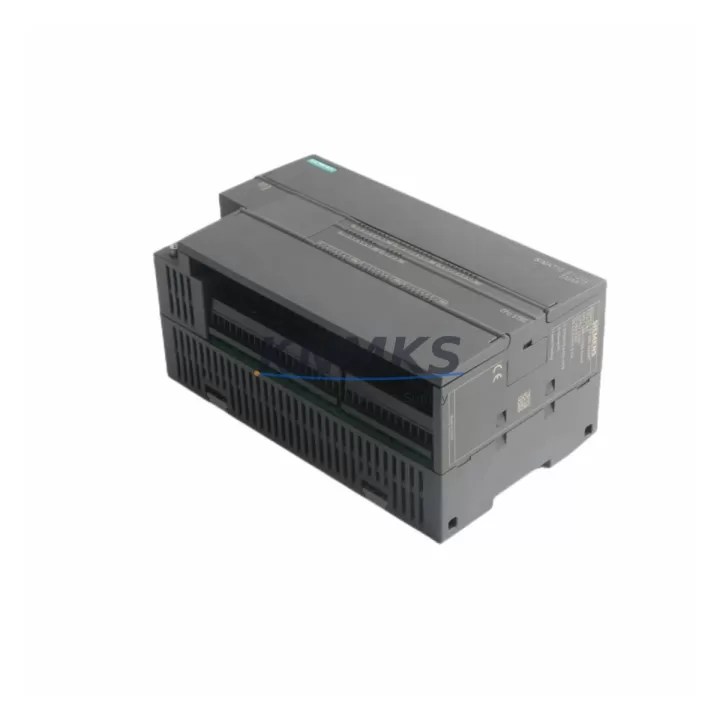
Overview
Siemens 6ES7288-1ST60-0AA0 Migration-Ready CPU for Legacy Control Systems
The Siemens 6ES7288-1ST60-0AA0 is a high-performance CPU module from the S7-200 SMART series, purpose-built to serve as a direct migration-ready replacement for aging S7-200 and early S7-200 SMART installations. With 60 onboard I/O points (36 digital inputs / 24 digital outputs), integrated Ethernet port, and support for Modbus RTU, Modbus TCP, and USS protocol, this CPU module delivers the processing power and communication flexibility required for modern retrofit projects without forcing a full platform migration.
For facilities operating legacy S7-200 CPUs — including the CPU 224, CPU 226, and CPU 224XP — the 6ES7288-1ST60-0AA0 provides a validated upgrade path that preserves existing panel wiring, DIN rail footprint, and STEP 7 Micro/WIN SMART program logic. Engineers undertaking control cabinet upgrades, production line modernization, or spare parts lifecycle extension will find this module a cost-effective, low-disruption solution backed by a support terms confirmed by quotation and confirmed in-stock availability.
Migration Compatibility Table
| Parameter | 6ES7288-1ST60-0AA0 (This Unit) | Legacy S7-200 CPU 226 | Notes |
|---|---|---|---|
| Digital I/O | 36 DI / 24 DO (60 total) | 24 DI / 16 DO (40 total) | Expanded I/O; verify field wiring terminal mapping |
| Onboard Ethernet | Yes (RJ45, 10/100 Mbps) | No (requires CP 243-1) | Eliminates CP module; frees rack slot |
| Communication Protocols | Modbus RTU, Modbus TCP, USS, PPI, MPI | PPI, MPI, Freeport | Confirm HMI and SCADA protocol compatibility |
| Programming Software | STEP 7 Micro/WIN SMART V2.4+ | STEP 7 Micro/WIN V4.0 | Program re-compilation required; logic is portable |
| Expansion Modules | Up to 6 EM modules via expansion bus | Up to 7 EM modules | Verify EM 221/222/223/231/232/235 compatibility |
| Power Supply Requirement | 24 VDC, max 1.0 A sensor supply | 24 VDC, max 0.9 A sensor supply | Confirm existing PSU capacity before swap |
| DIN Rail / Panel Mount | Standard 35 mm DIN rail | Standard 35 mm DIN rail | Direct mechanical fit in most existing cabinets |
| Firmware Version | V2.6 (field-upgradeable via SD card) | Fixed firmware | Confirm firmware version matches expansion EM modules |
| Support terms | 12 Months | N/A (discontinued) | Covered from date of shipment |
| Availability | availability confirmed by RFQ — Ships within 3 business days | Discontinued / EOL | Confirm quantity requirements for project planning |
Retrofit Planning for Existing Automation Systems
A successful retrofit using the 6ES7288-1ST60-0AA0 begins with a thorough pre-migration audit of the existing control cabinet. Engineers should document all terminal block assignments, verify the capacity of the existing 24 VDC power supply module — such as the Siemens SITOP PSU100S 24V/5A — and confirm that the available rail space accommodates the slightly wider footprint of the ST60 CPU compared to older S7-200 units.
Expansion I/O modules already installed in the cabinet — including the EM 221 DI 8×24VDC, EM 222 DO 8×24VDC/0.75A, and EM 231 AI 4×12Bit — are generally compatible with the S7-200 SMART platform and can be retained during the migration, significantly reducing rewiring time and material cost. Confirm the expansion bus connector alignment and module address assignments before powering up the new CPU.
For systems that previously relied on a CP 243-1 Ethernet module or a CP 243-2 AS-Interface master for network connectivity, the integrated Ethernet port on the 6ES7288-1ST60-0AA0 can replace the CP 243-1 function entirely, freeing a slot in the expansion chain. If the legacy system used a TD 400C text display or a third-party HMI panel connected via PPI, verify that the HMI communication driver supports the S7-200 SMART PPI implementation — most modern HMI platforms from Weintek, Kinco, and Delta do.
Program migration from STEP 7 Micro/WIN to STEP 7 Micro/WIN SMART is straightforward for standard ladder logic, but engineers should audit any STL (Statement List) blocks, interrupt routines, and PID loop configurations for syntax differences. The Micro/WIN SMART V2.4 import wizard handles most conversion tasks automatically. After import, validate all I/O address mappings against the new terminal layout before conducting a live commissioning run.
For projects involving communication protocol migration — for example, transitioning from a legacy Profibus DP network to Modbus TCP over Ethernet — the 6ES7288-1ST60-0AA0 supports both protocols natively, allowing a phased migration where the old Profibus segment remains active while the new Ethernet backbone is commissioned in parallel. This approach minimizes production disruption and allows individual field devices to be migrated one segment at a time.
Downtime Control During System Migration
Minimizing unplanned downtime is the primary engineering constraint in any legacy PLC replacement project. For the 6ES7288-1ST60-0AA0, the recommended migration sequence is: (1) complete offline program conversion and simulation in STEP 7 Micro/WIN SMART before any physical work begins; (2) pre-configure the new CPU’s IP address, Modbus slave ID, and communication parameters on the bench; (3) prepare a terminal-by-terminal wiring map cross-referenced to the new I/O address table; (4) schedule the physical swap during a planned maintenance window, targeting a cabinet changeover time of under 4 hours for a standard 60-point installation.
Retaining the original program backup on a PC and on the CPU’s integrated Micro SD card slot provides a fast rollback path if commissioning issues arise. The SD card also supports firmware updates in the field without a programming cable, reducing the tools required on-site. Before declaring the migration complete, verify all analog input scaling, PID setpoints, and communication watchdog timers against the original system documentation. A structured pre-shipment function test is performed on every unit before dispatch, confirming I/O response, communication link establishment, and power-on self-diagnostics — reducing the risk of DOA failures on the production floor.
For multi-cabinet or multi-zone installations, consider staging the migration zone by zone, using the integrated Ethernet port to maintain SCADA visibility across both the legacy and upgraded segments simultaneously. This approach preserves overall plant control continuity and allows operators to monitor the new CPU’s performance in parallel with the legacy system before full cutover.
Retrofit Support FAQ
Q1: Is the 6ES7288-1ST60-0AA0 a direct drop-in replacement for the S7-200 CPU 226?
The 6ES7288-1ST60-0AA0 is a functional replacement for the CPU 226 in terms of I/O capacity and DIN rail mounting, but it is not a pin-for-pin hardware substitute. Terminal wiring assignments differ between the two platforms, and the program must be re-compiled in STEP 7 Micro/WIN SMART. Most ladder logic migrates cleanly; STL blocks and interrupt routines should be reviewed individually. A bench test prior to site installation is strongly recommended.
Q2: What commissioning steps are required after installation?
After physical installation and wiring, configure the CPU’s Ethernet IP address via the STEP 7 Micro/WIN SMART communication wizard. Download the converted program, verify all I/O force tables, and confirm communication links to any connected HMI, SCADA, or Modbus slave devices. Run a full I/O scan with field devices energized before releasing the system to production. Document all final address assignments and communication parameters for the site maintenance record.
Q3: Are existing EM expansion modules compatible with this CPU?
Most S7-200 SMART EM modules — including EM 221, EM 222, EM 223, EM 231, EM 232, and EM 235 — are compatible with the 6ES7288-1ST60-0AA0. Confirm the firmware version of the CPU matches the minimum requirement for each EM module type. Legacy S7-200 EM modules (non-SMART) are not compatible and must be replaced with S7-200 SMART equivalents.
Q4: What support terms and stock availability can I expect?
Every 6ES7288-1ST60-0AA0 unit ships with a support terms confirmed by quotation covering manufacturing defects and functional failures under normal operating conditions. Units are pre-tested before dispatch, including power-on self-test, I/O verification, and communication link confirmation. In-stock units typically ship within 3 business days. For project quantities or scheduled delivery requirements, contact the sales team to confirm allocation and lead time.
© 2026 KNMKS. All rights reserved.
Original Source: https://knmks.com
Contact: admin@knmks.com | +86 18359268345
Product Identification
- Brand / Ecosystem
-
Siemens
Siemens - Model / Series
-
6ES7288-1ST60-0AA0
SIMATIC Series - Product Family
- PLCs & Controllers
- Availability Status
- Available on request after model and quantity confirmation
- Inquiry Type
- B2B RFQ, replacement inquiry and project spare-part request
- Pre-Quote Check
- Exact SKU, brand, series, quantity, nameplate photos and destination country are checked before quotation
System Path
Where this product fits in the KNMKS automation structure.
Specification & Inquiry Focus
- Control platform
- PLC, PAC and modular controllers
- Common needs
- CPU, rack, power and I/O expansion
- Project support
- Replacement, cabinet build and maintenance
Buyer Confirmation
Information KNMKS checks before replying.
- Exact model
- 6ES7288-1ST60-0AA0
- Brand / ecosystem
- Siemens
- Product family
- PLCs & Controllers
- Application note
- Replacement, maintenance, project build or spare-part list
- Useful photos
- Nameplate, installed unit, cabinet layout or connector side
- Delivery details
- Quantity, destination country and target schedule
Document Support
Files and notes can be confirmed during quotation.
- Product photos or nameplate confirmation when available
- Packing and delivery notes before quotation confirmation
- Support scope and delivery terms confirmed per inquiry
- Export document coordination for qualified B2B requests
Inquiry Support
- Model cross-checking before quotation
- CPU, power, rack and expansion module matching
- Support for replacement and project inquiry
What to Send Us
- Brand and exact model number: Siemens 6ES7288-1ST60-0AA0
- Quantity and required delivery time
- Application, replacement requirement or nameplate photo
- Destination country and shipping preference
RFQ Preparation
This is a product inquiry page built for RFQ communication.
Fast Model Check
Send this model to KNMKS for confirmation.
Include quantity, destination country and photos if this is a maintenance replacement. The inquiry will be saved with a reference number after submission.
Brand & Compatibility Note
KNMKS displays automation product information for well-known industrial brand ecosystems and compatible replacement references. Brand names are used for product identification and compatibility reference only; final availability and commercial terms are confirmed per quotation.
 Manufacturing
 Machine Tools
 Packaging
 Energy & Power



 HMI & Displays
 Servo Systems
 Variable Frequency Drives
 Sensors