
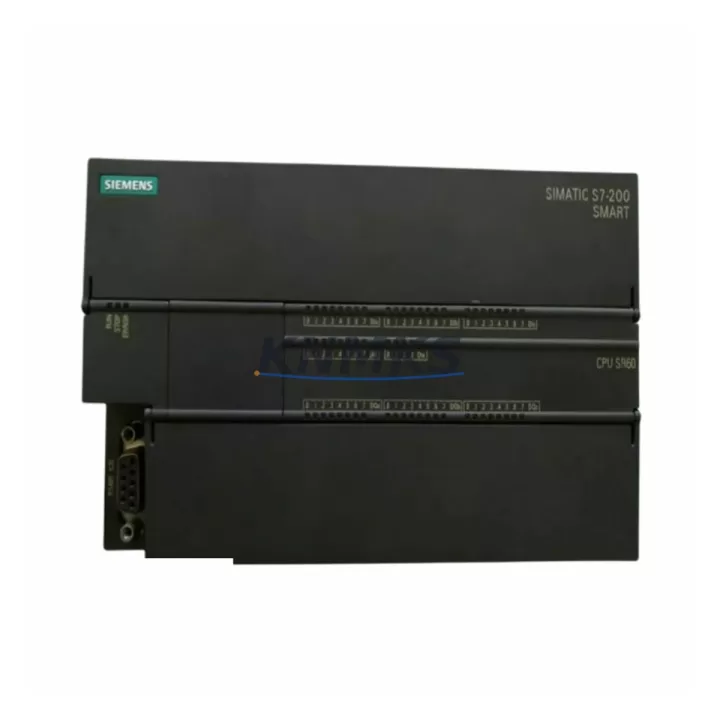
Overview
Siemens 6ES7288-1SR60-0AA0 Migration-Ready CPU for Legacy Control Systems
The Siemens 6ES7288-1SR60-0AA0 (CPU SR60) is a high-performance programmable logic controller designed as a direct migration solution for aging S7-200 SMART automation platforms. With 60 integrated I/O points (36 digital inputs / 24 relay outputs), AC power supply, and full compatibility with STEP 7-Micro/WIN SMART programming software, this CPU module is the preferred choice for engineers managing legacy system retrofits, discontinued spare part replacements, and control cabinet modernization projects across manufacturing, energy, petrochemical, and infrastructure sectors.
Whether you are replacing a failed CPU module on an existing production line or planning a phased migration from an older S7-200 or third-party PLC platform, the 6ES7288-1SR60-0AA0 delivers the processing power, communication flexibility, and I/O density required to maintain operational continuity with minimal downtime risk.
Migration Compatibility Table
| Parameter | Details |
|---|---|
| SKU / Model | 6ES7288-1SR60-0AA0 (CPU SR60) |
| Series | SIMATIC S7-200 SMART |
| I/O Configuration | 36 DI / 24 DO (Relay), AC Power |
| Communication Ports | 1 × Ethernet (RJ45), 1 × RS485 (Port 0) |
| Replaces / Compatible With | S7-200 SMART CPU SR60, legacy S7-200 CPU variants with equivalent I/O |
| Backplane / Rack Interface | Direct module expansion via SB/EM bus connector |
| Programming Software | STEP 7-Micro/WIN SMART V2.4+ |
| Firmware Compatibility | V2.3 and above; field-upgradeable via Ethernet |
| Installation Footprint | DIN rail mount; verify cabinet depth ≥ 75 mm |
| Power Supply Requirement | 85–264 VAC, 50/60 Hz; verify existing PSU capacity before swap |
| Terminal Wiring | Screw-type removable terminal blocks; compatible with existing field wiring |
| Commissioning Checklist | Module address verification, program download, HMI screen re-link, comms test |
| Support terms | 12 Months — covers hardware defects, DOA replacement, and pre-shipment function test |
Retrofit Planning for Existing Automation Systems
Successful integration of the 6ES7288-1SR60-0AA0 into an existing control system requires a structured pre-migration assessment. Before removing the legacy CPU, engineers should document all existing I/O assignments, confirm that the replacement module’s terminal block layout matches the field wiring scheme, and verify that the control cabinet provides adequate clearance for the SR60’s physical footprint.
In most S7-200 SMART retrofit scenarios, the CPU SR60 is deployed alongside expansion modules such as the EM DE08 (8-point digital input expansion) or EM QR16 (16-point relay output expansion) to replicate the I/O capacity of the legacy system. Where analog signal conditioning is required — for example, in temperature or pressure monitoring loops — the EM AE04 analog input module provides four channels of 0–10 V / 4–20 mA input compatible with the SR60’s expansion bus.
Communication protocol migration is a critical step. If the legacy system used Modbus RTU over RS485, the SR60’s built-in Port 0 supports this natively. For Ethernet-based SCADA integration or OPC connectivity, the onboard RJ45 port handles Modbus TCP and S7 protocol without additional communication modules. In cases where PROFIBUS DP connectivity is required for upstream integration with a SIMATIC S7-300 or S7-400 master station, a EM DP01 PROFIBUS DP slave module can be added to the expansion bus.
HMI re-commissioning is frequently overlooked during CPU replacements. If the existing panel uses a SIMATIC Smart 700 IE V3 or Smart 1000 IE V3 HMI, the Ethernet connection to the new CPU SR60 must be re-established and all variable tags re-linked to the updated PLC data block addresses. Where the legacy HMI communicates via RS485 PPI protocol, the SR60’s Port 0 maintains backward compatibility, reducing re-programming effort.
For installations where the original system used a PC Access SMART OPC server for data logging or SCADA integration, the new CPU’s Ethernet port allows direct OPC DA/UA connectivity without hardware changes to the supervisory layer. Programming cable connections (USB-PPI or Ethernet direct) should be verified against the installed STEP 7-Micro/WIN SMART version to ensure firmware compatibility before the first program download.
Downtime Control During System Migration
Minimizing production downtime during a CPU replacement requires advance preparation and a disciplined commissioning sequence. The recommended approach is to perform a full program backup from the existing CPU using STEP 7-Micro/WIN SMART before any hardware is disturbed. The backup should include the main OB1 program block, all subroutines, interrupt routines, data blocks, and the system block containing I/O configuration and communication parameters.
Once the 6ES7288-1SR60-0AA0 is physically installed and terminal wiring is confirmed, the saved program should be downloaded to the new CPU in STOP mode. Before switching to RUN, engineers should verify that all I/O module addresses are correctly assigned — particularly if any EM expansion modules have been repositioned in the rack during the retrofit. Incorrect module addressing is one of the most common causes of post-replacement faults and can be resolved in the system block configuration without modifying the control logic.
Communication links — including Ethernet connections to SCADA systems, HMI panels, and remote I/O — should be tested in sequence before the system is returned to automatic operation. Where the legacy system used a fixed IP address scheme, the new CPU’s Ethernet parameters must be configured to match the existing network topology to avoid disrupting upstream supervisory systems. A structured pre-startup checklist covering power supply verification, terminal integrity, module status LEDs, program checksum, HMI connectivity, and a manual I/O force test will reduce the risk of unplanned stops after handover.
For critical processes where even brief interruptions are unacceptable, a parallel run strategy — where the new CPU is configured and tested offline before the cutover window — is strongly recommended. This approach allows the full commissioning sequence to be completed in advance, reducing the live cutover to a terminal transfer and program activation, typically achievable within a planned maintenance window of 2–4 hours.
Retrofit Support FAQ
Q1: Is the 6ES7288-1SR60-0AA0 a direct drop-in replacement for the legacy S7-200 SMART CPU SR60?
Yes. The 6ES7288-1SR60-0AA0 is the current production variant of the CPU SR60 and is fully compatible with existing S7-200 SMART expansion modules, terminal wiring, and STEP 7-Micro/WIN SMART programs. No hardware modifications to the control cabinet are required in standard replacement scenarios.
Q2: What pre-shipment testing is performed on each unit?
Every 6ES7288-1SR60-0AA0 supplied by KNMKS undergoes a function test prior to dispatch, including power-on verification, I/O point check, communication port test, and firmware version confirmation. A test report is available upon request. All units are covered by a support terms confirmed by quotation against hardware defects.
Q3: Can the existing field wiring be reused when replacing the CPU?
In most cases, yes. The SR60 uses screw-type removable terminal blocks with the same pin assignment as the previous production revision. Engineers should verify terminal torque specifications and inspect wiring insulation condition during the replacement procedure. Where wiring modifications are required due to cabinet reconfiguration, updated terminal diagrams are available from KNMKS technical support.
Q4: What is the lead time and stock availability?
KNMKS maintains standing inventory of the 6ES7288-1SR60-0AA0 to support urgent replacement and planned retrofit projects. Standard orders ship within 1–3 business days. For project quantities or long-term supply commitments, contact our sales team to discuss scheduled delivery and inventory reservation arrangements.
© 2026 KNMKS. All rights reserved.
Original Source: https://knmks.com
Contact: admin@knmks.com | +86 18359268345
Product Identification
- Brand / Ecosystem
-
Siemens
Siemens - Model / Series
-
6ES7288-1SR60-0AA0
SIMATIC Series - Product Family
- PLCs & Controllers
- Availability Status
- Available on request after model and quantity confirmation
- Inquiry Type
- B2B RFQ, replacement inquiry and project spare-part request
- Pre-Quote Check
- Exact SKU, brand, series, quantity, nameplate photos and destination country are checked before quotation
System Path
Where this product fits in the KNMKS automation structure.
Specification & Inquiry Focus
- Control platform
- PLC, PAC and modular controllers
- Common needs
- CPU, rack, power and I/O expansion
- Project support
- Replacement, cabinet build and maintenance
Buyer Confirmation
Information KNMKS checks before replying.
- Exact model
- 6ES7288-1SR60-0AA0
- Brand / ecosystem
- Siemens
- Product family
- PLCs & Controllers
- Application note
- Replacement, maintenance, project build or spare-part list
- Useful photos
- Nameplate, installed unit, cabinet layout or connector side
- Delivery details
- Quantity, destination country and target schedule
Document Support
Files and notes can be confirmed during quotation.
- Product photos or nameplate confirmation when available
- Packing and delivery notes before quotation confirmation
- Support scope and delivery terms confirmed per inquiry
- Export document coordination for qualified B2B requests
Inquiry Support
- Model cross-checking before quotation
- CPU, power, rack and expansion module matching
- Support for replacement and project inquiry
What to Send Us
- Brand and exact model number: Siemens 6ES7288-1SR60-0AA0
- Quantity and required delivery time
- Application, replacement requirement or nameplate photo
- Destination country and shipping preference
RFQ Preparation
This is a product inquiry page built for RFQ communication.
Fast Model Check
Send this model to KNMKS for confirmation.
Include quantity, destination country and photos if this is a maintenance replacement. The inquiry will be saved with a reference number after submission.
Brand & Compatibility Note
KNMKS displays automation product information for well-known industrial brand ecosystems and compatible replacement references. Brand names are used for product identification and compatibility reference only; final availability and commercial terms are confirmed per quotation.
 Manufacturing
 Machine Tools
 Packaging
 Energy & Power



 HMI & Displays
 Servo Systems
 Variable Frequency Drives
 Sensors