
Overview
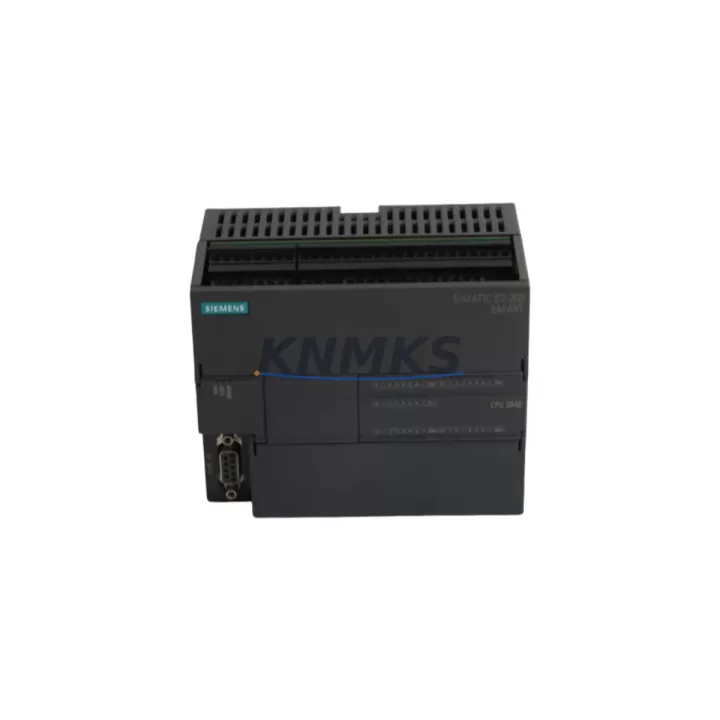
Siemens 6ES7288-1SR40-0AA0 Maintenance Spare for Factory Uptime
The Siemens 6ES7288-1SR40-0AA0 is the SR40 standard CPU module for the S7-200 SMART series — a compact, relay-output PLC platform widely deployed across packaging lines, material handling systems, conveyor controls, and process automation cells. As a maintenance-proven spare part, this CPU is a critical stock item for any facility running S7-200 SMART-based control architectures. Holding a verified unit on the shelf directly reduces mean time to repair (MTTR) and protects production continuity against unplanned CPU failures.
The SR40 integrates 24 digital inputs and 16 relay digital outputs onboard, eliminating the need for additional I/O expansion in many standard machine configurations. Its relay output design makes it suitable for direct load switching of solenoids, contactors, and indicator lamps without intermediate relay modules. The CPU supports up to three expansion modules, enabling scalable I/O growth as machine requirements evolve — a key advantage for retrofit and system extension projects.
For maintenance engineers managing aging S7-200 SMART installations, the 6ES7288-1SR40-0AA0 is the direct replacement for worn or failed SR40 units. The module retains full program compatibility with STEP 7-Micro/WIN SMART, meaning existing ladder logic, function block diagrams, and structured text programs transfer without modification. This compatibility eliminates reprogramming risk during emergency replacements and allows technicians to restore operation within a single maintenance window.
Spare Maintenance Table
| Parameter | Specification |
|---|---|
| Part Number | 6ES7288-1SR40-0AA0 |
| Series | S7-200 SMART |
| CPU Type | SR40 Standard CPU (Relay Output) |
| Digital Inputs (Onboard) | 24 DI (24 VDC) |
| Digital Outputs (Onboard) | 16 DO (Relay, 2A per point) |
| Program Memory | 24 KB |
| Data Memory | 10 KB |
| Max Expansion Modules | 3 |
| Communication Ports | 1 × Ethernet (PROFINET), 1 × RS485 |
| Programming Software | STEP 7-Micro/WIN SMART |
| Supply Voltage | 85–264 VAC / 47–63 Hz |
| Operating Temperature | 0°C to +55°C |
| Protection Rating | IP20 |
| Country of Origin | Germany |
| Compatibility | S7-200 SMART expansion modules (EM series), SMART LINE HMI panels |
| Support terms | 12 Months — Pre-shipment tested and verified |
Maintenance Planning for Continuous Operation
When replacing the 6ES7288-1SR40-0AA0 SR40 CPU in the field, a disciplined maintenance workflow requires inspecting and verifying all interconnected components before returning the system to production. Begin with the 24 VDC power supply feeding the CPU input circuit — voltage ripple or supply instability is a common root cause of CPU faults that are misdiagnosed as CPU hardware failure. Verify supply output under load before installing the replacement unit.
Next, inspect the RS485 communication port and associated wiring to any connected HMI panels, such as the Siemens SMART LINE series (e.g., SMART 700 IE V3 or SMART 1000 IE V3). Damaged RS485 cables or incorrect termination resistors can cause communication faults that prevent the new CPU from establishing operator panel connectivity. Similarly, verify the Ethernet port connection and IP address configuration if the CPU is integrated into a PROFINET or TCP/IP supervisory network.
Expansion modules connected via the S7-200 SMART backplane bus — including EM DE08 digital input modules, EM DR08 relay output modules, and EM AE04 analog input modules — should be inspected for secure seating and connector integrity. A loose expansion connector can generate I/O errors that appear as CPU faults post-replacement. Check each module’s LED status indicators after power-up to confirm healthy bus communication.
For relay output circuits, inspect the output terminal wiring and verify that load currents are within the 2A per-point relay rating. Overloaded relay contacts are a frequent cause of output module degradation and can stress the CPU’s internal relay drivers. If relay contact wear is suspected, consider replacing the CPU alongside a Siemens EM DR16 relay output expansion module to restore full output capacity.
Signal integrity on analog I/O loops should also be verified using a calibrated loop tester before commissioning the replacement CPU. Analog signal drift or ground loop issues can cause process control instability that is incorrectly attributed to the new CPU unit. Finally, inspect all 24 VDC fuse protection on the input and output circuits — blown fuses are a leading indicator of wiring faults that may have contributed to the original CPU failure.
Site Replacement Workflow
The 6ES7288-1SR40-0AA0 is a direct drop-in replacement for any failed or end-of-life SR40 CPU within the S7-200 SMART platform. The replacement procedure follows a structured sequence to minimize downtime and eliminate configuration errors:
Step 1 — Program Backup: If the existing CPU is still partially functional, use STEP 7-Micro/WIN SMART to upload and save the current program, data block values, and system block (including IP address, communication settings, and password configuration) to an engineering workstation before powering down.
Step 2 — Power Isolation: Isolate the control cabinet supply and verify zero-energy state using a calibrated voltage tester. Disconnect all I/O wiring from the CPU terminal blocks, labeling each wire group for accurate reconnection.
Step 3 — Module Swap: Remove the failed SR40 CPU from the DIN rail mount. Install the replacement 6ES7288-1SR40-0AA0, ensuring the expansion bus connector engages correctly with any attached EM modules. Reconnect all terminal block wiring per the original labeling.
Step 4 — Program Restore: Power up the cabinet and download the saved program, system block, and data block to the new CPU via Ethernet or RS485. Verify IP address assignment and communication port settings match the original configuration.
Step 5 — Functional Verification: Execute a controlled I/O test — force each digital input and verify the corresponding output response. Confirm HMI panel connectivity and SCADA/supervisory communication before releasing the machine to production.
This workflow supports a typical replacement time of under two hours for a prepared maintenance team, significantly reducing unplanned downtime costs on production lines dependent on S7-200 SMART control systems.
Spare Parts Support FAQ
Q1: Is the 6ES7288-1SR40-0AA0 compatible with all S7-200 SMART expansion modules?
Yes. The SR40 CPU is fully compatible with the complete S7-200 SMART EM expansion module range, including digital input, digital output, relay output, analog input, analog output, and combination I/O modules. Compatibility extends to all SMART LINE HMI panels communicating via RS485 or Ethernet.
Q2: What is included in the support terms confirmed by quotation and pre-shipment testing?
Every 6ES7288-1SR40-0AA0 unit is powered on and functionally tested prior to shipment — verifying CPU boot, I/O point operation, communication port integrity, and program download capability. The support terms confirmed by quotation cover hardware defects under normal operating conditions from the date of delivery. Support requests are supported with replacement or repair at no additional cost.
Q3: Can this CPU replace an older S7-200 SMART SR40 unit without reprogramming?
Yes. The 6ES7288-1SR40-0AA0 maintains full backward compatibility with all S7-200 SMART program structures created in STEP 7-Micro/WIN SMART. Existing ladder logic, function blocks, and system block configurations transfer directly to the replacement unit without modification, provided the firmware version is compatible. Firmware updates can be applied via STEP 7-Micro/WIN SMART if required.
Q4: Do you support long-term supply agreements for S7-200 SMART spare parts?
Yes. We support 12–36 month supply agreements for the 6ES7288-1SR40-0AA0 and related S7-200 SMART components, including EM expansion modules, SMART LINE HMI panels, and associated power supply units. Long-term agreements include reserved stock allocation, priority fulfillment, and fixed pricing to protect against market availability fluctuations for this legacy platform.
© 2026 KNMKS. All rights reserved.
Original Source: https://knmks.com
Contact: admin@knmks.com | +86 18359268345
Product Identification
- Brand / Ecosystem
-
Siemens
Siemens - Model / Series
-
6ES7288-1SR40-0AA0
SIMATIC Series - Product Family
- PLCs & Controllers
- Availability Status
- Available on request after model and quantity confirmation
- Inquiry Type
- B2B RFQ, replacement inquiry and project spare-part request
- Pre-Quote Check
- Exact SKU, brand, series, quantity, nameplate photos and destination country are checked before quotation
System Path
Where this product fits in the KNMKS automation structure.
Specification & Inquiry Focus
- Control platform
- PLC, PAC and modular controllers
- Common needs
- CPU, rack, power and I/O expansion
- Project support
- Replacement, cabinet build and maintenance
Buyer Confirmation
Information KNMKS checks before replying.
- Exact model
- 6ES7288-1SR40-0AA0
- Brand / ecosystem
- Siemens
- Product family
- PLCs & Controllers
- Application note
- Replacement, maintenance, project build or spare-part list
- Useful photos
- Nameplate, installed unit, cabinet layout or connector side
- Delivery details
- Quantity, destination country and target schedule
Document Support
Files and notes can be confirmed during quotation.
- Product photos or nameplate confirmation when available
- Packing and delivery notes before quotation confirmation
- Support scope and delivery terms confirmed per inquiry
- Export document coordination for qualified B2B requests
Inquiry Support
- Model cross-checking before quotation
- CPU, power, rack and expansion module matching
- Support for replacement and project inquiry
What to Send Us
- Brand and exact model number: Siemens 6ES7288-1SR40-0AA0
- Quantity and required delivery time
- Application, replacement requirement or nameplate photo
- Destination country and shipping preference
RFQ Preparation
This is a product inquiry page built for RFQ communication.
Fast Model Check
Send this model to KNMKS for confirmation.
Include quantity, destination country and photos if this is a maintenance replacement. The inquiry will be saved with a reference number after submission.
Brand & Compatibility Note
KNMKS displays automation product information for well-known industrial brand ecosystems and compatible replacement references. Brand names are used for product identification and compatibility reference only; final availability and commercial terms are confirmed per quotation.
 Manufacturing
 Machine Tools
 Packaging
 Energy & Power



 HMI & Displays
 Servo Systems
 Variable Frequency Drives
 Sensors