
Overview
Siemens 6ES7235-0KD22-0XA0 Migration-Ready Analog I/O Module: Legacy System Retrofit & Compatibility Upgrade
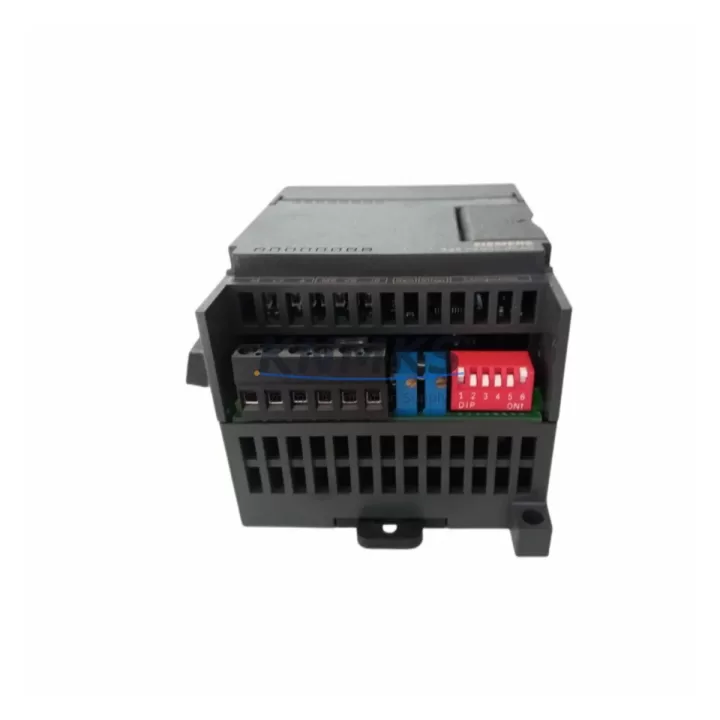
The Siemens 6ES7235-0KD22-0XA0 is the EM 235 expansion module for the SIMATIC S7-200 series, providing 4 analog inputs and 1 analog output in a compact DIN-rail form factor. As S7-200 systems approach end-of-life and spare part availability tightens, this module remains a critical component for engineers managing legacy production lines, retrofit projects, and control cabinet upgrades. Whether you are replacing a failed unit, extending the operational life of an existing S7-200 rack, or planning a phased migration to a newer control platform, the 6ES7235-0KD22-0XA0 delivers verified drop-in compatibility with minimal downtime risk.
This module supports voltage and current input ranges selectable via DIP switch, including 0–10 V, ±10 V, 0–20 mA, and 4–20 mA configurations. The single analog output supports 0–10 V or 0–20 mA, making it suitable for valve positioners, variable frequency drives, and process transmitters commonly found in legacy automation environments. Resolution is 12-bit for inputs and 11-bit for output, consistent with original S7-200 EM 235 specifications.
Migration Compatibility Table
| Parameter | Specification / Retrofit Note |
|---|---|
| Compatible Controller | SIMATIC S7-200 CPU 221, 222, 224, 224XP, 226 |
| Analog Inputs | 4 × AI — voltage/current selectable via DIP switch |
| Analog Output | 1 × AO — 0–10 V / 0–20 mA |
| Input Resolution | 12-bit |
| Output Resolution | 11-bit |
| Supply Voltage | 24 V DC (from CPU or external 24 V rail) |
| Backplane Interface | S7-200 expansion bus ribbon cable (I/O bus connector) |
| Module Address | Auto-assigned by CPU based on expansion slot position |
| Installation Space | 71.2 mm × 80 mm × 62 mm; DIN rail or panel mount |
| Communication Protocol | S7-200 internal I/O bus (not Profibus/MPI — direct expansion) |
| Firmware Compatibility | Compatible with all S7-200 CPU firmware versions; no firmware update required on module |
| Replacement Recommendation | Direct drop-in for failed or discontinued EM 235 units; verify DIP switch settings match original configuration |
| Commissioning Focus | Confirm DIP switch input range, verify AIW/AQW addresses in STEP 7 Micro/WIN, validate signal scaling in PLC program |
| Support terms | 12 months from shipment date |
Retrofit Planning for Existing Automation Systems
When integrating the 6ES7235-0KD22-0XA0 into an existing S7-200 control cabinet, the first step is confirming available 24 V DC power budget on the CPU’s sensor supply rail. The S7-200 CPU 224 and CPU 226 can power up to 7 expansion modules, but total current draw — including digital I/O modules such as the EM 223 digital combination module and any EM 231 analog input modules already installed — must remain within the CPU’s rated expansion current. If the power budget is tight, an external 24 V DC power supply module should be added to the cabinet before installing additional expansion modules.
The expansion bus ribbon cable connecting the 6ES7235-0KD22-0XA0 to the CPU or adjacent expansion module must be inspected for damage, particularly in older installations where cable fatigue or connector oxidation may cause intermittent analog signal errors. Replacement ribbon cables are available as standard S7-200 accessories and should be part of any planned retrofit kit.
For projects involving communication protocol migration — for example, transitioning from a standalone S7-200 system to a networked architecture using a CP 243-1 Ethernet communication module or a CP 243-2 AS-Interface master — the analog I/O addressing in the existing STEP 7 Micro/WIN project must be reviewed. Adding or repositioning expansion modules changes the AIW and AQW byte addresses assigned by the CPU, which can silently corrupt analog scaling blocks and PID loop setpoints if not recalculated before the new program is downloaded.
In control cabinets where an HMI panel such as the Siemens TD 400C text display or a third-party operator panel is connected via PPI protocol, any changes to analog variable addresses must be reflected in the HMI tag database before commissioning. Failure to synchronize HMI screen tags with updated PLC addresses is one of the most common causes of extended downtime during S7-200 retrofit projects.
For systems being upgraded to the S7-1200 or S7-1500 platform, the 6ES7235-0KD22-0XA0 serves as a bridging component during phased migration — maintaining analog I/O continuity on the legacy S7-200 rack while new hardware is staged and tested in parallel. Once the migration is complete, analog signals can be re-terminated to SM 1231 analog input modules or SM 1232 analog output modules on the new platform, with signal scaling reconfigured in TIA Portal.
Downtime Control During System Migration
Minimizing unplanned downtime is the primary concern in any S7-200 retrofit involving analog I/O replacement. Before removing the failed or end-of-life 6ES7235-0KD22-0XA0, the following steps are recommended to protect program logic and maintain field control continuity:
1. Back up the existing PLC program. Use STEP 7 Micro/WIN to upload and save the current program block, data block, and system block to a PC. Confirm the backup includes the current analog scaling values stored in the data block, as these are often modified during commissioning and may differ from the original engineering documentation.
2. Record DIP switch configuration. Photograph or document the DIP switch positions on the existing module before removal. The input range configuration (voltage vs. current, unipolar vs. bipolar) must be replicated exactly on the replacement unit to avoid signal range mismatches that would require recalibration of all connected transmitters and actuators.
3. Label all field wiring. Terminal block wiring on the EM 235 uses a 12-terminal connector. Each analog input channel uses three terminals (A+, B+, M), and the output uses two terminals (V0, I0, M). Label all wires before disconnection to prevent cross-wiring errors during reinstallation.
4. Verify module address after installation. After installing the replacement 6ES7235-0KD22-0XA0, power up the system and confirm that the CPU recognizes the module without I/O bus errors. Use STEP 7 Micro/WIN to verify that AIW and AQW addresses match the original program. If the module is installed in the same slot position, addresses will be unchanged.
5. Perform signal loop test before returning to production. Apply known reference signals to each analog input channel and verify that the PLC reads the expected engineering unit values. Test the analog output by commanding a known setpoint and measuring the output terminal voltage or current with a calibrated meter. This pre-production verification step is included in our standard outgoing test procedure for all shipped units.
By following this sequence, most S7-200 analog I/O replacements can be completed within a planned maintenance window of two to four hours, with no changes required to the existing PLC program logic.
Retrofit Support FAQ
Q1: Is the 6ES7235-0KD22-0XA0 a direct replacement for an existing EM 235 module in my S7-200 system?
Yes. The 6ES7235-0KD22-0XA0 is the standard Siemens order number for the EM 235 analog combination module. It is a direct drop-in replacement for any existing EM 235 unit installed in an S7-200 expansion rack. No program changes are required provided the replacement module is installed in the same slot position and the DIP switches are configured to match the original input range settings.
Q2: What commissioning steps are required after installing the replacement module?
After installation, confirm that the CPU powers up without expansion bus errors. Verify AIW and AQW addresses in STEP 7 Micro/WIN match the original program. Perform a signal loop test on all analog input channels and the analog output channel using a process calibrator or signal generator. If the module is replacing a unit that failed due to overvoltage or wiring damage, inspect the field wiring and terminal connections before applying power.
Q3: Can this module be used during a phased migration from S7-200 to S7-1200?
Yes. The 6ES7235-0KD22-0XA0 can remain in service on the existing S7-200 rack during a phased migration. It maintains full analog I/O functionality while the new S7-1200 hardware is configured and tested in parallel. Once the migration is complete, analog field devices can be re-terminated to the new platform’s SM 1231 or SM 1232 analog modules without requiring changes to field wiring beyond the control cabinet.
Q4: What does the support terms confirmed by quotation cover, and is pre-shipment testing performed?
All units are functionally tested prior to shipment, including power-up verification, analog input channel accuracy check, and analog output range test. The support terms confirmed by quotation cover manufacturing defects and functional failures under normal operating conditions from the date of shipment. Units damaged by incorrect wiring, overvoltage, or installation errors are not covered. Replacement or repair is arranged directly through our sales team at admin@knmks.com.
© 2026 KNMKS. All rights reserved.
Original Source: https://knmks.com
Contact: admin@knmks.com | +86 18359268345
Product Identification
- Brand / Ecosystem
-
Siemens
Siemens - Model / Series
-
6ES7235-0KD22-0XA0
SIMATIC Series - Product Family
- PLCs & Controllers
- Availability Status
- Available on request after model and quantity confirmation
- Inquiry Type
- B2B RFQ, replacement inquiry and project spare-part request
- Pre-Quote Check
- Exact SKU, brand, series, quantity, nameplate photos and destination country are checked before quotation
System Path
Where this product fits in the KNMKS automation structure.
Specification & Inquiry Focus
- Control platform
- PLC, PAC and modular controllers
- Common needs
- CPU, rack, power and I/O expansion
- Project support
- Replacement, cabinet build and maintenance
Buyer Confirmation
Information KNMKS checks before replying.
- Exact model
- 6ES7235-0KD22-0XA0
- Brand / ecosystem
- Siemens
- Product family
- PLCs & Controllers
- Application note
- Replacement, maintenance, project build or spare-part list
- Useful photos
- Nameplate, installed unit, cabinet layout or connector side
- Delivery details
- Quantity, destination country and target schedule
Document Support
Files and notes can be confirmed during quotation.
- Product photos or nameplate confirmation when available
- Packing and delivery notes before quotation confirmation
- Support scope and delivery terms confirmed per inquiry
- Export document coordination for qualified B2B requests
Inquiry Support
- Model cross-checking before quotation
- CPU, power, rack and expansion module matching
- Support for replacement and project inquiry
What to Send Us
- Brand and exact model number: Siemens 6ES7235-0KD22-0XA0
- Quantity and required delivery time
- Application, replacement requirement or nameplate photo
- Destination country and shipping preference
RFQ Preparation
This is a product inquiry page built for RFQ communication.
Fast Model Check
Send this model to KNMKS for confirmation.
Include quantity, destination country and photos if this is a maintenance replacement. The inquiry will be saved with a reference number after submission.
Brand & Compatibility Note
KNMKS displays automation product information for well-known industrial brand ecosystems and compatible replacement references. Brand names are used for product identification and compatibility reference only; final availability and commercial terms are confirmed per quotation.
 Manufacturing
 Machine Tools
 Packaging
 Energy & Power



 HMI & Displays
 Servo Systems
 Variable Frequency Drives
 Sensors