
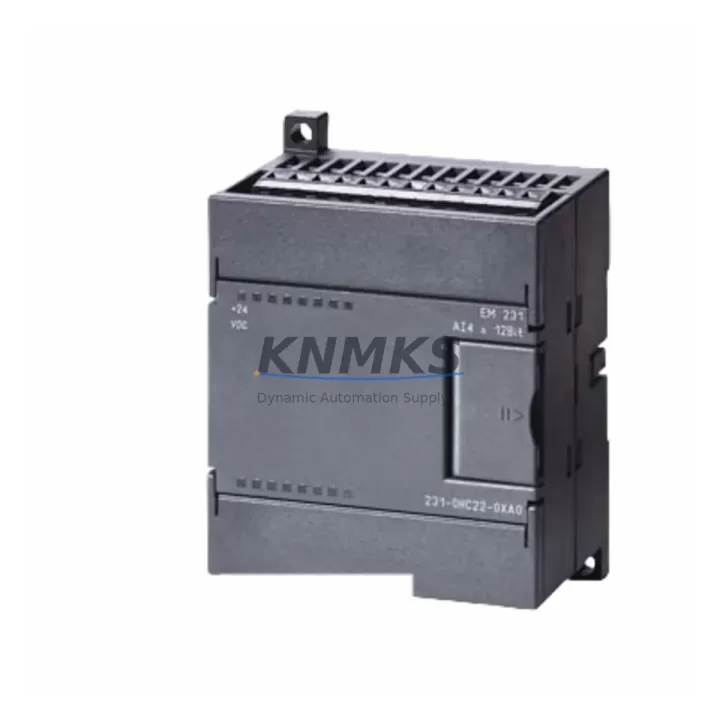
Overview
Siemens 6ES7231-7PC22-0XA0 Maintenance-Proven Spare Part for Factory Uptime
The Siemens 6ES7231-7PC22-0XA0 is a 2-channel RTD and thermocouple analog input expansion module designed for the S7-200 SMART PLC platform. In process industries, utilities, and discrete manufacturing environments, this module is a critical component for temperature measurement loops, furnace control, heat-treatment monitoring, and HVAC integration. When this module fails or reaches end-of-service life, the impact on production continuity is immediate — temperature feedback is lost, safety interlocks may trip, and manual intervention becomes necessary. Stocking a verified replacement unit is the most reliable way to minimize unplanned downtime and protect process integrity.
At KNMKS, every 6ES7231-7PC22-0XA0 unit is sourced from authorized supply chains, pre-shipment tested for channel accuracy and communication handshake with the S7-200 SMART CPU, and dispatched with a support terms confirmed by quotation. Multi-region stock ensures global delivery details confirmed by RFQ for both emergency replacements and scheduled annual maintenance windows.
Spare Maintenance Table
| Parameter | Specification |
|---|---|
| SKU / Part Number | 6ES7231-7PC22-0XA0 |
| Brand | Siemens |
| Series | S7-200 SMART |
| Module Type | Analog Input Expansion Module (RTD / Thermocouple) |
| Input Channels | 2 channels (RTD or TC, software-selectable per channel) |
| Supported Sensor Types | Pt100, Pt1000, Ni100, Ni1000, Cu50, Cu100; Type J, K, T, E, R, S, B thermocouples |
| Resolution | 15-bit + sign |
| Supply Voltage | 24 VDC (via CPU or expansion bus) |
| Communication Interface | S7-200 SMART expansion bus (I/O bus connector) |
| Operating Temperature | 0 °C to +55 °C |
| Storage Temperature | -40 °C to +70 °C |
| Protection Rating | IP20 |
| Dimensions (W×H×D) | Approx. 45 × 100 × 81 mm |
| Origin | Germany |
| Compatibility | S7-200 SMART CPU SR20, SR30, SR40, SR60, ST20, ST30, ST40, ST60 and all SMART expansion slots |
| Installation | DIN rail, side-by-side expansion with CPU or other EM modules |
| Maintenance Recommendation | Inspect wiring terminals and sensor leads annually; verify channel calibration during scheduled outages |
| Support terms | 12 Months — KNMKS Pre-Shipment Tested |
Maintenance Planning for Continuous Operation
Replacing the 6ES7231-7PC22-0XA0 in a live S7-200 SMART panel is rarely an isolated task. Maintenance engineers and procurement teams should treat this module replacement as an opportunity to audit the surrounding electrical and control infrastructure to prevent secondary failures and reduce the risk of repeat callouts.
Begin with the 24 VDC power supply rail feeding the CPU and expansion bus. Modules like the Siemens 6ES7288-1SR20-0AA0 (CPU SR20) or 6ES7288-1SR40-0AA0 (CPU SR40) draw regulated power from the same rail; a degraded power supply can cause intermittent analog errors that mimic module failure. Verify output voltage stability under load before commissioning the replacement module.
Inspect the expansion bus connector and ribbon cable between the CPU and the EM module stack. Oxidized or loose connectors are a common root cause of analog input faults on S7-200 SMART systems. If the panel has been in service for more than five years, replacing the bus connector at the same time as the analog module is a sound preventive measure.
Check the sensor wiring and terminal blocks connected to the RTD or thermocouple inputs. Loose Pt100 leads, corroded terminals, or incorrect 2-wire vs. 3-wire RTD wiring will produce persistent measurement errors even after a module swap. Terminal blocks from the Siemens SIMATIC S7-200 SMART EM AM06 (6ES7288-3AM06-0AA0) analog mixed I/O module family share similar wiring conventions and can serve as a cross-reference for correct termination practice.
If the system uses a Siemens SMART LINE HMI panel (such as the Smart 700 IE or Smart 1000 IE) for temperature display and alarm management, verify that the HMI tag database and alarm thresholds are correctly mapped to the new module’s I/O addresses after replacement. Address mapping errors are a frequent post-replacement issue in S7-200 SMART systems.
For panels operating in high-EMI environments — near variable frequency drives, motor starters, or welding equipment — consider adding or inspecting signal isolators on the RTD/TC input lines. Signal isolation prevents ground loops and common-mode noise from corrupting temperature readings, extending the service life of the analog input module significantly.
Finally, review the fuse and circuit protection on the 24 VDC supply circuit. A blown or weakened fuse on the sensor supply line can cause all channels to read open-circuit, which is often misdiagnosed as module failure. Replacing the fuse and verifying sensor excitation voltage before condemning the module can save significant time and cost.
Site Replacement Workflow
Step 1 — Isolate and document. Before removing the 6ES7231-7PC22-0XA0, place the S7-200 SMART CPU in STOP mode via the STEP 7 Micro/WIN SMART programming software or the physical RUN/STOP switch. Record all current analog input values, channel configurations (sensor type, wire mode, filter settings), and I/O addresses from the program block. Take a photograph of the wiring before disconnection.
Step 2 — Physical removal. Disconnect the sensor wiring from the terminal block. Release the DIN rail locking tab and slide the module out of the expansion bus connector. Inspect the bus connector pins on both the CPU and the removed module for damage or oxidation.
Step 3 — Install the replacement unit. Slide the new 6ES7231-7PC22-0XA0 onto the DIN rail and engage the expansion bus connector firmly. Reconnect sensor wiring according to the documented wiring photograph, observing correct 2-wire or 3-wire RTD termination as required. The module is a direct drop-in replacement — no firmware update or hardware configuration change is required in STEP 7 Micro/WIN SMART.
Step 4 — Verify and commission. Return the CPU to RUN mode. Monitor the analog input values in the status chart or HMI display. Compare readings against known reference temperatures or a calibrated handheld thermometer. Confirm that all channels are within the expected accuracy range (typically ±0.5 °C for Pt100 at ambient temperature). Log the replacement date, new module serial number, and post-replacement readings in the panel maintenance record.
Step 5 — Update spare parts inventory. Replenish the replaced unit in your site spare parts store immediately. For facilities running multiple S7-200 SMART panels, maintaining at least one 6ES7231-7PC22-0XA0 per site — or per three panels — is a practical minimum stock level to support emergency response without waiting for international shipping lead times.
Spare Parts Support FAQ
Q1: Is the 6ES7231-7PC22-0XA0 still available as a new original part, or is it end-of-life?
The S7-200 SMART platform remains in active production and support as of 2026, and the 6ES7231-7PC22-0XA0 is available as a new original Siemens module. KNMKS maintains multi-region stock to support both emergency replacements and long-term supply agreements. Contact admin@knmks.com to confirm current availability and lead time for your region.
Q2: What pre-shipment testing is performed on each unit?
Every 6ES7231-7PC22-0XA0 dispatched by KNMKS undergoes functional verification including power-on self-test, expansion bus communication handshake with a reference S7-200 SMART CPU, and channel-level analog input accuracy check across at least one RTD and one thermocouple input type. Units that do not pass all test criteria are quarantined and not shipped. A support terms confirmed by quotation is provided on all dispatched units.
Q3: Can this module replace older S7-200 (non-SMART) analog input modules?
No. The 6ES7231-7PC22-0XA0 is designed exclusively for the S7-200 SMART expansion bus and is not electrically or mechanically compatible with the classic S7-200 (S7-200 EM series) expansion bus. If you are migrating from a classic S7-200 system to S7-200 SMART, this module is the correct replacement for RTD/TC analog input functionality, but the CPU and all other expansion modules must also be upgraded to the SMART platform.
Q4: How should we manage long-term spare parts supply for S7-200 SMART systems?
For facilities with a planned system life of five or more years, KNMKS recommends establishing a long-term supply agreement that locks in pricing and guarantees stock reservation. This is particularly important for analog input modules, which are subject to higher failure rates in high-temperature or high-vibration environments. Annual procurement of one to two units per active panel, combined with a site-level minimum stock policy, provides the most cost-effective protection against unplanned downtime.
© 2026 KNMKS. All rights reserved.
Original Source: https://knmks.com
Contact: admin@knmks.com | +86 18359268345
Product Identification
- Brand / Ecosystem
-
Siemens
Siemens - Model / Series
-
6ES7231-7PC22-0XA0
SIMATIC Series - Product Family
- PLCs & Controllers
- Availability Status
- Available on request after model and quantity confirmation
- Inquiry Type
- B2B RFQ, replacement inquiry and project spare-part request
- Pre-Quote Check
- Exact SKU, brand, series, quantity, nameplate photos and destination country are checked before quotation
System Path
Where this product fits in the KNMKS automation structure.
Specification & Inquiry Focus
- Control platform
- PLC, PAC and modular controllers
- Common needs
- CPU, rack, power and I/O expansion
- Project support
- Replacement, cabinet build and maintenance
Buyer Confirmation
Information KNMKS checks before replying.
- Exact model
- 6ES7231-7PC22-0XA0
- Brand / ecosystem
- Siemens
- Product family
- PLCs & Controllers
- Application note
- Replacement, maintenance, project build or spare-part list
- Useful photos
- Nameplate, installed unit, cabinet layout or connector side
- Delivery details
- Quantity, destination country and target schedule
Document Support
Files and notes can be confirmed during quotation.
- Product photos or nameplate confirmation when available
- Packing and delivery notes before quotation confirmation
- Support scope and delivery terms confirmed per inquiry
- Export document coordination for qualified B2B requests
Inquiry Support
- Model cross-checking before quotation
- CPU, power, rack and expansion module matching
- Support for replacement and project inquiry
What to Send Us
- Brand and exact model number: Siemens 6ES7231-7PC22-0XA0
- Quantity and required delivery time
- Application, replacement requirement or nameplate photo
- Destination country and shipping preference
RFQ Preparation
This is a product inquiry page built for RFQ communication.
Fast Model Check
Send this model to KNMKS for confirmation.
Include quantity, destination country and photos if this is a maintenance replacement. The inquiry will be saved with a reference number after submission.
Brand & Compatibility Note
KNMKS displays automation product information for well-known industrial brand ecosystems and compatible replacement references. Brand names are used for product identification and compatibility reference only; final availability and commercial terms are confirmed per quotation.
 Manufacturing
 Machine Tools
 Packaging
 Energy & Power



 HMI & Displays
 Servo Systems
 Variable Frequency Drives
 Sensors