
Overview
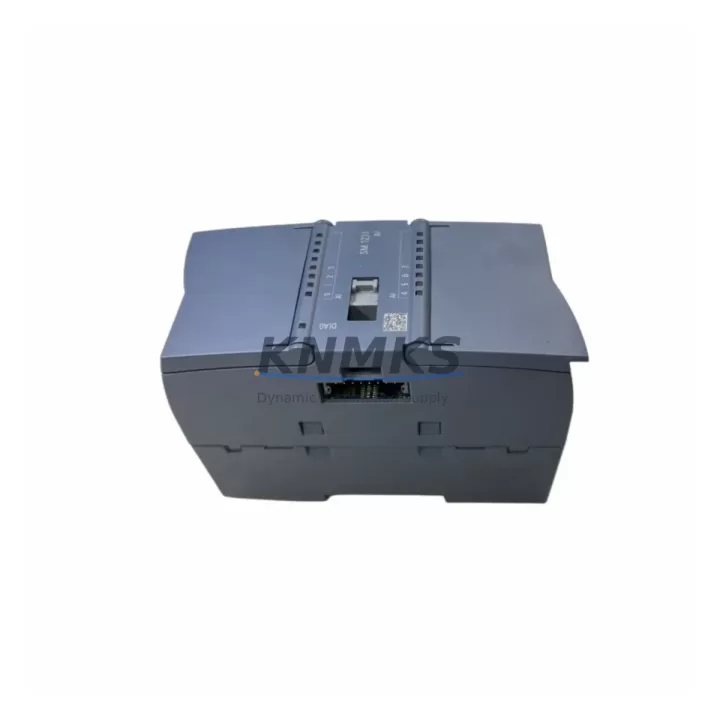
Siemens 6ES7231-4HF32-0XB0 Spare Part for Factory Uptime
The Siemens 6ES7231-4HF32-0XB0 is an SM 1231 series 8-channel analog input module designed for the SIMATIC S7-1200 programmable logic controller platform. As a maintenance-proven spare part, this module supports continuous factory operation by enabling rapid field replacement of failed or degraded analog input channels without requiring system reconfiguration or PLC program modification. Sourced as an original Siemens component, each unit is pre-shipment tested to confirm electrical integrity, channel accuracy, and communication handshake with the S7-1200 CPU before dispatch.
For maintenance engineers managing aging S7-1200 control cabinets, the 6ES7231-4HF32-0XB0 is a critical line item in any structured spare parts inventory. Analog input modules are among the highest-wear signal interface components in process control environments — subject to voltage transients, ground loops, and cumulative thermal stress. Holding at least one verified spare on-site directly reduces mean time to repair (MTTR) during unplanned shutdowns and supports annual preventive maintenance schedules without extended lead times.
Procurement engineers sourcing this module for multi-site or long-term maintenance contracts benefit from confirmed support terms confirmed by quotation coverage, pre-shipment functional testing documentation, and stable long-term supply availability. This module is suitable for new installations, direct like-for-like replacement, and system life extension programs for legacy S7-1200 deployments.
Spare Maintenance Table
| SKU / Part Number | 6ES7231-4HF32-0XB0 |
| Series | SIMATIC S7-1200 SM 1231 |
| Module Type | Analog Input Signal Module |
| Number of Channels | 8 x Analog Input |
| Input Signal Types | Voltage (±10V, ±5V, ±2.5V, 0–5V, 0–10V) / Current (0–20mA, 4–20mA) |
| Resolution | 12-bit + sign (13-bit) |
| Supply Voltage | 24 VDC (via S7-1200 backplane bus) |
| Compatible CPUs | S7-1200 CPU 1211C, 1212C, 1214C, 1215C, 1217C |
| Mounting | DIN Rail, right-side expansion slot of S7-1200 CPU |
| Dimensions (W×H×D) | 45 mm × 100 mm × 75 mm (approx.) |
| Operating Temperature | 0 °C to +55 °C (horizontal); 0 °C to +45 °C (vertical) |
| Protection Rating | IP20 |
| Country of Origin | Germany |
| Firmware Compatibility | TIA Portal V13 SP1 and above |
| Pre-Shipment Testing | Channel accuracy, bus communication, and power-on self-test verified |
| Support terms | 12 Months from date of shipment |
Maintenance Planning for Continuous Operation
When replacing the 6ES7231-4HF32-0XB0 in a live S7-1200 control cabinet, a structured inspection of adjacent components is essential to prevent repeat failures and confirm system integrity after module swap. Maintenance engineers should treat the analog input module replacement as a trigger for a broader cabinet health check.
Begin with the 24 VDC power supply rail feeding the S7-1200 system — verify output voltage stability under load, check for ripple or voltage sag that may have contributed to the original module failure. Siemens SITOP PSU100S or equivalent regulated DIN rail power supplies are commonly paired with S7-1200 systems and should be inspected for capacitor aging or thermal discoloration.
Inspect the S7-1200 CPU module (e.g., CPU 1214C or CPU 1215C) for firmware version compatibility with the replacement SM 1231 module. Confirm that the hardware configuration in TIA Portal reflects the correct module order number to avoid I/O mapping errors after restart. Check the CPU signal board (SB) if installed — signal boards share the backplane bus and a degraded SB can affect analog channel performance across the expansion rack.
Review the field wiring terminals connected to the analog input channels. Loose or corroded terminal connections on the SM 1231 connector block are a leading cause of intermittent analog signal faults. Inspect shielding continuity on sensor cables — unshielded or improperly grounded cables introduce noise that degrades 4–20mA or voltage signal accuracy. If the system uses signal isolators between field transmitters and the PLC input channels, verify isolator output range and calibration before commissioning the replacement module.
Check any fuse or circuit protection elements on the 24VDC supply lines to the analog field devices. A blown fuse upstream of a transmitter will present as a failed analog channel and may have been misdiagnosed as a module fault. Similarly, inspect relay output modules (such as SM 1222 relay variants) in the same cabinet for contact wear — relay switching transients can couple into analog signal wiring in poorly segregated cable runs.
If the control system includes an HMI panel (e.g., Siemens KTP700 Basic or TP1200 Comfort) connected to the S7-1200 via PROFINET, confirm that analog tag values are displaying correctly after module replacement and that no HMI alarm states are latched from the fault period. For systems with CM 1241 RS485/RS232 communication modules or CP 1242-7 GPRS modules, verify that communication cycles were not disrupted during the module swap and that all remote I/O or SCADA connections have re-established cleanly.
Site Replacement Workflow
Step 1 — Pre-Replacement Verification: Confirm the replacement module part number (6ES7231-4HF32-0XB0) matches the hardware configuration in TIA Portal. Export the current PLC program and hardware configuration as a backup before any physical work begins.
Step 2 — Safe Isolation: Follow site LOTO (Lockout/Tagout) procedures. De-energize the 24VDC supply to the S7-1200 expansion rack. Do not hot-swap SM 1231 modules — the S7-1200 platform does not support hot-plug on standard signal modules.
Step 3 — Physical Replacement: Disconnect the analog input connector block from the failed module (the connector is removable, preserving field wiring). Remove the module from the DIN rail expansion slot. Seat the replacement 6ES7231-4HF32-0XB0, reconnect the wiring connector, and restore power.
Step 4 — Commissioning Check: Monitor the CPU RUN/STOP LED and module status LED. In TIA Portal online mode, verify that all 8 analog input channels are reading within expected engineering unit ranges. Compare live values against known-good baseline readings from the SCADA historian or HMI trend logs.
Step 5 — Documentation: Record the replacement date, module serial number, and post-replacement channel readings in the site maintenance log. Update the spare parts inventory to trigger reorder of a replacement spare unit, maintaining minimum stock levels for critical analog input capacity.
This workflow supports like-for-like replacement of legacy SM 1231 modules in existing S7-1200 installations without requiring PLC program changes, hardware reconfiguration, or extended commissioning time — minimizing production downtime to under 30 minutes in most field scenarios.
Spare Parts Support FAQ
Q1: Is the 6ES7231-4HF32-0XB0 compatible with all S7-1200 CPU variants?
The SM 1231 8-channel analog input module is compatible with all standard S7-1200 CPU models (CPU 1211C through CPU 1217C) running TIA Portal V13 SP1 or later firmware. It occupies one expansion slot on the right side of the CPU and is recognized automatically upon power-up when the hardware configuration is correctly defined in TIA Portal. Confirm your CPU firmware version before installation if the system has not been updated recently.
Q2: What pre-shipment testing is performed on this module?
Each 6ES7231-4HF32-0XB0 unit undergoes power-on self-test, backplane bus communication verification, and per-channel analog accuracy spot-check prior to dispatch. Testing confirms that the module meets Siemens factory electrical specifications. A test record is available upon request for quality-controlled procurement processes.
Q3: What is the support terms coverage and what does it include?
All units are covered by a support terms confirmed by quotation from the date of shipment. The support terms covers manufacturing defects, channel failure under normal operating conditions, and bus communication faults. It does not cover damage resulting from incorrect installation, overvoltage events, or operation outside specified environmental limits. Support requests are processed via direct contact with our sales team.
Q4: Can long-term supply be arranged for multi-site maintenance contracts?
Yes. For maintenance contractors, OEMs, and plant operators managing multiple S7-1200 installations, we support blanket order arrangements and reserved stock allocation for the 6ES7231-4HF32-0XB0 and related SM 1231 series modules. Contact our sales team to discuss volume pricing, lead time commitments, and consignment stock options suited to your annual maintenance schedule.
—
© 2026 KNMKS. All rights reserved.
Original Source: https://knmks.com
Contact: admin@knmks.com | +86 18359268345
Product Identification
- Brand / Ecosystem
-
Siemens
Siemens - Model / Series
-
6ES7231-4HF32-0XB0
SIMATIC Series - Product Family
- PLCs & Controllers
- Availability Status
- Available on request after model and quantity confirmation
- Inquiry Type
- B2B RFQ, replacement inquiry and project spare-part request
- Pre-Quote Check
- Exact SKU, brand, series, quantity, nameplate photos and destination country are checked before quotation
System Path
Where this product fits in the KNMKS automation structure.
Specification & Inquiry Focus
- Control platform
- PLC, PAC and modular controllers
- Common needs
- CPU, rack, power and I/O expansion
- Project support
- Replacement, cabinet build and maintenance
Buyer Confirmation
Information KNMKS checks before replying.
- Exact model
- 6ES7231-4HF32-0XB0
- Brand / ecosystem
- Siemens
- Product family
- PLCs & Controllers
- Application note
- Replacement, maintenance, project build or spare-part list
- Useful photos
- Nameplate, installed unit, cabinet layout or connector side
- Delivery details
- Quantity, destination country and target schedule
Document Support
Files and notes can be confirmed during quotation.
- Product photos or nameplate confirmation when available
- Packing and delivery notes before quotation confirmation
- Support scope and delivery terms confirmed per inquiry
- Export document coordination for qualified B2B requests
Inquiry Support
- Model cross-checking before quotation
- CPU, power, rack and expansion module matching
- Support for replacement and project inquiry
What to Send Us
- Brand and exact model number: Siemens 6ES7231-4HF32-0XB0
- Quantity and required delivery time
- Application, replacement requirement or nameplate photo
- Destination country and shipping preference
RFQ Preparation
This is a product inquiry page built for RFQ communication.
Fast Model Check
Send this model to KNMKS for confirmation.
Include quantity, destination country and photos if this is a maintenance replacement. The inquiry will be saved with a reference number after submission.
Brand & Compatibility Note
KNMKS displays automation product information for well-known industrial brand ecosystems and compatible replacement references. Brand names are used for product identification and compatibility reference only; final availability and commercial terms are confirmed per quotation.
 Manufacturing
 Machine Tools
 Packaging
 Energy & Power



 HMI & Displays
 Servo Systems
 Variable Frequency Drives
 Sensors