
Overview
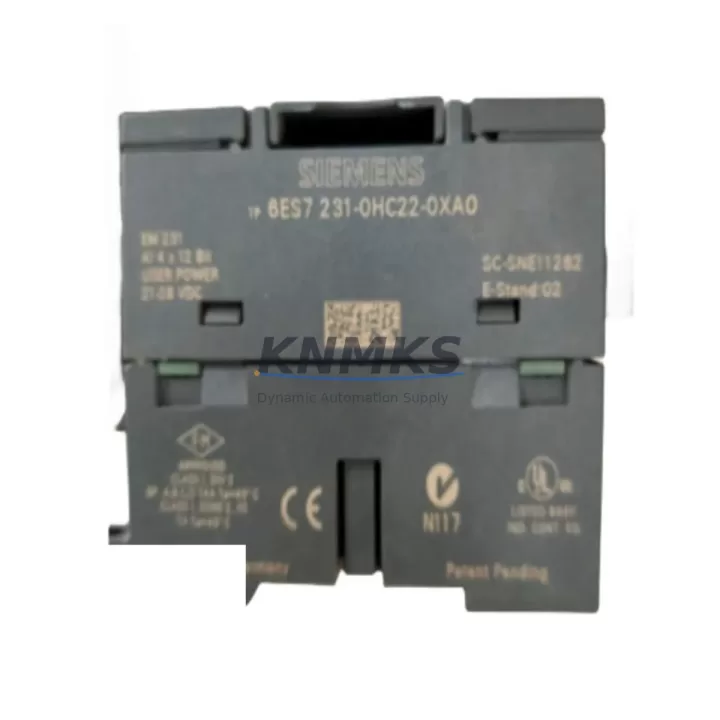
Siemens 6ES7231-0HC22-0XA0 Migration-Ready Analog Input for Legacy Control Systems
The Siemens 6ES7231-0HC22-0XA0 is a 4-channel analog input expansion module (EM231) engineered for the SIMATIC S7-200 compact PLC platform. As legacy S7-200 systems approach end-of-life and spare parts become increasingly scarce, this module remains a critical component for engineers managing brownfield retrofits, control cabinet upgrades, and phased migration projects. Whether you are replacing a failed unit on an active production line or building a validated spare parts inventory ahead of a planned system overhaul, the 6ES7231-0HC22-0XA0 delivers the signal acquisition accuracy and backplane compatibility required to maintain operational continuity without rewriting existing ladder logic or reconfiguring HMI screens.
Each unit is sourced, inspected, and dispatched with a support terms confirmed by quotation, ensuring procurement teams can justify the investment as a long-term asset rather than a short-term stopgap. Stock is maintained to support both single-unit emergency replacements and multi-unit bulk orders for system integrators managing multi-site rollouts.
Migration Compatibility Table
| Parameter | 6ES7231-0HC22-0XA0 (EM231) | Retrofit Notes |
|---|---|---|
| Analog Input Channels | 4 × single-ended | Verify field wiring polarity before swap |
| Input Range | 0–10 V / 0–20 mA / 4–20 mA | DIP switch selection; confirm range matches legacy config |
| Resolution | 12-bit (0–32000 counts) | Scaling blocks in existing program remain valid |
| Backplane Interface | S7-200 expansion bus connector | Direct drop-in; no backplane adapter required |
| Power Supply | 24 VDC from CPU or external | Verify CPU 24 V budget; add external PSU if margin is tight |
| Module Address | Auto-assigned by CPU slot position | Maintain original slot position to preserve AIW addresses |
| Communication Protocol | S7-200 internal expansion bus | No protocol change; PPI/MPI links unaffected |
| Installation Footprint | Standard S7-200 DIN rail mount | Confirm rail space; no additional mounting hardware needed |
| Firmware Compatibility | Compatible with all S7-200 CPU firmware versions | No firmware update required on replacement |
| Support terms | 12 months from date of dispatch — covers manufacturing defects and functional failure | |
Retrofit Planning for Existing Automation Systems
A successful retrofit of the 6ES7231-0HC22-0XA0 begins well before the module arrives on site. Engineers should audit the existing S7-200 CPU — typically a CPU 224 or CPU 226 — to confirm the available 24 VDC expansion power budget. The EM231 draws current from the CPU’s internal 24 V rail, and systems running multiple expansion modules such as a 6ES7232-0HB22-0XA0 EM232 analog output or a 6ES7231-4BD23-0XB0 EM231 thermocouple input may be operating close to the CPU’s rated expansion current limit. Adding a replacement module without this check risks intermittent faults or CPU shutdown under load.
Terminal wiring should be documented from the existing module before removal. The EM231 uses a removable screw-terminal connector, which simplifies the physical swap, but field wiring labels must be verified against the original I/O table in STEP 7 Micro/WIN. If the legacy system uses a 6ES7290-6AA20-0XA0 bus connector to chain expansion modules, inspect the connector for mechanical wear before reuse — a degraded bus connector is a common source of intermittent analog read errors after module replacement.
For sites where the S7-200 communicates with a SIMATIC TP177 or OP77 HMI panel via PPI protocol, the replacement module does not affect the communication link. However, HMI engineers should verify that any analog trend screens or bar graph displays referencing AIW addresses are still mapped correctly after the swap, particularly if the module slot position changed during the retrofit. Systems using a 6ES7901-3CB30-0XA0 PC/PPI cable for programming access should confirm the cable driver version is compatible with the engineering workstation OS before beginning the commissioning sequence.
Where the retrofit is part of a broader migration from S7-200 to a SIMATIC S7-1200 platform, the 6ES7231-0HC22-0XA0 can serve as a validated interim solution, keeping the legacy line operational while the new control architecture is engineered, tested, and staged in parallel. This phased approach eliminates the need for a single extended shutdown and allows the migration team to validate the S7-1200 program logic — including any SM1231 analog input modules on the new platform — against live process data before cutover.
Downtime Control During System Migration
Minimizing unplanned downtime during an analog input module replacement requires a structured pre-swap checklist and a clear rollback plan. Before powering down the control cabinet, the engineering team should capture a full program backup from the S7-200 CPU using STEP 7 Micro/WIN and store it on a verified offline medium. This backup preserves all data block values, PID tuning parameters, and retentive memory contents that would otherwise be lost during a cold restart.
The physical swap of the 6ES7231-0HC22-0XA0 is a hot-swap-capable operation only if the CPU is placed in STOP mode first. Attempting to remove or insert an expansion module with the CPU in RUN mode risks corrupting the expansion bus handshake and may require a CPU power cycle to recover. Once the replacement module is seated and the terminal connector is reattached, the CPU should be powered up in STOP mode, the program downloaded from backup, and a controlled RUN mode transition executed with an operator present at the HMI to monitor analog process values in real time.
For critical process lines where even a brief STOP mode transition is unacceptable, a parallel redundancy approach using a secondary S7-200 rack with a pre-configured CPU 224XP and a pre-wired EM231 can be staged offline and cut over at a scheduled maintenance window. This approach, combined with pre-tested program logic and verified HMI screen mappings, typically reduces the active cutover window to under 15 minutes. All replacement units shipped by KNMKS undergo functional output testing prior to dispatch, reducing the risk of a DOA module extending the maintenance window.
Retrofit Support FAQ
Q1: Is the 6ES7231-0HC22-0XA0 a direct drop-in replacement for the original EM231 analog input module?
Yes. The 6ES7231-0HC22-0XA0 is the standard production part number for the S7-200 EM231 4-channel analog input module. It connects directly to the S7-200 expansion bus without adapters, uses the same terminal connector pinout, and is recognized by all S7-200 CPU firmware versions. No program changes are required provided the replacement module is installed in the same slot position as the original.
Q2: What commissioning steps are required after installing the replacement module?
After physical installation, power up the CPU in STOP mode and verify that the EM231 is recognized in the STEP 7 Micro/WIN system block. Confirm the DIP switch input range settings match the original module configuration. Transition to RUN mode and monitor AIW values against known process references — a calibrated signal source (e.g., 4 mA loop calibrator) is recommended for final verification. Document the commissioning result and retain the backup program file.
Q3: How do I confirm wiring compatibility before removing the legacy module?
Photograph or transcribe the existing terminal wiring before removal. The EM231 uses a 10-position removable terminal block. Channels are wired as differential pairs (A+/A−) or single-ended depending on the DIP switch configuration. Cross-reference the wiring against the original I/O table in the STEP 7 Micro/WIN project. If the original wiring documentation is unavailable, use a multimeter to trace signal sources before disconnecting.
Q4: What does the support terms confirmed by quotation cover, and what is the stock availability?
The support terms confirmed by quotation cover manufacturing defects and functional failure under normal operating conditions from the date of dispatch. It does not cover damage resulting from incorrect installation, overvoltage, or environmental exposure beyond the module’s rated specifications. Stock is maintained for both single-unit and bulk orders. Lead time for in-stock units is typically 3–5 business days. Contact admin@knmks.com or +86 18359268345 to confirm current availability before placing a critical-path order.
© 2026 KNMKS. All rights reserved.
Original Source: https://knmks.com
Contact: admin@knmks.com | +86 18359268345
Product Identification
- Brand / Ecosystem
-
Siemens
Siemens - Model / Series
-
6ES7231-0HC22-0XA0
SIMATIC Series - Product Family
- PLCs & Controllers
- Availability Status
- Available on request after model and quantity confirmation
- Inquiry Type
- B2B RFQ, replacement inquiry and project spare-part request
- Pre-Quote Check
- Exact SKU, brand, series, quantity, nameplate photos and destination country are checked before quotation
System Path
Where this product fits in the KNMKS automation structure.
Specification & Inquiry Focus
- Control platform
- PLC, PAC and modular controllers
- Common needs
- CPU, rack, power and I/O expansion
- Project support
- Replacement, cabinet build and maintenance
Buyer Confirmation
Information KNMKS checks before replying.
- Exact model
- 6ES7231-0HC22-0XA0
- Brand / ecosystem
- Siemens
- Product family
- PLCs & Controllers
- Application note
- Replacement, maintenance, project build or spare-part list
- Useful photos
- Nameplate, installed unit, cabinet layout or connector side
- Delivery details
- Quantity, destination country and target schedule
Document Support
Files and notes can be confirmed during quotation.
- Product photos or nameplate confirmation when available
- Packing and delivery notes before quotation confirmation
- Support scope and delivery terms confirmed per inquiry
- Export document coordination for qualified B2B requests
Inquiry Support
- Model cross-checking before quotation
- CPU, power, rack and expansion module matching
- Support for replacement and project inquiry
What to Send Us
- Brand and exact model number: Siemens 6ES7231-0HC22-0XA0
- Quantity and required delivery time
- Application, replacement requirement or nameplate photo
- Destination country and shipping preference
RFQ Preparation
This is a product inquiry page built for RFQ communication.
Fast Model Check
Send this model to KNMKS for confirmation.
Include quantity, destination country and photos if this is a maintenance replacement. The inquiry will be saved with a reference number after submission.
Brand & Compatibility Note
KNMKS displays automation product information for well-known industrial brand ecosystems and compatible replacement references. Brand names are used for product identification and compatibility reference only; final availability and commercial terms are confirmed per quotation.
 Manufacturing
 Machine Tools
 Packaging
 Energy & Power



 HMI & Displays
 Servo Systems
 Variable Frequency Drives
 Sensors