
Overview
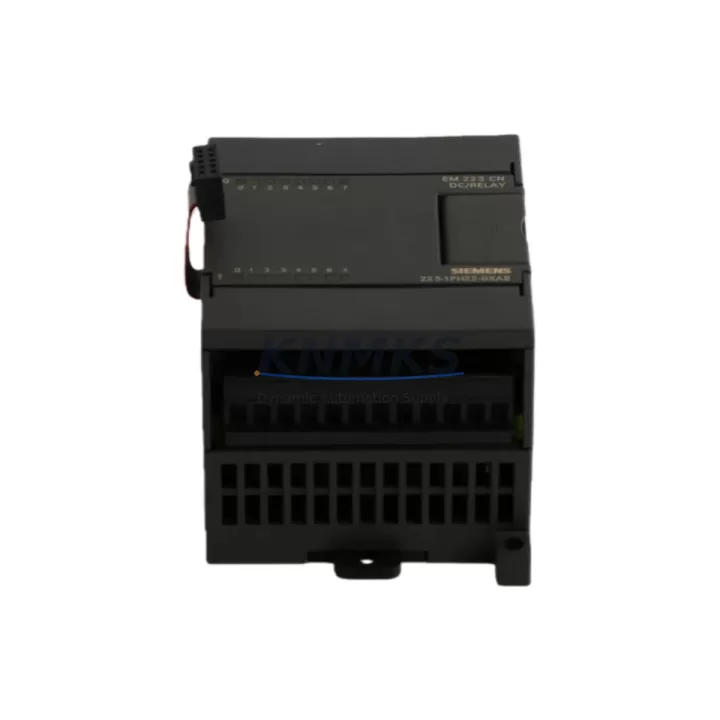
Siemens 6ES7223-1PH22-0XA0 Maintenance-Proven Spare Part for Factory Uptime
The Siemens 6ES7223-1PH22-0XA0 is a digital combination I/O expansion module (EM 223) designed for the S7-200 SMART series PLC platform. With 8 digital inputs and 8 digital outputs, this module is a critical field-replaceable unit in discrete manufacturing, packaging lines, water treatment facilities, petrochemical process control, and building automation systems. Sourced as an original Siemens spare part, each unit supplied by KNMKS undergoes pre-shipment functional verification and is backed by a support terms confirmed by quotation.
For maintenance engineers managing aging S7-200 SMART control cabinets, the 6ES7223-1PH22-0XA0 represents a direct, plug-compatible replacement that eliminates the need for hardware reconfiguration or software re-engineering. For procurement engineers, stocking this module as a critical spare reduces mean time to repair (MTTR) and protects production continuity against unplanned downtime events.
Spare Maintenance Table
| SKU / Part Number | 6ES7223-1PH22-0XA0 |
| Series | S7-200 SMART |
| Module Type | EM 223 — Digital Combination I/O |
| Digital Inputs | 8 × 24 VDC Sink/Source |
| Digital Outputs | 8 × Transistor (Source), 0.75 A per output |
| Supply Voltage | 24 VDC (via CPU or external 24 V bus) |
| Current Consumption | ≤ 180 mA at 5 VDC (backplane); ≤ 50 mA at 24 VDC |
| Isolation | Optocoupler isolation between field and logic side |
| Connector Type | Removable screw terminal block |
| Mounting | DIN rail, right-side expansion bus connector |
| Operating Temperature | 0 °C to +55 °C (horizontal); 0 °C to +45 °C (vertical) |
| Protection Rating | IP20 |
| Dimensions (W×H×D) | Approx. 71.2 × 80 × 62 mm |
| Weight | ~180 g |
| Origin | Germany |
| Compatibility | Siemens S7-200 SMART CPU ST20, ST30, ST40, ST60, SR20, SR30, SR40, SR60 |
| Support terms | 12 Months — Tested & Verified Before Shipment |
Maintenance Planning for Continuous Operation
When a 6ES7223-1PH22-0XA0 module fails or is flagged during a scheduled inspection, the fault rarely exists in isolation. A disciplined maintenance engineer will treat the module replacement as an opportunity to audit the surrounding electrical environment to prevent repeat failures and ensure system stability after restoration.
Begin by verifying the 24 VDC power supply feeding the S7-200 SMART expansion bus. A degraded or undersized power supply — such as a Siemens SITOP PSU100S 24 V/5 A or equivalent — can cause intermittent I/O faults that mimic module failure. Measure output voltage under load and check for ripple exceeding 5% before installing the replacement module.
Inspect the expansion bus ribbon cable connecting the CPU (e.g., CPU ST40 or CPU SR60) to the EM 223 module. Cracked connectors, bent pins, or oxidized contacts on the bus interface are a common root cause of digital I/O communication errors in S7-200 SMART systems. Replace the bus cable if any physical damage is observed.
Check all field wiring terminals on the removable screw block. Loose or corroded terminals on input channels connected to proximity sensors, limit switches, or push buttons can generate false input signals that stress output logic. Re-torque all terminals to specification and apply contact protection spray in high-humidity environments.
If the control cabinet includes intermediate relay modules (such as Phoenix Contact or Weidmüller relay terminal blocks) driven by the EM 223 outputs, inspect coil voltage ratings and contact wear. Relay coil inrush current can exceed the 0.75 A per-channel output rating if relay selection is incorrect — a common oversight in retrofit projects.
For systems using Siemens EM 231 analog input modules or EM 232 analog output modules in the same expansion rack, verify that total backplane current draw remains within the CPU’s 5 VDC bus budget. Overloaded backplanes cause random module resets that are difficult to diagnose without a current audit.
Finally, review the STEP 7 Micro/WIN SMART program for any I/O force tables or diagnostic buffer entries that may have been set during the fault event. Clear forced values before commissioning the replacement module to avoid unexpected output activation during startup.
Site Replacement Workflow
Step 1 — Isolation: Place the S7-200 SMART CPU in STOP mode via the STEP 7 Micro/WIN SMART software or the physical RUN/STOP switch. De-energize the 24 VDC field power supply feeding the EM 223 module. Do not remove the module under live power.
Step 2 — Documentation: Photograph the existing terminal wiring before disconnection. Record the I/O address assignment from the system block configuration (default: typically Q0.0–Q0.7 and I0.0–I0.7 for the first EM 223 in the expansion chain, but verify against the actual project configuration).
Step 3 — Module Removal: Disconnect the removable terminal block. Release the DIN rail locking tab and slide the module off the rail. Disconnect the expansion bus connector carefully to avoid pin damage.
Step 4 — Replacement Installation: Mount the 6ES7223-1PH22-0XA0 on the DIN rail. Connect the expansion bus cable. Reattach the terminal block, verifying wire positions against the documentation photograph.
Step 5 — Power-Up and Verification: Restore 24 VDC field power. Switch the CPU to RUN mode. Monitor the STEP 7 Micro/WIN SMART diagnostic buffer for any new errors. Perform a full I/O point-to-point test using the status monitor before returning the line to production.
This workflow is compatible with direct replacement of older 6ES7223-1PH22-0XA8 variants in legacy S7-200 SMART installations, subject to firmware version compatibility verification.
Spare Parts Support FAQ
Q1: Is the 6ES7223-1PH22-0XA0 a direct replacement for older EM 223 variants in S7-200 SMART systems?
A: In most cases, yes. The 6ES7223-1PH22-0XA0 is the current production revision of the EM 223 8DI/8DO transistor output module for S7-200 SMART. It is physically and electrically compatible with all S7-200 SMART CPUs. For legacy S7-200 (non-SMART) systems, this module is not compatible — the S7-200 SMART and classic S7-200 use different expansion bus protocols.
Q2: How does KNMKS verify spare parts before shipment?
A: Each 6ES7223-1PH22-0XA0 unit is powered up and subjected to a functional I/O verification test prior to packaging. Units that fail any test point are quarantined and not shipped. A test report is available upon request for critical procurement orders.
Q3: What is the recommended spare parts stocking strategy for S7-200 SMART systems?
A: For production lines with more than three S7-200 SMART expansion modules, we recommend maintaining a minimum of one EM 223 unit on-site as a cold standby spare. For high-criticality applications (continuous process, 24/7 operations), a hot standby spare stored in the control room is advisable. KNMKS supports long-term supply agreements to ensure consistent availability.
Q4: What support terms and after-sales support does KNMKS provide?
A: All spare parts supplied by KNMKS carry a support terms confirmed by quotation from the date of shipment, covering manufacturing defects and functional failures under normal operating conditions. Support requests are processed within 5 business days. For urgent replacement needs, expedited shipment options are available. Contact our technical team at admin@knmks.com or +86 18359268345 for support.
© 2026 KNMKS. All rights reserved.
Original Source: https://knmks.com
Contact: admin@knmks.com | +86 18359268345
Product Identification
- Brand / Ecosystem
-
Siemens
Siemens - Model / Series
-
6ES7223-1PH22-0XA0
SIMATIC Series - Product Family
- PLCs & Controllers
- Availability Status
- Available on request after model and quantity confirmation
- Inquiry Type
- B2B RFQ, replacement inquiry and project spare-part request
- Pre-Quote Check
- Exact SKU, brand, series, quantity, nameplate photos and destination country are checked before quotation
System Path
Where this product fits in the KNMKS automation structure.
Specification & Inquiry Focus
- Control platform
- PLC, PAC and modular controllers
- Common needs
- CPU, rack, power and I/O expansion
- Project support
- Replacement, cabinet build and maintenance
Buyer Confirmation
Information KNMKS checks before replying.
- Exact model
- 6ES7223-1PH22-0XA0
- Brand / ecosystem
- Siemens
- Product family
- PLCs & Controllers
- Application note
- Replacement, maintenance, project build or spare-part list
- Useful photos
- Nameplate, installed unit, cabinet layout or connector side
- Delivery details
- Quantity, destination country and target schedule
Document Support
Files and notes can be confirmed during quotation.
- Product photos or nameplate confirmation when available
- Packing and delivery notes before quotation confirmation
- Support scope and delivery terms confirmed per inquiry
- Export document coordination for qualified B2B requests
Inquiry Support
- Model cross-checking before quotation
- CPU, power, rack and expansion module matching
- Support for replacement and project inquiry
What to Send Us
- Brand and exact model number: Siemens 6ES7223-1PH22-0XA0
- Quantity and required delivery time
- Application, replacement requirement or nameplate photo
- Destination country and shipping preference
RFQ Preparation
This is a product inquiry page built for RFQ communication.
Fast Model Check
Send this model to KNMKS for confirmation.
Include quantity, destination country and photos if this is a maintenance replacement. The inquiry will be saved with a reference number after submission.
Brand & Compatibility Note
KNMKS displays automation product information for well-known industrial brand ecosystems and compatible replacement references. Brand names are used for product identification and compatibility reference only; final availability and commercial terms are confirmed per quotation.
 Manufacturing
 Machine Tools
 Packaging
 Energy & Power



 HMI & Displays
 Servo Systems
 Variable Frequency Drives
 Sensors