
Overview
Siemens 6ES7223-1BL22-0XA0 Migration-Ready Digital I/O for Legacy Control Systems
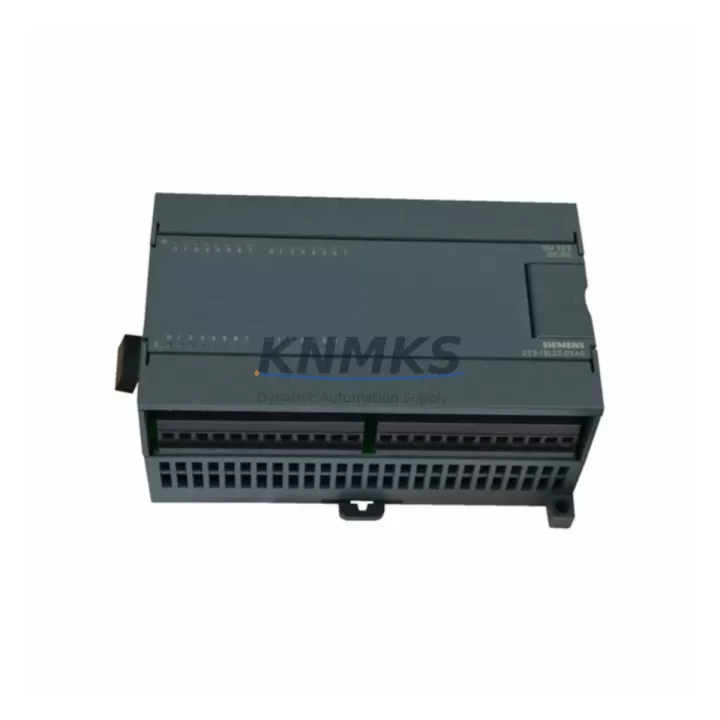
The Siemens 6ES7223-1BL22-0XA0 is a 16-input / 16-output digital expansion module from the SIMATIC S7-200 EM223 series, designed for 24 VDC discrete signal processing in compact PLC architectures. As the S7-200 platform has reached end-of-life status, this module has become a critical spare part for facilities operating legacy control panels, older OEM machinery, and distributed I/O cabinets that cannot be immediately migrated to newer platforms such as the S7-1200 or S7-1500. Our stock of the 6ES7223-1BL22-0XA0 is sourced from verified supply chains, individually tested prior to shipment, and backed by a support terms confirmed by quotation — making it a reliable solution for both emergency replacement and planned retrofit programs.
When integrating this module into an existing S7-200 system, engineers must confirm several key parameters before installation. Power budget on the CPU expansion bus is the first checkpoint: the S7-200 CPU — whether a CPU 224, CPU 226, or CPU 224XP — allocates a fixed 5 VDC bus current to expansion modules, and adding the 6ES7223-1BL22-0XA0 draws approximately 110 mA from the 5 V bus and up to 280 mA from the 24 VDC user supply. Exceeding the CPU’s rated expansion current will cause unpredictable module faults. Terminal wiring must also be reviewed: the module uses a 40-pin removable terminal block, and field wiring from the legacy installation should be mapped against the new module’s I/O addressing before power-up. Module address assignment in STEP 7 Micro/WIN is automatic based on slot position in the expansion chain, so the physical order of modules — including any EM221, EM222, or EM231 analog input modules already installed — must be preserved or the program’s I/O mapping will shift and require software correction.
For sites running SIMATIC S7-200 CPUs connected to a TP177 or TP270 HMI panel via PPI protocol, the replacement of this module does not affect the communication link, as PPI operates at the CPU level. However, HMI screen tag addresses tied to specific I/O bits (e.g., Q1.0 through Q2.7) must be verified against the updated I/O map after module insertion. If the 6ES7223-1BL22-0XA0 is replacing a failed unit in a multi-drop PPI network alongside a CP 243-1 Ethernet module or a EM277 PROFIBUS-DP module, the network topology and station addresses should be documented before any hardware swap to avoid communication loss during the changeover window.
Migration Compatibility Table
| Parameter | 6ES7223-1BL22-0XA0 (EM223) | Retrofit / Migration Notes |
|---|---|---|
| Digital Inputs | 16 × 24 VDC sink/source | Compatible with existing field wiring; verify input filter time settings in Micro/WIN |
| Digital Outputs | 16 × 24 VDC transistor (source) | Confirm load current per output channel does not exceed 0.75 A |
| Bus Current Draw (5 VDC) | ~110 mA | Verify CPU expansion bus budget before adding additional modules |
| 24 VDC User Supply | ~280 mA (outputs loaded) | Check existing 24 VDC PSU capacity; consider PM 1207 or equivalent if margin is tight |
| Terminal Block | 40-pin removable | Re-use existing wiring harness if connector pitch matches; label all terminals before removal |
| Expansion Interface | S7-200 proprietary bus connector | Not compatible with S7-1200 signal boards or S7-300 backplane; direct S7-200 slot replacement only |
| Communication Protocol | PPI (via CPU) | No impact on PPI/MPI links; CP 243-1 or EM277 PROFIBUS-DP unaffected by module swap |
| Programming Software | STEP 7 Micro/WIN V4.0+ | No program changes required if slot position is maintained; re-download if I/O map shifts |
| Installation Space | DIN rail, 71.2 mm width | Verify cabinet rail space; module must be adjacent to CPU or prior expansion module |
| Firmware | Factory firmware (no field update) | No firmware flashing required; plug-and-play replacement in same slot position |
| Support terms | support terms confirmed by quotation | Pre-shipment functional test included on all units | |
Retrofit Planning for Existing Automation Systems
Retrofit projects involving the 6ES7223-1BL22-0XA0 typically arise in one of three scenarios: emergency replacement of a failed module with no available local stock, planned lifecycle extension of an S7-200-based control panel, or a phased migration where the S7-200 system must remain operational while a parallel S7-1200 or S7-1500 architecture is being commissioned alongside it.
In emergency replacement scenarios, the primary concern is minimizing downtime. Having a pre-tested, in-stock unit of the 6ES7223-1BL22-0XA0 available for same-day or next-day dispatch is critical. Our global dispatch capability supports urgent requirements across Asia-Pacific, the Middle East, and European markets. Before the replacement unit arrives on site, maintenance teams should back up the current CPU program using STEP 7 Micro/WIN and document the existing I/O wiring layout — particularly the terminal assignments on the 40-pin connector — to ensure the swap can be completed within a single maintenance window.
For planned lifecycle extension projects, the 6ES7223-1BL22-0XA0 is often deployed alongside other S7-200 expansion modules to restore full I/O capacity to aging control cabinets. Common companion modules in these projects include the EM221 (8DI) for additional discrete inputs, the EM222 (8DO) for supplementary output channels, and the EM231 (4AI) for analog signal acquisition from legacy sensors. Where the control cabinet also houses a CP 243-1 Industrial Ethernet module for remote SCADA connectivity, the network configuration should be preserved during the module swap to avoid disrupting supervisory data collection. In cabinets where a TD 200 text display or TP 177 touch panel is connected via PPI, the HMI communication will resume automatically once the CPU re-establishes its expansion bus after the new module is seated and powered.
For phased migration projects — where the end goal is eventual transition to an S7-1200 system — the 6ES7223-1BL22-0XA0 serves as a bridge component, keeping the legacy system stable while the new architecture is validated. During this phase, signal isolation between the old and new systems may require the use of signal isolators or relay interface modules to prevent ground loop interference between the two control platforms. Installation space in the existing cabinet should be assessed early: the 6ES7223-1BL22-0XA0 occupies 71.2 mm of DIN rail width, and any additional modules planned for the migration phase must be accounted for in the cabinet layout before procurement.
Downtime Control During System Migration
Controlling downtime during a module replacement or system migration involving the 6ES7223-1BL22-0XA0 requires a structured approach that protects the existing program logic, preserves field wiring integrity, and maintains control continuity for connected process equipment.
The first step is a full program backup. Using STEP 7 Micro/WIN, upload the current CPU program — including all data blocks, system blocks, and symbol tables — to an offline project file before any hardware is disturbed. This backup serves as the recovery baseline if the replacement module triggers unexpected behavior during commissioning. The system block in particular contains the CPU configuration, including expansion module I/O assignments, and should be reviewed to confirm that the replacement 6ES7223-1BL22-0XA0 will occupy the same logical slot as the failed unit.
Terminal block removal should be performed with the 24 VDC user supply de-energized but with the CPU in STOP mode rather than fully powered down where process safety permits. The removable 40-pin terminal block on the EM223 allows the field wiring harness to be transferred to the new module without re-terminating individual conductors, significantly reducing the risk of wiring errors and cutting the physical swap time to under 15 minutes in most installations. After seating the new module and reconnecting the terminal block, the CPU should be powered up and observed for expansion bus errors on the diagnostic LEDs before switching to RUN mode.
Once the CPU is in RUN mode, the first verification step is to confirm that all I/O status indicators on the 6ES7223-1BL22-0XA0 reflect the expected field states. Any discrepancy between the expected and actual I/O states should be investigated at the terminal level before resuming process control. For systems connected to a TP 177 or TD 200 operator panel, the HMI should be checked for alarm states that may have been triggered during the power cycle. In networked installations where the S7-200 CPU communicates with a SCADA system via a CP 243-1 Ethernet module, the SCADA historian should be reviewed for any data gaps recorded during the maintenance window to ensure data integrity is maintained for compliance reporting.
Retrofit Support FAQ
Q1: Is the 6ES7223-1BL22-0XA0 a direct drop-in replacement for a failed EM223 module in an S7-200 system?
Yes. The 6ES7223-1BL22-0XA0 is the standard EM223 16DI/16DO module for the S7-200 platform. Provided the replacement unit is installed in the same physical slot position and the terminal block wiring is preserved, no program changes are required. The CPU will automatically recognize the module on power-up.
Q2: What pre-shipment testing is performed on each unit?
Every 6ES7223-1BL22-0XA0 unit dispatched from our facility undergoes functional I/O verification testing prior to shipment. Input channel response and output switching are confirmed under load conditions. Units that do not pass functional testing are not dispatched. All shipped units are covered by a support terms confirmed by quotation from the date of delivery.
Q3: Can this module be used in a system that is being migrated from S7-200 to S7-1200?
The 6ES7223-1BL22-0XA0 is specific to the S7-200 expansion bus and is not compatible with the S7-1200 signal board or distributed I/O architecture. During a phased migration, it is used to maintain the legacy S7-200 system in operation while the S7-1200 platform is being commissioned in parallel. Once the migration is complete and the S7-200 system is decommissioned, the module’s role ends. We can advise on equivalent S7-1200 I/O modules for the target architecture if required.
Q4: What is the typical lead time and do you maintain stock for urgent requirements?
We maintain multi-region stock of the 6ES7223-1BL22-0XA0 to support urgent dispatch requirements. Standard lead time for in-stock units is 1–3 business days for international shipments. For emergency requirements, same-day dispatch is available subject to order confirmation before the daily cut-off time. Contact our sales team directly to confirm current stock availability and dispatch options for your region.
© 2026 KNMKS. All rights reserved.
Original Source: https://knmks.com
Contact: admin@knmks.com | +86 18359268345
Product Identification
- Brand / Ecosystem
-
Siemens
Siemens - Model / Series
-
6ES7223-1BL22-0XA0
SIMATIC Series - Product Family
- PLCs & Controllers
- Availability Status
- Available on request after model and quantity confirmation
- Inquiry Type
- B2B RFQ, replacement inquiry and project spare-part request
- Pre-Quote Check
- Exact SKU, brand, series, quantity, nameplate photos and destination country are checked before quotation
System Path
Where this product fits in the KNMKS automation structure.
Specification & Inquiry Focus
- Control platform
- PLC, PAC and modular controllers
- Common needs
- CPU, rack, power and I/O expansion
- Project support
- Replacement, cabinet build and maintenance
Buyer Confirmation
Information KNMKS checks before replying.
- Exact model
- 6ES7223-1BL22-0XA0
- Brand / ecosystem
- Siemens
- Product family
- PLCs & Controllers
- Application note
- Replacement, maintenance, project build or spare-part list
- Useful photos
- Nameplate, installed unit, cabinet layout or connector side
- Delivery details
- Quantity, destination country and target schedule
Document Support
Files and notes can be confirmed during quotation.
- Product photos or nameplate confirmation when available
- Packing and delivery notes before quotation confirmation
- Support scope and delivery terms confirmed per inquiry
- Export document coordination for qualified B2B requests
Inquiry Support
- Model cross-checking before quotation
- CPU, power, rack and expansion module matching
- Support for replacement and project inquiry
What to Send Us
- Brand and exact model number: Siemens 6ES7223-1BL22-0XA0
- Quantity and required delivery time
- Application, replacement requirement or nameplate photo
- Destination country and shipping preference
RFQ Preparation
This is a product inquiry page built for RFQ communication.
Fast Model Check
Send this model to KNMKS for confirmation.
Include quantity, destination country and photos if this is a maintenance replacement. The inquiry will be saved with a reference number after submission.
Brand & Compatibility Note
KNMKS displays automation product information for well-known industrial brand ecosystems and compatible replacement references. Brand names are used for product identification and compatibility reference only; final availability and commercial terms are confirmed per quotation.
 Manufacturing
 Machine Tools
 Packaging
 Energy & Power



 HMI & Displays
 Servo Systems
 Variable Frequency Drives
 Sensors