
Overview
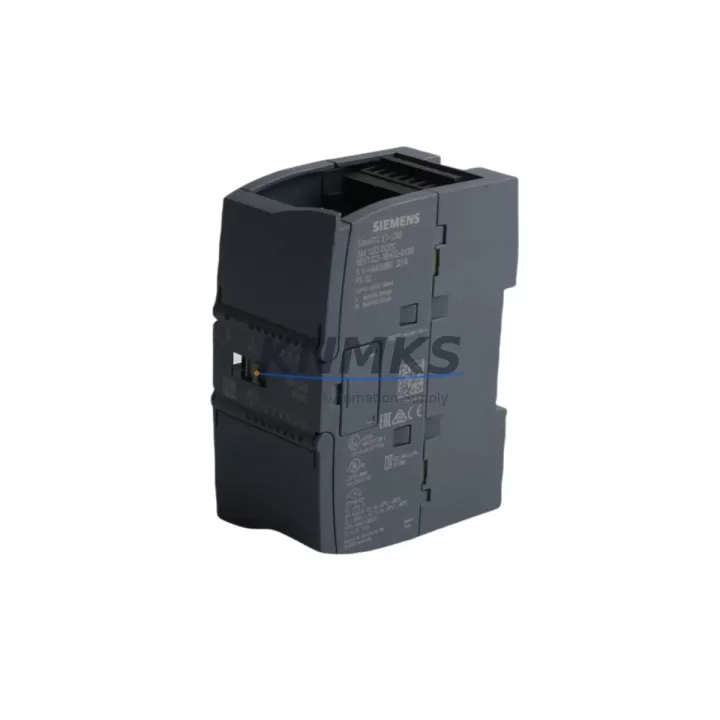
Siemens 6ES7223-1BH32-0XB0 Maintenance-Proven Spare Part for Factory Uptime
The Siemens 6ES7223-1BH32-0XB0 is an SM 223 Digital Combination I/O Expansion Module designed for the S7-200 SMART PLC platform. With 8 digital inputs (24 VDC) and 8 digital outputs (relay or transistor), this module is a cornerstone component in discrete control architectures across manufacturing, packaging, water treatment, and building automation industries. When a production line halts due to a failed I/O expansion module, every minute of downtime translates directly into lost output and escalating maintenance costs. Stocking a verified replacement unit of the 6ES7223-1BH32-0XB0 is one of the most cost-effective strategies a maintenance team can adopt to protect factory uptime.
At KNMKS, every unit of the 6ES7223-1BH32-0XB0 is sourced from authorized supply chains, individually tested for electrical integrity and I/O channel functionality before shipment, and backed by a support terms confirmed by quotation. Our global warehouse network supports rapid dispatch to minimize lead time risk for critical spare parts programs.
Spare Maintenance Table
| Parameter | Specification |
|---|---|
| Part Number / SKU | 6ES7223-1BH32-0XB0 |
| Module Type | SM 223 Digital Combination I/O Expansion Module |
| Compatible PLC Platform | Siemens S7-200 SMART |
| Digital Inputs | 8 × 24 VDC (IEC Type 1 sink) |
| Digital Outputs | 8 × Relay, 2A per point / or Transistor 0.75A per point |
| Supply Voltage | 24 VDC (±15%) |
| Power Consumption | ≤ 4W (module bus) + load current |
| Isolation | Optical isolation between field and logic side |
| Connector Type | Removable screw terminal block |
| Mounting | DIN rail, right-side expansion bus connector |
| Operating Temperature | 0°C to +55°C |
| Storage Temperature | -40°C to +70°C |
| Humidity | 5% to 95% RH (non-condensing) |
| Protection Rating | IP20 |
| Dimensions (W×H×D) | Approx. 71.2 × 100 × 81 mm |
| Weight | Approx. 180 g |
| Country of Origin | Germany |
| Compatibility | S7-200 SMART CPU ST20, ST30, ST40, ST60, SR20, SR30, SR40, SR60 |
| Support terms | 12 Months — Tested before shipment |
Maintenance Planning for Continuous Operation
Replacing the 6ES7223-1BH32-0XB0 in the field is rarely an isolated task. Experienced maintenance engineers know that an I/O expansion module failure is often a symptom of broader electrical stress in the control cabinet. Before declaring the replacement complete, a thorough site inspection should cover the following associated components:
24 VDC Power Supply Rail: The SM 223 module draws its logic and field power from the 24 VDC bus. Verify that the cabinet’s SITOP PSU100S or equivalent 24 VDC power supply is delivering stable voltage within ±15% tolerance. A degraded power supply is a leading cause of intermittent I/O faults and premature module failure. Inspect the power supply output terminals and check for ripple or voltage sag under load.
S7-200 SMART CPU Module: The expansion bus connector on the CPU (e.g., CPU ST40 or CPU SR60) must be inspected for pin damage, oxidation, or mechanical stress. A faulty expansion bus interface on the CPU side can cause the replacement SM 223 to report communication errors immediately after installation. Confirm firmware compatibility between the CPU and the new module using STEP 7-Micro/WIN SMART software.
Expansion Bus Ribbon Cable and Connectors: The S7-200 SMART system uses a direct side-mount expansion bus — inspect the bus connector on both the CPU and the SM 223 for bent pins or cracked housings. If the system includes additional expansion modules such as the 6ES7231-4HD32-0XB0 (SM 231 Analog Input) or the 6ES7232-4HD32-0XB0 (SM 232 Analog Output), verify that all modules are firmly seated and that the expansion chain is intact.
Output Load Wiring and Fusing: For relay output variants, inspect the output terminal wiring for signs of arcing, insulation degradation, or overloaded contacts. Each relay output should be protected by an appropriately rated fuse (typically 2A fast-blow per output group). Replace any discolored or blown fuses and verify that inductive loads (solenoids, contactors) are equipped with freewheeling diodes or RC snubbers to suppress back-EMF.
Input Signal Wiring and Sensors: Check the 24 VDC input wiring from field sensors — proximity switches, limit switches, and photoelectric sensors — for loose terminals, broken conductors, or ground faults. A single shorted input channel can cause the entire module to latch into a fault state. Use a multimeter to verify input signal levels at the terminal block before powering up the replacement module.
HMI Communication and PROFINET/RS-485 Links: If the S7-200 SMART CPU is connected to a Siemens SMART LINE HMI (e.g., 6AV6648-0CC11-3AX0 SMART 700 IE V3) via Ethernet or RS-485, verify that the communication link is restored after module replacement. An I/O fault can sometimes trigger HMI alarm screens that mask the root cause — clear all active alarms and confirm normal HMI data exchange before returning the line to production.
Maintaining a minimum stock of one spare 6ES7223-1BH32-0XB0 per production line — alongside a spare CPU module and a 24 VDC power supply — is a proven strategy for reducing mean time to repair (MTTR) in S7-200 SMART-based control systems. For facilities operating multiple lines, a centralized spare parts cabinet with labeled, tested modules dramatically reduces emergency procurement lead times.
Site Replacement Workflow
The 6ES7223-1BH32-0XB0 is a direct plug-and-play replacement for any failed SM 223 8DI/8DO module in the S7-200 SMART expansion chain. Follow this field-proven workflow to minimize downtime:
Step 1 — Safe Isolation: Place the S7-200 SMART CPU in STOP mode via the RUN/STOP switch or STEP 7-Micro/WIN SMART. De-energize the 24 VDC supply to the expansion module rack. Lock out / tag out (LOTO) the cabinet per site safety procedures.
Step 2 — Module Removal: Disconnect the field wiring terminal block from the failed SM 223 module (the removable terminal block design allows wiring to remain intact). Release the DIN rail locking tab and slide the module out of the expansion chain. Note the module position in the expansion sequence — the S7-200 SMART CPU addresses expansion modules by physical slot order.
Step 3 — Replacement Installation: Slide the new 6ES7223-1BH32-0XB0 into the same slot position, ensuring the expansion bus connector engages fully with the adjacent module or CPU. Reattach the terminal block. Verify that the DIN rail locking tab is fully engaged.
Step 4 — Power-Up and Verification: Restore 24 VDC power and switch the CPU to RUN mode. Observe the module’s LED indicators — the green PWR LED should illuminate, and the I/O LEDs should reflect the current field signal states. Use STEP 7-Micro/WIN SMART to perform an online diagnostic and confirm that all 8 input and 8 output channels are reporting correctly.
Step 5 — Functional Test: Perform a controlled I/O test by activating each input signal from the field and verifying the corresponding output response. For relay outputs, use a continuity tester to confirm contact closure. Document the replacement in the site maintenance log and update the spare parts inventory record.
This workflow is compatible with all S7-200 SMART CPU variants and requires no firmware re-flashing or software reconfiguration — the CPU automatically recognizes the replacement SM 223 module upon power-up, provided the module type and slot position are unchanged.
Spare Parts Support FAQ
Q1: Is the 6ES7223-1BH32-0XB0 still available for long-term supply?
Yes. KNMKS maintains allocated stock of the 6ES7223-1BH32-0XB0 to support long-term maintenance programs. While Siemens has announced the S7-200 SMART platform’s lifecycle roadmap, the module remains in active production and is available through authorized distribution channels. We recommend establishing a blanket order or annual procurement agreement to lock in pricing and ensure supply continuity for multi-year maintenance contracts.
Q2: How is each unit tested before shipment?
Every 6ES7223-1BH32-0XB0 unit shipped by KNMKS undergoes a pre-shipment electrical test covering power-up integrity, I/O channel functionality (all 8 DI and 8 DO channels), expansion bus communication, and LED indicator verification. Units that fail any test parameter are quarantined and not shipped. A test report is available upon request for critical procurement programs.
Q3: What is covered under the support terms confirmed by quotation?
The support terms confirmed by quotation cover manufacturing defects, electrical failures under normal operating conditions, and DOA (dead on arrival) units. It does not cover damage caused by incorrect installation, overvoltage events, reverse polarity, or physical impact. In the event of a support terms claim, KNMKS provides a replacement unit or documented resolution support within the confirmed support period. Contact admin@knmks.com with your order number and a description of the fault.
Q4: Can this module replace older S7-200 (non-SMART) expansion modules?
No. The 6ES7223-1BH32-0XB0 is designed exclusively for the S7-200 SMART platform and uses a different expansion bus protocol than the classic S7-200 series. It is not backward-compatible with S7-200 CPU 224, CPU 226, or their associated EM 223 expansion modules. If you are maintaining a classic S7-200 system, please contact our team for the correct EM 223 replacement part number.
© 2026 KNMKS. All rights reserved.
Original Source: https://knmks.com
Contact: admin@knmks.com | +86 18359268345
Product Identification
- Brand / Ecosystem
-
Siemens
Siemens - Model / Series
-
6ES7223-1BH32-0XB0
SIMATIC Series - Product Family
- PLCs & Controllers
- Availability Status
- Available on request after model and quantity confirmation
- Inquiry Type
- B2B RFQ, replacement inquiry and project spare-part request
- Pre-Quote Check
- Exact SKU, brand, series, quantity, nameplate photos and destination country are checked before quotation
System Path
Where this product fits in the KNMKS automation structure.
Specification & Inquiry Focus
- Control platform
- PLC, PAC and modular controllers
- Common needs
- CPU, rack, power and I/O expansion
- Project support
- Replacement, cabinet build and maintenance
Buyer Confirmation
Information KNMKS checks before replying.
- Exact model
- 6ES7223-1BH32-0XB0
- Brand / ecosystem
- Siemens
- Product family
- PLCs & Controllers
- Application note
- Replacement, maintenance, project build or spare-part list
- Useful photos
- Nameplate, installed unit, cabinet layout or connector side
- Delivery details
- Quantity, destination country and target schedule
Document Support
Files and notes can be confirmed during quotation.
- Product photos or nameplate confirmation when available
- Packing and delivery notes before quotation confirmation
- Support scope and delivery terms confirmed per inquiry
- Export document coordination for qualified B2B requests
Inquiry Support
- Model cross-checking before quotation
- CPU, power, rack and expansion module matching
- Support for replacement and project inquiry
What to Send Us
- Brand and exact model number: Siemens 6ES7223-1BH32-0XB0
- Quantity and required delivery time
- Application, replacement requirement or nameplate photo
- Destination country and shipping preference
RFQ Preparation
This is a product inquiry page built for RFQ communication.
Fast Model Check
Send this model to KNMKS for confirmation.
Include quantity, destination country and photos if this is a maintenance replacement. The inquiry will be saved with a reference number after submission.
Brand & Compatibility Note
KNMKS displays automation product information for well-known industrial brand ecosystems and compatible replacement references. Brand names are used for product identification and compatibility reference only; final availability and commercial terms are confirmed per quotation.
 Manufacturing
 Machine Tools
 Packaging
 Energy & Power



 HMI & Displays
 Servo Systems
 Variable Frequency Drives
 Sensors