
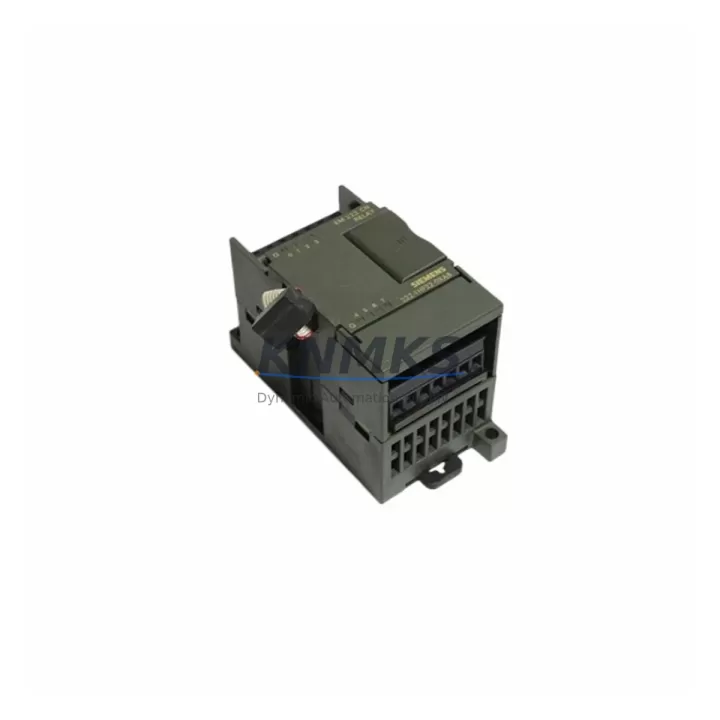
Overview
Siemens 6ES7222-1HF22-0XA8 Migration-Ready Digital Output Module: Legacy System Retrofit & Compatibility Upgrade
The Siemens 6ES7222-1HF22-0XA8 is an EM222 series digital output expansion module designed for the S7-200 Micro PLC platform. With 8 × 24 V DC transistor outputs rated at 0.75 A per channel, this module delivers reliable discrete control for legacy automation lines that remain in active production or are undergoing phased modernization. Whether you are replacing a failed output card in an aging control cabinet, extending the service life of an S7-200 system, or bridging the gap before a full migration to the S7-1200 or S7-1500 platform, the 6ES7222-1HF22-0XA8 provides a verified drop-in solution with minimal engineering overhead.
For engineers managing retrofit projects, the first priority is confirming that the replacement module matches the original electrical and mechanical specification. The 6ES7222-1HF22-0XA8 operates on a 24 V DC supply and connects to the S7-200 CPU via the proprietary expansion bus on the right side of the CPU module — the same interface used by the EM221 digital input module and the EM231 analog input module. Terminal wiring follows the standard 20-pin removable connector layout, so existing field wiring can be reconnected without modification provided the original terminal assignment documentation is available. Output channel addressing is determined by the module’s physical slot position on the backplane, and the address must be verified against the existing STEP 7 Micro/WIN program before powering the system. Incorrect address mapping is one of the most common causes of unexpected output behavior during a hot-swap replacement.
Power budget verification is equally critical. The S7-200 CPU’s internal 5 V DC bus supplies logic power to all expansion modules through the expansion connector. Each EM222 module draws approximately 40 mA from this bus. When the 6ES7222-1HF22-0XA8 is added to a system that already includes an EM223 combination I/O module or an EM235 analog combination module, the cumulative 5 V current draw must remain within the CPU’s rated expansion bus capacity — typically 660 mA for the CPU 224 and 1000 mA for the CPU 226. Exceeding this limit will cause intermittent faults or prevent the system from entering RUN mode.
Installation space in the control cabinet should be confirmed before ordering. The 6ES7222-1HF22-0XA8 occupies 46 mm of DIN rail width and requires a minimum clearance of 35 mm above and below for ventilation and cable routing. In compact enclosures where the original module was mounted adjacent to a CP 243-1 Ethernet communication module or a TD 200 text display, the available rail space may be constrained by existing cable bundles. A physical measurement of the available slot width is recommended before the replacement unit arrives on site.
Firmware compatibility does not require any action for this module — the EM222 carries no user-programmable firmware. However, the STEP 7 Micro/WIN version used for program download should be confirmed against the CPU firmware version. CPU 224 units running firmware V2.0 or earlier may exhibit compatibility issues with certain instruction sets. If the existing program uses PID control blocks or interrupt-driven output routines, these should be tested in simulation mode before live commissioning. The EM222’s output response time of less than 0.2 ms is sufficient for the vast majority of discrete control applications including conveyor sequencing, valve actuation, and motor starter control.
For sites planning a longer-term migration from S7-200 to S7-1200, the 6ES7222-1HF22-0XA8 can serve as a bridge component during the transition period. The S7-1200 platform uses SM 1222 signal modules for digital output expansion, and the I/O point count and channel addressing will need to be remapped in TIA Portal during the migration project. Retaining the S7-200 system in parallel operation during the cutover — with the 6ES7222-1HF22-0XA8 maintaining output continuity on the legacy side — is a proven strategy for minimizing production downtime during control system upgrades.
Migration Compatibility Table
| Parameter | Specification / Recommendation |
|---|---|
| Module Type | EM222 Digital Output Expansion Module |
| Output Channels | 8 × 24 V DC Transistor, 0.75 A per channel |
| Compatible CPU | S7-200: CPU 221, CPU 222, CPU 224, CPU 224XP, CPU 226 |
| Expansion Bus Interface | Right-side proprietary S7-200 expansion connector |
| Terminal Connector | 20-pin removable screw terminal block |
| 5 V Bus Current Draw | ~40 mA (verify total expansion bus budget) |
| Installation Width | 46 mm DIN rail |
| Firmware Required | None (no user firmware on EM222) |
| Programming Software | STEP 7 Micro/WIN V4.0 or later recommended |
| Migration Path | S7-200 → S7-1200 (SM 1222 equivalent); address remapping required in TIA Portal |
| Communication Compatibility | PPI, MPI via CPU; no direct Profibus/Profinet on EM222 |
| Replacement Verification | Confirm slot position, output address, and field wiring before power-on |
| Support terms | support terms confirmed by quotation — covers manufacturing defects and functional failure |
Retrofit Planning for Existing Automation Systems
A successful retrofit begins with a complete audit of the existing control cabinet. For systems built around the S7-200 platform, this typically means documenting the CPU model, the number and type of expansion modules, the communication modules in use, and the HMI configuration. In many legacy installations, the CPU 224 or CPU 226 is paired with a combination of EM221 digital input modules, EM222 digital output modules, and EM231 or EM235 analog modules. The 6ES7222-1HF22-0XA8 slots directly into this architecture without requiring any changes to the CPU program, provided the module occupies the same physical position as the unit being replaced.
Communication infrastructure should also be reviewed during the retrofit planning phase. Many S7-200 systems use a CP 243-1 Ethernet module for SCADA connectivity or a CP 243-2 AS-Interface master for field device integration. These communication modules occupy expansion slots and consume 5 V bus current, which must be factored into the power budget calculation alongside the replacement EM222. If the system includes a TD 400C operator panel connected via the PPI port, the panel’s screen layouts and alarm messages should be backed up before any hardware changes are made, as a CPU replacement or firmware update can sometimes reset the HMI configuration.
For sites where the control cabinet also houses third-party signal conditioning equipment — such as signal isolators for thermocouple inputs or frequency converters for encoder signals — the output wiring from the 6ES7222-1HF22-0XA8 may interface with these devices. Verifying the load current and voltage compatibility of each output channel against the connected device specification is a mandatory step before commissioning. The EM222’s 0.75 A per channel rating is adequate for most relay coils, solenoid valves, and indicator lamps, but should be confirmed against the actual field device data sheets.
Downtime Control During System Migration
Minimizing unplanned downtime is the primary concern for any control system replacement project. For the 6ES7222-1HF22-0XA8, the recommended approach is to prepare the replacement module in advance by labeling all terminal connections on the existing unit before disconnection. A photograph of the wiring and a printed copy of the terminal assignment from the electrical drawings should be available at the point of installation. The module swap itself — disconnecting the expansion bus connector, removing the DIN rail clip, and reversing the process with the new unit — typically takes less than ten minutes for an experienced technician.
Before returning the system to RUN mode, the CPU program should be verified to confirm that the output address assigned to the replacement module matches the original configuration. In STEP 7 Micro/WIN, the system block can be used to review the I/O configuration and confirm that the module type and slot position are correctly recognized. If the CPU displays a configuration error after the module swap, the most common cause is a mismatch between the configured module type in the system block and the physical module installed. Clearing and re-downloading the system block with the correct EM222 configuration will resolve this in most cases.
For critical production lines where even a brief interruption is unacceptable, a parallel commissioning approach is recommended: install and wire the replacement 6ES7222-1HF22-0XA8 alongside the existing module, verify all output states in FORCE mode before switching over, and then remove the original unit only after the replacement has been confirmed operational. This approach eliminates the risk of an extended outage caused by an unexpected wiring or configuration issue discovered after the original module has been removed.
Retrofit Support FAQ
Q: Is the 6ES7222-1HF22-0XA8 a direct replacement for all EM222 variants?
A: The 6ES7222-1HF22-0XA8 is the 8-channel 24 V DC transistor output variant of the EM222 family. It is a direct replacement for units with the same SKU. Other EM222 variants — such as relay output versions — have different electrical characteristics and are not interchangeable. Confirm the original module’s order number before ordering a replacement.
Q: What pre-shipment testing is performed on this module?
A: Each 6ES7222-1HF22-0XA8 unit undergoes functional output testing prior to dispatch. All 8 output channels are verified for correct switching behavior under load. Units are shipped with original or equivalent packaging to prevent transit damage. A test report is available on request.
Q: Can this module be used in a system that is being migrated to S7-1200?
A: Yes. The 6ES7222-1HF22-0XA8 can continue to operate on the S7-200 side of a phased migration while the S7-1200 system is being commissioned in parallel. Once the S7-1200 is fully operational with SM 1222 output modules handling the same I/O points, the S7-200 system can be decommissioned. This staged approach is the most reliable method for maintaining production continuity during a platform migration.
Q: What does the support terms confirmed by quotation cover?
A: The support terms confirmed by quotation cover manufacturing defects and functional failure under normal operating conditions. It does not cover damage caused by incorrect wiring, overvoltage, or installation in environments outside the module’s rated specifications. Support requests are processed through our sales team with a return authorization number issued within 2 business days of the claim submission.
© 2026 KNMKS. All rights reserved.
Original Source: https://knmks.com
Contact: admin@knmks.com | +86 18359268345
Product Identification
- Brand / Ecosystem
-
Siemens
Siemens - Model / Series
-
6ES7222-1HF22-0XA8
SIMATIC Series - Product Family
- PLCs & Controllers
- Availability Status
- Available on request after model and quantity confirmation
- Inquiry Type
- B2B RFQ, replacement inquiry and project spare-part request
- Pre-Quote Check
- Exact SKU, brand, series, quantity, nameplate photos and destination country are checked before quotation
System Path
Where this product fits in the KNMKS automation structure.
Specification & Inquiry Focus
- Control platform
- PLC, PAC and modular controllers
- Common needs
- CPU, rack, power and I/O expansion
- Project support
- Replacement, cabinet build and maintenance
Buyer Confirmation
Information KNMKS checks before replying.
- Exact model
- 6ES7222-1HF22-0XA8
- Brand / ecosystem
- Siemens
- Product family
- PLCs & Controllers
- Application note
- Replacement, maintenance, project build or spare-part list
- Useful photos
- Nameplate, installed unit, cabinet layout or connector side
- Delivery details
- Quantity, destination country and target schedule
Document Support
Files and notes can be confirmed during quotation.
- Product photos or nameplate confirmation when available
- Packing and delivery notes before quotation confirmation
- Support scope and delivery terms confirmed per inquiry
- Export document coordination for qualified B2B requests
Inquiry Support
- Model cross-checking before quotation
- CPU, power, rack and expansion module matching
- Support for replacement and project inquiry
What to Send Us
- Brand and exact model number: Siemens 6ES7222-1HF22-0XA8
- Quantity and required delivery time
- Application, replacement requirement or nameplate photo
- Destination country and shipping preference
RFQ Preparation
This is a product inquiry page built for RFQ communication.
Fast Model Check
Send this model to KNMKS for confirmation.
Include quantity, destination country and photos if this is a maintenance replacement. The inquiry will be saved with a reference number after submission.
Brand & Compatibility Note
KNMKS displays automation product information for well-known industrial brand ecosystems and compatible replacement references. Brand names are used for product identification and compatibility reference only; final availability and commercial terms are confirmed per quotation.
 Manufacturing
 Machine Tools
 Packaging
 Energy & Power



 HMI & Displays
 Servo Systems
 Variable Frequency Drives
 Sensors