
Overview
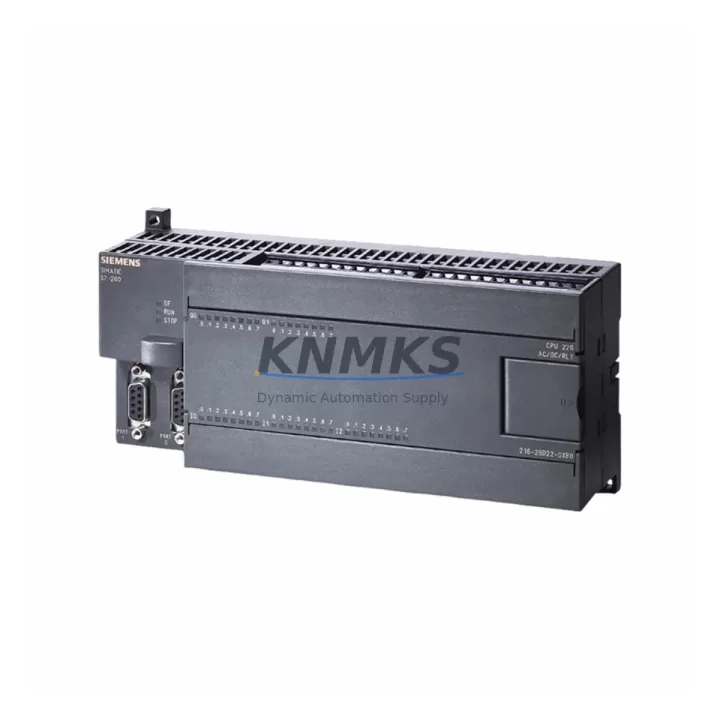
Siemens 6ES7222-1BF22-0XA0 Migration-Ready DO Module for Legacy Control Systems
The Siemens 6ES7222-1BF22-0XA0 is an 8-point 24 VDC transistor digital output expansion module from the S7-200 EM222 series, designed for compact PLC applications in legacy automation environments. As the S7-200 platform approaches end-of-life and spare parts become increasingly scarce, this module remains a critical component for facilities that must maintain existing control architectures while planning a structured migration path. Whether you are sustaining a legacy production line, replacing a failed output module during an emergency shutdown, or executing a phased upgrade toward the S7-1200 or S7-1500 platform, the 6ES7222-1BF22-0XA0 provides a direct, drop-in replacement with verified electrical compatibility.
Each unit is sourced from controlled inventory, subjected to pre-shipment functional testing under rated load conditions, and backed by a support terms confirmed by quotation. Global dispatch is available with typical lead times of 3–7 business days, supporting both emergency replacement and planned maintenance schedules.
Migration Compatibility Table
| Parameter | 6ES7222-1BF22-0XA0 (EM222) | Migration / Retrofit Notes |
|---|---|---|
| Output Channels | 8 × Digital Output (DO) | Direct replacement for failed EM222 DO modules; no channel remapping required for same-slot substitution |
| Output Voltage | 24 VDC (transistor, sourcing) | Verify field device voltage compatibility before substitution; sinking/sourcing wiring polarity must be confirmed |
| Load Current per Channel | 0.75 A max | Confirm actuator inrush current does not exceed rated channel capacity; add suppression diodes for inductive loads |
| Backplane Interface | S7-200 expansion bus connector | Compatible with CPU 221, 222, 224, 224XP, 226; verify ribbon cable and bus connector condition before installation |
| Module Address | Auto-assigned by CPU slot position | Slot order determines Q-address mapping; confirm program Q-byte assignments match physical slot sequence |
| Communication Protocol | S7-200 internal expansion bus (not Profibus/Profinet) | For Profinet migration, transition to S7-1200 with ET 200SP distributed I/O; this module is not Profinet-capable |
| Programming Environment | STEP 7 Micro/WIN (V4.0+) | Existing ladder/FBD programs are compatible; no firmware update required for module swap |
| Installation Footprint | 46 mm width, DIN rail mount | Confirm available rail space in control cabinet; adjacent module clearance must meet thermal derating requirements |
| Power Consumption | Supplied via CPU 5 VDC bus (max 40 mA) + 24 VDC field supply | Verify CPU 5 V bus budget when adding multiple expansion modules; total expansion current must not exceed CPU spec |
| Support terms | support terms confirmed by quotation | Pre-Shipment Functional Test | Controlled Storage | |
Retrofit Planning for Existing Automation Systems
Replacing the 6ES7222-1BF22-0XA0 within an operational S7-200 system requires a structured approach that accounts for both the electrical environment and the software configuration. Before removing the failed module, document the existing terminal wiring using the original panel drawings or a field survey — each of the 8 output channels connects to field actuators such as solenoid valves, motor contactors, or indicator lamps, and incorrect rewiring will cause immediate process faults.
The S7-200 CPU’s 5 VDC expansion bus powers the module’s logic circuitry, while the 24 VDC field supply powers the output transistors. When planning a multi-module retrofit, calculate the total 5 V bus current draw across all connected expansion modules — including analog input modules such as the EM231 and analog output modules such as the EM232 — to ensure the CPU’s bus capacity is not exceeded. Overloading the bus is a common cause of intermittent module faults in aging S7-200 panels.
For facilities planning a longer-term migration to the S7-1200 platform, the 6ES7222-1BF22-0XA0 can serve as a bridge component during a phased cutover. In this scenario, the S7-200 system continues to control non-critical outputs while the S7-1200 CPU — connected via a CP 1242-7 communications processor or a CM 1241 serial module — takes over supervisory functions. Distributed I/O expansion using ET 200S or ET 200SP stations over Profinet can replace the S7-200 expansion bus architecture entirely, but this requires HMI screen remapping in SIMATIC WinCC or TP/OP panel projects.
During the retrofit, also inspect the 6ES7290-1AA22-0XA0 bus connector ribbon cable that links expansion modules to the CPU. Aged or cracked ribbon cables are a frequent source of communication errors that mimic module failure. Replacing the ribbon cable alongside the output module eliminates this variable and reduces the risk of a repeat fault call. Similarly, verify that the 24 VDC field power supply — often a SITOP PSU100S or equivalent — is within voltage tolerance, as low supply voltage causes transistor output saturation failures that are misdiagnosed as module defects.
Downtime Control During System Migration
Minimizing unplanned downtime during an S7-200 output module replacement begins with preparation before the maintenance window opens. Upload and archive the current CPU program using STEP 7 Micro/WIN before any hardware is disturbed — this protects the existing ladder logic, data block values, and retentive memory configuration against accidental loss during power cycling. If the CPU’s battery-backed RAM has not been replaced recently, treat the program backup as mandatory rather than optional.
During the physical swap, power down the 24 VDC field supply to the output module before disconnecting terminal wiring. The CPU can remain powered if the maintenance procedure requires monitoring of input signals or HMI status during the changeover, but the field supply must be isolated to prevent actuator movement while terminals are open. Label each wire before removal using the panel drawing reference, not just the terminal number, to prevent cross-connection errors during reinstallation.
After installing the replacement 6ES7222-1BF22-0XA0, restore the 24 VDC field supply and observe the module’s diagnostic LED. A steady green LED on the EM222 confirms that the CPU has recognized the module and assigned the correct Q-address. If the LED flashes or remains red, check the slot position against the program’s Q-byte mapping and verify that no other expansion module has been inadvertently shifted in the rack sequence. Restore normal operation in manual mode first — forcing individual outputs through STEP 7 Micro/WIN’s status table — before returning the system to automatic control. This staged commissioning approach contains any wiring errors to a single output at a time and prevents cascading process faults.
Retrofit Support FAQ
Q1: Is the 6ES7222-1BF22-0XA0 a direct replacement for all EM222 variants?
The 6ES7222-1BF22-0XA0 is the standard 8-point 24 VDC transistor output version of the EM222. It is not interchangeable with relay output variants such as the 6ES7222-1HF22-0XA0, which uses dry-contact relay outputs rated for AC loads. Confirm the output type (transistor vs. relay) and voltage rating of the module being replaced before ordering.
Q2: Will my existing STEP 7 Micro/WIN program require modification after the module swap?
No program modification is required for a like-for-like replacement in the same slot position. The CPU automatically assigns Q-addresses based on slot order, so the program’s output addressing remains valid. If the module is installed in a different slot due to physical constraints, the Q-byte assignments will shift and the program must be updated accordingly.
Q3: What pre-shipment testing is performed on each unit?
Each 6ES7222-1BF22-0XA0 is tested under rated 24 VDC load conditions prior to dispatch. All 8 output channels are individually verified for correct switching response, and the module is inspected for physical damage, connector integrity, and LED function. A test report is available upon request. Units are shipped in anti-static packaging with protective connector covers.
Q4: What is the support terms coverage and what does it include?
All units carry a support terms confirmed by quotation from the date of dispatch. The support terms covers functional failure under normal operating conditions and includes free replacement or refund at the buyer’s election. It does not cover damage resulting from incorrect installation, overvoltage, reverse polarity, or physical impact. Support requests are processed within 5 business days of fault confirmation. Stock is maintained across multiple regional warehouses to support rapid support terms replacement without extended lead times.
© 2026 KNMKS. All rights reserved.
Original Source: https://knmks.com
Contact: admin@knmks.com | +86 18359268345
Product Identification
- Brand / Ecosystem
-
Siemens
Siemens - Model / Series
-
6ES7222-1BF22-0XA0
SIMATIC Series - Product Family
- PLCs & Controllers
- Availability Status
- Available on request after model and quantity confirmation
- Inquiry Type
- B2B RFQ, replacement inquiry and project spare-part request
- Pre-Quote Check
- Exact SKU, brand, series, quantity, nameplate photos and destination country are checked before quotation
System Path
Where this product fits in the KNMKS automation structure.
Specification & Inquiry Focus
- Control platform
- PLC, PAC and modular controllers
- Common needs
- CPU, rack, power and I/O expansion
- Project support
- Replacement, cabinet build and maintenance
Buyer Confirmation
Information KNMKS checks before replying.
- Exact model
- 6ES7222-1BF22-0XA0
- Brand / ecosystem
- Siemens
- Product family
- PLCs & Controllers
- Application note
- Replacement, maintenance, project build or spare-part list
- Useful photos
- Nameplate, installed unit, cabinet layout or connector side
- Delivery details
- Quantity, destination country and target schedule
Document Support
Files and notes can be confirmed during quotation.
- Product photos or nameplate confirmation when available
- Packing and delivery notes before quotation confirmation
- Support scope and delivery terms confirmed per inquiry
- Export document coordination for qualified B2B requests
Inquiry Support
- Model cross-checking before quotation
- CPU, power, rack and expansion module matching
- Support for replacement and project inquiry
What to Send Us
- Brand and exact model number: Siemens 6ES7222-1BF22-0XA0
- Quantity and required delivery time
- Application, replacement requirement or nameplate photo
- Destination country and shipping preference
RFQ Preparation
This is a product inquiry page built for RFQ communication.
Fast Model Check
Send this model to KNMKS for confirmation.
Include quantity, destination country and photos if this is a maintenance replacement. The inquiry will be saved with a reference number after submission.
Brand & Compatibility Note
KNMKS displays automation product information for well-known industrial brand ecosystems and compatible replacement references. Brand names are used for product identification and compatibility reference only; final availability and commercial terms are confirmed per quotation.
 Manufacturing
 Machine Tools
 Packaging
 Energy & Power



 HMI & Displays
 Servo Systems
 Variable Frequency Drives
 Sensors