
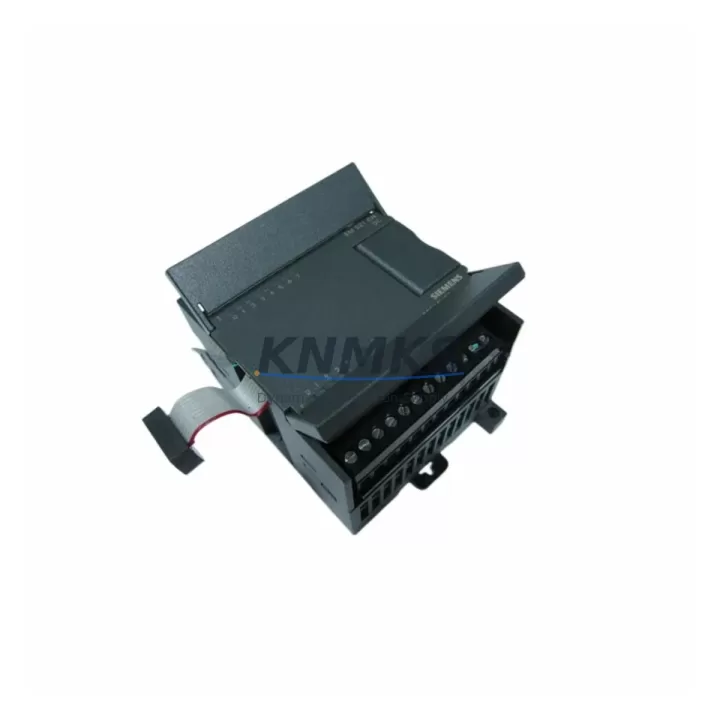
Overview
Siemens 6ES7221-1BH22-0XA8 Migration-Ready 16DI Module for Legacy Control Systems
The Siemens 6ES7221-1BH22-0XA8 is a 16-channel digital input expansion module designed for the SIMATIC S7-200 series PLC platform. With 24 VDC input voltage and a compact DIN-rail form factor, this module serves as a direct drop-in replacement for legacy EM221 configurations in aging control cabinets. As S7-200 systems approach end-of-life and spare parts become increasingly scarce, the 6ES7221-1BH22-0XA8 remains one of the most sought-after retrofit components for engineers managing brownfield automation upgrades, production line continuity, and phased migration projects.
Whether you are replacing a failed input module in an existing S7-200 rack, extending I/O capacity during a partial system upgrade, or sourcing verified stock to extend the operational life of a legacy control panel, the 6ES7221-1BH22-0XA8 provides the electrical and mechanical compatibility required for seamless integration without reprogramming the host CPU or redesigning the cabinet layout.
Migration Compatibility Table
| Parameter | Specification / Retrofit Note |
|---|---|
| SKU / Part Number | 6ES7221-1BH22-0XA8 |
| Module Type | Digital Input (DI), 16-channel |
| Input Voltage | 24 VDC |
| Compatible Platform | SIMATIC S7-200 (CPU 221, 222, 224, 224XP, 226) |
| Replaces / Equivalent | EM221 16DI 24VDC; earlier 6ES7221-1BH20-0XA0 / 0XA8 revisions |
| Backplane Interface | S7-200 expansion bus connector (right-side ribbon cable) |
| Terminal Wiring | Screw-type removable terminal block; 24 VDC sourcing/sinking inputs |
| Installation Space | DIN rail mount; 71.2 mm width — verify cabinet slot clearance before ordering |
| Module Address | Auto-assigned by CPU based on expansion slot position; no manual DIP switch required |
| Firmware Compatibility | Compatible with all S7-200 CPU firmware versions; no firmware update required on module |
| Communication Link | Local I/O expansion only; not a network node — no Profibus/Profinet address needed |
| Program Compatibility | Existing STEP 7 Micro/WIN ladder logic and STL programs remain valid after module swap |
| Commissioning | Power cycle CPU after installation; verify I/O status via STEP 7 Micro/WIN status table |
| Outgoing Test | Each unit tested for channel integrity and input response before shipment |
| Support terms | support terms confirmed by quotation — covers hardware defects and channel failure under normal operating conditions |
Retrofit Planning for Existing Automation Systems
Integrating the 6ES7221-1BH22-0XA8 into an existing S7-200 control system requires a structured pre-installation review to avoid commissioning delays and unplanned downtime. Before removing the failed or end-of-life module, engineers should document the current terminal wiring layout using the original cabinet drawings or a field photograph of the terminal block. The 16 input channels are mapped to the I-byte address space of the CPU, and the address offset depends on the physical slot position in the expansion chain — confirm this against the existing STEP 7 Micro/WIN hardware configuration before powering down.
Power budget verification is a critical step often overlooked during emergency replacements. The S7-200 CPU supplies 5 VDC logic power to expansion modules via the internal bus. When the 6ES7221-1BH22-0XA8 is added alongside other expansion modules such as the 6ES7222-1BF22-0XA8 (EM222 8DO 24VDC digital output module) or the 6ES7231-0HC22-0XA8 (EM231 4AI analog input module), the total 5 VDC current draw must remain within the CPU’s rated expansion bus capacity. Exceeding this limit causes intermittent faults or module dropout — always recalculate the power budget when adding or replacing modules in an existing rack.
For systems that also include analog signal conditioning, the 6ES7232-0HB22-0XA8 (EM232 2AO analog output module) may be present in the same expansion chain. Ensure the ribbon cable connectors between modules are fully seated and undamaged during the swap — a partially connected expansion bus is a common source of post-retrofit communication errors between the CPU and downstream I/O modules.
In control cabinets where the S7-200 CPU communicates with an HMI panel — such as a Siemens TP177B or a third-party operator panel connected via the PPI/MPI port — the HMI screen tags referencing the digital input addresses must be verified after the module replacement. If the new module occupies a different slot position than the original, the I-byte address will shift, and HMI variable bindings will need to be updated in WinCC flexible or the equivalent HMI configuration tool to prevent display errors on the operator interface.
For sites planning a phased migration from S7-200 to a more current platform such as the SIMATIC S7-1200 series, the 6ES7221-1BH22-0XA8 provides a cost-effective bridge solution that maintains production continuity while the migration project is scoped and budgeted. The existing field wiring, sensor connections, and cabinet layout can remain unchanged during this interim period, reducing the engineering effort required for the final cutover.
Where communication protocol migration is also in scope — for example, transitioning from PPI to Profinet — a 6GK7243-1EX30-0XE0 (CP 243-1 Ethernet module) may already be installed in the S7-200 expansion chain. Confirm that the addition of the 6ES7221-1BH22-0XA8 does not exceed the maximum number of expansion modules supported by the host CPU variant, as this limit varies between CPU 221, 222, 224, and 226 models.
Downtime Control During System Migration
Minimizing unplanned downtime during a module replacement or system migration is the primary operational concern for maintenance engineers working on live production lines. For the 6ES7221-1BH22-0XA8, the physical swap procedure is straightforward, but the surrounding workflow determines whether the changeover takes 20 minutes or 4 hours.
Before initiating the replacement, upload and save a backup of the current CPU program using STEP 7 Micro/WIN. Store the backup on a local engineering laptop and a network share — not only on the PG/PC connected to the machine. This ensures that if the CPU loses its program during the power cycle (which can occur on older CPUs with degraded internal memory), the logic can be restored immediately without waiting for a remote engineer or searching for the original project file.
During the module swap, keep the field wiring terminal block intact if the terminal block is removable. The 6ES7221-1BH22-0XA8 uses a plug-in screw terminal block, which allows the wiring harness to be transferred directly to the new module without disconnecting individual conductors. This single step eliminates the most common source of wiring errors during emergency replacements and reduces recommissioning time significantly.
After reinstalling the module and restoring power, use the STEP 7 Micro/WIN I/O status table to verify that all 16 input channels are reading correctly against the known field device states. Do not release the line to production until each channel has been individually confirmed — a single miswired or floating input can trigger an unexpected machine stop or safety interlock activation after restart.
For sites with a documented change management process, the 6ES7221-1BH22-0XA8 replacement should be logged with the module serial number, installation date, slot position, and post-installation test results. This record supports future troubleshooting, support requests, and audit compliance for ISO or industry-specific certification requirements.
Retrofit Support FAQ
Q1: Is the 6ES7221-1BH22-0XA8 a direct replacement for earlier EM221 revisions such as 6ES7221-1BH20-0XA0?
Yes. The -0XA8 hardware revision is backward compatible with earlier -0XA0 and -0XA8 suffix variants of the EM221 16DI 24VDC module. The electrical interface, terminal layout, and expansion bus connector are identical. No program changes or hardware configuration updates are required in STEP 7 Micro/WIN after the swap.
Q2: What commissioning steps are required after installing the module?
Power down the S7-200 CPU before installing the module. After securing the DIN rail mount and connecting the expansion ribbon cable, restore power and allow the CPU to complete its startup diagnostic cycle. Open STEP 7 Micro/WIN, go online with the CPU, and use the status chart or I/O monitor to verify that all 16 input channels respond correctly to field signals. No firmware update or module configuration is required — the CPU auto-detects the module type and assigns the I-byte address based on slot position.
Q3: How is outgoing testing performed, and what does the support terms confirmed by quotation cover?
Each 6ES7221-1BH22-0XA8 unit is tested for channel integrity, input voltage response, and expansion bus communication before shipment. The support terms confirmed by quotation cover hardware defects, channel failure, and expansion bus interface faults under normal operating conditions (24 VDC input, rated ambient temperature, correct installation). Physical damage caused by incorrect wiring, overvoltage, or improper handling is excluded. Support requests are processed via admin@knmks.com with the order reference and fault description.
Q4: Is stock available for immediate shipment, and can multiple units be sourced for a planned maintenance inventory?
Yes. The 6ES7221-1BH22-0XA8 is held in verified stock and available for immediate dispatch. For planned maintenance programs, bulk orders and reserved inventory arrangements are supported — contact admin@knmks.com or call +86 18359268345 to confirm lead times, quantity availability, and pricing for multi-unit procurement.
© 2026 KNMKS. All rights reserved.
Original Source: https://knmks.com
Contact: admin@knmks.com | +86 18359268345
Product Identification
- Brand / Ecosystem
-
Siemens
Siemens - Model / Series
-
6ES7221-1BH22-0XA8
SIMATIC Series - Product Family
- PLCs & Controllers
- Availability Status
- Available on request after model and quantity confirmation
- Inquiry Type
- B2B RFQ, replacement inquiry and project spare-part request
- Pre-Quote Check
- Exact SKU, brand, series, quantity, nameplate photos and destination country are checked before quotation
System Path
Where this product fits in the KNMKS automation structure.
Specification & Inquiry Focus
- Control platform
- PLC, PAC and modular controllers
- Common needs
- CPU, rack, power and I/O expansion
- Project support
- Replacement, cabinet build and maintenance
Buyer Confirmation
Information KNMKS checks before replying.
- Exact model
- 6ES7221-1BH22-0XA8
- Brand / ecosystem
- Siemens
- Product family
- PLCs & Controllers
- Application note
- Replacement, maintenance, project build or spare-part list
- Useful photos
- Nameplate, installed unit, cabinet layout or connector side
- Delivery details
- Quantity, destination country and target schedule
Document Support
Files and notes can be confirmed during quotation.
- Product photos or nameplate confirmation when available
- Packing and delivery notes before quotation confirmation
- Support scope and delivery terms confirmed per inquiry
- Export document coordination for qualified B2B requests
Inquiry Support
- Model cross-checking before quotation
- CPU, power, rack and expansion module matching
- Support for replacement and project inquiry
What to Send Us
- Brand and exact model number: Siemens 6ES7221-1BH22-0XA8
- Quantity and required delivery time
- Application, replacement requirement or nameplate photo
- Destination country and shipping preference
RFQ Preparation
This is a product inquiry page built for RFQ communication.
Fast Model Check
Send this model to KNMKS for confirmation.
Include quantity, destination country and photos if this is a maintenance replacement. The inquiry will be saved with a reference number after submission.
Brand & Compatibility Note
KNMKS displays automation product information for well-known industrial brand ecosystems and compatible replacement references. Brand names are used for product identification and compatibility reference only; final availability and commercial terms are confirmed per quotation.
 Manufacturing
 Machine Tools
 Packaging
 Energy & Power



 HMI & Displays
 Servo Systems
 Variable Frequency Drives
 Sensors