
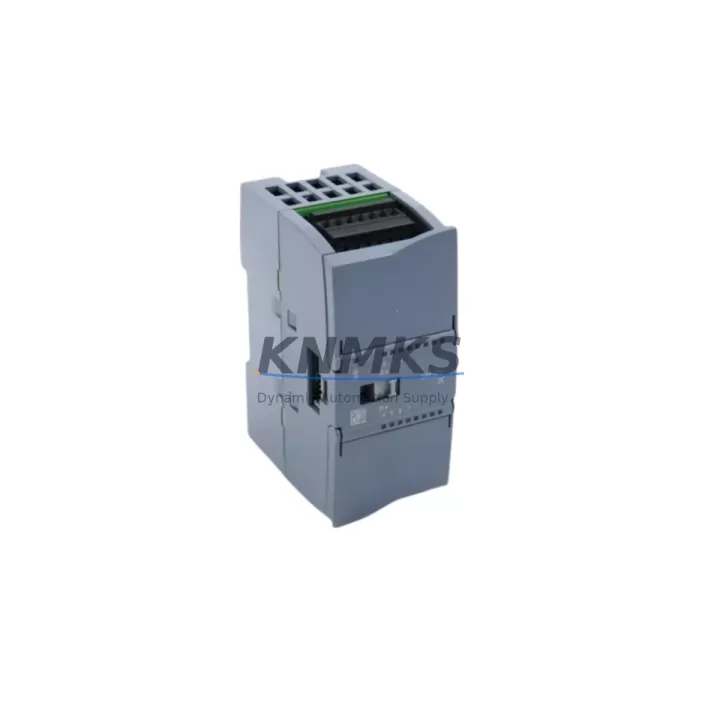
Overview
Siemens 6ES7221-1BF32-0XB0 Maintenance-Proven Spare Part for Factory Uptime
The Siemens 6ES7221-1BF32-0XB0 is an SM 1221 Signal Module providing 8 × 24 VDC digital inputs for the S7-1200 PLC platform. Designed for continuous industrial duty, this module is a critical component in discrete manufacturing, process control, conveyor automation, and machine safety interlocking circuits. When a digital input module fails or degrades, the entire control loop is compromised — field signals go unread, alarms are missed, and production halts. Stocking a verified original replacement is the single most effective way to compress mean time to repair (MTTR) and restore factory uptime within the same shift.
At KNMKS, every 6ES7221-1BF32-0XB0 unit is sourced as an original Siemens spare, subjected to pre-shipment functional testing, and dispatched with a support terms confirmed by quotation. Our inventory is maintained specifically for MRO (Maintenance, Repair & Operations) buyers who cannot afford lead-time uncertainty on critical control system components.
Spare Maintenance Table
| Parameter | Specification |
|---|---|
| Part Number (SKU) | 6ES7221-1BF32-0XB0 |
| Module Type | SM 1221 — Digital Input Signal Module |
| Compatible Platform | Siemens SIMATIC S7-1200 Series |
| Number of Digital Inputs | 8 × 24 VDC |
| Input Voltage Range | 20.4 – 28.8 VDC (IEC Type 1 sink) |
| Input Current (per channel) | 4 mA typical at 24 VDC |
| Isolation | 500 VAC optical isolation (field side to logic side) |
| Response Time | 0.2 ms filter (configurable via TIA Portal) |
| Connector Type | 20-pin removable screw terminal |
| Dimensions (W × H × D) | 45 × 100 × 75 mm |
| Operating Temperature | 0 °C to +55 °C (horizontal mount); 0 °C to +45 °C (vertical mount) |
| Storage Temperature | –40 °C to +70 °C |
| Protection Rating | IP20 |
| Certifications | CE, UL, cUL, ATEX Zone 2 |
| Country of Origin | Germany |
| Compatibility | CPU 1211C, 1212C, 1214C, 1215C, 1217C (all firmware versions) |
| Support terms | 12 Months — KNMKS Guarantee |
| Pre-Shipment Test | Functional I/O verification performed before dispatch |
Maintenance Planning for Continuous Operation
A digital input module failure rarely occurs in isolation. When the 6ES7221-1BF32-0XB0 is flagged during a fault diagnostic or routine panel inspection, maintenance engineers should treat the event as a trigger for a broader control cabinet audit. The S7-1200 backplane bus connects the CPU and all attached signal modules in a tightly coupled architecture — a degraded module can introduce intermittent bus errors that affect adjacent modules and complicate fault isolation.
During the same maintenance window, inspect the Siemens 6ES7221-1BH32-0XB0 (SM 1221 16DI variant) if it shares the same cabinet, as both modules operate on the same 24 VDC field supply rail. Verify the 6EP1333-3BA10 or equivalent SITOP PSU300S 24 VDC power supply output voltage and ripple — an out-of-tolerance supply is a leading cause of premature input module failure. Check the 6ES7290-6AA30-0XA0 bus connector integrity between modules; a cracked or improperly seated connector can cause sporadic input read errors that mimic module failure.
For installations using the CPU 1214C (6ES7214-1AG40-0XB0), confirm that the total current draw across all SM modules does not exceed the CPU’s 5 VDC backplane supply budget. If the cabinet includes a 6ES7231-4HD32-0XB0 SM 1231 analog input module on the same rail, verify signal ground isolation to prevent common-mode noise from corrupting digital input thresholds. Where field wiring runs exceed 30 metres, consider adding a signal isolator or surge protection terminal (e.g., Phoenix Contact TRABTECH series) on each input channel to protect the module from transient overvoltage events common in motor-heavy environments.
Fuse protection on the 24 VDC field supply feeding the SM 1221 input commons should be reviewed — a 2 A fast-blow fuse per group of 8 inputs is the recommended practice. Terminal block condition (e.g., Weidmüller or Phoenix Contact DIN-rail terminals) should be checked for loose crimps and corrosion, particularly in high-vibration or high-humidity environments. Document all findings in the maintenance log before closing the cabinet.
Site Replacement Workflow
Step 1 — Preparation: Download the current TIA Portal project backup before any hardware change. Confirm the replacement 6ES7221-1BF32-0XB0 firmware revision is compatible with the installed CPU firmware. For S7-1200 V4.x CPUs, SM 1221 modules with firmware V2.0 and above are fully compatible without configuration changes.
Step 2 — Safe Isolation: Switch the CPU to STOP mode via TIA Portal or the onboard mode selector. De-energise the 24 VDC field supply to the module group. Do not rely solely on software STOP — physically isolate the field supply at the cabinet fuse or MCB before touching the terminal block.
Step 3 — Module Removal: Disconnect the 20-pin terminal block (it is removable without tools on the 0XB0 variant). Release the DIN-rail locking tab and slide the module off the backplane bus connector. Inspect the bus connector pins on the adjacent module for damage before installing the replacement.
Step 4 — Installation: Seat the replacement 6ES7221-1BF32-0XB0 onto the backplane bus connector, engage the DIN-rail latch, and reconnect the terminal block. The S7-1200 CPU will automatically detect the new module on power-up — no re-configuration is required if the module type is identical.
Step 5 — Verification: Restore 24 VDC field supply and switch the CPU to RUN. Use TIA Portal online diagnostics or the module’s LED indicators to confirm all 8 input channels are reading correctly. Perform a forced I/O test on each channel using a known field signal source before returning the line to production.
This plug-and-play replacement approach eliminates the need for engineering re-work, reduces downtime to under 30 minutes for a trained technician, and maintains full system compatibility without firmware updates or hardware reconfiguration.
Spare Parts Support FAQ
Q1: Is the 6ES7221-1BF32-0XB0 compatible with all S7-1200 CPU variants?
Yes. The SM 1221 8DI module is compatible with all S7-1200 CPU models — 1211C, 1212C, 1214C, 1215C, and 1217C — across all firmware versions from V1.0 onwards. No hardware or software modification is required when replacing a like-for-like unit. Always verify the TIA Portal hardware catalog entry matches the installed module order number before downloading a project.
Q2: What does the support terms confirmed by quotation cover, and how is it validated?
KNMKS’s support terms confirmed by quotation cover manufacturing defects and functional failure under normal operating conditions as specified in the Siemens SM 1221 manual. Each unit undergoes pre-shipment functional I/O testing. Support requests are supported by the shipment documentation and test record provided with every order. Units showing damage from incorrect wiring, overvoltage, or physical impact are assessed case-by-case.
Q3: Can KNMKS support long-term or blanket purchase orders for this spare part?
Yes. KNMKS maintains dedicated MRO inventory for the 6ES7221-1BF32-0XB0 and can support scheduled delivery agreements covering 12 to 36 months. Long-term supply contracts are available for multi-site operations and OEM service organisations. Contact our sales team to discuss volume pricing, consignment stock arrangements, and priority allocation during supply-constrained periods.
Q4: How do I confirm the module is genuine Siemens before installation?
All units supplied by KNMKS are original Siemens products. Authenticity can be verified by checking the Siemens product label (order number, date code, and CE/UL markings), scanning the DataMatrix code on the module housing using the Siemens Industry Online Support app, and confirming the module is recognised correctly in TIA Portal’s hardware catalog on first connection. If any discrepancy is found, contact KNMKS before installation.
© 2026 KNMKS. All rights reserved.
Original Source: https://knmks.com
Contact: admin@knmks.com | +86 18359268345
Product Identification
- Brand / Ecosystem
-
Siemens
Siemens - Model / Series
-
6ES7221-1BF32-0XB0
SIMATIC Series - Product Family
- PLCs & Controllers
- Availability Status
- Available on request after model and quantity confirmation
- Inquiry Type
- B2B RFQ, replacement inquiry and project spare-part request
- Pre-Quote Check
- Exact SKU, brand, series, quantity, nameplate photos and destination country are checked before quotation
System Path
Where this product fits in the KNMKS automation structure.
Specification & Inquiry Focus
- Control platform
- PLC, PAC and modular controllers
- Common needs
- CPU, rack, power and I/O expansion
- Project support
- Replacement, cabinet build and maintenance
Buyer Confirmation
Information KNMKS checks before replying.
- Exact model
- 6ES7221-1BF32-0XB0
- Brand / ecosystem
- Siemens
- Product family
- PLCs & Controllers
- Application note
- Replacement, maintenance, project build or spare-part list
- Useful photos
- Nameplate, installed unit, cabinet layout or connector side
- Delivery details
- Quantity, destination country and target schedule
Document Support
Files and notes can be confirmed during quotation.
- Product photos or nameplate confirmation when available
- Packing and delivery notes before quotation confirmation
- Support scope and delivery terms confirmed per inquiry
- Export document coordination for qualified B2B requests
Inquiry Support
- Model cross-checking before quotation
- CPU, power, rack and expansion module matching
- Support for replacement and project inquiry
What to Send Us
- Brand and exact model number: Siemens 6ES7221-1BF32-0XB0
- Quantity and required delivery time
- Application, replacement requirement or nameplate photo
- Destination country and shipping preference
RFQ Preparation
This is a product inquiry page built for RFQ communication.
Fast Model Check
Send this model to KNMKS for confirmation.
Include quantity, destination country and photos if this is a maintenance replacement. The inquiry will be saved with a reference number after submission.
Brand & Compatibility Note
KNMKS displays automation product information for well-known industrial brand ecosystems and compatible replacement references. Brand names are used for product identification and compatibility reference only; final availability and commercial terms are confirmed per quotation.
 Manufacturing
 Machine Tools
 Packaging
 Energy & Power



 HMI & Displays
 Servo Systems
 Variable Frequency Drives
 Sensors