
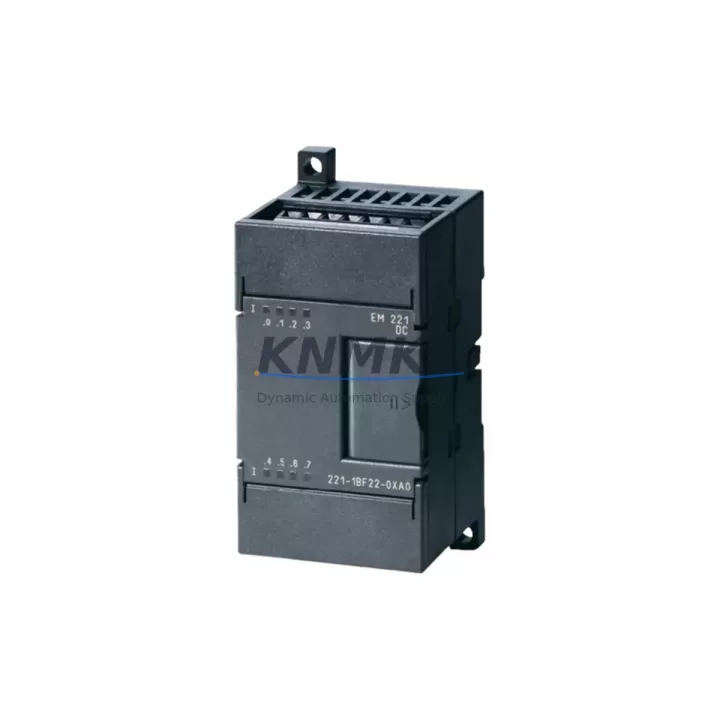
Overview
Siemens 6ES7221-1BF22-0XA0 Maintenance-Proven Spare Part for Factory Uptime
The Siemens 6ES7221-1BF22-0XA0 is an EM221 Digital Input expansion module for the S7-200 Micro PLC series, providing 8 discrete 24 VDC inputs in a compact DIN-rail form factor. As a maintenance-proven spare part, it is a critical component in sustaining continuous factory operation across discrete manufacturing, packaging lines, water treatment, and building automation systems where S7-200 controllers remain in active service. KNMKS maintains verified stock of the 6ES7221-1BF22-0XA0 with pre-shipment functional testing and a support terms confirmed by quotation, enabling maintenance engineers and procurement teams to execute fast, low-risk replacements without extended lead times.
Whether you are responding to an unplanned I/O fault, executing a scheduled annual overhaul, or building a strategic spare parts buffer for aging S7-200 infrastructure, the 6ES7221-1BF22-0XA0 is a direct, plug-compatible replacement that restores digital input capacity without requiring PLC program modification or hardware reconfiguration. Its 24 VDC sourcing input design is compatible with standard field sensors, proximity switches, and pushbutton circuits already wired in legacy S7-200 control cabinets.
Spare Maintenance Table
| Parameter | Specification |
|---|---|
| Part Number (SKU) | 6ES7221-1BF22-0XA0 |
| Module Type | EM221 Digital Input Expansion Module |
| Compatible System | Siemens S7-200 Micro PLC Series |
| Number of Inputs | 8 × Digital Input (DI) |
| Input Voltage | 24 VDC (Sourcing / PNP) |
| Input Current (per channel) | Approx. 4 mA at 24 VDC |
| Isolation | Optical isolation between field and logic side |
| Connection Type | Removable screw terminal block |
| Mounting | DIN rail, right-side expansion bus connector |
| Operating Temperature | 0 °C to +55 °C |
| Storage Temperature | -40 °C to +70 °C |
| Dimensions (W × H × D) | Approx. 71.2 × 80 × 62 mm |
| Weight | Approx. 210 g |
| Country of Origin | Germany |
| Compatibility Verified | S7-200 CPU 221, CPU 222, CPU 224, CPU 224XP, CPU 226 |
| Pre-Shipment Testing | Yes — functional I/O verification before dispatch |
| Support terms | 12 Months from date of shipment |
| Stock Status | Multi-region stock available for fast global dispatch |
Maintenance Planning for Continuous Operation
When replacing the 6ES7221-1BF22-0XA0 during a corrective or preventive maintenance event, a thorough inspection of the surrounding control cabinet components is essential to prevent repeat failures and ensure full system restoration. Maintenance engineers should begin by verifying the 24 VDC power supply rail feeding the EM221 module — a degraded or undersized power supply such as a Siemens SITOP PSU100S or equivalent 24 VDC regulated supply can cause intermittent input faults that mimic module failure. Confirm output voltage stability under load before installing the replacement module.
Inspect the expansion bus connector and the S7-200 CPU unit itself. The EM221 communicates with the CPU via the right-side expansion bus; a worn or contaminated bus connector can cause communication errors even with a new module installed. If the CPU is a CPU 224 or CPU 226 variant, check the CPU’s I/O status LEDs and diagnostic buffer for any pre-existing fault codes that may indicate a deeper system issue beyond the input module.
Review the field wiring at the screw terminal block. Loose terminals, corroded conductors, or miswired sensor commons are frequent root causes of digital input failures. Verify that all 24 VDC sensor commons are correctly referenced and that no field device is back-feeding voltage onto an input channel. For installations using inductive proximity sensors (e.g., Siemens 3RG40 series or equivalent), confirm that suppression diodes or RC snubbers are fitted to prevent voltage spikes from damaging input circuitry.
If the control cabinet includes a Siemens EM222 Digital Output module or an EM223 combined DI/DO module in the same expansion chain, inspect those modules simultaneously — shared power bus faults often affect multiple expansion modules. Similarly, if an EM231 Analog Input or EM232 Analog Output module is present in the expansion chain, verify that the analog signal commons are properly isolated and that no ground loop exists between the analog and digital sections.
For cabinets with a Siemens TD200 or TD400C text display (HMI) connected to the S7-200 CPU, confirm that the HMI communication cable and port are undamaged, as HMI communication faults can sometimes be misdiagnosed as I/O module failures. Finally, check the cabinet’s fuse protection — individual channel fuses or group fuses protecting the 24 VDC input circuit should be inspected and replaced if any show signs of thermal stress or intermittent continuity.
Site Replacement Workflow
Step 1 — Isolate and document: Before removing the 6ES7221-1BF22-0XA0, place the S7-200 CPU in STOP mode via the mode selector switch or STEP 7 Micro/WIN software. Record the current I/O mapping and any active diagnostic codes from the CPU diagnostic buffer. Photograph the terminal wiring for reference during reinstallation.
Step 2 — Remove the faulty module: Disconnect the 24 VDC power supply to the expansion module. Release the DIN rail locking tab and disconnect the expansion bus connector from the adjacent CPU or expansion module. Remove the screw terminal block (it is removable on the 6ES7221-1BF22-0XA0, allowing wiring to be transferred intact to the replacement unit).
Step 3 — Install the replacement: Transfer the wired terminal block to the new 6ES7221-1BF22-0XA0. Snap the module onto the DIN rail and reconnect the expansion bus connector. Restore 24 VDC power to the module.
Step 4 — Verify and commission: Switch the CPU to RUN mode. Confirm that all 8 input channels respond correctly to field device signals using the STEP 7 Micro/WIN status table or the CPU’s onboard I/O LEDs. Clear any residual diagnostic faults from the CPU buffer. Document the replacement in the site maintenance log with the new module’s serial number and installation date.
Step 5 — Update spare parts inventory: Replenish the replaced unit in your spare parts buffer. For facilities operating multiple S7-200 systems, maintaining a minimum of one 6ES7221-1BF22-0XA0 per control cabinet cluster is recommended to support rapid response to future I/O faults without waiting for procurement lead times.
Spare Parts Support FAQ
Q1: Is the 6ES7221-1BF22-0XA0 still available as a new original spare, and what is its supply outlook?
The Siemens S7-200 series has reached end-of-sale status, but original spare parts including the 6ES7221-1BF22-0XA0 remain available through authorized industrial spare parts suppliers. KNMKS maintains multi-region stock specifically to support facilities that continue to operate S7-200 systems through extended lifecycle phases. All units are sourced as original Siemens components and undergo pre-shipment functional testing before dispatch. Long-term supply agreements are available for customers requiring guaranteed stock reservation over 12–36 month horizons.
Q2: How do I verify compatibility before ordering the 6ES7221-1BF22-0XA0 for my S7-200 system?
The 6ES7221-1BF22-0XA0 is compatible with all S7-200 CPU variants (CPU 221, 222, 224, 224XP, and 226) as a right-side expansion module. Compatibility is determined by the expansion bus connector type and the 24 VDC input voltage standard. If your existing module carries the same part number, the replacement is direct and plug-compatible with no program changes required. For mixed expansion chains, confirm the total expansion module count does not exceed the CPU’s maximum supported expansion modules (up to 7 for CPU 224/226). Contact admin@knmks.com with your CPU model and current expansion chain configuration for a pre-order compatibility confirmation.
Q3: What does the support terms confirmed by quotation cover, and what is the claims process?
The support terms confirmed by quotation cover manufacturing defects and functional failures under normal operating conditions from the date of shipment. It does not cover damage resulting from incorrect installation, overvoltage events, or physical mishandling. In the event of a support terms claim, contact KNMKS at admin@knmks.com with the order reference, installation date, and a description of the fault. Replacement units are dispatched on a priority basis to minimize site downtime. Pre-shipment testing documentation is available upon request to support incoming inspection and quality records.
Q4: What is the recommended spare parts stocking strategy for S7-200 EM221 modules in a multi-line facility?
For facilities operating 5 or more S7-200 control systems, a minimum buffer of 2–3 units of the 6ES7221-1BF22-0XA0 is recommended to cover simultaneous failures across production lines during peak operation periods. Annual consumption should be reviewed against the facility’s mean time between failures (MTBF) data for I/O modules. For facilities approaching a migration to S7-1200 or S7-1500 platforms, maintaining a 12–18 month spare buffer for legacy S7-200 I/O modules ensures uninterrupted operation during the transition period without emergency procurement exposure. KNMKS offers volume pricing and reserved stock programs for procurement teams managing multi-site spare parts strategies.
© 2026 KNMKS. All rights reserved.
Original Source: https://knmks.com
Contact: admin@knmks.com | +86 18359268345
Product Identification
- Brand / Ecosystem
-
Siemens
Siemens - Model / Series
-
6ES7221-1BF22-0XA0
SIMATIC Series - Product Family
- PLCs & Controllers
- Availability Status
- Available on request after model and quantity confirmation
- Inquiry Type
- B2B RFQ, replacement inquiry and project spare-part request
- Pre-Quote Check
- Exact SKU, brand, series, quantity, nameplate photos and destination country are checked before quotation
System Path
Where this product fits in the KNMKS automation structure.
Specification & Inquiry Focus
- Control platform
- PLC, PAC and modular controllers
- Common needs
- CPU, rack, power and I/O expansion
- Project support
- Replacement, cabinet build and maintenance
Buyer Confirmation
Information KNMKS checks before replying.
- Exact model
- 6ES7221-1BF22-0XA0
- Brand / ecosystem
- Siemens
- Product family
- PLCs & Controllers
- Application note
- Replacement, maintenance, project build or spare-part list
- Useful photos
- Nameplate, installed unit, cabinet layout or connector side
- Delivery details
- Quantity, destination country and target schedule
Document Support
Files and notes can be confirmed during quotation.
- Product photos or nameplate confirmation when available
- Packing and delivery notes before quotation confirmation
- Support scope and delivery terms confirmed per inquiry
- Export document coordination for qualified B2B requests
Inquiry Support
- Model cross-checking before quotation
- CPU, power, rack and expansion module matching
- Support for replacement and project inquiry
What to Send Us
- Brand and exact model number: Siemens 6ES7221-1BF22-0XA0
- Quantity and required delivery time
- Application, replacement requirement or nameplate photo
- Destination country and shipping preference
RFQ Preparation
This is a product inquiry page built for RFQ communication.
Fast Model Check
Send this model to KNMKS for confirmation.
Include quantity, destination country and photos if this is a maintenance replacement. The inquiry will be saved with a reference number after submission.
Brand & Compatibility Note
KNMKS displays automation product information for well-known industrial brand ecosystems and compatible replacement references. Brand names are used for product identification and compatibility reference only; final availability and commercial terms are confirmed per quotation.
 Manufacturing
 Machine Tools
 Packaging
 Energy & Power



 HMI & Displays
 Servo Systems
 Variable Frequency Drives
 Sensors