
Overview
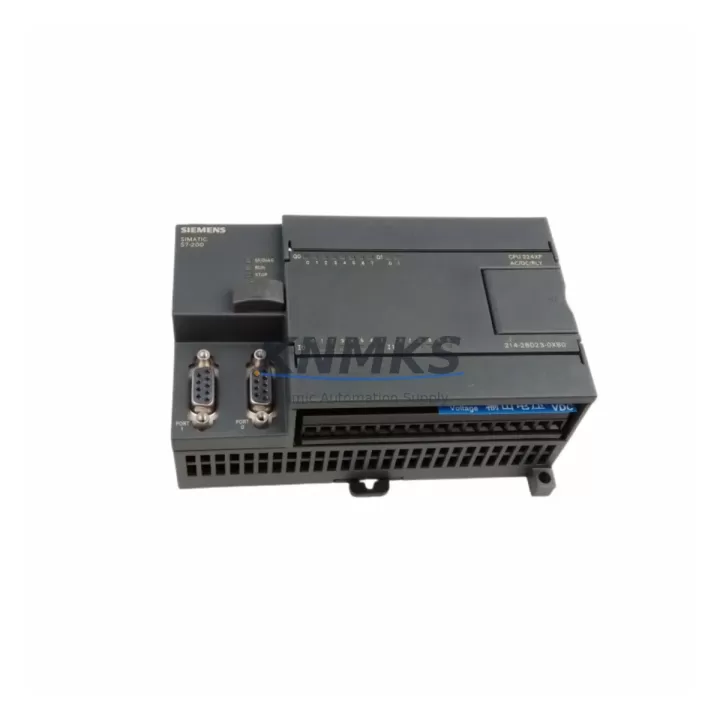
Siemens 6ES7214-2BD23-0XB0 Migration-Ready CPU for Legacy S7-200 Systems
The Siemens 6ES7214-2BD23-0XB0 is a SIMATIC S7-200 CPU 224XP module engineered for direct replacement and retrofit deployment in legacy S7-200 control architectures. As Siemens has officially discontinued the S7-200 product line, facilities operating aging production lines, control cabinets, and distributed I/O panels face increasing pressure to source verified, compatible CPU units that can be installed without rewriting core ladder logic or reconfiguring field wiring. This unit addresses that requirement precisely.
The 6ES7214-2BD23-0XB0 features 14 digital inputs, 10 digital outputs, and two integrated analog I/O channels — a configuration that makes it a direct functional replacement for earlier CPU 224 and CPU 224XP variants. Its onboard MPI port supports existing programming cable connections via PC/PPI adapters such as the 6ES7901-3CB30-0XA0, and the integrated RS-485 port enables continued Profibus DP or PPI multi-master communication without protocol migration overhead. Engineers retrofitting legacy lines can retain existing STEP 7 Micro/WIN project files, preserving subroutine structures, interrupt routines, and data block assignments accumulated over years of production tuning.
Before installation, retrofit planners must verify several critical parameters. Power supply capacity is the first checkpoint: the CPU 224XP draws 24 VDC at up to 900 mA from the system bus, and any existing 6ES7307-series power supply module must be confirmed to have sufficient headroom after accounting for connected expansion modules. Terminal wiring compatibility should be validated against the original I/O map — the 6ES7214-2BD23-0XB0 uses the same 24-pin terminal block layout as predecessor CPU 224 units, but field engineers should confirm wire gauge and ferrule sizing before re-termination. Backplane slot addressing is not applicable to the S7-200 architecture (which uses a single-rack, left-to-right expansion bus), but the physical expansion connector on the right side of the CPU must be inspected for pin condition before attaching 6ES7221, 6ES7222, or 6ES7231 series digital and analog expansion modules.
Module address assignment in STEP 7 Micro/WIN is automatic for the S7-200 platform, but any changes to the expansion module count or order will shift I/O addresses and require program verification before live commissioning. HMI screen mappings — particularly those connected via TD 400C text displays or TP 177 panels over PPI — must be re-validated after CPU swap to confirm that variable addresses and screen navigation remain intact. Communication link integrity between the CPU and any upstream SIMATIC S7-300 or S7-400 master via Profibus DP should be tested at the network layer before returning the line to production.
Installation space confirmation is straightforward for standard DIN rail cabinets: the CPU 224XP occupies 120.5 mm width on a 35 mm DIN rail, consistent with the original footprint. Firmware version compatibility is embedded in the hardware revision; the 6ES7214-2BD23-0XB0 (firmware V02.01) is compatible with STEP 7 Micro/WIN V4.0 SP9 and later. Field commissioning should include a full I/O force test, analog channel calibration verification, and a timed cycle scan check to confirm that scan time remains within the watchdog threshold defined in the original program.
Migration Compatibility Table
| Parameter | 6ES7214-2BD23-0XB0 (CPU 224XP) | Retrofit Notes |
|---|---|---|
| Digital Inputs / Outputs | 14 DI / 10 DO (relay or transistor) | Direct replacement for CPU 224 and CPU 224XP variants |
| Analog I/O (Onboard) | 2 AI / 1 AO | Verify scaling factors in existing analog subroutines |
| Communication Ports | Port 0: MPI/PPI; Port 1: RS-485 Profibus/PPI | Compatible with 6ES7901-3CB30-0XA0 PC/PPI cable |
| Power Supply Requirement | 24 VDC, max 900 mA bus current | Confirm 6ES7307-series PSU headroom before installation |
| Expansion Bus | Right-side expansion connector (S7-200 standard) | Compatible with 6ES7221/222/231/232 expansion modules |
| DIN Rail Footprint | 120.5 mm W × 80 mm H × 62 mm D | Same footprint as original CPU 224XP — no cabinet modification required |
| Firmware Version | V02.01 | Compatible with STEP 7 Micro/WIN V4.0 SP9+ |
| Programming Software | STEP 7 Micro/WIN (V4.0 SP9 or later) | Existing project files (.mwp) are directly reusable |
| HMI Compatibility | TD 400C, TP 177, OP 77B via PPI | Re-validate variable addresses after CPU swap |
| Support terms | support terms confirmed by quotation — covers hardware defects; includes pre-shipment functional test | |
Retrofit Planning for Existing Automation Systems
A successful S7-200 retrofit begins with a complete audit of the existing control cabinet. In most legacy installations, the CPU 224XP operates alongside a 6ES7307-1BA01-0AA0 or 6ES7307-1EA01-0AA0 power supply module, one or more 6ES7221-1BF22-0XA0 digital input expansion modules, and a 6ES7232-0HB22-0XA0 analog output module for process variable control. Each of these components must be inventoried and their current draw totalled before the replacement CPU is powered on.
For lines that include Profibus DP field devices — such as ET 200S distributed I/O stations or third-party variable frequency drives — the CPU’s Port 1 must be configured as DP master in STEP 7 Micro/WIN before the network is re-enabled. Lines using PPI multi-master mode to connect a TD 400C operator panel should verify that the panel’s CPU address assignment matches the replacement unit’s station address, which defaults to address 2 and must be confirmed in the system block configuration.
Where the retrofit scope extends to communication protocol migration — for example, transitioning from PPI to Modbus RTU for integration with newer SCADA systems — the 6ES7214-2BD23-0XB0 supports Modbus RTU via the Modbus library in STEP 7 Micro/WIN, eliminating the need for an external protocol converter in many cases. For installations requiring Ethernet connectivity, a 6GK7243-1EX01-0XE0 CP 243-1 Ethernet module can be added to the expansion bus, enabling S7 communication with upstream S7-300 or S7-400 controllers without replacing the CPU platform.
Signal isolation requirements should also be reviewed during retrofit planning. Analog input channels connected to thermocouples or 4–20 mA transmitters may require a signal isolator or barrier if the field wiring runs exceed 50 metres or cross electrical noise sources. Confirming these parameters before commissioning reduces the risk of analog drift errors that can be misdiagnosed as CPU faults during initial power-up.
Downtime Control During System Migration
Minimising production downtime during a CPU swap requires a structured pre-outage preparation sequence. Before the scheduled maintenance window, the existing program should be uploaded from the running CPU and saved as a verified backup in STEP 7 Micro/WIN. All data block values — including retentive memory ranges (MB, VB) that store recipe parameters or production counters — should be documented, as these are cleared on a cold restart unless the memory cartridge (6ES7291-8GF23-0XA0) is transferred to the replacement unit.
During the outage, the recommended sequence is: de-energise the cabinet, remove the original CPU, install the 6ES7214-2BD23-0XB0, re-terminate the 24 VDC supply and I/O wiring, re-attach expansion modules in the original left-to-right order, and restore the program via the PC/PPI cable before applying power. The first power-on should be performed in STOP mode to allow I/O status verification before switching to RUN. A structured force table test — cycling each digital output and reading each digital input — confirms wiring integrity before the line is returned to automatic mode.
For facilities with strict SLA requirements, a parallel commissioning approach is recommended: configure and test the replacement CPU on a bench setup using the same program and a simulated I/O load before the production outage. This reduces the in-cabinet commissioning window to under two hours in most standard S7-200 installations and eliminates the risk of discovering wiring or address conflicts under time pressure.
Retrofit Support FAQ
Q1: Is the 6ES7214-2BD23-0XB0 a direct drop-in replacement for the CPU 224XP DC/DC/DC variant?
Yes. The 6ES7214-2BD23-0XB0 is the DC/DC/DC version of the CPU 224XP, with 24 VDC supply, 24 VDC digital inputs, and transistor (sourcing) digital outputs. It is a direct hardware replacement for earlier CPU 224XP DC/DC/DC units. Relay output variants (6ES7214-2BD23-0XB8) are not interchangeable for transistor output applications.
Q2: Can I reuse my existing STEP 7 Micro/WIN project file without modification?
In most cases, yes. Existing .mwp project files are directly compatible provided the expansion module configuration has not changed. If the number or order of expansion modules differs from the original configuration, I/O addresses will shift and the program must be reviewed before commissioning. Data block values stored in retentive memory should be re-entered or restored via memory cartridge after the CPU swap.
Q3: What pre-shipment testing is performed on this unit?
Each 6ES7214-2BD23-0XB0 unit undergoes a functional power-on test, I/O channel verification, and communication port check before dispatch. Units are supplied with a test report confirming operational status. The support terms confirmed by quotation cover hardware defects identified after installation and is supported by our technical team at admin@knmks.com.
Q4: Is stock available for immediate shipment?
Yes. The 6ES7214-2BD23-0XB0 is maintained in inventory for same-week dispatch. For urgent retrofit requirements or multi-unit orders, contact our team directly to confirm lead time and reserve allocation. Volume pricing is available for system integrators and OEM retrofit projects.
© 2026 KNMKS. All rights reserved.
Original Source: https://knmks.com
Contact: admin@knmks.com | +86 18359268345
Product Identification
- Brand / Ecosystem
-
Siemens
Siemens - Model / Series
-
6ES7214-2BD23-0XB0
SIMATIC Series - Product Family
- PLCs & Controllers
- Availability Status
- Available on request after model and quantity confirmation
- Inquiry Type
- B2B RFQ, replacement inquiry and project spare-part request
- Pre-Quote Check
- Exact SKU, brand, series, quantity, nameplate photos and destination country are checked before quotation
System Path
Where this product fits in the KNMKS automation structure.
Specification & Inquiry Focus
- Control platform
- PLC, PAC and modular controllers
- Common needs
- CPU, rack, power and I/O expansion
- Project support
- Replacement, cabinet build and maintenance
Buyer Confirmation
Information KNMKS checks before replying.
- Exact model
- 6ES7214-2BD23-0XB0
- Brand / ecosystem
- Siemens
- Product family
- PLCs & Controllers
- Application note
- Replacement, maintenance, project build or spare-part list
- Useful photos
- Nameplate, installed unit, cabinet layout or connector side
- Delivery details
- Quantity, destination country and target schedule
Document Support
Files and notes can be confirmed during quotation.
- Product photos or nameplate confirmation when available
- Packing and delivery notes before quotation confirmation
- Support scope and delivery terms confirmed per inquiry
- Export document coordination for qualified B2B requests
Inquiry Support
- Model cross-checking before quotation
- CPU, power, rack and expansion module matching
- Support for replacement and project inquiry
What to Send Us
- Brand and exact model number: Siemens 6ES7214-2BD23-0XB0
- Quantity and required delivery time
- Application, replacement requirement or nameplate photo
- Destination country and shipping preference
RFQ Preparation
This is a product inquiry page built for RFQ communication.
Fast Model Check
Send this model to KNMKS for confirmation.
Include quantity, destination country and photos if this is a maintenance replacement. The inquiry will be saved with a reference number after submission.
Brand & Compatibility Note
KNMKS displays automation product information for well-known industrial brand ecosystems and compatible replacement references. Brand names are used for product identification and compatibility reference only; final availability and commercial terms are confirmed per quotation.
 Manufacturing
 Machine Tools
 Packaging
 Energy & Power



 HMI & Displays
 Servo Systems
 Variable Frequency Drives
 Sensors